Compare commits
94 Commits
main
..
463e265fbe
| Author | SHA1 | Date | |
|---|---|---|---|
 祀梦 祀梦
|
463e265fbe | ||
|
祀梦
|
b75fa7337f | ||
|
祀梦
|
09e9d996f8 | ||
|
祀梦
|
d08ce7e3e7 | ||
|
祀梦
|
fc6a6a03b8 | ||
|
祀梦
|
4a674ccc7a | ||
|
祀梦
|
0fb0ad811b | ||
|
祀梦
|
98ec780ed9 | ||
|
祀梦
|
a89746e0e8 | ||
|
祀梦
|
2cf5142b0e | ||
|
祀梦
|
1726ac9828 | ||
|
祀梦
|
01c3741b9a | ||
|
祀梦
|
b7018f8423 | ||
|
祀梦
|
d9a089be3f | ||
|
祀梦
|
c0ff3b29de | ||
 Kawaxxxsaki Kawaxxxsaki
|
82324f6274 | ||
|
Kawaxxxsaki
|
3531360974 | ||
|
Kawaxxxsaki
|
da188afd82 | ||
|
祀梦
|
ba9298852e | ||
|
祀梦
|
8ad5c45a42 | ||
|
祀梦
|
bca2e0619c | ||
|
祀梦
|
5d510b0433 | ||
|
Kawaxxxsaki
|
2f55fc7184 | ||
|
Kawaxxxsaki
|
474f335e94 | ||
|
祀梦
|
2b9e5f9bd1 | ||
|
祀梦
|
43aa3f07e5 | ||
|
祀梦
|
c3e8cad947 | ||
|
Kawaxxxsaki
|
b7c97d0f17 | ||
|
Kawaxxxsaki
|
2391018d79 | ||
|
祀梦
|
b28ed8ebfe | ||
|
Kawaxxxsaki
|
799551073c | ||
|
祀梦
|
3f8169ae56 | ||
|
祀梦
|
8c7e8ea6e3 | ||
|
Kawaxxxsaki
|
669f62549e | ||
|
Kawaxxxsaki
|
c95b09f329 | ||
|
祀梦
|
868cc9b514 | ||
|
祀梦
|
60b9923302 | ||
|
祀梦
|
4db01489ee | ||
|
Kawaxxxsaki
|
c365afbd8a | ||
|
祀梦
|
b860b75dc8 | ||
|
祀梦
|
a037e09c17 | ||
|
祀梦
|
faac3d94ff | ||
|
祀梦
|
09ce0b7b78 | ||
|
祀梦
|
95de5b4d3e | ||
|
祀梦
|
7b04ffbedd | ||
|
祀梦
|
c51e0977d7 | ||
|
祀梦
|
7e1131844f | ||
|
祀梦
|
566b6cd385 | ||
|
Kawaxxxsaki
|
12181dbdcd | ||
|
Kawaxxxsaki
|
02ec95b12d | ||
|
Kawaxxxsaki
|
e097e53603 | ||
|
Kawaxxxsaki
|
f3dda6078c | ||
|
祀梦
|
5dba6ac5b4 | ||
|
Kawaxxxsaki
|
d7d342fd55 | ||
|
Kawaxxxsaki
|
b734f403b3 | ||
|
祀梦
|
086835d409 | ||
|
祀梦
|
69312a780e | ||
|
祀梦
|
b3b5198eac | ||
|
祀梦
|
771fa51fb9 | ||
|
祀梦
|
90ed801658 | ||
|
祀梦
|
f0e768d66f | ||
|
祀梦
|
6a508cc8d4 | ||
|
祀梦
|
6ac5000c86 | ||
|
祀梦
|
df01754706 | ||
|
祀梦
|
7e413866c2 | ||
 si-meng-spec si-meng-spec
|
95dc8fecf9 | ||
|
si-meng-spec
|
807e222e8a | ||
|
si-meng-spec
|
ba6702c880 | ||
|
si-meng-spec
|
5984402fb2 | ||
|
si-meng-spec
|
9f28803260 | ||
|
si-meng-spec
|
e2c883233c | ||
|
si-meng-spec
|
564040b8c3 | ||
|
si-meng-spec
|
44689736d5 | ||
|
si-meng-spec
|
cb3747d38c | ||
|
si-meng-spec
|
eeb0031bf5 | ||
|
si-meng-spec
|
3130dcbbc3 | ||
|
si-meng-spec
|
056e58c5bd | ||
|
si-meng-spec
|
89a3f2182a | ||
|
si-meng-spec
|
8eb832de6c | ||
|
si-meng-spec
|
d831135553 | ||
|
si-meng-spec
|
7ac31a3984 | ||
|
si-meng-spec
|
3bb7ee6796 | ||
|
si-meng-spec
|
12fdf56539 | ||
|
si-meng-spec
|
173a99a626 | ||
|
si-meng-spec
|
99a79b4af6 | ||
|
si-meng-spec
|
1f02282ad6 | ||
|
si-meng-spec
|
218c43abd9 | ||
|
si-meng-spec
|
48130b5d8f | ||
|
si-meng-spec
|
cc419e6541 | ||
|
si-meng-spec
|
7e9b7e6a2a | ||
|
si-meng-spec
|
d2513b2158 | ||
|
si-meng-spec
|
38d8fccaa0 | ||
|
si-meng-spec
|
3029cc0fdf | ||
|
root
|
6465c714e0 |
@@ -1,31 +0,0 @@
|
||||
---
|
||||
description: 每次站点相关修改后须本地构建/启动并验证;Git 仅在被用户明确要求时提交
|
||||
alwaysApply: true
|
||||
---
|
||||
|
||||
# Agent 工作流:验证站点与 Git 提交
|
||||
|
||||
## 修改后必须自行验证(硬性要求)
|
||||
|
||||
凡改动 **VuePress / Plume 配置、`docs/` 下内容与主题相关代码** 等会影响站点展示或 dev/build 的行为时,**在本轮任务结束前必须**完成下列至少一项,并确认 **首页等主要页面非白屏**、**无控制台致命报错**(开发模式下可 F12 查看):
|
||||
|
||||
1. **推荐(与线上最接近)**:在项目根执行
|
||||
`npm run docs:build`
|
||||
然后执行
|
||||
`npm run docs:verify`
|
||||
(会检查 `docs/.vuepress/dist/index.html` 是否包含首页 hero 结构。)
|
||||
|
||||
2. **若重点验证热更新 / 开发体验**:执行
|
||||
`npm run docs:dev-clean`
|
||||
(`--clean-cache --clean-temp` 可避免 **Vite 预构建缓存** 仍指向旧版 `@vuepress/helper`,从而触发 **`encodeSVG` 导出缺失、整站白屏**。)
|
||||
在浏览器打开本地地址,确认首页 hero 与导航正常。
|
||||
|
||||
**白屏常见原因速记**:`@vuepress/plugin-markdown-chart` 等依赖需要 `@vuepress/helper/client` 导出 `encodeSVG`;若 `docs/.vuepress/.cache` 里预打包了过旧的 helper,会出现 **仅 dev 白屏、build 正常**。处理:执行 **`npm run docs:clear-cache`** 后重启 dev,或 **`npm run docs:dev-clean`** / **`npm run docs:build`**(后两者会 clean)。项目已在 `config.ts` 的 Vite `optimizeDeps.include` 中强制包含 `@vuepress/helper/client`,以降低复发概率。
|
||||
|
||||
## Git 提交策略
|
||||
|
||||
- **禁止自作主张提交**:**仅当用户在本轮对话中明确说出要提交**(例如「提交一下」「帮我 commit」「推到 git」等)时,才执行 `git add` / `git commit` / `git push`。
|
||||
- **未要求提交时**:改完代码、做完验证即可结束;**不要**替用户 commit。
|
||||
- **用户若说不要提交**:同样不执行任何 git 写入操作。
|
||||
|
||||
**注意**:构建产物目录 **`docs/.vuepress/dist`**、缓存 **`.cache` / `.temp`** 已在 `.gitignore` 中,**不要**将编译输出提交进源码仓。
|
||||
@@ -1,14 +0,0 @@
|
||||
---
|
||||
description: RAGFlow 检索 Plume 主题时必须使用 VuePress2-Plume 数据集,避免选错知识库
|
||||
alwaysApply: true
|
||||
---
|
||||
|
||||
# RAGFlow 与 Plume 文档
|
||||
|
||||
当任务涉及 **vuepress-theme-plume**、**Plume 主题**、**主题配置 / 博客 / 分类 / 标签 / 侧边栏** 等与 Plume 相关的问题,需要通过 **RAGFlow MCP**(`ragflow_retrieval`)查官方文档时:
|
||||
|
||||
- **必须使用数据集**:**VuePress2-Plume**(名称)。
|
||||
- 若接口需要 `dataset_ids`:当前知识库 ID 为 **`e57440b52aa711f1845c9627700ac9a4`**(与名称对应;若后台重建数据集请以维护者为准更新本条)。
|
||||
- **禁止**在未确认数据集的情况下用其它知识库代替 Plume 文档检索,以免污染答案或引发环境异常。
|
||||
|
||||
与 Plume 无关的问题(例如通用 VuePress 2 核心、本项目业务逻辑)再按需选择其它数据集或不指定 `dataset_ids`。
|
||||
@@ -1,17 +0,0 @@
|
||||
---
|
||||
description: 双仓库结构、本地构建与发布流程;启动时加载项目上下文
|
||||
alwaysApply: true
|
||||
---
|
||||
|
||||
# SiMengWebSite_Notes — 仓库与部署上下文
|
||||
|
||||
在开始涉及 **构建、发布、静态资源路径、`_publish`** 或 **多仓库** 的任务前,请先阅读仓库根目录的 **`PROJECT_BRIEF.local.md`**(若存在)。该文件为本地说明,不进入 Git,含完整背景与命令示例。
|
||||
|
||||
## 速记(无本地文件时的兜底)
|
||||
|
||||
- **源码仓**:仓库根目录 → 远程示例 `SiMengWebSite_Notes.git`;日常开发与提交 Markdown / VuePress 配置。
|
||||
- **构建仓**:**`_publish/`** 内为 **独立 Git 仓库** → 远程示例 `build_notes_simengweb.git`;**只提交** `npm run docs:build` 产出(`docs/.vuepress/dist` 的内容同步至此)。
|
||||
- **原因**:业务服务器性能不足,**不在线上构建**;本地构建后推送构建仓,**服务器拉取更新**即可换页。
|
||||
- **`_publish/`** 与 **`PROJECT_BRIEF.local.md`** 已被根目录 `.gitignore` 忽略,勿把构建产物或该简介误提交进源码仓。
|
||||
|
||||
若缺少 `PROJECT_BRIEF.local.md`,可向维护者索取模板或根据上述速记操作,避免在源码仓中提交 `dist` 或误改发布仓历史。
|
||||
+13
-10
@@ -7,15 +7,18 @@ docs/.vuepress/dist
|
||||
.trae/
|
||||
.DS_Store
|
||||
*.log
|
||||
# Assets in public directory
|
||||
docs/.vuepress/public/images/**
|
||||
docs/.vuepress/public/life/**
|
||||
docs/.vuepress/public/videos/**
|
||||
|
||||
# Local project brief for agents (do not commit)
|
||||
PROJECT_BRIEF.local.md
|
||||
|
||||
# Build and Publish output
|
||||
_publish/
|
||||
|
||||
# Local resources storage (not uploaded)
|
||||
resources/
|
||||
|
||||
# Ensure .gitkeep files are always tracked
|
||||
# Allow specific used assets
|
||||
!docs/.vuepress/public/images/elysia/
|
||||
!docs/.vuepress/public/images/elysia/1.jpg
|
||||
!docs/.vuepress/public/images/elysia/2.png
|
||||
!docs/.vuepress/public/images/elysia/3.jpg
|
||||
!docs/.vuepress/public/images/elysia/4.jpg
|
||||
!docs/.vuepress/public/images/elysia/5.jpg
|
||||
!docs/.vuepress/public/images/elysia/6.jpg
|
||||
!docs/.vuepress/public/plume.svg
|
||||
!**/.gitkeep
|
||||
|
||||
Submodule
+1
Submodule _publish added at 92b6adfa36
@@ -1,6 +1,5 @@
|
||||
import { defineClientConfig } from 'vuepress/client'
|
||||
import RImg from './theme/components/RImg.vue'
|
||||
import './theme/styles/custom.css'
|
||||
|
||||
export default defineClientConfig({
|
||||
enhance({ app }) {
|
||||
|
||||
@@ -1,272 +0,0 @@
|
||||
import { defineCollection, defineCollections } from 'vuepress-theme-plume'
|
||||
|
||||
/** 博客目录名 → 中文分类展示 */
|
||||
const BLOG_CATEGORY_LABEL_ZH: Record<string, string> = {
|
||||
blog: '博客',
|
||||
competition: '竞赛',
|
||||
technology: '技术',
|
||||
website: '网站',
|
||||
elysia: '爱莉希雅',
|
||||
collect: '合集',
|
||||
ai: 'AI',
|
||||
}
|
||||
|
||||
export default defineCollections([
|
||||
defineCollection({
|
||||
type: 'post',
|
||||
dir: 'blog',
|
||||
title: '博客',
|
||||
link: '/blog/',
|
||||
linkPrefix: '/article/',
|
||||
postCover: {
|
||||
layout: 'left',
|
||||
compact: true,
|
||||
},
|
||||
categoriesTransform: (categories) =>
|
||||
categories.map((c) => ({
|
||||
...c,
|
||||
name: BLOG_CATEGORY_LABEL_ZH[c.name] ?? c.name,
|
||||
})),
|
||||
}),
|
||||
|
||||
defineCollection({
|
||||
type: 'doc',
|
||||
dir: 'notes/ai',
|
||||
title: '模型',
|
||||
linkPrefix: '/ai/',
|
||||
sidebar: [
|
||||
{ text: '模型', link: '/ai/' },
|
||||
{
|
||||
text: '基础概念',
|
||||
collapsed: false,
|
||||
items: [
|
||||
{ text: 'MCP 与 Skills 详解', link: '/article/mcp-and-skills/' },
|
||||
],
|
||||
},
|
||||
{
|
||||
text: '部署与工具链',
|
||||
collapsed: false,
|
||||
items: [
|
||||
{ text: 'RAGFlow 与 MCP', link: '/article/windows11-ragflow-deployment-mcp/' },
|
||||
],
|
||||
},
|
||||
{
|
||||
text: '模型与 API',
|
||||
collapsed: false,
|
||||
items: [{ text: '大模型 API 整合', link: '/article/free_model_api/' }],
|
||||
},
|
||||
],
|
||||
}),
|
||||
|
||||
defineCollection({
|
||||
type: 'doc',
|
||||
dir: 'notes/subject/english',
|
||||
title: '英语学习',
|
||||
linkPrefix: '/subject/english/',
|
||||
sidebar: [
|
||||
{ text: '英语学习笔记', link: '/subject/english/' },
|
||||
{
|
||||
text: '学习环境与工具',
|
||||
prefix: '/basis',
|
||||
items: [{ text: '英语环境配置', link: '/subject/english/basis/' }],
|
||||
},
|
||||
{
|
||||
text: '词汇与记忆',
|
||||
prefix: '/vocabulary',
|
||||
items: [{ text: '词汇学习与记忆法', link: '/subject/english/vocabulary/' }],
|
||||
},
|
||||
{
|
||||
text: '语法与句法',
|
||||
prefix: '/grammar',
|
||||
items: [{ text: '核心语法与句型', link: '/subject/english/grammar/' }],
|
||||
},
|
||||
{
|
||||
text: '听力与口语',
|
||||
prefix: '/listening-speaking',
|
||||
items: [{ text: '听力口语训练', link: '/subject/english/listening-speaking/' }],
|
||||
},
|
||||
{
|
||||
text: '阅读与写作',
|
||||
prefix: '/reading-writing',
|
||||
items: [{ text: '阅读提升', link: '/subject/english/reading-writing/' }],
|
||||
},
|
||||
{
|
||||
text: '写译',
|
||||
prefix: '/writing-translation',
|
||||
items: [{ text: '写作与翻译指南', link: '/subject/english/writing-translation/' }],
|
||||
},
|
||||
{
|
||||
text: '考试与备考',
|
||||
prefix: '/exam',
|
||||
items: [{ text: '英语四级 (CET-4) 备考指南', link: '/subject/english/exam/cet-4/' }],
|
||||
},
|
||||
{
|
||||
text: '资源与工具',
|
||||
prefix: '/resources',
|
||||
items: [{ text: '学习资源与工具', link: '/subject/english/resources/' }],
|
||||
},
|
||||
],
|
||||
}),
|
||||
|
||||
defineCollection({
|
||||
type: 'doc',
|
||||
dir: 'notes/subject/certification',
|
||||
title: '系统分析师',
|
||||
linkPrefix: '/subject/certification/',
|
||||
sidebar: [
|
||||
{ text: '系统分析师简介', link: '/subject/certification/' },
|
||||
{
|
||||
text: '第一篇 基础知识',
|
||||
prefix: '/certification/sys-analyst',
|
||||
items: [
|
||||
{ text: '第一章 绪论', link: '/subject/certification/sys-analyst/' },
|
||||
{ text: '第二章 数学与工程基础', link: '/subject/certification/sys-analyst/math/' },
|
||||
],
|
||||
},
|
||||
{
|
||||
text: '第二篇 关键技术',
|
||||
prefix: '/certification/sys-analyst',
|
||||
items: [
|
||||
{ text: '第十章 系统规划与分析', link: '/subject/certification/sys-analyst/planning/' },
|
||||
],
|
||||
},
|
||||
],
|
||||
}),
|
||||
|
||||
defineCollection({
|
||||
type: 'doc',
|
||||
dir: 'notes/programming/solidity',
|
||||
title: 'Solidity',
|
||||
linkPrefix: '/programming/solidity/',
|
||||
sidebar: [
|
||||
{ text: 'Solidity 学习笔记', link: '/programming/solidity/' },
|
||||
{
|
||||
text: '基础语法',
|
||||
prefix: '/basic-syntax',
|
||||
items: [
|
||||
{ text: 'Solidity 基础语法与数据类型', link: '/programming/solidity/basic-syntax/' },
|
||||
],
|
||||
},
|
||||
{
|
||||
text: '项目实例',
|
||||
prefix: '/basic-syntax',
|
||||
items: [{ text: 'Solidity 代码实例', link: '/programming/solidity/analysis/case-analysis/' }],
|
||||
},
|
||||
{
|
||||
text: '杂项',
|
||||
prefix: '/other',
|
||||
items: [
|
||||
{ text: 'Hardhat 相关知识', link: '/programming/solidity/other/hardhat/' },
|
||||
{ text: '一些没分类的小知识', link: '/programming/solidity/other/miscellaneous/' },
|
||||
],
|
||||
},
|
||||
],
|
||||
}),
|
||||
|
||||
defineCollection({
|
||||
type: 'doc',
|
||||
dir: 'notes/theory/cryptography',
|
||||
title: '密码学基础',
|
||||
linkPrefix: '/theory/cryptography/',
|
||||
sidebar: [
|
||||
{ text: '密码学基础', link: '/theory/cryptography/' },
|
||||
{
|
||||
text: '古典加密算法',
|
||||
prefix: '/theory',
|
||||
items: [
|
||||
{ text: '替换密码', link: '/theory/cryptography/substitution-ciphers/' },
|
||||
{ text: '置换密码', link: '/theory/cryptography/permutation-encryption/' },
|
||||
],
|
||||
},
|
||||
],
|
||||
}),
|
||||
|
||||
defineCollection({
|
||||
type: 'doc',
|
||||
dir: 'notes/ops/blockchain',
|
||||
title: '区块链运维',
|
||||
linkPrefix: '/ops/blockchain/',
|
||||
sidebar: [
|
||||
{ text: '区块链运维指南', link: '/ops/blockchain/' },
|
||||
{
|
||||
text: '区块链理论基础',
|
||||
prefix: '/theory',
|
||||
items: [
|
||||
{ text: '区块链的基本原理', link: '/ops/blockchain/theory/basic-principles/' },
|
||||
{ text: 'FISCO-BCOS 节点类型', link: '/ops/blockchain/theory/fisco-bcos-node-type/' },
|
||||
],
|
||||
},
|
||||
{
|
||||
text: '区块链运维',
|
||||
items: [
|
||||
{ text: '区块链产品设计和基本部署', link: '/ops/blockchain/practice/basic-deployment/' },
|
||||
{ text: '区块链网络部署与管理', link: '/ops/blockchain/practice/node-deployment/' },
|
||||
{ text: 'Console 控制台操作', link: '/ops/blockchain/practice/console-operator/' },
|
||||
],
|
||||
},
|
||||
],
|
||||
}),
|
||||
|
||||
defineCollection({
|
||||
type: 'doc',
|
||||
dir: 'notes/ops/linux',
|
||||
title: 'Linux 运维',
|
||||
linkPrefix: '/ops/linux/',
|
||||
sidebar: [
|
||||
{ text: 'Linux 运维笔记', link: '/ops/linux/' },
|
||||
{
|
||||
text: 'Linux 基础',
|
||||
prefix: '/linux',
|
||||
items: [{ text: 'Linux 基础命令详解', link: '/ops/linux/basic-commands/' }],
|
||||
},
|
||||
{
|
||||
text: '其他',
|
||||
prefix: '/linux',
|
||||
items: [{ text: '一些零散的命令', link: '/ops/linux/other/' }],
|
||||
},
|
||||
],
|
||||
}),
|
||||
|
||||
defineCollection({
|
||||
type: 'doc',
|
||||
dir: 'notes/ops/docker',
|
||||
title: 'Docker',
|
||||
linkPrefix: '/ops/docker/',
|
||||
sidebar: [
|
||||
{ text: 'Docker 运维笔记', link: '/ops/docker/' },
|
||||
{
|
||||
text: '数据库相关',
|
||||
prefix: '/ops/docker/db/',
|
||||
items: [
|
||||
{ text: 'MongoDB 部署', link: '/ops/docker/db/mongodb/' },
|
||||
{ text: 'Postgres 部署', link: '/ops/docker/db/postgres/' },
|
||||
],
|
||||
},
|
||||
{
|
||||
text: '其他服务',
|
||||
prefix: '/ops/docker/other/',
|
||||
items: [{ text: 'ETLCloud 部署', link: '/ops/docker/other/ETLCloud/' }],
|
||||
},
|
||||
],
|
||||
}),
|
||||
|
||||
defineCollection({
|
||||
type: 'doc',
|
||||
dir: 'notes/programming/web',
|
||||
title: 'Web 开发',
|
||||
linkPrefix: '/programming/web/',
|
||||
sidebar: [
|
||||
{ text: 'Web 开发学习笔记', link: '/programming/web/' },
|
||||
{
|
||||
text: '基础知识',
|
||||
prefix: '/basic-syntax',
|
||||
items: [
|
||||
{ text: 'Web 前端基础讲解', link: '/programming/web/basic-syntax/html-css-js/' },
|
||||
{ text: 'HTML 常用标签与属性', link: '/programming/web/basic-syntax/html-tags-attributes/' },
|
||||
{ text: 'HTML 列表与语义布局', link: '/programming/web/basic-syntax/html-lists-and-semantic-layout/' },
|
||||
{ text: 'JavaScript 基础知识', link: '/programming/web/basic-syntax/javascript-basics/' },
|
||||
],
|
||||
},
|
||||
],
|
||||
}),
|
||||
])
|
||||
+12
-10
@@ -3,7 +3,6 @@ import { plumeTheme } from 'vuepress-theme-plume'
|
||||
import { viteBundler } from '@vuepress/bundler-vite'
|
||||
import { commentPlugin } from '@vuepress/plugin-comment'
|
||||
import { umamiAnalyticsPlugin } from '@vuepress/plugin-umami-analytics'
|
||||
import { enrichBlogReadingTimePlugin } from './plugins/enrichBlogReadingTime'
|
||||
import path from 'node:path'
|
||||
import { fileURLToPath } from 'node:url'
|
||||
|
||||
@@ -24,16 +23,8 @@ export default defineUserConfig({
|
||||
viteOptions: {
|
||||
resolve: {
|
||||
alias: {
|
||||
'@theme/Blog/VPPostItem.vue': path.resolve(__dirname, './theme/Blog/VPPostItem.vue'),
|
||||
},
|
||||
},
|
||||
/**
|
||||
* 强制预构建含 encodeSVG 的 client 入口,避免 docs/.vuepress/.cache/deps 里残留旧版
|
||||
* @vuepress/helper 导致 dev 下「does not provide an export named encodeSVG」整页白屏。
|
||||
*/
|
||||
optimizeDeps: {
|
||||
include: ['@vuepress/helper/client'],
|
||||
},
|
||||
},
|
||||
}),
|
||||
shouldPrefetch: false,
|
||||
@@ -41,6 +32,8 @@ export default defineUserConfig({
|
||||
theme: plumeTheme({
|
||||
/* 站点域名,启动 SEO 优化 */
|
||||
hostname: 'https://www.simengweb.com',
|
||||
/* 博客文章页面链接前缀 */
|
||||
article: '/article/',
|
||||
|
||||
/* 启用数学公式支持和Mermaid图表 */
|
||||
markdown: {
|
||||
@@ -61,6 +54,16 @@ export default defineUserConfig({
|
||||
message: '愿每一份温柔都被世界珍藏 ✨',
|
||||
copyright: '<a href="https://beian.miit.gov.cn/" target="_blank" aria-label="gongan filing address">沪ICP备2023010022号-1</a>©2025祀梦的个人博客'
|
||||
},
|
||||
/**
|
||||
* 博客相关配置
|
||||
*/
|
||||
blog: {
|
||||
postCover: {
|
||||
layout: 'left',
|
||||
width: 300,
|
||||
compact: true
|
||||
}
|
||||
},
|
||||
|
||||
/**
|
||||
* 文章贡献者配置
|
||||
@@ -103,6 +106,5 @@ export default defineUserConfig({
|
||||
domains: ['www.simengweb.com'],
|
||||
cache: true
|
||||
}),
|
||||
enrichBlogReadingTimePlugin(),
|
||||
],
|
||||
})
|
||||
|
||||
@@ -9,10 +9,6 @@ export default defineNavbarConfig([
|
||||
text: '博客',
|
||||
link: '/blog/',
|
||||
},
|
||||
{
|
||||
text: '模型',
|
||||
link: '/ai/',
|
||||
},
|
||||
{
|
||||
text: '学科知识',
|
||||
items: [
|
||||
@@ -20,15 +16,19 @@ export default defineNavbarConfig([
|
||||
text: '英语学习笔记',
|
||||
link: '/subject/english/',
|
||||
},
|
||||
{
|
||||
text: '系统分析师',
|
||||
link: '/subject/certification/',
|
||||
},
|
||||
],
|
||||
},
|
||||
{
|
||||
text: '编程笔记',
|
||||
items: [
|
||||
{
|
||||
text: 'LeetCode',
|
||||
link: '/programming/leetcode/',
|
||||
},
|
||||
{
|
||||
text: 'C++',
|
||||
link: '/programming/cplusplus/',
|
||||
},
|
||||
{
|
||||
text: 'Solidity',
|
||||
link: '/programming/solidity/',
|
||||
|
||||
@@ -0,0 +1,194 @@
|
||||
import { defineNoteConfig, defineNotesConfig } from 'vuepress-theme-plume'
|
||||
|
||||
/**
|
||||
* 配置编程笔记
|
||||
*/
|
||||
const LeetCode = defineNoteConfig({
|
||||
dir: 'programming',
|
||||
link: '/programming/leetcode/',
|
||||
sidebar: [
|
||||
{ text: "LeetCode 指南", link: "/programming/leetcode/" },
|
||||
{
|
||||
text: "刷题题单", prefix: "/question_sheet", items: [
|
||||
{ text: "LeetCode 入门题单~(≧∇≦)ノ", link: "/programming/leetcode/question_sheet/beginner/" }
|
||||
]
|
||||
}
|
||||
]
|
||||
})
|
||||
const cPlusPlus = defineNoteConfig({
|
||||
dir: 'programming',
|
||||
link: '/programming/cplusplus/',
|
||||
sidebar: [
|
||||
{ text: "C++ 学习笔记", link: "/programming/cplusplus/" },
|
||||
{
|
||||
text: "基础配置与开发工具", prefix: "/basis", items: [
|
||||
{ text: "C++ 环境配置", link: "/programming/cplusplus/basis/" }
|
||||
]
|
||||
}
|
||||
]
|
||||
})
|
||||
const english = defineNoteConfig({
|
||||
dir: 'subject',
|
||||
link: '/subject/english/',
|
||||
sidebar: [
|
||||
{ text: "英语学习笔记", link: "/subject/english/" },
|
||||
{
|
||||
text: "学习环境与工具", prefix: "/basis", items: [
|
||||
{ text: "英语环境配置", link: "/subject/english/basis/" }
|
||||
]
|
||||
},
|
||||
{
|
||||
text: "词汇与记忆", prefix: "/vocabulary", items: [
|
||||
{ text: "词汇学习与记忆法", link: "/subject/english/vocabulary/" }
|
||||
]
|
||||
},
|
||||
{
|
||||
text: "语法与句法", prefix: "/grammar", items: [
|
||||
{ text: "核心语法与句型", link: "/subject/english/grammar/" }
|
||||
]
|
||||
},
|
||||
{
|
||||
text: "听力与口语", prefix: "/listening-speaking", items: [
|
||||
{ text: "听力口语训练", link: "/subject/english/listening-speaking/" }
|
||||
]
|
||||
},
|
||||
{
|
||||
text: "阅读与写作", prefix: "/reading-writing", items: [
|
||||
{ text: "阅读提升", link: "/subject/english/reading-writing/" }
|
||||
]
|
||||
},
|
||||
{
|
||||
text: "写译", prefix: "/writing-translation", items: [
|
||||
{ text: "写作与翻译指南", link: "/subject/english/writing-translation/" }
|
||||
]
|
||||
},
|
||||
{
|
||||
text: "考试与备考", prefix: "/exam", items: [
|
||||
{ text: "英语四级 (CET-4) 备考指南", link: "/subject/english/exam/cet-4/" }
|
||||
]
|
||||
},
|
||||
{
|
||||
text: "资源与工具", prefix: "/resources", items: [
|
||||
{ text: "学习资源与工具", link: "/subject/english/resources/" }
|
||||
]
|
||||
}
|
||||
]
|
||||
})
|
||||
const solidity = defineNoteConfig({
|
||||
dir: 'programming',
|
||||
link: '/programming/solidity/',
|
||||
sidebar: [
|
||||
{ text: "Solidity 学习笔记", link: "/programming/solidity/" },
|
||||
{
|
||||
text: "基础语法", prefix: "/basic-syntax", items: [
|
||||
{ text: "Solidity 基础语法与数据类型", link: "/programming/solidity/basic-syntax/" }
|
||||
],
|
||||
},
|
||||
{
|
||||
text: "项目实例", prefix: "/basic-syntax", items: [
|
||||
{ text: "Solidity 代码实例", link: "/programming/solidity/analysis/case-analysis/" }
|
||||
],
|
||||
},
|
||||
{
|
||||
text: "杂项", prefix: "/other", items: [
|
||||
{ text: "Hardhat 相关知识", link: "/programming/solidity/other/hardhat/" },
|
||||
{ text: "一些没分类的小知识", link: "/programming/solidity/other/miscellaneous/" }
|
||||
],
|
||||
}
|
||||
]
|
||||
})
|
||||
const cryptography = defineNoteConfig({
|
||||
dir: 'theory',
|
||||
link: '/theory/cryptography/',
|
||||
sidebar: [
|
||||
{ text: "密码学基础", link: "/theory/cryptography/" },
|
||||
{
|
||||
text: "古典加密算法", prefix: "/theory", items: [
|
||||
{ text: "替换密码", link: "/theory/cryptography/substitution-ciphers/" },
|
||||
{ text: "置换密码", link: "/theory/cryptography/permutation-encryption/" },
|
||||
]
|
||||
},
|
||||
]
|
||||
})
|
||||
const blockchain = defineNoteConfig({
|
||||
dir: 'ops',
|
||||
link: '/ops/blockchain',
|
||||
sidebar: [
|
||||
{ text: "区块链运维指南", link: "/ops/blockchain/" },
|
||||
{
|
||||
text: "区块链理论基础", prefix: "/theory", items: [
|
||||
{ text: "区块链的基本原理", link: "/ops/blockchain/theory/basic-principles/" },
|
||||
{ text: "FISCO-BCOS 节点类型", link: "/ops/blockchain/theory/fisco-bcos-node-type/" }
|
||||
]
|
||||
},
|
||||
{
|
||||
text: "区块链运维", items: [
|
||||
{ text: "区块链产品设计和基本部署", link: "/ops/blockchain/practice/basic-deployment/" },
|
||||
{ text: "区块链网络部署与管理", link: "/ops/blockchain/practice/node-deployment/" },
|
||||
{ text: "Console 控制台操作", link: "/ops/blockchain/practice/console-operator/" }
|
||||
]
|
||||
}
|
||||
]
|
||||
})
|
||||
const linux = defineNoteConfig({
|
||||
dir: 'ops',
|
||||
link: '/ops/',
|
||||
sidebar: [
|
||||
{ text: "Linux 运维笔记", link: "/ops/linux/" },
|
||||
{
|
||||
text: "Linux 基础", prefix: "/linux", items: [
|
||||
{ text: "Linux 基础命令详解", link: "/ops/linux/basic-commands/" }
|
||||
]
|
||||
},
|
||||
{
|
||||
text: "其他", prefix: "/linux", items: [
|
||||
{ text: "一些零散的命令", link: "/ops/linux/other/" }
|
||||
]
|
||||
}
|
||||
]
|
||||
})
|
||||
const docker = defineNoteConfig({
|
||||
dir: 'ops',
|
||||
link: '/ops/docker/',
|
||||
sidebar: [
|
||||
{ text: "Docker 运维笔记", link: "/ops/docker/" },
|
||||
{
|
||||
text: "数据库相关",
|
||||
prefix: "/ops/docker/db/",
|
||||
items: [
|
||||
{ text: "MongoDB 部署", link: "/ops/docker/db/mongodb/" },
|
||||
{ text: "Postgres 部署", link: "/ops/docker/db/postgres/" },
|
||||
]
|
||||
},
|
||||
{
|
||||
text: "其他服务",
|
||||
prefix: "/ops/docker/other/",
|
||||
items: [
|
||||
{ text: "ETLCloud 部署", link: "/ops/docker/other/ETLCloud/" },
|
||||
]
|
||||
},
|
||||
]
|
||||
})
|
||||
const web = defineNoteConfig({
|
||||
dir: 'programming',
|
||||
link: '/programming/web/',
|
||||
sidebar: [
|
||||
{ text: "Web 开发学习笔记", link: "/programming/web/" },
|
||||
{
|
||||
text: "基础知识", prefix: "/basic-syntax", items: [
|
||||
{ text: "Web 前端基础讲解", link: "/programming/web/basic-syntax/html-css-js/" },
|
||||
{ text: "HTML 常用标签与属性", link: "/programming/web/basic-syntax/html-tags-attributes/" },
|
||||
{ text: "HTML 列表与语义布局", link: "/programming/web/basic-syntax/html-lists-and-semantic-layout/" },
|
||||
{ text: "JavaScript 基础知识", link: "/programming/web/basic-syntax/javascript-basics/" },
|
||||
],
|
||||
},
|
||||
]
|
||||
})
|
||||
/**
|
||||
* 导出所有的 note
|
||||
*/
|
||||
export default defineNotesConfig({
|
||||
dir: 'notes',
|
||||
link: '/',
|
||||
notes: [LeetCode, english, cPlusPlus, solidity, blockchain, linux, docker, cryptography, web],
|
||||
})
|
||||
@@ -1,61 +0,0 @@
|
||||
import fs from 'node:fs'
|
||||
import { pathToFileURL } from 'node:url'
|
||||
import type { App, PluginFunction } from 'vuepress'
|
||||
|
||||
const HMR_TAIL = `if (import.meta.webpackHot) {
|
||||
import.meta.webpackHot.accept()
|
||||
if (__VUE_HMR_RUNTIME__.updateBlogPostData) {
|
||||
__VUE_HMR_RUNTIME__.updateBlogPostData(blogPostData)
|
||||
}
|
||||
}
|
||||
|
||||
if (import.meta.hot) {
|
||||
import.meta.hot.accept(({ blogPostData }) => {
|
||||
__VUE_HMR_RUNTIME__.updateBlogPostData(blogPostData)
|
||||
})
|
||||
}
|
||||
`
|
||||
|
||||
async function enrichBlogData(app: App): Promise<void> {
|
||||
const tempFile = app.dir.temp('internal/blogData.js')
|
||||
if (!fs.existsSync(tempFile)) return
|
||||
|
||||
let blogPostData: Record<string, unknown>[]
|
||||
try {
|
||||
const url = `${pathToFileURL(tempFile).href}?t=${Date.now()}`
|
||||
const mod = await import(url) as { blogPostData: Record<string, unknown>[] }
|
||||
blogPostData = mod.blogPostData.map(p => ({ ...p }))
|
||||
}
|
||||
catch {
|
||||
return
|
||||
}
|
||||
|
||||
const byPath = new Map<string, { minutes: number; words: number }>()
|
||||
for (const page of app.pages) {
|
||||
const rt = page.data.readingTime as { minutes: number; words: number } | undefined
|
||||
if (rt && typeof rt.words === 'number') byPath.set(page.path, rt)
|
||||
}
|
||||
|
||||
for (const post of blogPostData) {
|
||||
const rt = byPath.get(post.path as string)
|
||||
if (rt) post.readingTime = rt
|
||||
}
|
||||
|
||||
await app.writeTemp(
|
||||
'internal/blogData.js',
|
||||
`export const blogPostData = ${JSON.stringify(blogPostData)}\n\n${HMR_TAIL}\n`,
|
||||
)
|
||||
}
|
||||
|
||||
/**
|
||||
* 在主题写入 blogData 之后,把各页的 readingTime(字数、分钟)并入博客列表数据,
|
||||
* 供自定义 VPPostItem 在 /blog/ 列表展示。
|
||||
*/
|
||||
export function enrichBlogReadingTimePlugin(): PluginFunction {
|
||||
return () => ({
|
||||
name: 'enrich-blog-reading-time',
|
||||
onPrepared: async (app: App) => {
|
||||
await enrichBlogData(app)
|
||||
},
|
||||
})
|
||||
}
|
||||
@@ -1,6 +1,6 @@
|
||||
import { defineThemeConfig } from 'vuepress-theme-plume'
|
||||
import collections from './collections'
|
||||
import navbar from './navbar'
|
||||
import notes from './notes'
|
||||
|
||||
export default defineThemeConfig({
|
||||
logo: '/plume.svg',
|
||||
@@ -21,5 +21,5 @@ export default defineThemeConfig({
|
||||
},
|
||||
|
||||
navbar,
|
||||
collections,
|
||||
notes,
|
||||
})
|
||||
|
||||

Binary file not shown.
|
Before Width: | Height: | Size: 629 KiB |

Binary file not shown.
|
Before Width: | Height: | Size: 384 KiB |

Binary file not shown.
|
Before Width: | Height: | Size: 676 KiB |

Binary file not shown.
|
Before Width: | Height: | Size: 592 KiB |

Binary file not shown.
|
Before Width: | Height: | Size: 658 KiB |
@@ -1,416 +0,0 @@
|
||||
<script lang="ts" setup>
|
||||
import type { ReadingTime } from '@vuepress/plugin-reading-time/client'
|
||||
import { getReadingTimeLocale, useReadingTimeLocaleConfig } from '@vuepress/plugin-reading-time/client'
|
||||
import type { BlogPostCoverStyle, ThemeBlogPostItem } from 'vuepress-theme-plume/shared'
|
||||
import VPLink from '@theme/VPLink.vue'
|
||||
import { isMobile as _isMobile } from '@vuepress/helper/client'
|
||||
import { computed, onMounted, ref } from 'vue'
|
||||
import { withBase } from 'vuepress/client'
|
||||
import { useData, useInternalLink, useTagColors } from 'vuepress-theme-plume/composables'
|
||||
|
||||
type PostItem = ThemeBlogPostItem & { readingTime?: ReadingTime }
|
||||
|
||||
const props = defineProps<{
|
||||
post: PostItem
|
||||
index: number
|
||||
}>()
|
||||
|
||||
const isMobile = ref(false)
|
||||
|
||||
onMounted(() => {
|
||||
isMobile.value = _isMobile(navigator.userAgent)
|
||||
window.addEventListener('resize', () => {
|
||||
isMobile.value = _isMobile(navigator.userAgent)
|
||||
})
|
||||
})
|
||||
|
||||
const { blog } = useData()
|
||||
const colors = useTagColors()
|
||||
const { categories: categoriesLink, tags: tagsLink } = useInternalLink()
|
||||
const readingLocale = useReadingTimeLocaleConfig()
|
||||
|
||||
const createTime = computed(() => props.post.createTime?.split(/\s|T/)[0].replace(/\//g, '-'))
|
||||
const categoryList = computed(() => props.post.categoryList ?? [])
|
||||
|
||||
const readingTimeText = computed(() => {
|
||||
const rt = props.post.readingTime
|
||||
const loc = readingLocale.value
|
||||
if (!rt || !loc) return null
|
||||
return getReadingTimeLocale(rt, loc)
|
||||
})
|
||||
|
||||
const sticky = computed(() => {
|
||||
if (typeof props.post.sticky === 'boolean') {
|
||||
return props.post.sticky
|
||||
}
|
||||
else if (typeof props.post.sticky === 'number') {
|
||||
return props.post.sticky >= 0
|
||||
}
|
||||
return false
|
||||
})
|
||||
|
||||
const tags = computed(() => {
|
||||
const tagTheme = blog.value.tagsTheme ?? 'colored'
|
||||
|
||||
return (props.post.tags ?? [])
|
||||
.slice(0, 4)
|
||||
.map(tag => ({
|
||||
name: tag,
|
||||
className: colors.value[tag] ? `vp-tag-${colors.value[tag]}` : `tag-${tagTheme}`,
|
||||
}))
|
||||
})
|
||||
|
||||
const cover = computed<BlogPostCoverStyle | null>(() => {
|
||||
if (!props.post.cover)
|
||||
return null
|
||||
const opt = blog.value.postCover ?? 'right'
|
||||
const options = typeof opt === 'string' ? { layout: opt } : opt
|
||||
return { layout: 'right', ratio: '4:3', ...options, ...props.post.coverStyle }
|
||||
})
|
||||
|
||||
const coverLayout = computed(() => {
|
||||
if (isMobile.value)
|
||||
return 'top'
|
||||
const layout = cover.value?.layout ?? 'right'
|
||||
const odd = (props.index + 1) % 2 === 1
|
||||
if (layout === 'odd-left')
|
||||
return odd ? 'left' : 'right'
|
||||
if (layout === 'odd-right')
|
||||
return odd ? 'right' : 'left'
|
||||
return layout
|
||||
})
|
||||
|
||||
const coverCompact = computed(() => {
|
||||
if (props.post.excerpt || coverLayout.value === 'top')
|
||||
return false
|
||||
return cover.value?.compact ?? false
|
||||
})
|
||||
|
||||
const coverStyles = computed(() => {
|
||||
if (!cover.value)
|
||||
return null
|
||||
let ratio: number
|
||||
if (typeof cover.value.ratio === 'number') {
|
||||
ratio = cover.value.ratio
|
||||
}
|
||||
else {
|
||||
const [w, h] = cover.value.ratio!.split(/[:/]/).map(Number)
|
||||
ratio = h / w
|
||||
}
|
||||
if (coverLayout.value === 'left' || coverLayout.value === 'right') {
|
||||
const w = cover.value.width ?? 240
|
||||
return { width: `${w}px`, height: `${w * ratio}px` }
|
||||
}
|
||||
|
||||
return { height: 0, paddingBottom: `${ratio * 100}%` }
|
||||
})
|
||||
</script>
|
||||
|
||||
<template>
|
||||
<div
|
||||
class="vp-blog-post-item" data-allow-mismatch
|
||||
:class="{ 'has-cover': post.cover, [coverLayout]: cover, 'draft': post.draft }"
|
||||
>
|
||||
<div
|
||||
v-if="post.cover" class="post-cover" data-allow-mismatch
|
||||
:class="{ compact: coverCompact }" :style="coverStyles"
|
||||
>
|
||||
<img :src="withBase(post.cover)" :alt="post.title" loading="lazy">
|
||||
</div>
|
||||
<div class="blog-post-item-content">
|
||||
<h3>
|
||||
<span v-if="sticky" class="sticky">TOP</span>
|
||||
<span v-if="post.draft" class="draft">DRAFT</span>
|
||||
<span v-if="post.encrypt" class="icon-lock vpi-lock" />
|
||||
<VPLink :href="post.path" :text="post.title" />
|
||||
</h3>
|
||||
<div class="post-meta">
|
||||
<div v-if="categoryList.length" class="category-list">
|
||||
<span class="icon vpi-folder" />
|
||||
<template v-for="(cate, i) in categoryList" :key="i">
|
||||
<VPLink :href="categoriesLink ? `${categoriesLink.link}?id=${cate.id}` : undefined">
|
||||
{{ cate.name }}
|
||||
</VPLink>
|
||||
<span v-if="i !== categoryList.length - 1">/</span>
|
||||
</template>
|
||||
</div>
|
||||
<div v-if="tags.length" class="tag-list">
|
||||
<span class="icon vpi-tag" />
|
||||
<template v-for="tag in tags" :key="tag.name">
|
||||
<VPLink
|
||||
class="tag"
|
||||
:class="tag.className"
|
||||
:href="tagsLink ? `${tagsLink.link}?tag=${tag.name}` : undefined"
|
||||
>
|
||||
{{ tag.name }}
|
||||
</VPLink>
|
||||
</template>
|
||||
</div>
|
||||
<div v-if="readingTimeText" class="reading-time">
|
||||
<span class="icon vpi-books" />
|
||||
<span>{{ readingTimeText.words }}</span>
|
||||
<span>{{ readingTimeText.time }}</span>
|
||||
</div>
|
||||
<div v-if="createTime" class="create-time">
|
||||
<span class="icon vpi-clock" />
|
||||
<span>{{ createTime }}</span>
|
||||
</div>
|
||||
</div>
|
||||
<div v-if="post.excerpt" class="vp-doc excerpt" v-html="post.excerpt" />
|
||||
</div>
|
||||
</div>
|
||||
</template>
|
||||
|
||||
<style scoped>
|
||||
.vp-blog-post-item {
|
||||
padding: 16px;
|
||||
margin: 0 -16px;
|
||||
background-color: var(--vp-c-bg);
|
||||
transition: background-color var(--vp-t-color);
|
||||
}
|
||||
|
||||
.vp-blog-post-item.draft {
|
||||
background-color: var(--vp-c-warning-soft);
|
||||
}
|
||||
|
||||
.vp-blog-post-item.has-cover:where(.left, .right) {
|
||||
display: flex;
|
||||
gap: 20px;
|
||||
}
|
||||
|
||||
@media (max-width: 419px) {
|
||||
.vp-blog-post-item.has-cover:where(.left, .right) {
|
||||
display: block;
|
||||
gap: unset;
|
||||
}
|
||||
}
|
||||
|
||||
.vp-blog-post-item.has-cover.right {
|
||||
flex-direction: row-reverse;
|
||||
}
|
||||
|
||||
.post-cover {
|
||||
position: relative;
|
||||
align-self: center;
|
||||
overflow: hidden;
|
||||
border-radius: 8px;
|
||||
}
|
||||
|
||||
.vp-blog-post-item.has-cover.left .post-cover.compact {
|
||||
margin: -24px 0 -24px -20px;
|
||||
}
|
||||
|
||||
.vp-blog-post-item.has-cover.right .post-cover.compact {
|
||||
margin: -24px -20px -24px 0;
|
||||
}
|
||||
|
||||
.vp-blog-post-item.has-cover.top .post-cover {
|
||||
margin: -16px -16px 16px;
|
||||
border-radius: 0;
|
||||
}
|
||||
|
||||
@media (min-width: 419px) {
|
||||
.vp-blog-post-item.has-cover.top .post-cover {
|
||||
width: calc(100% + 40px);
|
||||
margin: -24px -20px 24px;
|
||||
border-top-left-radius: 8px;
|
||||
border-top-right-radius: 8px;
|
||||
}
|
||||
}
|
||||
|
||||
.post-cover img {
|
||||
position: absolute;
|
||||
top: 0;
|
||||
left: 0;
|
||||
width: 100%;
|
||||
height: 100%;
|
||||
object-fit: cover;
|
||||
transition: transform 0.5s;
|
||||
transform: scale(1);
|
||||
}
|
||||
|
||||
.vp-blog-post-item.has-cover:hover .post-cover img {
|
||||
transform: scale(1.02);
|
||||
}
|
||||
|
||||
.vp-blog-post-item.has-cover.left .post-cover.compact {
|
||||
border-top-right-radius: 0;
|
||||
border-bottom-right-radius: 0;
|
||||
}
|
||||
|
||||
.vp-blog-post-item.has-cover.right .post-cover.compact {
|
||||
border-top-left-radius: 0;
|
||||
border-bottom-left-radius: 0;
|
||||
}
|
||||
|
||||
.blog-post-item-content {
|
||||
display: flex;
|
||||
flex-direction: column;
|
||||
gap: 8px;
|
||||
}
|
||||
|
||||
.vp-blog-post-item.has-cover .blog-post-item-content {
|
||||
flex: 1 2;
|
||||
}
|
||||
|
||||
.blog-post-item-content .sticky,
|
||||
.blog-post-item-content .draft {
|
||||
display: inline-block;
|
||||
padding: 3px 6px;
|
||||
margin-right: 0.5rem;
|
||||
font-size: 13px;
|
||||
font-weight: 600;
|
||||
line-height: 1;
|
||||
color: var(--vp-c-text-2);
|
||||
background-color: var(--vp-c-brand-soft);
|
||||
border-radius: 4px;
|
||||
transition: var(--vp-t-color);
|
||||
transition-property: color, background-color;
|
||||
}
|
||||
|
||||
.blog-post-item-content .draft {
|
||||
color: var(--vp-c-warning-1);
|
||||
background-color: var(--vp-c-warning-soft);
|
||||
}
|
||||
|
||||
.blog-post-item-content .icon-lock {
|
||||
width: 1em;
|
||||
height: 1em;
|
||||
margin-right: 8px;
|
||||
margin-left: 3px;
|
||||
color: var(--vp-c-text-3);
|
||||
transition: var(--vp-t-color);
|
||||
transition-property: color;
|
||||
}
|
||||
|
||||
.blog-post-item-content h3 {
|
||||
display: flex;
|
||||
align-items: center;
|
||||
margin: 0;
|
||||
font-size: 18px;
|
||||
font-weight: 600;
|
||||
color: var(--vp-c-text-1);
|
||||
transition: color var(--vp-t-color);
|
||||
}
|
||||
|
||||
.blog-post-item-content h3 a {
|
||||
color: inherit;
|
||||
text-decoration: none;
|
||||
}
|
||||
|
||||
.blog-post-item-content h3:hover {
|
||||
color: var(--vp-c-brand-1);
|
||||
}
|
||||
|
||||
.blog-post-item-content h3:hover .sticky {
|
||||
color: var(--vp-c-text-2);
|
||||
}
|
||||
|
||||
.blog-post-item-content .excerpt {
|
||||
margin-top: 12px;
|
||||
}
|
||||
|
||||
@media (min-width: 768px) {
|
||||
.vp-blog-post-item {
|
||||
padding: 24px 20px;
|
||||
margin: 0;
|
||||
border-radius: 8px;
|
||||
box-shadow: var(--vp-shadow-1);
|
||||
transition: var(--vp-t-color);
|
||||
transition-property: background-color, color, box-shadow;
|
||||
will-change: transform;
|
||||
}
|
||||
|
||||
.vp-blog-post-item:hover {
|
||||
box-shadow: var(--vp-shadow-2);
|
||||
}
|
||||
|
||||
.blog-post-item-content .post-meta {
|
||||
margin-bottom: 0;
|
||||
}
|
||||
}
|
||||
|
||||
.blog-post-item-content .post-meta {
|
||||
display: flex;
|
||||
flex-wrap: wrap;
|
||||
gap: 16px;
|
||||
align-items: center;
|
||||
justify-content: flex-start;
|
||||
font-size: 14px;
|
||||
font-weight: 400;
|
||||
color: var(--vp-c-text-2);
|
||||
transition: color var(--vp-t-color);
|
||||
}
|
||||
|
||||
.blog-post-item-content .post-meta > div {
|
||||
display: flex;
|
||||
align-items: center;
|
||||
justify-content: flex-start;
|
||||
}
|
||||
|
||||
.blog-post-item-content .post-meta .reading-time {
|
||||
gap: 6px;
|
||||
}
|
||||
|
||||
.blog-post-item-content .post-meta .tag-list {
|
||||
display: flex;
|
||||
align-items: center;
|
||||
}
|
||||
|
||||
.blog-post-item-content .post-meta .tag-list .tag {
|
||||
display: inline-block;
|
||||
padding: 3px 5px;
|
||||
margin-right: 6px;
|
||||
font-size: 12px;
|
||||
line-height: 1;
|
||||
color: var(--vp-tag-color);
|
||||
background-color: var(--vp-tag-bg);
|
||||
border-radius: 3px;
|
||||
transition: color var(--vp-t-color), background-color var(--vp-t-color);
|
||||
}
|
||||
|
||||
.blog-post-item-content .post-meta .tag-list .tag:last-of-type {
|
||||
margin-right: 0;
|
||||
}
|
||||
|
||||
.blog-post-item-content .post-meta .icon {
|
||||
width: 14px;
|
||||
height: 14px;
|
||||
margin-right: 0.3rem;
|
||||
color: var(--vp-c-text-3);
|
||||
transition: color var(--vp-t-color);
|
||||
}
|
||||
|
||||
.blog-post-item-content .post-meta a {
|
||||
font-weight: normal;
|
||||
color: inherit;
|
||||
text-decoration: none;
|
||||
}
|
||||
|
||||
.excerpt.vp-doc :deep(p) {
|
||||
margin: 0.5rem 0;
|
||||
}
|
||||
|
||||
.excerpt.vp-doc :deep(p:first-of-type) {
|
||||
margin-top: 0;
|
||||
}
|
||||
|
||||
.excerpt.vp-doc :deep(p:last-of-type) {
|
||||
margin-bottom: 0;
|
||||
}
|
||||
|
||||
.excerpt.vp-doc :deep(p strong) {
|
||||
color: var(--vp-c-text-2);
|
||||
transition: color var(--vp-t-color);
|
||||
}
|
||||
|
||||
.excerpt.vp-doc :deep(div[class*="language-"]) {
|
||||
margin: 16px -16px;
|
||||
}
|
||||
|
||||
@media (min-width: 496px) {
|
||||
.excerpt.vp-doc :deep(div[class*="language-"]) {
|
||||
margin: 16px 0;
|
||||
}
|
||||
}
|
||||
</style>
|
||||
@@ -1,31 +1,3 @@
|
||||
/**
|
||||
* 博客:分类(中文展示名)与标签(英文)之间留出间距;分类路径本身前后略松一些
|
||||
*/
|
||||
.vp-blog-post-item .post-meta .category-list {
|
||||
padding: 0.3em 0.65em;
|
||||
margin-right: 0.75rem;
|
||||
margin-left: 0.15rem;
|
||||
border-radius: 4px;
|
||||
}
|
||||
|
||||
.vp-blog-post-item .post-meta .category-list .icon {
|
||||
margin-right: 0.45rem;
|
||||
}
|
||||
|
||||
.vp-blog-post-item .post-meta .category-list a + span {
|
||||
margin-inline: 0.2em;
|
||||
}
|
||||
|
||||
/* 文章页面包屑:各级目录名前后略留白 */
|
||||
.vp-breadcrumb ol {
|
||||
gap: 6px 10px;
|
||||
}
|
||||
|
||||
.vp-breadcrumb ol li .breadcrumb:not(.current) {
|
||||
padding: 0.15em 0.5em;
|
||||
border-radius: 4px;
|
||||
}
|
||||
|
||||
:root {
|
||||
/** 主题颜色 */
|
||||
|
||||
|
||||
@@ -1,12 +1,15 @@
|
||||
---
|
||||
title: 便宜免费的大模型 API 整合 ( 2025年11月11日 )
|
||||
createTime: 2025/11/11 13:54:02
|
||||
cover: /images/elysia/1.jpg
|
||||
coverStyle:
|
||||
layout: right
|
||||
permalink: /article/free_model_api/
|
||||
sidebar: '/ai/'
|
||||
---
|
||||
|
||||
百度千帆、讯飞星火、腾讯混元均有免费在线额度,SCNet 提供 0.1 元/百万 tokens 的超低价大模型,轻量任务先薅免费,量大了再掏 0.1 元,稳!
|
||||
|
||||
<!-- more -->
|
||||
## 免费的大模型 API 整合
|
||||
|
||||
嗨~如果你在找既温柔又省荷包的小模型,就把它们悄悄收进这里吧!它们也许不是夜空最亮的那颗星,却能在摘要、划重点、轻声问答的小角落里,给你软软又稳稳的陪伴哦~
|
||||
@@ -1,266 +0,0 @@
|
||||
---
|
||||
title: 第十四届蓝桥杯大赛软件赛国赛 Python 研究生组(正在更新)
|
||||
createTime: 2026/01/09 15:57:22
|
||||
permalink: /archives/b1c77a1d-d402-4788-8049-fa3aeb12ebd0/
|
||||
tags:
|
||||
- contest
|
||||
---
|
||||
## 一、X 质数
|
||||
|
||||
### 题目
|
||||
|
||||
题目链接:0X质数 - 蓝桥云课
|
||||
|
||||
### 问题描述
|
||||
|
||||
对于一个含有 M 个数位的正整数 N ,任意选中其中 K 个不同的数位(0≤K<M),将这些选中的数位删除之后,余下的数位按照原来的顺序组成了一个新的数字 P 。如果至少存在一个 P 是质数,我们就称 N 是一个 X 质数。例如,对于整数 7869 ,我们可以删去 7 和 6 ,得到一个新的数字 89 ,由于 89 是一个质数,因此 7869 是一个 X 质数。又如,对于整数 77 ,可以删去一个 7 后变为质数 7 ,因此 77 也是一个 X 质数。
|
||||
|
||||
请问 1 (含)至 1000000(含)中一共有多少个不同的 X 质数。
|
||||
|
||||
### 解析
|
||||
|
||||
先通过埃氏筛,获取到范围内的所有质数。然后遍历每个数字的所有子串,查看是否满足 X 质数的定义,我们只要找到一个符合条件的子串即可退出循环,只要子串是质数或者 X 质数,我们都可以认定当前数字为 X 质数。
|
||||
|
||||
这里在寻找每个数的子串的时候,可以采用二进制的方式,详情查看:通过位运算快速生成所有的子序列|祀梦的个人博客
|
||||
|
||||
### 答案
|
||||
|
||||
```python
|
||||
# import os
|
||||
# import sys
|
||||
|
||||
# def is_prime(n):
|
||||
# _nums = [True] * (n + 1)
|
||||
# _nums[0] = _nums[1] = False
|
||||
# for i in range(2, n):
|
||||
# if _nums[i]:
|
||||
# for j in range(i ** 2, n + 1, i):
|
||||
# _nums[j] = False
|
||||
# return _nums
|
||||
|
||||
# N = 1000000
|
||||
# nums = is_prime(N)
|
||||
# ans = 0
|
||||
|
||||
# for num in range(N + 1):
|
||||
# digits = [int(n) for n in str(num)]
|
||||
# length = len(str(num))
|
||||
# for mask in range(1,1 << length):
|
||||
# subseq = 0
|
||||
# for i in range(length):
|
||||
# if mask & ( 1 << i ):
|
||||
# subseq = subseq * 10 + digits[i]
|
||||
# if nums[subseq]:
|
||||
# nums[num] = True
|
||||
# ans += 1
|
||||
# break
|
||||
|
||||
# print(ans) # 989457
|
||||
print(989457)
|
||||
```
|
||||
|
||||
## 二、顶板上的正方形
|
||||
|
||||
### 题目
|
||||
|
||||
题目链接:0钉板上的正方形 - 蓝桥云课
|
||||
|
||||
### 问题描述
|
||||
|
||||
小蓝有一个大小为 10×1010×10 钉板,如下图所示,上面等距分布着 10×1010×10 个钉槽(上下/左右相邻的钉槽之间的距离均相同)。其中有一些钉槽上面有钉子, 在图中用红色来进行标注,白色则表示此处没有钉子。小蓝喜欢用橡皮筋在钉 子上围出正方形图案,即选择钉板上的四个钉子,将其作为正方形的四个顶点, 从而把橡皮筋拉伸为一个正方形。
|
||||
|
||||
现在,小蓝想要知道在这个钉板上,可以围出多少种边长不同的正方 形?(相同边长的正方形均视作是同一种,不用考虑正方形的位置)。图中展示 了三种不同边长的正方形,其中蓝色线条表示橡皮筋。
|
||||
|
||||
### 解析
|
||||
|
||||
参考了评论区的大哥(马国良的个人主页 - 蓝桥云课)的思路,如下图所示
|
||||
|
||||
dr 为行之间的差距
|
||||
|
||||
dc 为列之间的差距
|
||||
|
||||
我们遍历 A 和 B,计算 C 和 D 的坐标,分别为 ( x2 + dr , y2 - dc ),( x1 + dr , y1 - dc )
|
||||
|
||||
然后确保CD没有超过棋盘范围并且都有钉子即可
|
||||
|
||||
### 答案
|
||||
|
||||
```python
|
||||
import os
|
||||
import sys
|
||||
from itertools import combinations
|
||||
|
||||
arr = [
|
||||
[1, 1, 0, 1, 0, 1, 1, 1, 1, 1],
|
||||
[1, 1, 1, 0, 0, 1, 1, 1, 1, 0],
|
||||
[1, 1, 0, 0, 1, 0, 1, 1, 1, 1],
|
||||
[1, 0, 1, 1, 0, 1, 1, 1, 1, 0],
|
||||
[1, 0, 1, 0, 1, 1, 1, 1, 0, 0],
|
||||
[1, 0, 0, 1, 0, 1, 0, 1, 0, 1],
|
||||
[1, 1, 1, 1, 1, 1, 1, 1, 1, 0],
|
||||
[0, 1, 1, 1, 1, 1, 1, 1, 1, 0],
|
||||
[0, 1, 1, 0, 1, 0, 1, 1, 1, 1],
|
||||
[1, 0, 1, 0, 0, 1, 0, 1, 0, 0]
|
||||
]
|
||||
points = [(i, j) for i in range(10) for j in range(10) if arr[i][j]]
|
||||
squares = set()
|
||||
|
||||
for (x1, y1), (x2, y2) in combinations(points, 2):
|
||||
dx, dy = x1 - x2, y1 - y2
|
||||
x3 = x2 + dy
|
||||
y3 = y2 - dx
|
||||
x4 = x1 + dy
|
||||
y4 = y1 - dx
|
||||
if all(0 <= coord < 10 for coord in [x3, y3, x4, y4]):
|
||||
if arr[x3][y3] and arr[x4][y4]:
|
||||
squares.add(dx*dx + dy*dy)
|
||||
print(len(squares))
|
||||
```
|
||||
|
||||
## 三、整数变换
|
||||
|
||||
### 题目
|
||||
|
||||
题目链接:0整数变换 - 蓝桥云课
|
||||
|
||||
### 问题描述
|
||||
|
||||
小蓝有一个整数 n。每分钟,小蓝的数都会发生变化,变为上一分钟的数减去上一分钟的数的各个数位和。
|
||||
|
||||
例如,如果小蓝开始时的数为 23,则下一分钟变为 23−(2+3)=18,再下一分钟变为 18−(1+8)=9,再下一分钟变为 9−9=0,共经过了 3 分钟变为 0。
|
||||
|
||||
给定一个正整数,请问这个数多少分钟后变为 0。
|
||||
|
||||
### 解析
|
||||
|
||||
这题直接暴力就过了。
|
||||
|
||||
Python3 跑出来只能通过 60% 的测试用例,用 PyPy3 就好了。
|
||||
|
||||
### 答案
|
||||
|
||||
```python
|
||||
import os
|
||||
import sys
|
||||
|
||||
num = int(input())
|
||||
count = 0
|
||||
while num != 0:
|
||||
num -= sum(map(int,str(num)))
|
||||
count += 1
|
||||
print(count)
|
||||
```
|
||||
|
||||
### 整数变换的第二种做法
|
||||
|
||||
### 答案
|
||||
|
||||
```python
|
||||
import os
|
||||
import sys
|
||||
|
||||
# 对 1000 以内的数进行预处理
|
||||
# difference[i][j] 代表每次减去 sum_digits(i) + j 之后,剩余的值,可能为负数
|
||||
# step[i][j] 记录最终结果
|
||||
# 题目中数字的最大值范围为 10的9 次方,我们每一步多减去的 j 值代表的其实是前六位的和
|
||||
# j 最大也就是 54( 前六位都是9 )
|
||||
|
||||
difference = [[0 for _ in range(55)] for _ in range(1000)]
|
||||
step = [[0 for _ in range(55)] for _ in range(1000)]
|
||||
|
||||
# 这里要考虑一下边界情况,有可能后三位为 0 前六位还有
|
||||
# 这个时候要减去前六位的值
|
||||
# 并且步数需要加一步
|
||||
difference[0] = [-num for num in range(55)]
|
||||
step[0] = [0] + [1 for num in range(54)]
|
||||
|
||||
# 先计算出 0 ~ 999 以内的数的值
|
||||
for i in range(1,1000):
|
||||
# 遍历所有可能的 j 值
|
||||
for j in range(55):
|
||||
ans,num = 0,i
|
||||
while num > 0:
|
||||
num -= ( sum(map(int,str(num))) + j )
|
||||
ans += 1
|
||||
difference[i][j] = num
|
||||
step[i][j] = ans
|
||||
|
||||
# 当 num 小于 1000 的时候直接返回
|
||||
num = int(input())
|
||||
if num < 1000:
|
||||
print(step[num][0])
|
||||
else:
|
||||
ans = 0
|
||||
while num:
|
||||
if num < 1000:
|
||||
ans += step[num][0]
|
||||
break
|
||||
# x 为前六位
|
||||
# y 为后三位
|
||||
x = num // 1000
|
||||
y = num % 1000
|
||||
# 直接加上步数,以及溢出的值即可
|
||||
ans += step[y][sum(map(int,str(x)))]
|
||||
num = x * 1000 + difference[y][sum(map(int,str(x)))]
|
||||
print(ans)
|
||||
```
|
||||
|
||||
## 四、火车运输
|
||||
|
||||
## 五、最大区间
|
||||
|
||||
### 题目
|
||||
|
||||
题目链接:0最大区间 - 蓝桥云课
|
||||
|
||||
### 问题描述
|
||||
|
||||
给定一个长度为 n 的序列 Ai,求 L,R 使 (R−L+1)⋅min(AL,AL+1,…,AR) 尽可能大,其中 min 表示最小值。
|
||||
|
||||
你只需要输出最大的值即可,不需要输出具体的 L,R。
|
||||
|
||||
### 解析
|
||||
|
||||
这道题要求给定字符串中的 (R−L+1)⋅min(AL,AL+1,…,AR) 的最大值,每次计算区间内的最小值再扩展区间很麻烦,我们可以转换一下思路以当前元素为区间内的最小元素,视为右边界,然后不断向左边扩展,一直到小于当前元素的位置停下,就可以得到当前区间的结果。(这里为什么不用向右边扩展,因为如果存在这种情况的话,右边向左扩展的时候会包括这一段)我们可以采用单调递增栈来加快寻找的速度,0 是为了确保清空栈。
|
||||
|
||||
可以用下面这个例子 debug 一下程序查看运行过程。
|
||||
|
||||
n = 6
|
||||
|
||||
A = [1,2,3,2,3,2]
|
||||
|
||||
(感觉解释的还是不太够清楚,有啥问题可以直接评论)
|
||||
|
||||
### 答案
|
||||
|
||||
```python
|
||||
import os
|
||||
import sys
|
||||
|
||||
n = int(input())
|
||||
A = list(map(int,input().split()))
|
||||
A.append(0)
|
||||
|
||||
stack = []
|
||||
ans = 0
|
||||
|
||||
for i in range(n+1):
|
||||
while stack and A[i] <= A[stack[-1]]:
|
||||
prev_i = stack.pop()
|
||||
L = stack[-1] if stack else -1
|
||||
ans = max( ( i - L - 1 ) * A[prev_i] ,ans)
|
||||
stack.append(i)
|
||||
|
||||
print(ans)
|
||||
```
|
||||
|
||||
## 六、等腰三角形
|
||||
|
||||
## 七、连续数组
|
||||
|
||||
## 八、质数排序
|
||||
|
||||
## 九、选段排序
|
||||
|
||||
## 十、最长同类子串
|
||||
|
||||
File diff suppressed because it is too large
Load Diff
@@ -1,12 +1,14 @@
|
||||
---
|
||||
title: 爱莉希雅语录
|
||||
createTime: 2026/01/08 15:39:17
|
||||
cover: /images/elysia/2.png
|
||||
coverStyle:
|
||||
layout: left
|
||||
permalink: /archives/a5b3ea8e-7c3c-40a1-a737-26e911623da8/
|
||||
tags:
|
||||
- honkai-impact-3rd
|
||||
---
|
||||
嗨,亲爱的来访者♪ 欢迎来到这片收集了“真我”与“美丽”碎片的园圃。在这里,你会读到执拗花朵在暴雨中的坚持,也会听见逐火英桀们为文明奏响的最后颂歌。请怀着期待慢慢翻阅吧,愿这些如星光般的文字能陪你开启属于自己的闪耀旅程,毕竟……你本身就是这世间最瑰丽的馈赠呢♪
|
||||
<!-- more -->
|
||||

|
||||
1. 执拗的花朵永远不会因暴雨而褪去颜色,你的决心也一定能在绝境中绽放真我。
|
||||
|
||||
2. 愿你前行的道路有群星闪耀。愿你留下的足迹有百花绽放。你即是上帝的馈赠,世界因你而瑰丽。
|
||||
|
||||
@@ -1,9 +1,10 @@
|
||||
---
|
||||
title: 在 Windows10 上部署 WSL2 并启动 ubuntu 虚拟机
|
||||
createTime: 2025/09/29 07:13:17
|
||||
cover: /images/elysia/3.jpg
|
||||
coverStyle:
|
||||
layout: right
|
||||
permalink: /article/deploying-wsl2-on-windows-10/
|
||||
tags:
|
||||
- wsl
|
||||
---
|
||||
|
||||
嗨呀~让我们在 Windows10 专业版上部署 WSL2 并启动 ubuntu 20.04 虚拟机吧~
|
||||
@@ -112,6 +113,8 @@ Press any key to continue...
|
||||
#### 错误码 0x80370102 虚拟化技术没有开启
|
||||
如果遇到这个错误,可能是因为虚拟化技术没有开启哦~如果是在真实机上操作的话,需要进入BIOS开启虚拟化技术呢~开启之后,可以在任务管理器 -> 性能 -> CPU 的详情页面中,看到下方的虚拟化状态显示为「已启用」哦~
|
||||
|
||||
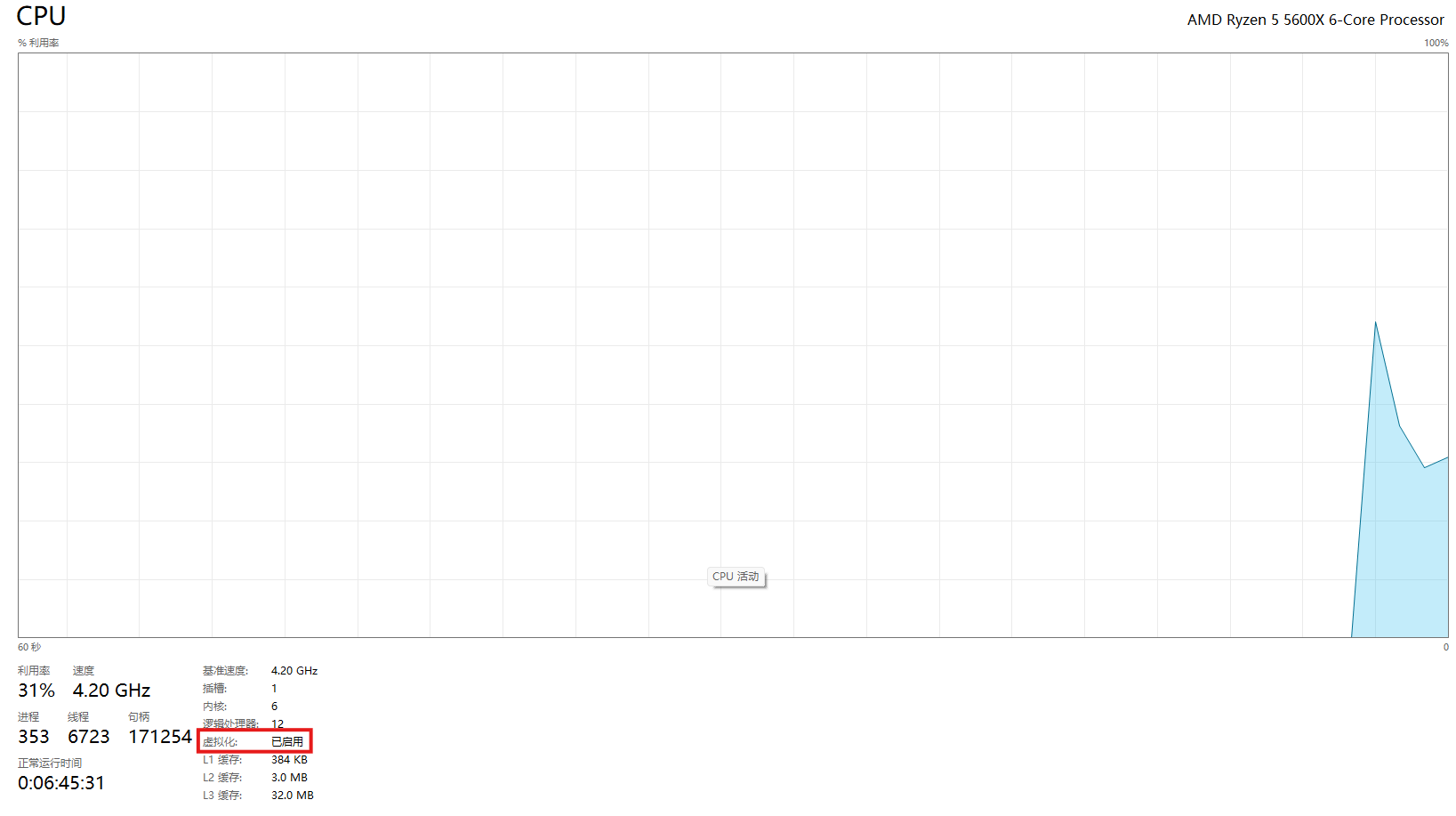
|
||||
|
||||
如果是在虚拟机中操作的话,就需要启用嵌套虚拟化技术啦~以VMware为例:
|
||||
|
||||
先关闭虚拟机,然后找到虚拟机的.vmx配置文件(通常在虚拟机目录下),在文件末尾添加一行:`vhv.enable = "TRUE"`
|
||||
@@ -142,4 +145,5 @@ wsl --terminate Ubuntu-20.04
|
||||
接下来,我们还可以通过VS Code来进行开发哦~不过需要先安装一些扩展呢:'Remote - SSH'和'WSL'
|
||||
|
||||
安装好扩展后,在VS Code左侧打开远程资源管理器,就可以看到Ubuntu20.04虚拟机啦~直接点击连接就可以了哦~不过第一次连接可能需要启动一下虚拟机,会有点慢呢,耐心等待一下吧~
|
||||
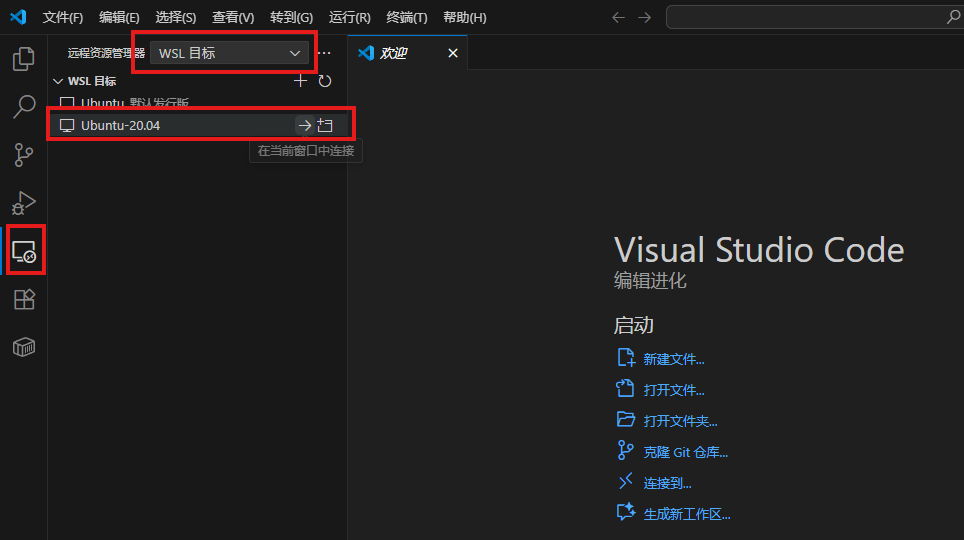
|
||||
连接成功之后,就可以愉快地进行开发啦~是不是很简单呢~
|
||||
|
||||
@@ -1,9 +1,8 @@
|
||||
---
|
||||
title: WSL2 核心操作指南
|
||||
createTime: 2025/09/30 16:08:32
|
||||
cover: /images/elysia/4.jpg
|
||||
permalink: /article/operate-wsl2/
|
||||
tags:
|
||||
- wsl
|
||||
---
|
||||
这篇文章主要讲WSL2虚拟机核心操作哦~它基于轻量级Hyper-V运行,像贴心小精灵默默工作~还能用命令行精细控制!接下来讲启动/关闭、实例管理、资源配置、网络操作、备份迁移这五大操作,是不是很期待呢~♪
|
||||
|
||||
|
||||
@@ -1,84 +0,0 @@
|
||||
---
|
||||
title: 通过位运算快速生成所有的子序列
|
||||
createTime: 2026/01/09 16:15:00
|
||||
permalink: /archives/ea20bdda-0d49-4472-a647-2e305a930d11/
|
||||
tags:
|
||||
- algorithms
|
||||
---
|
||||
## 一、子序列的本质
|
||||
|
||||
子序列是从原字符串中选择任意数量的字符(可以是 0 个、1 个、...、所有字符),且保持这些字符的原始顺序形成的字符串。
|
||||
|
||||
例如:原字符串 `"abc"` 的子序列包括 `"a"`, `"b"`, `"c"`, `"ab"`, `"ac"`, `"bc"`, `"abc"` 和空字符串 `""`(共 $2^3 = 8$ 种可能性)。
|
||||
|
||||
## 二、位掩码(Bitmask)的引入
|
||||
|
||||
假设字符串长度为 `n`,我们可以用一个 `n` 位的二进制数来表示是否选择某个字符:
|
||||
- 二进制数的每一位对应原字符串的一个字符。
|
||||
- 如果某一位是 `1`,表示选择对应的字符;如果是 `0`,表示不选择。
|
||||
|
||||
例如,对于字符串 `"abc"`(`n=3`):
|
||||
|
||||
| 二进制数 | 十进制 | 选择情况 | 生成子序列 |
|
||||
| :--- | :--- | :--- | :--- |
|
||||
| `101` | 5 | 选择第 1 个字符 "a" 和第 3 个字符 "c" | `"ac"` |
|
||||
| `010` | 2 | 选择第 2 个字符 "b" | `"b"` |
|
||||
|
||||
## 三、遍历所有可能的二进制数
|
||||
|
||||
所有可能的二进制数范围是 `0`(全 0)到 $2^n - 1$(全 1)。例如,`n=3` 时:
|
||||
- 范围是 `000` (0) 到 `111` (7),共 $2^3 = 8$ 种可能。
|
||||
- 每个二进制数对应一种子序列选择方式。
|
||||
- 如果包含 `000` (0),对应空字符串 `""`。若不需要空字符串,可以从 `1` 开始遍历。
|
||||
|
||||
## 四、如何将二进制数转换为子序列?
|
||||
|
||||
### 1. 外层循环:遍历所有可能的二进制数
|
||||
对于 `n=3`,遍历 `1` (`001`) 到 `7` (`111`)。
|
||||
|
||||
### 2. 内层循环:检查每一位是否为 1
|
||||
- 对于每个二进制数 `mask`,遍历其每一位 `i`(从 `0` 到 `n-1`)。
|
||||
- 如果 `mask` 的第 `i` 位是 `1`(即 `mask & (1 << i)` 为真),则将原字符串的第 `i` 个字符加入子序列。
|
||||
|
||||
## 五、代码示例
|
||||
|
||||
```python
|
||||
def get_all_subsequences(s):
|
||||
n = len(s)
|
||||
subsequences = []
|
||||
# 遍历 1 到 2^n - 1 (排除空字符串)
|
||||
for mask in range(1, 1 << n):
|
||||
subseq = []
|
||||
for i in range(n):
|
||||
# 检查 mask 的第 i 位是否为 1
|
||||
if mask & (1 << i):
|
||||
subseq.append(s[i])
|
||||
subsequences.append(''.join(subseq))
|
||||
return subsequences
|
||||
|
||||
# 测试
|
||||
print(get_all_subsequences("abc"))
|
||||
# 输出: ['a', 'b', 'ab', 'c', 'ac', 'bc', 'abc']
|
||||
```
|
||||
|
||||
## 六、应用场景
|
||||
|
||||
在处理类似 **X 质数** 的问题时,我们需要检查一个数字的所有数字子序列。通过这种位运算的方式,可以非常高效地生成所有组合并进行判断。
|
||||
|
||||
```python
|
||||
def solve_x_prime(num):
|
||||
s = str(num)
|
||||
n = len(s)
|
||||
for mask in range(1, 1 << n):
|
||||
subseq_str = ""
|
||||
for i in range(n):
|
||||
if mask & (1 << i):
|
||||
subseq_str += s[i]
|
||||
|
||||
# 将生成的子序列转换为整数并判断是否为质数
|
||||
p = int(subseq_str)
|
||||
if is_prime(p):
|
||||
return True
|
||||
return False
|
||||
```
|
||||
|
||||
@@ -1,77 +0,0 @@
|
||||
---
|
||||
title: 快速幂算法详解
|
||||
createTime: 2026/01/09 16:05:00
|
||||
permalink: /archives/1325a3bf-91d7-43ff-9630-e894549e12c1/
|
||||
tags:
|
||||
- algorithms
|
||||
---
|
||||
## 简介
|
||||
|
||||
快速幂算法是用于快速计算的算法,可以用于快速的处理大整数幂的场景。
|
||||
|
||||
最简单的 for 循环求数字的 n 次幂需要 $O(n)$ 的时间复杂度。快速幂方法可以达到 $O(\log N)$ 的时间复杂度。
|
||||
|
||||
快速幂的核心思想是将指数拆分,以达到快速计算的目的。
|
||||
|
||||
## 快速幂 - 二进制法
|
||||
|
||||
### 原理
|
||||
|
||||
二进制法的核心思想是将指数转换为二进制形式,通过逐位处理并结合平方运算减少乘法次数。
|
||||
|
||||
**二进制分解指数**
|
||||
将指数 $n$ 表示为二进制形式,例如 $n=13$ 对应二进制为 `1101`,即 $13=8+4+1=2^3+2^2+2^0$。
|
||||
|
||||
**幂的拆分**
|
||||
根据二进制分解,$a^n=a^{2^k} \times a^{2^{k-1}} \times \dots \times a^{2^0}$,其中仅当二进制位为 1 时,对应项被保留。
|
||||
|
||||
**逐位处理与平方加速**
|
||||
- 从最低位到最高位依次处理二进制每一位。
|
||||
- 若当前位为 1,则将当前的底数累乘到结果中。
|
||||
- 每一步将底数平方,为处理更高位做准备。
|
||||
|
||||
### 代码示例
|
||||
|
||||
```python
|
||||
def power(base, exp):
|
||||
res = 1
|
||||
while exp > 0:
|
||||
if exp & 1:
|
||||
res *= base
|
||||
base *= base
|
||||
exp >>= 1
|
||||
return res
|
||||
```
|
||||
|
||||
## 快速幂 - 折半法
|
||||
|
||||
### 原理
|
||||
|
||||
折半法的核心公式如下:
|
||||
|
||||
我们要快速计算 $a$ 的 $n$ 次方:
|
||||
|
||||
- 当 $n$ 为奇数的时候:$a^n = a \cdot (a^2)^{(n-1)/2}$
|
||||
- 当 $n$ 为偶数的时候:$a^n = (a^2)^{n/2}$
|
||||
- 当 $n$ 为 0 的时候,直接返回 1
|
||||
|
||||
通过递归或迭代,将大指数问题分解为小指数问题,最后合并结果。
|
||||
|
||||
### 代码示例
|
||||
|
||||
```python
|
||||
def power(base, exp):
|
||||
if exp == 0: return 1
|
||||
half = power(base, exp // 2)
|
||||
return half * half * (base if exp % 2 else 1)
|
||||
```
|
||||
|
||||
## 两种方法对比
|
||||
|
||||
| 特性 | 二进制法 | 折半法 |
|
||||
| :--- | :--- | :--- |
|
||||
| **实现方式** | 迭代 + 位运算 | 递归/迭代 + 分治 |
|
||||
| **时间复杂度** | $O(\log N)$ | $O(\log N)$ |
|
||||
| **空间复杂度** | $O(1)$ | $O(\log N)$ (递归) |
|
||||
|
||||
两者都可以实现在指数时间解决问题,二进制方法比折半法更加的省空间。
|
||||
@@ -1,300 +0,0 @@
|
||||
---
|
||||
title: Python 字符串格式化全指南
|
||||
createTime: 2026/01/09 14:00:48
|
||||
permalink: /archives/56ea3081-9c69-43d7-96c8-2812ec08be2c/
|
||||
tags:
|
||||
- python
|
||||
---
|
||||
|
||||
## 字符串格式化
|
||||
|
||||
我们经常会输出类似“亲爱的xxx你好!你xx月的话费是xx,余额是xx”之类的字符串,而xxx的内容都是根据变量变化的,所以需要一种简便的格式化字符串的方式。
|
||||
|
||||
在 Python 中可以使用很多种的字符串格式化方式,下面逐个列举。
|
||||
|
||||
### 字符串格式化的四种方式
|
||||
|
||||
#### 一、 %号
|
||||
|
||||
在Python中,可以采用%来实现字符串格式化,%号格式化字符串的方式是从Python诞生之处就已经存在,时至今日,Python官方也未放弃使用%号,但是也不推荐使用这种格式化方式。
|
||||
|
||||
在字符串内部,`%s`表示用字符串替换,`%d`表示用整数替换,有几个占位符,后面就跟几个变量或值,顺序要对应。如果只有一个`%?`,括号可以省略。如果不太确定应该用什么,可以使用`%s`,它会把任何数据类型转换为字符串。
|
||||
|
||||
有的时候,字符串里的%是一个普通的字符,这个时候就需要转义,用`%%`来表示一个%。
|
||||
|
||||
下面是常见的字符串格式化替代符:
|
||||
|
||||
- `%c`:格式化字符以及ASCII码
|
||||
- `%s`:格式化字符串
|
||||
- `%d`:格式化整数
|
||||
- `%u`:格式化无符号整数
|
||||
- `%o`:格式化无符号八进制数
|
||||
- `%x`:格式化无符号十六进制数
|
||||
- `%X`:格式化无符号十六进制数(大写)
|
||||
- `%f`:格式化浮点数,可指定小数点后精度
|
||||
- `%e`:用科学表示法格式化浮点数
|
||||
- `%E`:同 %e
|
||||
- `%g`:%f 和 %e 的简写
|
||||
- `%G`:%f 和 %E 的简写
|
||||
|
||||
**Python 字符串格式化的代码示例:**
|
||||
|
||||
```python
|
||||
a=15 #定义变量a并赋值
|
||||
b=12345678.1234567 #定义变量b并赋值
|
||||
strs="I love Python!" #定义字符串strs并赋值
|
||||
print("a=%05d"%a) #使用m控制输出位数,空位补0
|
||||
print("b=%8.3f"%b) #输出b,用m.n控制输出的长度和小数点位数
|
||||
print("%s"%strs) #正常输出字符串,用于做比较
|
||||
print("%17s"%strs) #使用m控制输出字符串长度
|
||||
print("%r"%strs) #使用%r输出字符串
|
||||
print("%-17.5s"%strs) #使用-m.n进行左对齐、限制字符串长度和字符位数
|
||||
print("a={0:05}".format(a)) #输出5位数字空位补0
|
||||
print("b={0:,.3f}".format(b)) #输出b,用千分位分隔并保留3位小数
|
||||
print("{0:*^30}".format(strs)) #居中且使用*填充
|
||||
```
|
||||
|
||||
**运行结果:**
|
||||
|
||||
```text
|
||||
a=00015
|
||||
b=12345678.123
|
||||
I love Python!
|
||||
I love Python!
|
||||
'I love Python!'
|
||||
I lov
|
||||
a=00015
|
||||
b=12,345,678.123
|
||||
********I love Python!********
|
||||
```
|
||||
|
||||
需要注意的一点是,Python中的中文大小为两字符,英文为一字符,所以说在写的时候要格外留意。
|
||||
|
||||
#### 二、 str.format 格式化
|
||||
|
||||
该format方法是在Python2.6中引入的,是字符串类型的内置方法。因为str.format的方式在性能(后面测试了一下,比%要慢)和使用的灵活性上都比%更胜一筹,所以推荐使用。
|
||||
|
||||
**1. 使用位置参数**
|
||||
|
||||
```python
|
||||
# 按照位置一一对应
|
||||
print('{} asked {} to do something'.format("egon","lili"))
|
||||
print('{} asked {} to do something'.format("lili","egon"))
|
||||
```
|
||||
|
||||
**2. 使用索引**
|
||||
|
||||
```python
|
||||
# 使用索引取对应位置的值
|
||||
print('{0}{0}{1}{0}'.format('x','y'))
|
||||
```
|
||||
|
||||
**3. 使用关键字参数 or 字典**
|
||||
|
||||
```python
|
||||
# 可以通过关键字or字典的方式格式化,打破了位置带来的限制与困扰
|
||||
print('我的名字是 {name}, 我的年龄是 {age}.'.format(age=18, name='egon'))
|
||||
|
||||
kwargs = {'name': 'egon', 'age': 18}
|
||||
print('我的名字是 {name}, 我的年龄是 {age}.'.format(**kwargs)) # 使用**进行解包操作
|
||||
```
|
||||
|
||||
关于解包详解可以参看:<https://blog.csdn.net/qq_36667170/article/details/121401668>
|
||||
|
||||
**4. 填充和格式化**
|
||||
|
||||
```python
|
||||
# 先取到值,然后在冒号后设定填充格式:[填充字符][对齐方式][宽度]
|
||||
|
||||
# *<10:左对齐,总共10个字符,不够的用*号填充
|
||||
print('{0:*<10}'.format('开始执行')) # 开始执行******
|
||||
|
||||
# *>10:右对齐,总共10个字符,不够的用*号填充
|
||||
print('{0:*>10}'.format('开始执行')) # ******开始执行
|
||||
|
||||
# *^10:居中显示,总共10个字符,不够的用*号填充
|
||||
print('{0:*^10}'.format('开始执行')) # ***开始执行***
|
||||
```
|
||||
|
||||
**5. 进度和进制**
|
||||
|
||||
```python
|
||||
print('{salary:.3f}'.format(salary=1232132.12351)) #精确到小数点后3位,四舍五入
|
||||
print('{0:b}'.format(123)) # 转成二进制,结果为:1111011
|
||||
print('{0:o}'.format(9)) # 转成八进制,结果为:11
|
||||
print('{0:x}'.format(15)) # 转成十六进制,结果为:f
|
||||
print('{0:,}'.format(99812939393931)) # 千分位格式化
|
||||
```
|
||||
|
||||
#### 三、 f-Strings 格式化
|
||||
|
||||
虽然str.format()比%格式稍微高级了一些,但是它还是有自己的缺陷。当需要传入的字符串过多时,仍然会显得非常冗长。于是在Python3.6中引入了f-strings,不仅比str.format更简洁,性能上也更胜一筹。
|
||||
|
||||
f-string是以 f 或 F 开头的字符串,核心在于字符串中符号{}的使用。
|
||||
|
||||
**1. {} 中可以是变量名**
|
||||
|
||||
```python
|
||||
name = 'egon'
|
||||
age = 18
|
||||
print(f'{name} {age}') # egon 18
|
||||
print(F'{age} {name}') # 18 egon
|
||||
```
|
||||
|
||||
**2. {} 中可以是表达式**
|
||||
|
||||
```python
|
||||
# 可以在{}中放置任意合法的Python表达式,会在运行时计算
|
||||
# 比如:数学表达式
|
||||
print(f'{3*3/2}') # 4.5
|
||||
|
||||
# 比如:函数的调用
|
||||
def foo(n):
|
||||
print('foo say hello')
|
||||
return n
|
||||
|
||||
print(f'{foo(10)}') # 会调用foo(10),然后打印其返回值
|
||||
|
||||
# 比如:调用对象的方法
|
||||
name='EGON'
|
||||
print(f'{name.lower()}') # egon
|
||||
```
|
||||
|
||||
**3. 在类中的使用**
|
||||
|
||||
```python
|
||||
class Person(object):
|
||||
def __init__(self, name, age):
|
||||
self.name = name
|
||||
self.age = age
|
||||
def __str__(self):
|
||||
return f'{self.name}:{self.age}'
|
||||
def __repr__(self):
|
||||
return f'===>{self.name}:{self.age}<==='
|
||||
|
||||
obj=Person('egon',18)
|
||||
print(obj) # 触发__str__
|
||||
print(obj.__repr__()) # 触发__repr__
|
||||
|
||||
# 在f-Strings中的使用
|
||||
print(f'{obj}') # 触发__str__
|
||||
print(f'{obj!r}') # 触发__repr__
|
||||
```
|
||||
|
||||
**4. 多行 f-Strings**
|
||||
|
||||
```python
|
||||
# 当格式化字符串过长时,如下列表info
|
||||
name = 'Egon'
|
||||
age = 18
|
||||
gender = 'male'
|
||||
hobbie1='play'
|
||||
hobbie2='music'
|
||||
hobbie3='read'
|
||||
info = [f'名字:{name}年龄:{age}性别:{gender}',
|
||||
f'第一个爱好:{hobbie1}第二个爱好:{hobbie2}第三个爱好:{hobbie3}']
|
||||
|
||||
# 我们可以回车分隔到多行,注意每行前都有一个f
|
||||
info = [
|
||||
# 第一个元素
|
||||
f'名字:{name}'
|
||||
f' 年龄:{age}'
|
||||
f' 性别:{gender}',
|
||||
|
||||
# 第二个元素
|
||||
f'第一个爱好:{hobbie1}'
|
||||
f' 第二个爱好:{hobbie2}'
|
||||
f' 第三个爱好:{hobbie3}'
|
||||
]
|
||||
print(info)
|
||||
```
|
||||
|
||||
**5. 引号的嵌套**
|
||||
|
||||
```python
|
||||
# 当字符串嵌套发送冲突时,与正常的字符串处理方式是一样的
|
||||
# 1、外层为单引号,内层嵌套也为单引号,并且想要输入的内容也为单引号,那么外层需要改用双引号
|
||||
print("my name is 'egon'")
|
||||
|
||||
# 2、外层为单引号,内层嵌套也为单引号,并且想要输入的内容也为单引号,需要用到转义
|
||||
print('my name is \'egon\'')
|
||||
```
|
||||
|
||||
**6. 括号的处理**
|
||||
|
||||
需要注意的是,反斜杠可以用来进行字符转义,但不能用在 {} 的表达式中,注释 # 号也不能出现在 {} 的表达式中。
|
||||
|
||||
```python
|
||||
f'{1\2}' # 语法错误
|
||||
f'{x#}' # 语法错误
|
||||
```
|
||||
|
||||
所以当我们的输出的结果中需要包含{}时,类似于之前输出%的做法,需要在原有的基础上再套一层。
|
||||
|
||||
```python
|
||||
print(f'{{天王盖地虎}}') # {天王盖地虎}
|
||||
print(f'{{{{天王盖地虎}}}}') # {{天王盖地虎}}
|
||||
```
|
||||
|
||||
#### 四、 三种字符串格式化方式的性能对比
|
||||
|
||||
```python
|
||||
from timeit import timeit
|
||||
|
||||
def test_s():
|
||||
name = 'Egon'
|
||||
age = 18
|
||||
return '%s:%s.' % (name, age)
|
||||
|
||||
def test_format():
|
||||
name = 'Egon'
|
||||
age = 18
|
||||
return '{}:{}.'.format(name, age)
|
||||
|
||||
def test_f_strings():
|
||||
name = 'Egon'
|
||||
age = 18
|
||||
return f'{name}:{age}.'
|
||||
|
||||
res1 = timeit(test_s, number=1000000)
|
||||
res2 = timeit(test_format, number=1000000)
|
||||
res3 = timeit(test_f_strings, number=1000000)
|
||||
print(res1) # 0.3338866999838501
|
||||
print(res2) # 0.40734450006857514
|
||||
print(res3) # 0.24273910000920296 最快
|
||||
```
|
||||
|
||||
#### 五、 标准库模版
|
||||
|
||||
从Python2.4起,Python标准库string引入了Template也可以用来格式化字符串,所以说,与前三种方式的一个显著的区别就是:Template属于Python语言的核心语法特征,使用方式如下。
|
||||
|
||||
```python
|
||||
from string import Template
|
||||
|
||||
name='EGON'
|
||||
t = Template('Hello $name!')
|
||||
res=t.substitute(name=name)
|
||||
|
||||
print(res) # Hello EGON!
|
||||
```
|
||||
|
||||
还有另外一个不同的地方是,这个模板字符串不支持类似str.format那样的进制转换,需要自己处理。
|
||||
|
||||
```python
|
||||
from string import Template
|
||||
|
||||
name='EGON'
|
||||
templ_string = 'Hello $name, there is a $error error!!!'
|
||||
res=Template(templ_string).substitute(name=name, error=hex(12345))
|
||||
|
||||
print(res) # Hello EGON, there is a 0x3039 error!!!
|
||||
```
|
||||
|
||||
另外稍微吐槽一下,这种方式真的慢。使用模板字符串Template的最佳的时机就是当你的程序需要处理由用户提供的输入内容时。模板字符串是最保险的选择,因为可以降低复杂性。其他一些复杂的字符串格式化技巧的可能会给你的程序带来安全漏洞。
|
||||
|
||||
### 总结
|
||||
|
||||
- 如果格式化的字符串是由用户输入的,那么基于安全性考虑,推荐使用Template。
|
||||
- 如果使用的python3.6+版本的解释器,推荐使用f-Strings。
|
||||
- 如果要兼容python2.x版本的python解释器,推荐使用str.format。
|
||||
- 如果不是测试的代码,不推荐使用%。
|
||||
@@ -1,9 +1,10 @@
|
||||
---
|
||||
title: 原码、反码、补码
|
||||
createTime: 2026/01/08 16:34:05
|
||||
cover: /images/elysia/6.jpg
|
||||
coverStyle:
|
||||
layout: right
|
||||
permalink: /archives/6f41cabe-41e6-4a09-9f1c-af7dd709a35d/
|
||||
tags:
|
||||
- cs-fundamentals
|
||||
---
|
||||
|
||||
欢迎来到 0 与 1 的魔法派对!这篇文章将带你揭开原码、反码与补码的奥秘,看计算机如何巧妙地用补码化减为加。让我们一起翻开这页,去捕捉二进制底层那份迷人的理性之美吧♪
|
||||
|
||||
@@ -1,9 +1,8 @@
|
||||
---
|
||||
title: 通过 EdgeOne Pages 搭建图床
|
||||
createTime: 2025/09/29 02:28:17
|
||||
cover: /images/elysia/5.jpg
|
||||
permalink: /article/8gihio2v/
|
||||
tags:
|
||||
- image-hosting
|
||||
---
|
||||
|
||||
各位~今天要给大家介绍一个超棒的图床搭建方法哦!EdgeOne Pages 是腾讯云提供的静态网站托管服务,而且还有免费额度可以使用呢,对于日常需求来说完全足够啦~
|
||||
|
||||
@@ -1,13 +0,0 @@
|
||||
---
|
||||
title: 模型
|
||||
createTime: 2026/03/29 20:00:00
|
||||
permalink: /ai/
|
||||
---
|
||||
|
||||
# 模型
|
||||
|
||||
这里是我和大模型、RAG、本地部署还有各种工具链打交道的地方~
|
||||
|
||||
和博客里的随想不同,这些笔记会更系统化一些,方便以后自己回来查的时候能一把抓到重点。左侧的目录会随着我记的东西越来越多而慢慢展开,就像「英语学习」「Web 开发」那些栏目一样,可以按专题慢慢逛。
|
||||
|
||||
当然啦,如果只是突然想到什么、想随手记几句碎碎念,还是会丢进 [博客](/blog/) 里,那里更适合发点动态更新的小东西~
|
||||
@@ -1,188 +0,0 @@
|
||||
---
|
||||
title: MCP 与 Skills:让 AI 助手更懂你的利器
|
||||
createTime: 2026/03/29 14:00:00
|
||||
permalink: /article/mcp-and-skills/
|
||||
sidebar: '/ai/'
|
||||
---
|
||||
|
||||
嗨~今天来聊聊两个让 AI 助手变得更聪明、更贴心的小魔法:**MCP** 和 **Skills** 🪄
|
||||
|
||||
它们就像是给 AI 装上了「外挂」和「说明书」,让它不仅能聊天,还能真正帮你干活、调用工具、甚至访问你的本地知识库~
|
||||
|
||||
|
||||
## 一、MCP 是什么?
|
||||
|
||||
**MCP** 全称是 **Model Context Protocol**(模型上下文协议),是由 [Anthropic](https://www.anthropic.com/) 提出的一种开放协议。
|
||||
|
||||
简单来说,它就像是 AI 和外部世界之间的「通用翻译官」🌐
|
||||
|
||||
### 为什么需要 MCP?
|
||||
|
||||
想象一下:
|
||||
- 你想让 AI 查一下你的本地数据库
|
||||
- 你想让 AI 调用某个特定工具
|
||||
- 你想让 AI 访问你的笔记知识库
|
||||
|
||||
以前,每个工具都要写一套单独的对接代码,很麻烦对吧?
|
||||
|
||||
MCP 的出现,就是为了让这些「对接」变得标准化——**一次配置,到处可用**。
|
||||
|
||||
### MCP 的工作原理
|
||||
|
||||
```
|
||||
┌─────────────┐ ┌─────────────┐ ┌─────────────┐
|
||||
│ AI 助手 │ ◄──► │ MCP 协议 │ ◄──► │ 外部工具 │
|
||||
│ (Cursor等) │ │ (标准化) │ │ (数据库/API) │
|
||||
└─────────────┘ └─────────────┘ └─────────────┘
|
||||
```
|
||||
|
||||
AI 助手通过 MCP 协议,可以:
|
||||
- 🔍 **检索**(Retrieval):查询知识库、数据库
|
||||
- 🛠️ **调用工具**(Tools):执行特定功能
|
||||
- 💾 **访问资源**(Resources):读取文件、配置等
|
||||
|
||||
|
||||
## 二、Skills 是什么?
|
||||
|
||||
如果说 MCP 是「通信协议」,那 **Skills** 就是「技能说明书」📖
|
||||
|
||||
### Skills 的概念
|
||||
|
||||
Skills(技能)是封装好的、可复用的功能模块。每个 Skill 通常包含:
|
||||
- **功能描述**:这个技能是干嘛的
|
||||
- **调用方式**:需要哪些参数、返回什么结果
|
||||
- **使用示例**:实际怎么调用
|
||||
|
||||
### MCP vs Skills 的关系
|
||||
|
||||
| 概念 | 比喻 | 作用 |
|
||||
|------|------|------|
|
||||
| **MCP** | 电话线/网络协议 📡 | 负责「能连上」 |
|
||||
| **Skills** | 电话簿/功能菜单 📋 | 负责「知道能做什么」 |
|
||||
|
||||
MCP 让 AI 和工具**连得通**,Skills 让 AI**知道怎么用**。
|
||||
|
||||
|
||||
## 三、实际应用场景
|
||||
|
||||
### 场景 1:本地知识库检索 🗃️
|
||||
|
||||
就像我在 [RAGFlow 部署文章](../windows11-ragflow-deployment-mcp/) 里写的,通过 MCP 把 RAGFlow 接到 Cursor 里:
|
||||
|
||||
```json
|
||||
// Cursor 的 MCP 配置
|
||||
{
|
||||
"mcpServers": {
|
||||
"RAGFlow": {
|
||||
"url": "http://127.0.0.1:39382/mcp/"
|
||||
}
|
||||
}
|
||||
}
|
||||
```
|
||||
|
||||
然后 AI 就能:
|
||||
- 自动检索你的笔记
|
||||
- 基于本地知识回答问题
|
||||
- 不用把敏感文件上传到云端
|
||||
|
||||
### 场景 2:数据库查询 🗄️
|
||||
|
||||
配置一个数据库 MCP Server,AI 就能直接帮你:
|
||||
|
||||
```
|
||||
用户:查一下上个月销售额最高的产品
|
||||
AI:【通过 MCP 调用数据库查询工具】
|
||||
SELECT product_name, SUM(sales)
|
||||
FROM sales
|
||||
WHERE date >= '2025-02-01'
|
||||
GROUP BY product_name
|
||||
ORDER BY SUM(sales) DESC
|
||||
LIMIT 1;
|
||||
|
||||
结果是:产品 A,销售额 ¥123,456
|
||||
```
|
||||
|
||||
### 场景 3:文件操作 📁
|
||||
|
||||
通过文件系统 MCP,AI 可以:
|
||||
- 读取项目配置文件
|
||||
- 批量重命名文件
|
||||
- 生成代码并保存到指定目录
|
||||
|
||||
|
||||
## 四、在 Cursor 中使用
|
||||
|
||||
### 配置 MCP Server
|
||||
|
||||
以 Cursor 为例,在 `~/.cursor/mcp.json` 中添加:
|
||||
|
||||
```json
|
||||
{
|
||||
"mcpServers": {
|
||||
"my-database": {
|
||||
"url": "http://localhost:3000/mcp"
|
||||
},
|
||||
"file-system": {
|
||||
"command": "npx",
|
||||
"args": ["-y", "@modelcontextprotocol/server-filesystem", "/path/to/allowed/dir"]
|
||||
}
|
||||
}
|
||||
}
|
||||
```
|
||||
|
||||
### 使用流程
|
||||
|
||||
1. **AI 发现技能**:启动时,AI 会自动获取所有可用的 Skills 列表
|
||||
2. **意图识别**:当你提问时,AI 判断是否需要调用工具
|
||||
3. **参数填充**:AI 自动提取所需参数
|
||||
4. **执行并返回**:调用 MCP Server,获取结果后呈现给你
|
||||
|
||||
### 交互示例
|
||||
|
||||
```
|
||||
你:帮我总结一下项目里的 API 接口
|
||||
|
||||
AI:我来帮你分析一下项目中的 API 接口。
|
||||
【调用 file-system skill 读取项目文件】
|
||||
【调用检索 skill 查找路由定义】
|
||||
|
||||
找到以下接口:
|
||||
1. GET /api/users - 获取用户列表
|
||||
2. POST /api/users - 创建用户
|
||||
3. GET /api/users/:id - 获取单个用户
|
||||
...
|
||||
```
|
||||
|
||||
|
||||
## 五、MCP 生态一览
|
||||
|
||||
目前 MCP 生态正在快速发展,已有许多现成的 Server 可用:
|
||||
|
||||
| 类型 | 代表项目 | 用途 |
|
||||
|------|---------|------|
|
||||
| 文件系统 | `@modelcontextprotocol/server-filesystem` | 读写本地文件 |
|
||||
| 数据库 | `@modelcontextprotocol/server-postgres` | PostgreSQL 查询 |
|
||||
| GitHub | `@modelcontextprotocol/server-github` | 操作 GitHub |
|
||||
| 浏览器 | `@browserbasehq/mcp-server-browserbase` | 自动化浏览器操作 |
|
||||
| 知识库 | RAGFlow MCP | 本地文档检索 |
|
||||
|
||||
完整的官方列表可以在 [MCP Servers Repository](https://github.com/modelcontextprotocol/servers) 找到。
|
||||
|
||||
|
||||
## 六、总结
|
||||
|
||||
| 要点 | 说明 |
|
||||
|------|------|
|
||||
| **MCP** | 让 AI 和工具「说同一种语言」的开放协议 |
|
||||
| **Skills** | 封装好的功能模块,告诉 AI「我能做什么」 |
|
||||
| **价值** | 打破信息孤岛,让 AI 真正连接你的数字世界 |
|
||||
| **前景** | 越来越多的工具会支持 MCP,生态会越来越丰富 |
|
||||
|
||||
用一句话概括:**MCP 是桥梁,Skills 是地图,让 AI 从「聊天伙伴」变成「得力助手」** 🎯
|
||||
|
||||
---
|
||||
|
||||
> 💡 **延伸阅读**
|
||||
> - [Windows 11 本地部署 RAGFlow 与 Cursor MCP](./windows11-ragflow-deployment-mcp.md)
|
||||
> - [MCP 官方文档](https://modelcontextprotocol.io/)
|
||||
> - [Anthropic MCP 介绍](https://www.anthropic.com/news/model-context-protocol)
|
||||
File diff suppressed because it is too large
Load Diff
@@ -0,0 +1,49 @@
|
||||
---
|
||||
title: C++ 学习笔记
|
||||
description: 记录C++编程语言的学习心得和基础知识
|
||||
createTime: 2025/09/22 09:00:00
|
||||
permalink: /programming/cplusplus/
|
||||
---
|
||||
|
||||
# C++ 学习笔记
|
||||
|
||||
这里是我在学习C++编程语言过程中记录的学习心得、基础知识和实战经验。通过整理这些笔记,希望能够帮助自己和他人更好地掌握C++这门强大的编程语言。
|
||||
|
||||
## 学习路径
|
||||
|
||||
C++是一门复杂而强大的编程语言,学习路径建议如下:
|
||||
|
||||
1. **基础语法** - 掌握C++的基本语法和编程概念
|
||||
2. **面向对象编程** - 学习C++的类、继承、多态等OOP特性
|
||||
3. **STL标准库** - 熟悉常用的容器和算法
|
||||
4. **高级特性** - 模板、异常处理、智能指针等
|
||||
5. **实战项目** - 通过实际项目巩固所学知识
|
||||
|
||||
## 笔记分类
|
||||
|
||||
### 基础语法
|
||||
|
||||
- 数据类型
|
||||
- 运算符和表达式
|
||||
- 控制流语句
|
||||
- 函数
|
||||
|
||||
### 面向对象编程
|
||||
|
||||
- 类和对象
|
||||
- 继承与多态
|
||||
- 封装与抽象
|
||||
- 构造函数与析构函数
|
||||
|
||||
### STL标准库
|
||||
|
||||
- 容器(vector, list, map等)
|
||||
- 迭代器
|
||||
- 算法
|
||||
- 函数对象
|
||||
|
||||
## 学习资源推荐
|
||||
|
||||
- [C++ Primer Plus:中文版(第六版)](https://101su.ru/book/5442395/430bc1/c-primer-plus%E4%B8%AD%E6%96%87%E7%89%88%E7%AC%AC%E5%85%AD%E7%89%88.html) - 很好的C++入门教材
|
||||
|
||||
开始你的C++学习之旅吧!坚持学习,你会发现C++的魅力所在!
|
||||
@@ -0,0 +1,10 @@
|
||||
---
|
||||
title: C++ 简介与环境配置
|
||||
createTime: 2025/09/22 09:06:00
|
||||
permalink: /programming/cplusplus/basis/
|
||||
---
|
||||
|
||||
## C++的简介
|
||||
欢迎来到C++的奇妙世界~(๑>◡<๑) 如果你之前接触过C语言的话,那真是太棒啦!C++就像是C语言穿上了漂亮的新衣裳,不仅保留了原来的优点,还添加了面向对象和泛型编程的魔法哦~不过呢,可能需要稍微调整一下之前的编程习惯呢。就算你是第一次接触C++也完全不用担心,我会用最简单可爱的方式,带着你一步一步探索这个神奇的编程世界哒!
|
||||
|
||||
## 环境配置
|
||||
@@ -0,0 +1,40 @@
|
||||
---
|
||||
title: LeetCode 题解笔记
|
||||
description: 记录LeetCode算法题的解题思路和代码实现
|
||||
createTime: 2025/09/22 08:09:52
|
||||
permalink: /programming/leetcode/
|
||||
---
|
||||
|
||||
# LeetCode 题解笔记
|
||||
|
||||
这里是我在LeetCode刷题过程中记录的解题思路和代码实现。通过整理这些题解,希望能够提高自己的算法水平和编程能力。
|
||||
|
||||
## 题解分类
|
||||
|
||||
### 数组与字符串
|
||||
|
||||
- [两数之和](https://leetcode-cn.com/problems/two-sum/)
|
||||
- [三数之和](https://leetcode-cn.com/problems/3sum/)
|
||||
|
||||
### 链表
|
||||
|
||||
- [反转链表](https://leetcode-cn.com/problems/reverse-linked-list/)
|
||||
- [合并两个有序链表](https://leetcode-cn.com/problems/merge-two-sorted-lists/)
|
||||
|
||||
### 动态规划
|
||||
|
||||
- [爬楼梯](https://leetcode-cn.com/problems/climbing-stairs/)
|
||||
- [最长回文子串](https://leetcode-cn.com/problems/longest-palindromic-substring/)
|
||||
|
||||
## 解题技巧
|
||||
|
||||
1. **双指针法**:常用于数组、链表问题,如两数之和、反转链表等
|
||||
2. **滑动窗口**:处理字符串子串问题
|
||||
3. **动态规划**:将原问题分解为子问题,自底向上求解
|
||||
4. **分治法**:将问题分成若干子问题,分别求解后合并结果
|
||||
|
||||
## 学习资源
|
||||
|
||||
- [LeetCode官方题解](https://leetcode-cn.com/problemset/all/)
|
||||
- [代码随想录](https://programmercarl.com/)
|
||||
- [算法导论](https://mitpress.mit.edu/books/introduction-algorithms)
|
||||
@@ -0,0 +1,13 @@
|
||||
---
|
||||
title: LeetCode 入门题单~(≧∇≦)ノ
|
||||
description: 给算法初学者的题目推荐和学习路径
|
||||
createTime: 2025年9月22日 08:52:52
|
||||
permalink: /programming/leetcode/question_sheet/beginner/
|
||||
---
|
||||
# LeetCode 入门题单~(๑>◡<๑)
|
||||
|
||||
作为算法初学者,选择合适的题目开始练习真的超~级重要哦!这里给大家推荐一份超棒的入门题单——[「新」动计划 · 编程入门](https://leetcode.cn/studyplan/primers-list/) ~这份题单就像给小树苗精心准备的阳光和雨露一样,特别适合刚开始算法之旅的你~(悄悄告诉你,里面有两题是数据库基础,暂时可以跳过哦~)
|
||||
|
||||
我的小建议是:先自己试着挑战一下,如果遇到困难了,再来看题解也没关系~重要的是享受这个成长的过程呀~(♡˙︶˙♡)
|
||||
|
||||
## 基础语法 & 数据类型 ٩(๑>◡<๑)۶
|
||||
@@ -1,202 +0,0 @@
|
||||
---
|
||||
title: 系统分析师
|
||||
createTime: 2026/03/01 12:40:00
|
||||
permalink: /subject/certification/
|
||||
---
|
||||
|
||||
# 系统分析师
|
||||
|
||||
软考高级资格考证笔记~
|
||||
|
||||
> 官网:https://www.ruankao.org.cn/
|
||||
|
||||
## 考试科目
|
||||
|
||||
| 科目 | 题型 | 分值 | 时长 |
|
||||
| :--- | :--- | :--- | :--- |
|
||||
| 综合知识 | 选择题 (75道) | 75分 | 150分钟 |
|
||||
| 案例分析 | 问答题 (5道选3道) | 75分 | 90分钟 |
|
||||
| 论文写作 | 论文题 (4选1,2500字) | 75分 | 120分钟 |
|
||||
|
||||
**及格标准**:各科目均需达到 45 分
|
||||
|
||||
## 考试要求
|
||||
|
||||
1. 具有系统工程的基础知识
|
||||
2. 掌握开发信息系统的综合技术知识(硬件、软件、网络、数据库)
|
||||
3. 熟悉企业和政府信息化建设,并具有组织信息化战略规划的知识
|
||||
4. 熟练掌握信息系统开发过程和方法
|
||||
5. 熟悉信息系统开发标准
|
||||
6. 掌握信息安全的相关知识与技术
|
||||
7. 理解软件质量保证的手段
|
||||
8. 具有经济与管理科学的相关基础知识,熟悉有关的法律法规
|
||||
9. 具有大学本科的数学基础
|
||||
10. 熟练阅读和正确理解相关领域的英文文献
|
||||
|
||||
## 综合知识考点分布
|
||||
|
||||
| 知识点 | 分数 | 比例 |
|
||||
| :--- | :--- | :--- |
|
||||
| 信息化战略规划 | 6-9 | 8-12% |
|
||||
| 需求工程 | 4-8 | 5.33-10.67% |
|
||||
| 系统设计 | 2-8 | 2.67-10.67% |
|
||||
| 信息安全 | 4-9 | 5.33-12% |
|
||||
| 数据库系统 | 6-8 | 8-10.67% |
|
||||
| 计算机网络 | 5-8 | 6.67-10.67% |
|
||||
| 操作系统 | 4-6 | 5.33-8% |
|
||||
| 软件工程 | 2-5 | 2.6-6.67% |
|
||||
| 法律法规与标准化 | 4 | 5.33% |
|
||||
| 专业英语 | 5 | 6.67% |
|
||||
|
||||
## 案例分析考查主题
|
||||
|
||||
- 系统规划
|
||||
- 开发方法与开发模型
|
||||
- 需求工程
|
||||
- 系统分析
|
||||
- 系统设计
|
||||
- 系统运行和维护
|
||||
- 数据库方向
|
||||
- 项目管理
|
||||
- 企业信息化战略与实施
|
||||
- 嵌入式方向
|
||||
- Web技术
|
||||
- 新技术的应用
|
||||
|
||||
## 论文写作主题
|
||||
|
||||
- 系统规划与战略规划
|
||||
- 需求工程
|
||||
- 系统开发方法
|
||||
- 系统维护和系统测试
|
||||
- 项目管理
|
||||
- 面向对象技术
|
||||
- 应用系统分析与设计
|
||||
- 数据库工程
|
||||
- 应用系统集成
|
||||
- 新技术的应用
|
||||
|
||||
## 备考攻略
|
||||
|
||||
### 备考周期
|
||||
建议 **4-6个月**,高级科目难度较大,需尽早准备!
|
||||
|
||||
### 第一阶段:基础构建(1-2个月)
|
||||
- 研究考试大纲,明确考试范围和重点
|
||||
- 购买官方推荐教材
|
||||
- 制定详细的学习计划
|
||||
- 从基础知识点开始,逐步构建知识体系
|
||||
|
||||
### 第二阶段:深入学习(1-2个月)
|
||||
- 细致阅读教材,做好学习笔记
|
||||
- 加入在线课程或学习小组交流
|
||||
- 实践应用所学知识
|
||||
- 定期自我测试
|
||||
|
||||
### 第三阶段:强化训练(1-2个月)
|
||||
- 大量做历年真题
|
||||
- 查漏补缺,强化记忆
|
||||
- 提高答题速度
|
||||
- 论文写作:看范文,写框架
|
||||
|
||||
### 第四阶段:冲刺复习(考前1个月)
|
||||
- 总结各章节重点和易错点
|
||||
- 全真模拟考试
|
||||
- 调整心态,保持状态
|
||||
|
||||
### 第五阶段:考前准备(考前1周)
|
||||
- 复习笔记和提纲
|
||||
- 检查考试资料(身份证、准考证)
|
||||
- 调整作息,确保精力充沛
|
||||
|
||||
## 答题技巧
|
||||
|
||||
### 综合知识
|
||||
- 先看问题,再看选项
|
||||
- 排除干扰项,选择相对稳妥的说法
|
||||
- 当两个选项截然相反时,必有一个正确答案
|
||||
- 可以用选项代入计算的方式走捷径
|
||||
|
||||
### 案例分析
|
||||
- 带着问题去看题干
|
||||
- 顺势而为答题,根据题干倾向分析优劣
|
||||
- 分条目答题,方便老师查看得分点
|
||||
- 根据分值决定条目数量和简略程度
|
||||
|
||||
### 论文写作
|
||||
- 提前准备 2-3 个主题的框架
|
||||
- 关注论文结构:背景、问题、方案、效果、总结
|
||||
- 结合实际项目经验
|
||||
- 字数控制在 2500 字左右
|
||||
|
||||
## 2026年考试时间安排
|
||||
|
||||
| 时间节点 | 说明 |
|
||||
| :--- | :--- |
|
||||
| 报名时间 | 2026年3月中旬至4月中旬(各省差异大) |
|
||||
| 考试时间 | 2026年5月23日-26日 |
|
||||
| 准考证打印 | 考前一周左右(5月中旬) |
|
||||
|
||||
**注意**:各地报名时间差异极大,部分省份窗口期可能短至一周,请务必关注当地通知!
|
||||
|
||||
## 报名流程与注意事项
|
||||
|
||||
### 报名官网
|
||||
- 中国计算机技术职业资格网:https://www.ruankao.org.cn/
|
||||
- 报名平台:https://bm.ruankao.org.cn/
|
||||
|
||||
### 报名流程
|
||||
1. **注册登录**:使用"国家网络身份认证"APP扫码登录
|
||||
2. **填报信息**:选择考区、填写个人信息,报考级别选"高级",资格选"系统分析师"
|
||||
3. **上传照片**:必须使用官方"照片验证工具"处理白底彩色证件照
|
||||
4. **审核缴费**:等待审核(1-3个工作日),审核通过后完成网上缴费
|
||||
|
||||
### 注意事项
|
||||
- **属地原则**:仅接受在工作地、居住地或学籍所在地报考
|
||||
- **异地报考**:需提供当地社保缴纳证明(连续6个月)或有效期内居住证
|
||||
- **实名认证**:需提前下载"国家网络身份认证"APP完成认证
|
||||
- **警惕骗子**:勿信"代报名"、"包过"、"异地代报"等诈骗信息
|
||||
|
||||
## 核心能力考查
|
||||
|
||||
系统分析师考试强调综合分析与解决实际问题的能力:
|
||||
|
||||
| 能力 | 说明 |
|
||||
| :--- | :--- |
|
||||
| 系统思维 | 从全局视角看待信息系统与组织战略的关系 |
|
||||
| 需求分析建模 | 能使用DFD、用例图、类图、活动图等工具进行系统建模 |
|
||||
| 方案设计与权衡 | 分析C/S vs B/S、单体 vs 微服务等方案的优劣 |
|
||||
| 项目管理与风险控制 | 制定项目计划(WBS、甘特图)、估算成本、识别风险 |
|
||||
| 技术趋势理解 | 对云计算、大数据、AI、物联网等新技术有基本理解 |
|
||||
| 表达与写作 | 撰写结构清晰、逻辑严谨、结合实际的论文 |
|
||||
|
||||
**三大核心模块**:软件工程 + 系统分析设计 + 项目管理,合计占 **45%以上**!
|
||||
|
||||
## 论文评分标准
|
||||
|
||||
| 评分项 | 占比 | 档次 |
|
||||
| :--- | :--- | :--- |
|
||||
| 切合题意 | 30% | 非常切合、较好地切合、基本上切合 |
|
||||
| 应用深度与水平 | 20% | 很强、较强、一般、较差 |
|
||||
| 实践性 | 20% | 很强、较强、一般、较差 |
|
||||
| 表达能力 | 15% | 很强、较强、一般、较差 |
|
||||
| 书面能力 | 15% | 很强、较强、一般、较差 |
|
||||
|
||||
## 推荐资料
|
||||
|
||||
### 官方教材
|
||||
- 《系统分析师教程(第2版)》(清华大学出版社,2024年10月出版)
|
||||
|
||||
### 备考资料
|
||||
- 近5年软考系统分析师真题
|
||||
- 《系统分析师考试全程指导》
|
||||
- 《5天修炼》
|
||||
- 在线资源:希赛网、软考真题网、B站相关课程
|
||||
|
||||
## 参考资料
|
||||
|
||||
- [中国计算机技术职业资格网](https://www.ruankao.org.cn/)
|
||||
- [软考高级系统分析师备考攻略 - 知乎](https://zhuanlan.zhihu.com/p/14782824101)
|
||||
- [新手一次过软考高级系统分析师 - CSDN](https://blog.csdn.net/winin2024/article/details/141386702)
|
||||
- [系统分析师考试备考全面解析 - CSDN](https://blog.csdn.net/summer_fish/article/details/151296190)
|
||||
- [2026上半年软考系统分析师报考指南 - 希赛网](https://www.educity.cn/rk/5454826.html)
|
||||
@@ -1,11 +0,0 @@
|
||||
---
|
||||
title: 第一章 绪论
|
||||
createTime: 2026/03/01 14:00:00
|
||||
permalink: /subject/certification/sys-analyst/
|
||||
---
|
||||
|
||||
# 第一章 绪论
|
||||
|
||||
> 还没有开始写呢,先占个位置~ ✨
|
||||
|
||||
敬请期待...
|
||||
@@ -1,11 +0,0 @@
|
||||
---
|
||||
title: 第二章 数学与工程基础
|
||||
createTime: 2026/03/01 14:00:00
|
||||
permalink: /subject/certification/sys-analyst/math/
|
||||
---
|
||||
|
||||
# 第二章 数学与工程基础
|
||||
|
||||
> 还没有开始写呢,先占个位置~ ✨
|
||||
|
||||
敬请期待...
|
||||
@@ -1,11 +0,0 @@
|
||||
---
|
||||
title: 第十章 系统规划与分析
|
||||
createTime: 2026/03/01 14:00:00
|
||||
permalink: /subject/certification/sys-analyst/planning/
|
||||
---
|
||||
|
||||
# 第十章 系统规划与分析
|
||||
|
||||
> 还没有开始写呢,先占个位置~ ✨
|
||||
|
||||
敬请期待...
|
||||
@@ -0,0 +1,50 @@
|
||||
---
|
||||
title: 学习资源与工具
|
||||
createTime: 2025/10/20 16:40:00
|
||||
permalink: /subject/english/resources/
|
||||
---
|
||||
|
||||
# 学习资源与工具
|
||||
|
||||
- 词典与语法书:牛津、朗文、柯林斯
|
||||
- 学习 App:扇贝、欧路、Grammarly
|
||||
- 新闻来源:BBC、VOA、The Economist
|
||||
- 社区与练习:Reddit、StackExchange English、写作论坛
|
||||
|
||||
## 每日读物
|
||||
希望每天都能读一篇简单的小文章,将不会的单词标出,不理解的句子记下来。通过有道词典等工具查询后能够自己理解并通读。
|
||||
|
||||
### 下面是今日份读物推荐~
|
||||
|
||||
解析将稍后更新~
|
||||
|
||||
### 2025.10.27
|
||||
|
||||
```
|
||||
https://web.shanbay.com/reading/web-news/articles/umxci
|
||||
```
|
||||
|
||||
复制链接至浏览器后,点击APP内打开,点击短文,登陆注册后找到这篇文章可读性更强且自带单词查询功能
|
||||
|
||||
不过个人建议先盲读,尝试用自己认识的单词推理拼凑一篇文章吧~
|
||||
|
||||
#### Study Finds Minimal Link Between phone Use and Adult Well-Being
|
||||
|
||||
Despite previous findings, Oregon-led research has determined that smartphone use isn't necessarily related to the well-being of adults.
|
||||
|
||||
The study conducted by the University of Oregon and Google Research found that younger adults experience lower moods when using social media in one particular stance, but the link between mental health and digital surfing was "either weak or statistically insignificant" when assessing longer time periods.
|
||||
|
||||
According to UO, Nicholas Allen — a psychology professor and director of the Center for Digital Mental Health — led the team that conducted the study.For four weeks, researchers recorded the smartphone activity and daily moods of more than 10,000 participants who were at least 18 years of age.
|
||||
|
||||
The university noted that previous studies have included self-reported data, which scientists claimed aren't as reliable.
|
||||
|
||||
"Our findings challenge the popular assumption that smartphone use is inherently harmful to mental health and well-being," Allen said in a release."There's been a lot of public concern and policy discussion often based on small, self-reported studies.This large-scale, objective data suggests the relationship is far more nuanced and, in most cases, minimal — at least over this time frame."
|
||||
|
||||
The findings, which were published in the National Library of Medicine earlier this week, show that demographics like age and gender were more likely to negatively impact mental well-being than smartphone usage.Notably, researchers discovered that younger adults and women experienced lower moods despite how often they surfed social media.
|
||||
|
||||
"Smartphones are part of the context of our daily lives; they're not inherently good or bad.The key is understanding how people use them and how technology can be designed to support well-being rather than detract from it," Allen added.
|
||||
|
||||
|
||||
|
||||
|
||||
#### 将生词整理到纸或本子上吧~熟记这些单词和使用时的语境会在你意想不到的时候帮助到你哦!
|
||||
Generated
+2265
-3486
File diff suppressed because it is too large
Load Diff
+5
-13
@@ -7,33 +7,25 @@
|
||||
"engines": {
|
||||
"node": "^20.6.0 || >=22.0.0"
|
||||
},
|
||||
"overrides": {
|
||||
"@vuepress/helper": "2.0.0-rc.123"
|
||||
},
|
||||
"scripts": {
|
||||
"docs:dev": "vuepress dev docs",
|
||||
"docs:dev-clean": "vuepress dev docs --clean-cache --clean-temp",
|
||||
"docs:clear-cache": "node scripts/clear-vuepress-cache.mjs",
|
||||
"docs:build": "vuepress build docs --clean-cache --clean-temp",
|
||||
"docs:verify": "node scripts/verify-site.mjs",
|
||||
"docs:place-ragflow-guide": "node scripts/place-ragflow-guide.mjs",
|
||||
"docs:preview": "http-server docs/.vuepress/dist",
|
||||
"vp-update": "npx vp-update"
|
||||
},
|
||||
"devDependencies": {
|
||||
"@vuepress/helper": "2.0.0-rc.123",
|
||||
"@vuepress/bundler-vite": "2.0.0-rc.26",
|
||||
"@vuepress/plugin-umami-analytics": "2.0.0-rc.112",
|
||||
"@vuepress/bundler-vite": "2.0.0-rc.24",
|
||||
"@vuepress/plugin-umami-analytics": "^2.0.0-rc.112",
|
||||
"artalk": "^2.9.1",
|
||||
"http-server": "^14.1.1",
|
||||
"typescript": "^5.9.2",
|
||||
"vue": "^3.5.21",
|
||||
"vuepress": "2.0.0-rc.26",
|
||||
"vuepress-theme-plume": "1.0.0-rc.192"
|
||||
"vuepress": "2.0.0-rc.24",
|
||||
"vuepress-theme-plume": "1.0.0-rc.164"
|
||||
},
|
||||
"dependencies": {
|
||||
"@vuepress/plugin-comment": "2.0.0-rc.123",
|
||||
"@waline/client": "^3.13.0",
|
||||
"@waline/client": "^3.6.0",
|
||||
"mermaid": "^11.12.1"
|
||||
}
|
||||
}
|
||||
|
||||
@@ -20,10 +20,6 @@ set "BRANCH=main"
|
||||
REM High memory limit for better performance/stability (8GB)
|
||||
set "NODE_OPTIONS=--max-old-space-size=8192"
|
||||
|
||||
REM Disable Git SSL Verification for this session
|
||||
git config --global http.sslVerify false
|
||||
git config --global http.sslBackend openssl
|
||||
|
||||
REM Args
|
||||
set "COMMIT_MSG=%~1"
|
||||
if "%COMMIT_MSG%"=="" set "COMMIT_MSG=Build: %DATE% %TIME%"
|
||||
|
||||
@@ -1,17 +0,0 @@
|
||||
# 提交笔记站源码变更(尊重 .gitignore,不会加入 _publish、dist、PROJECT_BRIEF.local.md 等)
|
||||
# 用法: .\script\commit-notes.ps1 -m "提交说明"
|
||||
param(
|
||||
[Parameter(Mandatory = $true)]
|
||||
[string] $Message
|
||||
)
|
||||
$ErrorActionPreference = "Stop"
|
||||
$root = Split-Path -Parent $PSScriptRoot
|
||||
Set-Location $root
|
||||
|
||||
git add docs/.vuepress docs/blog .cursor/rules script/commit-notes.ps1
|
||||
$staged = @(git diff --cached --name-only)
|
||||
if ($staged.Count -eq 0) {
|
||||
Write-Host "No staged changes."
|
||||
exit 0
|
||||
}
|
||||
git commit -m $Message
|
||||
Reference in New Issue
Block a user