Compare commits
8 Commits
9e9e82c1dd
...
main
| Author | SHA1 | Date | |
|---|---|---|---|

|
396d78fb73 | ||
|
|
145f5b8971 | ||
|
|
5578a63c1d | ||
|
|
de14950045 | ||
|
|
2d5b8c35b8 | ||
|
|
f50d8ef8c2 | ||
|
|
8da5cf2593 | ||
|
|
05349b2628 |
31
.cursor/rules/agent-workflow-verify-and-git.mdc
Normal file
31
.cursor/rules/agent-workflow-verify-and-git.mdc
Normal file
@@ -0,0 +1,31 @@
|
|||||||
|
---
|
||||||
|
description: 每次站点相关修改后须本地构建/启动并验证;Git 仅在被用户明确要求时提交
|
||||||
|
alwaysApply: true
|
||||||
|
---
|
||||||
|
|
||||||
|
# Agent 工作流:验证站点与 Git 提交
|
||||||
|
|
||||||
|
## 修改后必须自行验证(硬性要求)
|
||||||
|
|
||||||
|
凡改动 **VuePress / Plume 配置、`docs/` 下内容与主题相关代码** 等会影响站点展示或 dev/build 的行为时,**在本轮任务结束前必须**完成下列至少一项,并确认 **首页等主要页面非白屏**、**无控制台致命报错**(开发模式下可 F12 查看):
|
||||||
|
|
||||||
|
1. **推荐(与线上最接近)**:在项目根执行
|
||||||
|
`npm run docs:build`
|
||||||
|
然后执行
|
||||||
|
`npm run docs:verify`
|
||||||
|
(会检查 `docs/.vuepress/dist/index.html` 是否包含首页 hero 结构。)
|
||||||
|
|
||||||
|
2. **若重点验证热更新 / 开发体验**:执行
|
||||||
|
`npm run docs:dev-clean`
|
||||||
|
(`--clean-cache --clean-temp` 可避免 **Vite 预构建缓存** 仍指向旧版 `@vuepress/helper`,从而触发 **`encodeSVG` 导出缺失、整站白屏**。)
|
||||||
|
在浏览器打开本地地址,确认首页 hero 与导航正常。
|
||||||
|
|
||||||
|
**白屏常见原因速记**:`@vuepress/plugin-markdown-chart` 等依赖需要 `@vuepress/helper/client` 导出 `encodeSVG`;若 `docs/.vuepress/.cache` 里预打包了过旧的 helper,会出现 **仅 dev 白屏、build 正常**。处理:执行 **`npm run docs:clear-cache`** 后重启 dev,或 **`npm run docs:dev-clean`** / **`npm run docs:build`**(后两者会 clean)。项目已在 `config.ts` 的 Vite `optimizeDeps.include` 中强制包含 `@vuepress/helper/client`,以降低复发概率。
|
||||||
|
|
||||||
|
## Git 提交策略
|
||||||
|
|
||||||
|
- **禁止自作主张提交**:**仅当用户在本轮对话中明确说出要提交**(例如「提交一下」「帮我 commit」「推到 git」等)时,才执行 `git add` / `git commit` / `git push`。
|
||||||
|
- **未要求提交时**:改完代码、做完验证即可结束;**不要**替用户 commit。
|
||||||
|
- **用户若说不要提交**:同样不执行任何 git 写入操作。
|
||||||
|
|
||||||
|
**注意**:构建产物目录 **`docs/.vuepress/dist`**、缓存 **`.cache` / `.temp`** 已在 `.gitignore` 中,**不要**将编译输出提交进源码仓。
|
||||||
14
.cursor/rules/ragflow-vuepress-plume-dataset.mdc
Normal file
14
.cursor/rules/ragflow-vuepress-plume-dataset.mdc
Normal file
@@ -0,0 +1,14 @@
|
|||||||
|
---
|
||||||
|
description: RAGFlow 检索 Plume 主题时必须使用 VuePress2-Plume 数据集,避免选错知识库
|
||||||
|
alwaysApply: true
|
||||||
|
---
|
||||||
|
|
||||||
|
# RAGFlow 与 Plume 文档
|
||||||
|
|
||||||
|
当任务涉及 **vuepress-theme-plume**、**Plume 主题**、**主题配置 / 博客 / 分类 / 标签 / 侧边栏** 等与 Plume 相关的问题,需要通过 **RAGFlow MCP**(`ragflow_retrieval`)查官方文档时:
|
||||||
|
|
||||||
|
- **必须使用数据集**:**VuePress2-Plume**(名称)。
|
||||||
|
- 若接口需要 `dataset_ids`:当前知识库 ID 为 **`e57440b52aa711f1845c9627700ac9a4`**(与名称对应;若后台重建数据集请以维护者为准更新本条)。
|
||||||
|
- **禁止**在未确认数据集的情况下用其它知识库代替 Plume 文档检索,以免污染答案或引发环境异常。
|
||||||
|
|
||||||
|
与 Plume 无关的问题(例如通用 VuePress 2 核心、本项目业务逻辑)再按需选择其它数据集或不指定 `dataset_ids`。
|
||||||
17
.cursor/rules/si-meng-repo-and-deploy-context.mdc
Normal file
17
.cursor/rules/si-meng-repo-and-deploy-context.mdc
Normal file
@@ -0,0 +1,17 @@
|
|||||||
|
---
|
||||||
|
description: 双仓库结构、本地构建与发布流程;启动时加载项目上下文
|
||||||
|
alwaysApply: true
|
||||||
|
---
|
||||||
|
|
||||||
|
# SiMengWebSite_Notes — 仓库与部署上下文
|
||||||
|
|
||||||
|
在开始涉及 **构建、发布、静态资源路径、`_publish`** 或 **多仓库** 的任务前,请先阅读仓库根目录的 **`PROJECT_BRIEF.local.md`**(若存在)。该文件为本地说明,不进入 Git,含完整背景与命令示例。
|
||||||
|
|
||||||
|
## 速记(无本地文件时的兜底)
|
||||||
|
|
||||||
|
- **源码仓**:仓库根目录 → 远程示例 `SiMengWebSite_Notes.git`;日常开发与提交 Markdown / VuePress 配置。
|
||||||
|
- **构建仓**:**`_publish/`** 内为 **独立 Git 仓库** → 远程示例 `build_notes_simengweb.git`;**只提交** `npm run docs:build` 产出(`docs/.vuepress/dist` 的内容同步至此)。
|
||||||
|
- **原因**:业务服务器性能不足,**不在线上构建**;本地构建后推送构建仓,**服务器拉取更新**即可换页。
|
||||||
|
- **`_publish/`** 与 **`PROJECT_BRIEF.local.md`** 已被根目录 `.gitignore` 忽略,勿把构建产物或该简介误提交进源码仓。
|
||||||
|
|
||||||
|
若缺少 `PROJECT_BRIEF.local.md`,可向维护者索取模板或根据上述速记操作,避免在源码仓中提交 `dist` 或误改发布仓历史。
|
||||||
3
.gitignore
vendored
3
.gitignore
vendored
@@ -8,6 +8,9 @@ docs/.vuepress/dist
|
|||||||
.DS_Store
|
.DS_Store
|
||||||
*.log
|
*.log
|
||||||
|
|
||||||
|
# Local project brief for agents (do not commit)
|
||||||
|
PROJECT_BRIEF.local.md
|
||||||
|
|
||||||
# Build and Publish output
|
# Build and Publish output
|
||||||
_publish/
|
_publish/
|
||||||
|
|
||||||
|
|||||||
@@ -1,5 +1,6 @@
|
|||||||
import { defineClientConfig } from 'vuepress/client'
|
import { defineClientConfig } from 'vuepress/client'
|
||||||
import RImg from './theme/components/RImg.vue'
|
import RImg from './theme/components/RImg.vue'
|
||||||
|
import './theme/styles/custom.css'
|
||||||
|
|
||||||
export default defineClientConfig({
|
export default defineClientConfig({
|
||||||
enhance({ app }) {
|
enhance({ app }) {
|
||||||
|
|||||||
272
docs/.vuepress/collections.ts
Normal file
272
docs/.vuepress/collections.ts
Normal file
@@ -0,0 +1,272 @@
|
|||||||
|
import { defineCollection, defineCollections } from 'vuepress-theme-plume'
|
||||||
|
|
||||||
|
/** 博客目录名 → 中文分类展示 */
|
||||||
|
const BLOG_CATEGORY_LABEL_ZH: Record<string, string> = {
|
||||||
|
blog: '博客',
|
||||||
|
competition: '竞赛',
|
||||||
|
technology: '技术',
|
||||||
|
website: '网站',
|
||||||
|
elysia: '爱莉希雅',
|
||||||
|
collect: '合集',
|
||||||
|
ai: 'AI',
|
||||||
|
}
|
||||||
|
|
||||||
|
export default defineCollections([
|
||||||
|
defineCollection({
|
||||||
|
type: 'post',
|
||||||
|
dir: 'blog',
|
||||||
|
title: '博客',
|
||||||
|
link: '/blog/',
|
||||||
|
linkPrefix: '/article/',
|
||||||
|
postCover: {
|
||||||
|
layout: 'left',
|
||||||
|
compact: true,
|
||||||
|
},
|
||||||
|
categoriesTransform: (categories) =>
|
||||||
|
categories.map((c) => ({
|
||||||
|
...c,
|
||||||
|
name: BLOG_CATEGORY_LABEL_ZH[c.name] ?? c.name,
|
||||||
|
})),
|
||||||
|
}),
|
||||||
|
|
||||||
|
defineCollection({
|
||||||
|
type: 'doc',
|
||||||
|
dir: 'notes/ai',
|
||||||
|
title: '模型',
|
||||||
|
linkPrefix: '/ai/',
|
||||||
|
sidebar: [
|
||||||
|
{ text: '模型', link: '/ai/' },
|
||||||
|
{
|
||||||
|
text: '基础概念',
|
||||||
|
collapsed: false,
|
||||||
|
items: [
|
||||||
|
{ text: 'MCP 与 Skills 详解', link: '/article/mcp-and-skills/' },
|
||||||
|
],
|
||||||
|
},
|
||||||
|
{
|
||||||
|
text: '部署与工具链',
|
||||||
|
collapsed: false,
|
||||||
|
items: [
|
||||||
|
{ text: 'RAGFlow 与 MCP', link: '/article/windows11-ragflow-deployment-mcp/' },
|
||||||
|
],
|
||||||
|
},
|
||||||
|
{
|
||||||
|
text: '模型与 API',
|
||||||
|
collapsed: false,
|
||||||
|
items: [{ text: '大模型 API 整合', link: '/article/free_model_api/' }],
|
||||||
|
},
|
||||||
|
],
|
||||||
|
}),
|
||||||
|
|
||||||
|
defineCollection({
|
||||||
|
type: 'doc',
|
||||||
|
dir: 'notes/subject/english',
|
||||||
|
title: '英语学习',
|
||||||
|
linkPrefix: '/subject/english/',
|
||||||
|
sidebar: [
|
||||||
|
{ text: '英语学习笔记', link: '/subject/english/' },
|
||||||
|
{
|
||||||
|
text: '学习环境与工具',
|
||||||
|
prefix: '/basis',
|
||||||
|
items: [{ text: '英语环境配置', link: '/subject/english/basis/' }],
|
||||||
|
},
|
||||||
|
{
|
||||||
|
text: '词汇与记忆',
|
||||||
|
prefix: '/vocabulary',
|
||||||
|
items: [{ text: '词汇学习与记忆法', link: '/subject/english/vocabulary/' }],
|
||||||
|
},
|
||||||
|
{
|
||||||
|
text: '语法与句法',
|
||||||
|
prefix: '/grammar',
|
||||||
|
items: [{ text: '核心语法与句型', link: '/subject/english/grammar/' }],
|
||||||
|
},
|
||||||
|
{
|
||||||
|
text: '听力与口语',
|
||||||
|
prefix: '/listening-speaking',
|
||||||
|
items: [{ text: '听力口语训练', link: '/subject/english/listening-speaking/' }],
|
||||||
|
},
|
||||||
|
{
|
||||||
|
text: '阅读与写作',
|
||||||
|
prefix: '/reading-writing',
|
||||||
|
items: [{ text: '阅读提升', link: '/subject/english/reading-writing/' }],
|
||||||
|
},
|
||||||
|
{
|
||||||
|
text: '写译',
|
||||||
|
prefix: '/writing-translation',
|
||||||
|
items: [{ text: '写作与翻译指南', link: '/subject/english/writing-translation/' }],
|
||||||
|
},
|
||||||
|
{
|
||||||
|
text: '考试与备考',
|
||||||
|
prefix: '/exam',
|
||||||
|
items: [{ text: '英语四级 (CET-4) 备考指南', link: '/subject/english/exam/cet-4/' }],
|
||||||
|
},
|
||||||
|
{
|
||||||
|
text: '资源与工具',
|
||||||
|
prefix: '/resources',
|
||||||
|
items: [{ text: '学习资源与工具', link: '/subject/english/resources/' }],
|
||||||
|
},
|
||||||
|
],
|
||||||
|
}),
|
||||||
|
|
||||||
|
defineCollection({
|
||||||
|
type: 'doc',
|
||||||
|
dir: 'notes/subject/certification',
|
||||||
|
title: '系统分析师',
|
||||||
|
linkPrefix: '/subject/certification/',
|
||||||
|
sidebar: [
|
||||||
|
{ text: '系统分析师简介', link: '/subject/certification/' },
|
||||||
|
{
|
||||||
|
text: '第一篇 基础知识',
|
||||||
|
prefix: '/certification/sys-analyst',
|
||||||
|
items: [
|
||||||
|
{ text: '第一章 绪论', link: '/subject/certification/sys-analyst/' },
|
||||||
|
{ text: '第二章 数学与工程基础', link: '/subject/certification/sys-analyst/math/' },
|
||||||
|
],
|
||||||
|
},
|
||||||
|
{
|
||||||
|
text: '第二篇 关键技术',
|
||||||
|
prefix: '/certification/sys-analyst',
|
||||||
|
items: [
|
||||||
|
{ text: '第十章 系统规划与分析', link: '/subject/certification/sys-analyst/planning/' },
|
||||||
|
],
|
||||||
|
},
|
||||||
|
],
|
||||||
|
}),
|
||||||
|
|
||||||
|
defineCollection({
|
||||||
|
type: 'doc',
|
||||||
|
dir: 'notes/programming/solidity',
|
||||||
|
title: 'Solidity',
|
||||||
|
linkPrefix: '/programming/solidity/',
|
||||||
|
sidebar: [
|
||||||
|
{ text: 'Solidity 学习笔记', link: '/programming/solidity/' },
|
||||||
|
{
|
||||||
|
text: '基础语法',
|
||||||
|
prefix: '/basic-syntax',
|
||||||
|
items: [
|
||||||
|
{ text: 'Solidity 基础语法与数据类型', link: '/programming/solidity/basic-syntax/' },
|
||||||
|
],
|
||||||
|
},
|
||||||
|
{
|
||||||
|
text: '项目实例',
|
||||||
|
prefix: '/basic-syntax',
|
||||||
|
items: [{ text: 'Solidity 代码实例', link: '/programming/solidity/analysis/case-analysis/' }],
|
||||||
|
},
|
||||||
|
{
|
||||||
|
text: '杂项',
|
||||||
|
prefix: '/other',
|
||||||
|
items: [
|
||||||
|
{ text: 'Hardhat 相关知识', link: '/programming/solidity/other/hardhat/' },
|
||||||
|
{ text: '一些没分类的小知识', link: '/programming/solidity/other/miscellaneous/' },
|
||||||
|
],
|
||||||
|
},
|
||||||
|
],
|
||||||
|
}),
|
||||||
|
|
||||||
|
defineCollection({
|
||||||
|
type: 'doc',
|
||||||
|
dir: 'notes/theory/cryptography',
|
||||||
|
title: '密码学基础',
|
||||||
|
linkPrefix: '/theory/cryptography/',
|
||||||
|
sidebar: [
|
||||||
|
{ text: '密码学基础', link: '/theory/cryptography/' },
|
||||||
|
{
|
||||||
|
text: '古典加密算法',
|
||||||
|
prefix: '/theory',
|
||||||
|
items: [
|
||||||
|
{ text: '替换密码', link: '/theory/cryptography/substitution-ciphers/' },
|
||||||
|
{ text: '置换密码', link: '/theory/cryptography/permutation-encryption/' },
|
||||||
|
],
|
||||||
|
},
|
||||||
|
],
|
||||||
|
}),
|
||||||
|
|
||||||
|
defineCollection({
|
||||||
|
type: 'doc',
|
||||||
|
dir: 'notes/ops/blockchain',
|
||||||
|
title: '区块链运维',
|
||||||
|
linkPrefix: '/ops/blockchain/',
|
||||||
|
sidebar: [
|
||||||
|
{ text: '区块链运维指南', link: '/ops/blockchain/' },
|
||||||
|
{
|
||||||
|
text: '区块链理论基础',
|
||||||
|
prefix: '/theory',
|
||||||
|
items: [
|
||||||
|
{ text: '区块链的基本原理', link: '/ops/blockchain/theory/basic-principles/' },
|
||||||
|
{ text: 'FISCO-BCOS 节点类型', link: '/ops/blockchain/theory/fisco-bcos-node-type/' },
|
||||||
|
],
|
||||||
|
},
|
||||||
|
{
|
||||||
|
text: '区块链运维',
|
||||||
|
items: [
|
||||||
|
{ text: '区块链产品设计和基本部署', link: '/ops/blockchain/practice/basic-deployment/' },
|
||||||
|
{ text: '区块链网络部署与管理', link: '/ops/blockchain/practice/node-deployment/' },
|
||||||
|
{ text: 'Console 控制台操作', link: '/ops/blockchain/practice/console-operator/' },
|
||||||
|
],
|
||||||
|
},
|
||||||
|
],
|
||||||
|
}),
|
||||||
|
|
||||||
|
defineCollection({
|
||||||
|
type: 'doc',
|
||||||
|
dir: 'notes/ops/linux',
|
||||||
|
title: 'Linux 运维',
|
||||||
|
linkPrefix: '/ops/linux/',
|
||||||
|
sidebar: [
|
||||||
|
{ text: 'Linux 运维笔记', link: '/ops/linux/' },
|
||||||
|
{
|
||||||
|
text: 'Linux 基础',
|
||||||
|
prefix: '/linux',
|
||||||
|
items: [{ text: 'Linux 基础命令详解', link: '/ops/linux/basic-commands/' }],
|
||||||
|
},
|
||||||
|
{
|
||||||
|
text: '其他',
|
||||||
|
prefix: '/linux',
|
||||||
|
items: [{ text: '一些零散的命令', link: '/ops/linux/other/' }],
|
||||||
|
},
|
||||||
|
],
|
||||||
|
}),
|
||||||
|
|
||||||
|
defineCollection({
|
||||||
|
type: 'doc',
|
||||||
|
dir: 'notes/ops/docker',
|
||||||
|
title: 'Docker',
|
||||||
|
linkPrefix: '/ops/docker/',
|
||||||
|
sidebar: [
|
||||||
|
{ text: 'Docker 运维笔记', link: '/ops/docker/' },
|
||||||
|
{
|
||||||
|
text: '数据库相关',
|
||||||
|
prefix: '/ops/docker/db/',
|
||||||
|
items: [
|
||||||
|
{ text: 'MongoDB 部署', link: '/ops/docker/db/mongodb/' },
|
||||||
|
{ text: 'Postgres 部署', link: '/ops/docker/db/postgres/' },
|
||||||
|
],
|
||||||
|
},
|
||||||
|
{
|
||||||
|
text: '其他服务',
|
||||||
|
prefix: '/ops/docker/other/',
|
||||||
|
items: [{ text: 'ETLCloud 部署', link: '/ops/docker/other/ETLCloud/' }],
|
||||||
|
},
|
||||||
|
],
|
||||||
|
}),
|
||||||
|
|
||||||
|
defineCollection({
|
||||||
|
type: 'doc',
|
||||||
|
dir: 'notes/programming/web',
|
||||||
|
title: 'Web 开发',
|
||||||
|
linkPrefix: '/programming/web/',
|
||||||
|
sidebar: [
|
||||||
|
{ text: 'Web 开发学习笔记', link: '/programming/web/' },
|
||||||
|
{
|
||||||
|
text: '基础知识',
|
||||||
|
prefix: '/basic-syntax',
|
||||||
|
items: [
|
||||||
|
{ text: 'Web 前端基础讲解', link: '/programming/web/basic-syntax/html-css-js/' },
|
||||||
|
{ text: 'HTML 常用标签与属性', link: '/programming/web/basic-syntax/html-tags-attributes/' },
|
||||||
|
{ text: 'HTML 列表与语义布局', link: '/programming/web/basic-syntax/html-lists-and-semantic-layout/' },
|
||||||
|
{ text: 'JavaScript 基础知识', link: '/programming/web/basic-syntax/javascript-basics/' },
|
||||||
|
],
|
||||||
|
},
|
||||||
|
],
|
||||||
|
}),
|
||||||
|
])
|
||||||
@@ -3,6 +3,7 @@ import { plumeTheme } from 'vuepress-theme-plume'
|
|||||||
import { viteBundler } from '@vuepress/bundler-vite'
|
import { viteBundler } from '@vuepress/bundler-vite'
|
||||||
import { commentPlugin } from '@vuepress/plugin-comment'
|
import { commentPlugin } from '@vuepress/plugin-comment'
|
||||||
import { umamiAnalyticsPlugin } from '@vuepress/plugin-umami-analytics'
|
import { umamiAnalyticsPlugin } from '@vuepress/plugin-umami-analytics'
|
||||||
|
import { enrichBlogReadingTimePlugin } from './plugins/enrichBlogReadingTime'
|
||||||
import path from 'node:path'
|
import path from 'node:path'
|
||||||
import { fileURLToPath } from 'node:url'
|
import { fileURLToPath } from 'node:url'
|
||||||
|
|
||||||
@@ -23,8 +24,16 @@ export default defineUserConfig({
|
|||||||
viteOptions: {
|
viteOptions: {
|
||||||
resolve: {
|
resolve: {
|
||||||
alias: {
|
alias: {
|
||||||
|
'@theme/Blog/VPPostItem.vue': path.resolve(__dirname, './theme/Blog/VPPostItem.vue'),
|
||||||
},
|
},
|
||||||
},
|
},
|
||||||
|
/**
|
||||||
|
* 强制预构建含 encodeSVG 的 client 入口,避免 docs/.vuepress/.cache/deps 里残留旧版
|
||||||
|
* @vuepress/helper 导致 dev 下「does not provide an export named encodeSVG」整页白屏。
|
||||||
|
*/
|
||||||
|
optimizeDeps: {
|
||||||
|
include: ['@vuepress/helper/client'],
|
||||||
|
},
|
||||||
},
|
},
|
||||||
}),
|
}),
|
||||||
shouldPrefetch: false,
|
shouldPrefetch: false,
|
||||||
@@ -32,8 +41,6 @@ export default defineUserConfig({
|
|||||||
theme: plumeTheme({
|
theme: plumeTheme({
|
||||||
/* 站点域名,启动 SEO 优化 */
|
/* 站点域名,启动 SEO 优化 */
|
||||||
hostname: 'https://www.simengweb.com',
|
hostname: 'https://www.simengweb.com',
|
||||||
/* 博客文章页面链接前缀 */
|
|
||||||
article: '/article/',
|
|
||||||
|
|
||||||
/* 启用数学公式支持和Mermaid图表 */
|
/* 启用数学公式支持和Mermaid图表 */
|
||||||
markdown: {
|
markdown: {
|
||||||
@@ -54,16 +61,6 @@ export default defineUserConfig({
|
|||||||
message: '愿每一份温柔都被世界珍藏 ✨',
|
message: '愿每一份温柔都被世界珍藏 ✨',
|
||||||
copyright: '<a href="https://beian.miit.gov.cn/" target="_blank" aria-label="gongan filing address">沪ICP备2023010022号-1</a>©2025祀梦的个人博客'
|
copyright: '<a href="https://beian.miit.gov.cn/" target="_blank" aria-label="gongan filing address">沪ICP备2023010022号-1</a>©2025祀梦的个人博客'
|
||||||
},
|
},
|
||||||
/**
|
|
||||||
* 博客相关配置
|
|
||||||
*/
|
|
||||||
blog: {
|
|
||||||
postCover: {
|
|
||||||
layout: 'left',
|
|
||||||
// width: 300,
|
|
||||||
compact: true
|
|
||||||
}
|
|
||||||
},
|
|
||||||
|
|
||||||
/**
|
/**
|
||||||
* 文章贡献者配置
|
* 文章贡献者配置
|
||||||
@@ -106,5 +103,6 @@ export default defineUserConfig({
|
|||||||
domains: ['www.simengweb.com'],
|
domains: ['www.simengweb.com'],
|
||||||
cache: true
|
cache: true
|
||||||
}),
|
}),
|
||||||
|
enrichBlogReadingTimePlugin(),
|
||||||
],
|
],
|
||||||
})
|
})
|
||||||
|
|||||||
@@ -9,6 +9,10 @@ export default defineNavbarConfig([
|
|||||||
text: '博客',
|
text: '博客',
|
||||||
link: '/blog/',
|
link: '/blog/',
|
||||||
},
|
},
|
||||||
|
{
|
||||||
|
text: '模型',
|
||||||
|
link: '/ai/',
|
||||||
|
},
|
||||||
{
|
{
|
||||||
text: '学科知识',
|
text: '学科知识',
|
||||||
items: [
|
items: [
|
||||||
@@ -25,10 +29,6 @@ export default defineNavbarConfig([
|
|||||||
{
|
{
|
||||||
text: '编程笔记',
|
text: '编程笔记',
|
||||||
items: [
|
items: [
|
||||||
{
|
|
||||||
text: 'LeetCode',
|
|
||||||
link: '/programming/leetcode/',
|
|
||||||
},
|
|
||||||
{
|
{
|
||||||
text: 'Solidity',
|
text: 'Solidity',
|
||||||
link: '/programming/solidity/',
|
link: '/programming/solidity/',
|
||||||
|
|||||||
@@ -1,200 +0,0 @@
|
|||||||
import { defineNoteConfig, defineNotesConfig } from 'vuepress-theme-plume'
|
|
||||||
|
|
||||||
/**
|
|
||||||
* 配置编程笔记
|
|
||||||
*/
|
|
||||||
const LeetCode = defineNoteConfig({
|
|
||||||
dir: 'programming',
|
|
||||||
link: '/programming/leetcode/',
|
|
||||||
sidebar: [
|
|
||||||
{ text: "LeetCode 指南", link: "/programming/leetcode/" },
|
|
||||||
{
|
|
||||||
text: "刷题题单", prefix: "/question_sheet", items: [
|
|
||||||
{ text: "LeetCode 入门题单~(≧∇≦)ノ", link: "/programming/leetcode/question_sheet/beginner/" }
|
|
||||||
]
|
|
||||||
}
|
|
||||||
]
|
|
||||||
})
|
|
||||||
const english = defineNoteConfig({
|
|
||||||
dir: 'subject',
|
|
||||||
link: '/subject/english/',
|
|
||||||
sidebar: [
|
|
||||||
{ text: "英语学习笔记", link: "/subject/english/" },
|
|
||||||
{
|
|
||||||
text: "学习环境与工具", prefix: "/basis", items: [
|
|
||||||
{ text: "英语环境配置", link: "/subject/english/basis/" }
|
|
||||||
]
|
|
||||||
},
|
|
||||||
{
|
|
||||||
text: "词汇与记忆", prefix: "/vocabulary", items: [
|
|
||||||
{ text: "词汇学习与记忆法", link: "/subject/english/vocabulary/" }
|
|
||||||
]
|
|
||||||
},
|
|
||||||
{
|
|
||||||
text: "语法与句法", prefix: "/grammar", items: [
|
|
||||||
{ text: "核心语法与句型", link: "/subject/english/grammar/" }
|
|
||||||
]
|
|
||||||
},
|
|
||||||
{
|
|
||||||
text: "听力与口语", prefix: "/listening-speaking", items: [
|
|
||||||
{ text: "听力口语训练", link: "/subject/english/listening-speaking/" }
|
|
||||||
]
|
|
||||||
},
|
|
||||||
{
|
|
||||||
text: "阅读与写作", prefix: "/reading-writing", items: [
|
|
||||||
{ text: "阅读提升", link: "/subject/english/reading-writing/" }
|
|
||||||
]
|
|
||||||
},
|
|
||||||
{
|
|
||||||
text: "写译", prefix: "/writing-translation", items: [
|
|
||||||
{ text: "写作与翻译指南", link: "/subject/english/writing-translation/" }
|
|
||||||
]
|
|
||||||
},
|
|
||||||
{
|
|
||||||
text: "考试与备考", prefix: "/exam", items: [
|
|
||||||
{ text: "英语四级 (CET-4) 备考指南", link: "/subject/english/exam/cet-4/" }
|
|
||||||
]
|
|
||||||
},
|
|
||||||
{
|
|
||||||
text: "资源与工具", prefix: "/resources", items: [
|
|
||||||
{ text: "学习资源与工具", link: "/subject/english/resources/" }
|
|
||||||
]
|
|
||||||
}
|
|
||||||
]
|
|
||||||
})
|
|
||||||
const certification = defineNoteConfig({
|
|
||||||
dir: 'subject',
|
|
||||||
link: '/subject/certification/',
|
|
||||||
sidebar: [
|
|
||||||
{ text: "系统分析师简介", link: "/subject/certification/" },
|
|
||||||
{
|
|
||||||
text: "第一篇 基础知识", prefix: "/certification/sys-analyst", items: [
|
|
||||||
{ text: "第一章 绪论", link: "/subject/certification/sys-analyst/" },
|
|
||||||
{ text: "第二章 数学与工程基础", link: "/subject/certification/sys-analyst/math/" }
|
|
||||||
],
|
|
||||||
},
|
|
||||||
{
|
|
||||||
text: "第二篇 关键技术", prefix: "/certification/sys-analyst", items: [
|
|
||||||
{ text: "第十章 系统规划与分析", link: "/subject/certification/sys-analyst/planning/" }
|
|
||||||
],
|
|
||||||
}
|
|
||||||
]
|
|
||||||
})
|
|
||||||
const solidity = defineNoteConfig({
|
|
||||||
dir: 'programming',
|
|
||||||
link: '/programming/solidity/',
|
|
||||||
sidebar: [
|
|
||||||
{ text: "Solidity 学习笔记", link: "/programming/solidity/" },
|
|
||||||
{
|
|
||||||
text: "基础语法", prefix: "/basic-syntax", items: [
|
|
||||||
{ text: "Solidity 基础语法与数据类型", link: "/programming/solidity/basic-syntax/" }
|
|
||||||
],
|
|
||||||
},
|
|
||||||
{
|
|
||||||
text: "项目实例", prefix: "/basic-syntax", items: [
|
|
||||||
{ text: "Solidity 代码实例", link: "/programming/solidity/analysis/case-analysis/" }
|
|
||||||
],
|
|
||||||
},
|
|
||||||
{
|
|
||||||
text: "杂项", prefix: "/other", items: [
|
|
||||||
{ text: "Hardhat 相关知识", link: "/programming/solidity/other/hardhat/" },
|
|
||||||
{ text: "一些没分类的小知识", link: "/programming/solidity/other/miscellaneous/" }
|
|
||||||
],
|
|
||||||
}
|
|
||||||
]
|
|
||||||
})
|
|
||||||
const cryptography = defineNoteConfig({
|
|
||||||
dir: 'theory',
|
|
||||||
link: '/theory/cryptography/',
|
|
||||||
sidebar: [
|
|
||||||
{ text: "密码学基础", link: "/theory/cryptography/" },
|
|
||||||
{
|
|
||||||
text: "古典加密算法", prefix: "/theory", items: [
|
|
||||||
{ text: "替换密码", link: "/theory/cryptography/substitution-ciphers/" },
|
|
||||||
{ text: "置换密码", link: "/theory/cryptography/permutation-encryption/" },
|
|
||||||
]
|
|
||||||
},
|
|
||||||
]
|
|
||||||
})
|
|
||||||
const blockchain = defineNoteConfig({
|
|
||||||
dir: 'ops',
|
|
||||||
link: '/ops/blockchain',
|
|
||||||
sidebar: [
|
|
||||||
{ text: "区块链运维指南", link: "/ops/blockchain/" },
|
|
||||||
{
|
|
||||||
text: "区块链理论基础", prefix: "/theory", items: [
|
|
||||||
{ text: "区块链的基本原理", link: "/ops/blockchain/theory/basic-principles/" },
|
|
||||||
{ text: "FISCO-BCOS 节点类型", link: "/ops/blockchain/theory/fisco-bcos-node-type/" }
|
|
||||||
]
|
|
||||||
},
|
|
||||||
{
|
|
||||||
text: "区块链运维", items: [
|
|
||||||
{ text: "区块链产品设计和基本部署", link: "/ops/blockchain/practice/basic-deployment/" },
|
|
||||||
{ text: "区块链网络部署与管理", link: "/ops/blockchain/practice/node-deployment/" },
|
|
||||||
{ text: "Console 控制台操作", link: "/ops/blockchain/practice/console-operator/" }
|
|
||||||
]
|
|
||||||
}
|
|
||||||
]
|
|
||||||
})
|
|
||||||
const linux = defineNoteConfig({
|
|
||||||
dir: 'ops',
|
|
||||||
link: '/ops/',
|
|
||||||
sidebar: [
|
|
||||||
{ text: "Linux 运维笔记", link: "/ops/linux/" },
|
|
||||||
{
|
|
||||||
text: "Linux 基础", prefix: "/linux", items: [
|
|
||||||
{ text: "Linux 基础命令详解", link: "/ops/linux/basic-commands/" }
|
|
||||||
]
|
|
||||||
},
|
|
||||||
{
|
|
||||||
text: "其他", prefix: "/linux", items: [
|
|
||||||
{ text: "一些零散的命令", link: "/ops/linux/other/" }
|
|
||||||
]
|
|
||||||
}
|
|
||||||
]
|
|
||||||
})
|
|
||||||
const docker = defineNoteConfig({
|
|
||||||
dir: 'ops',
|
|
||||||
link: '/ops/docker/',
|
|
||||||
sidebar: [
|
|
||||||
{ text: "Docker 运维笔记", link: "/ops/docker/" },
|
|
||||||
{
|
|
||||||
text: "数据库相关",
|
|
||||||
prefix: "/ops/docker/db/",
|
|
||||||
items: [
|
|
||||||
{ text: "MongoDB 部署", link: "/ops/docker/db/mongodb/" },
|
|
||||||
{ text: "Postgres 部署", link: "/ops/docker/db/postgres/" },
|
|
||||||
]
|
|
||||||
},
|
|
||||||
{
|
|
||||||
text: "其他服务",
|
|
||||||
prefix: "/ops/docker/other/",
|
|
||||||
items: [
|
|
||||||
{ text: "ETLCloud 部署", link: "/ops/docker/other/ETLCloud/" },
|
|
||||||
]
|
|
||||||
},
|
|
||||||
]
|
|
||||||
})
|
|
||||||
const web = defineNoteConfig({
|
|
||||||
dir: 'programming',
|
|
||||||
link: '/programming/web/',
|
|
||||||
sidebar: [
|
|
||||||
{ text: "Web 开发学习笔记", link: "/programming/web/" },
|
|
||||||
{
|
|
||||||
text: "基础知识", prefix: "/basic-syntax", items: [
|
|
||||||
{ text: "Web 前端基础讲解", link: "/programming/web/basic-syntax/html-css-js/" },
|
|
||||||
{ text: "HTML 常用标签与属性", link: "/programming/web/basic-syntax/html-tags-attributes/" },
|
|
||||||
{ text: "HTML 列表与语义布局", link: "/programming/web/basic-syntax/html-lists-and-semantic-layout/" },
|
|
||||||
{ text: "JavaScript 基础知识", link: "/programming/web/basic-syntax/javascript-basics/" },
|
|
||||||
],
|
|
||||||
},
|
|
||||||
]
|
|
||||||
})
|
|
||||||
/**
|
|
||||||
* 导出所有的 note
|
|
||||||
*/
|
|
||||||
export default defineNotesConfig({
|
|
||||||
dir: 'notes',
|
|
||||||
link: '/',
|
|
||||||
notes: [LeetCode, english, certification, solidity, blockchain, linux, docker, cryptography, web],
|
|
||||||
})
|
|
||||||
61
docs/.vuepress/plugins/enrichBlogReadingTime.ts
Normal file
61
docs/.vuepress/plugins/enrichBlogReadingTime.ts
Normal file
@@ -0,0 +1,61 @@
|
|||||||
|
import fs from 'node:fs'
|
||||||
|
import { pathToFileURL } from 'node:url'
|
||||||
|
import type { App, PluginFunction } from 'vuepress'
|
||||||
|
|
||||||
|
const HMR_TAIL = `if (import.meta.webpackHot) {
|
||||||
|
import.meta.webpackHot.accept()
|
||||||
|
if (__VUE_HMR_RUNTIME__.updateBlogPostData) {
|
||||||
|
__VUE_HMR_RUNTIME__.updateBlogPostData(blogPostData)
|
||||||
|
}
|
||||||
|
}
|
||||||
|
|
||||||
|
if (import.meta.hot) {
|
||||||
|
import.meta.hot.accept(({ blogPostData }) => {
|
||||||
|
__VUE_HMR_RUNTIME__.updateBlogPostData(blogPostData)
|
||||||
|
})
|
||||||
|
}
|
||||||
|
`
|
||||||
|
|
||||||
|
async function enrichBlogData(app: App): Promise<void> {
|
||||||
|
const tempFile = app.dir.temp('internal/blogData.js')
|
||||||
|
if (!fs.existsSync(tempFile)) return
|
||||||
|
|
||||||
|
let blogPostData: Record<string, unknown>[]
|
||||||
|
try {
|
||||||
|
const url = `${pathToFileURL(tempFile).href}?t=${Date.now()}`
|
||||||
|
const mod = await import(url) as { blogPostData: Record<string, unknown>[] }
|
||||||
|
blogPostData = mod.blogPostData.map(p => ({ ...p }))
|
||||||
|
}
|
||||||
|
catch {
|
||||||
|
return
|
||||||
|
}
|
||||||
|
|
||||||
|
const byPath = new Map<string, { minutes: number; words: number }>()
|
||||||
|
for (const page of app.pages) {
|
||||||
|
const rt = page.data.readingTime as { minutes: number; words: number } | undefined
|
||||||
|
if (rt && typeof rt.words === 'number') byPath.set(page.path, rt)
|
||||||
|
}
|
||||||
|
|
||||||
|
for (const post of blogPostData) {
|
||||||
|
const rt = byPath.get(post.path as string)
|
||||||
|
if (rt) post.readingTime = rt
|
||||||
|
}
|
||||||
|
|
||||||
|
await app.writeTemp(
|
||||||
|
'internal/blogData.js',
|
||||||
|
`export const blogPostData = ${JSON.stringify(blogPostData)}\n\n${HMR_TAIL}\n`,
|
||||||
|
)
|
||||||
|
}
|
||||||
|
|
||||||
|
/**
|
||||||
|
* 在主题写入 blogData 之后,把各页的 readingTime(字数、分钟)并入博客列表数据,
|
||||||
|
* 供自定义 VPPostItem 在 /blog/ 列表展示。
|
||||||
|
*/
|
||||||
|
export function enrichBlogReadingTimePlugin(): PluginFunction {
|
||||||
|
return () => ({
|
||||||
|
name: 'enrich-blog-reading-time',
|
||||||
|
onPrepared: async (app: App) => {
|
||||||
|
await enrichBlogData(app)
|
||||||
|
},
|
||||||
|
})
|
||||||
|
}
|
||||||
@@ -1,6 +1,6 @@
|
|||||||
import { defineThemeConfig } from 'vuepress-theme-plume'
|
import { defineThemeConfig } from 'vuepress-theme-plume'
|
||||||
|
import collections from './collections'
|
||||||
import navbar from './navbar'
|
import navbar from './navbar'
|
||||||
import notes from './notes'
|
|
||||||
|
|
||||||
export default defineThemeConfig({
|
export default defineThemeConfig({
|
||||||
logo: '/plume.svg',
|
logo: '/plume.svg',
|
||||||
@@ -21,5 +21,5 @@ export default defineThemeConfig({
|
|||||||
},
|
},
|
||||||
|
|
||||||
navbar,
|
navbar,
|
||||||
notes,
|
collections,
|
||||||
})
|
})
|
||||||
|
|||||||
416
docs/.vuepress/theme/Blog/VPPostItem.vue
Normal file
416
docs/.vuepress/theme/Blog/VPPostItem.vue
Normal file
@@ -0,0 +1,416 @@
|
|||||||
|
<script lang="ts" setup>
|
||||||
|
import type { ReadingTime } from '@vuepress/plugin-reading-time/client'
|
||||||
|
import { getReadingTimeLocale, useReadingTimeLocaleConfig } from '@vuepress/plugin-reading-time/client'
|
||||||
|
import type { BlogPostCoverStyle, ThemeBlogPostItem } from 'vuepress-theme-plume/shared'
|
||||||
|
import VPLink from '@theme/VPLink.vue'
|
||||||
|
import { isMobile as _isMobile } from '@vuepress/helper/client'
|
||||||
|
import { computed, onMounted, ref } from 'vue'
|
||||||
|
import { withBase } from 'vuepress/client'
|
||||||
|
import { useData, useInternalLink, useTagColors } from 'vuepress-theme-plume/composables'
|
||||||
|
|
||||||
|
type PostItem = ThemeBlogPostItem & { readingTime?: ReadingTime }
|
||||||
|
|
||||||
|
const props = defineProps<{
|
||||||
|
post: PostItem
|
||||||
|
index: number
|
||||||
|
}>()
|
||||||
|
|
||||||
|
const isMobile = ref(false)
|
||||||
|
|
||||||
|
onMounted(() => {
|
||||||
|
isMobile.value = _isMobile(navigator.userAgent)
|
||||||
|
window.addEventListener('resize', () => {
|
||||||
|
isMobile.value = _isMobile(navigator.userAgent)
|
||||||
|
})
|
||||||
|
})
|
||||||
|
|
||||||
|
const { blog } = useData()
|
||||||
|
const colors = useTagColors()
|
||||||
|
const { categories: categoriesLink, tags: tagsLink } = useInternalLink()
|
||||||
|
const readingLocale = useReadingTimeLocaleConfig()
|
||||||
|
|
||||||
|
const createTime = computed(() => props.post.createTime?.split(/\s|T/)[0].replace(/\//g, '-'))
|
||||||
|
const categoryList = computed(() => props.post.categoryList ?? [])
|
||||||
|
|
||||||
|
const readingTimeText = computed(() => {
|
||||||
|
const rt = props.post.readingTime
|
||||||
|
const loc = readingLocale.value
|
||||||
|
if (!rt || !loc) return null
|
||||||
|
return getReadingTimeLocale(rt, loc)
|
||||||
|
})
|
||||||
|
|
||||||
|
const sticky = computed(() => {
|
||||||
|
if (typeof props.post.sticky === 'boolean') {
|
||||||
|
return props.post.sticky
|
||||||
|
}
|
||||||
|
else if (typeof props.post.sticky === 'number') {
|
||||||
|
return props.post.sticky >= 0
|
||||||
|
}
|
||||||
|
return false
|
||||||
|
})
|
||||||
|
|
||||||
|
const tags = computed(() => {
|
||||||
|
const tagTheme = blog.value.tagsTheme ?? 'colored'
|
||||||
|
|
||||||
|
return (props.post.tags ?? [])
|
||||||
|
.slice(0, 4)
|
||||||
|
.map(tag => ({
|
||||||
|
name: tag,
|
||||||
|
className: colors.value[tag] ? `vp-tag-${colors.value[tag]}` : `tag-${tagTheme}`,
|
||||||
|
}))
|
||||||
|
})
|
||||||
|
|
||||||
|
const cover = computed<BlogPostCoverStyle | null>(() => {
|
||||||
|
if (!props.post.cover)
|
||||||
|
return null
|
||||||
|
const opt = blog.value.postCover ?? 'right'
|
||||||
|
const options = typeof opt === 'string' ? { layout: opt } : opt
|
||||||
|
return { layout: 'right', ratio: '4:3', ...options, ...props.post.coverStyle }
|
||||||
|
})
|
||||||
|
|
||||||
|
const coverLayout = computed(() => {
|
||||||
|
if (isMobile.value)
|
||||||
|
return 'top'
|
||||||
|
const layout = cover.value?.layout ?? 'right'
|
||||||
|
const odd = (props.index + 1) % 2 === 1
|
||||||
|
if (layout === 'odd-left')
|
||||||
|
return odd ? 'left' : 'right'
|
||||||
|
if (layout === 'odd-right')
|
||||||
|
return odd ? 'right' : 'left'
|
||||||
|
return layout
|
||||||
|
})
|
||||||
|
|
||||||
|
const coverCompact = computed(() => {
|
||||||
|
if (props.post.excerpt || coverLayout.value === 'top')
|
||||||
|
return false
|
||||||
|
return cover.value?.compact ?? false
|
||||||
|
})
|
||||||
|
|
||||||
|
const coverStyles = computed(() => {
|
||||||
|
if (!cover.value)
|
||||||
|
return null
|
||||||
|
let ratio: number
|
||||||
|
if (typeof cover.value.ratio === 'number') {
|
||||||
|
ratio = cover.value.ratio
|
||||||
|
}
|
||||||
|
else {
|
||||||
|
const [w, h] = cover.value.ratio!.split(/[:/]/).map(Number)
|
||||||
|
ratio = h / w
|
||||||
|
}
|
||||||
|
if (coverLayout.value === 'left' || coverLayout.value === 'right') {
|
||||||
|
const w = cover.value.width ?? 240
|
||||||
|
return { width: `${w}px`, height: `${w * ratio}px` }
|
||||||
|
}
|
||||||
|
|
||||||
|
return { height: 0, paddingBottom: `${ratio * 100}%` }
|
||||||
|
})
|
||||||
|
</script>
|
||||||
|
|
||||||
|
<template>
|
||||||
|
<div
|
||||||
|
class="vp-blog-post-item" data-allow-mismatch
|
||||||
|
:class="{ 'has-cover': post.cover, [coverLayout]: cover, 'draft': post.draft }"
|
||||||
|
>
|
||||||
|
<div
|
||||||
|
v-if="post.cover" class="post-cover" data-allow-mismatch
|
||||||
|
:class="{ compact: coverCompact }" :style="coverStyles"
|
||||||
|
>
|
||||||
|
<img :src="withBase(post.cover)" :alt="post.title" loading="lazy">
|
||||||
|
</div>
|
||||||
|
<div class="blog-post-item-content">
|
||||||
|
<h3>
|
||||||
|
<span v-if="sticky" class="sticky">TOP</span>
|
||||||
|
<span v-if="post.draft" class="draft">DRAFT</span>
|
||||||
|
<span v-if="post.encrypt" class="icon-lock vpi-lock" />
|
||||||
|
<VPLink :href="post.path" :text="post.title" />
|
||||||
|
</h3>
|
||||||
|
<div class="post-meta">
|
||||||
|
<div v-if="categoryList.length" class="category-list">
|
||||||
|
<span class="icon vpi-folder" />
|
||||||
|
<template v-for="(cate, i) in categoryList" :key="i">
|
||||||
|
<VPLink :href="categoriesLink ? `${categoriesLink.link}?id=${cate.id}` : undefined">
|
||||||
|
{{ cate.name }}
|
||||||
|
</VPLink>
|
||||||
|
<span v-if="i !== categoryList.length - 1">/</span>
|
||||||
|
</template>
|
||||||
|
</div>
|
||||||
|
<div v-if="tags.length" class="tag-list">
|
||||||
|
<span class="icon vpi-tag" />
|
||||||
|
<template v-for="tag in tags" :key="tag.name">
|
||||||
|
<VPLink
|
||||||
|
class="tag"
|
||||||
|
:class="tag.className"
|
||||||
|
:href="tagsLink ? `${tagsLink.link}?tag=${tag.name}` : undefined"
|
||||||
|
>
|
||||||
|
{{ tag.name }}
|
||||||
|
</VPLink>
|
||||||
|
</template>
|
||||||
|
</div>
|
||||||
|
<div v-if="readingTimeText" class="reading-time">
|
||||||
|
<span class="icon vpi-books" />
|
||||||
|
<span>{{ readingTimeText.words }}</span>
|
||||||
|
<span>{{ readingTimeText.time }}</span>
|
||||||
|
</div>
|
||||||
|
<div v-if="createTime" class="create-time">
|
||||||
|
<span class="icon vpi-clock" />
|
||||||
|
<span>{{ createTime }}</span>
|
||||||
|
</div>
|
||||||
|
</div>
|
||||||
|
<div v-if="post.excerpt" class="vp-doc excerpt" v-html="post.excerpt" />
|
||||||
|
</div>
|
||||||
|
</div>
|
||||||
|
</template>
|
||||||
|
|
||||||
|
<style scoped>
|
||||||
|
.vp-blog-post-item {
|
||||||
|
padding: 16px;
|
||||||
|
margin: 0 -16px;
|
||||||
|
background-color: var(--vp-c-bg);
|
||||||
|
transition: background-color var(--vp-t-color);
|
||||||
|
}
|
||||||
|
|
||||||
|
.vp-blog-post-item.draft {
|
||||||
|
background-color: var(--vp-c-warning-soft);
|
||||||
|
}
|
||||||
|
|
||||||
|
.vp-blog-post-item.has-cover:where(.left, .right) {
|
||||||
|
display: flex;
|
||||||
|
gap: 20px;
|
||||||
|
}
|
||||||
|
|
||||||
|
@media (max-width: 419px) {
|
||||||
|
.vp-blog-post-item.has-cover:where(.left, .right) {
|
||||||
|
display: block;
|
||||||
|
gap: unset;
|
||||||
|
}
|
||||||
|
}
|
||||||
|
|
||||||
|
.vp-blog-post-item.has-cover.right {
|
||||||
|
flex-direction: row-reverse;
|
||||||
|
}
|
||||||
|
|
||||||
|
.post-cover {
|
||||||
|
position: relative;
|
||||||
|
align-self: center;
|
||||||
|
overflow: hidden;
|
||||||
|
border-radius: 8px;
|
||||||
|
}
|
||||||
|
|
||||||
|
.vp-blog-post-item.has-cover.left .post-cover.compact {
|
||||||
|
margin: -24px 0 -24px -20px;
|
||||||
|
}
|
||||||
|
|
||||||
|
.vp-blog-post-item.has-cover.right .post-cover.compact {
|
||||||
|
margin: -24px -20px -24px 0;
|
||||||
|
}
|
||||||
|
|
||||||
|
.vp-blog-post-item.has-cover.top .post-cover {
|
||||||
|
margin: -16px -16px 16px;
|
||||||
|
border-radius: 0;
|
||||||
|
}
|
||||||
|
|
||||||
|
@media (min-width: 419px) {
|
||||||
|
.vp-blog-post-item.has-cover.top .post-cover {
|
||||||
|
width: calc(100% + 40px);
|
||||||
|
margin: -24px -20px 24px;
|
||||||
|
border-top-left-radius: 8px;
|
||||||
|
border-top-right-radius: 8px;
|
||||||
|
}
|
||||||
|
}
|
||||||
|
|
||||||
|
.post-cover img {
|
||||||
|
position: absolute;
|
||||||
|
top: 0;
|
||||||
|
left: 0;
|
||||||
|
width: 100%;
|
||||||
|
height: 100%;
|
||||||
|
object-fit: cover;
|
||||||
|
transition: transform 0.5s;
|
||||||
|
transform: scale(1);
|
||||||
|
}
|
||||||
|
|
||||||
|
.vp-blog-post-item.has-cover:hover .post-cover img {
|
||||||
|
transform: scale(1.02);
|
||||||
|
}
|
||||||
|
|
||||||
|
.vp-blog-post-item.has-cover.left .post-cover.compact {
|
||||||
|
border-top-right-radius: 0;
|
||||||
|
border-bottom-right-radius: 0;
|
||||||
|
}
|
||||||
|
|
||||||
|
.vp-blog-post-item.has-cover.right .post-cover.compact {
|
||||||
|
border-top-left-radius: 0;
|
||||||
|
border-bottom-left-radius: 0;
|
||||||
|
}
|
||||||
|
|
||||||
|
.blog-post-item-content {
|
||||||
|
display: flex;
|
||||||
|
flex-direction: column;
|
||||||
|
gap: 8px;
|
||||||
|
}
|
||||||
|
|
||||||
|
.vp-blog-post-item.has-cover .blog-post-item-content {
|
||||||
|
flex: 1 2;
|
||||||
|
}
|
||||||
|
|
||||||
|
.blog-post-item-content .sticky,
|
||||||
|
.blog-post-item-content .draft {
|
||||||
|
display: inline-block;
|
||||||
|
padding: 3px 6px;
|
||||||
|
margin-right: 0.5rem;
|
||||||
|
font-size: 13px;
|
||||||
|
font-weight: 600;
|
||||||
|
line-height: 1;
|
||||||
|
color: var(--vp-c-text-2);
|
||||||
|
background-color: var(--vp-c-brand-soft);
|
||||||
|
border-radius: 4px;
|
||||||
|
transition: var(--vp-t-color);
|
||||||
|
transition-property: color, background-color;
|
||||||
|
}
|
||||||
|
|
||||||
|
.blog-post-item-content .draft {
|
||||||
|
color: var(--vp-c-warning-1);
|
||||||
|
background-color: var(--vp-c-warning-soft);
|
||||||
|
}
|
||||||
|
|
||||||
|
.blog-post-item-content .icon-lock {
|
||||||
|
width: 1em;
|
||||||
|
height: 1em;
|
||||||
|
margin-right: 8px;
|
||||||
|
margin-left: 3px;
|
||||||
|
color: var(--vp-c-text-3);
|
||||||
|
transition: var(--vp-t-color);
|
||||||
|
transition-property: color;
|
||||||
|
}
|
||||||
|
|
||||||
|
.blog-post-item-content h3 {
|
||||||
|
display: flex;
|
||||||
|
align-items: center;
|
||||||
|
margin: 0;
|
||||||
|
font-size: 18px;
|
||||||
|
font-weight: 600;
|
||||||
|
color: var(--vp-c-text-1);
|
||||||
|
transition: color var(--vp-t-color);
|
||||||
|
}
|
||||||
|
|
||||||
|
.blog-post-item-content h3 a {
|
||||||
|
color: inherit;
|
||||||
|
text-decoration: none;
|
||||||
|
}
|
||||||
|
|
||||||
|
.blog-post-item-content h3:hover {
|
||||||
|
color: var(--vp-c-brand-1);
|
||||||
|
}
|
||||||
|
|
||||||
|
.blog-post-item-content h3:hover .sticky {
|
||||||
|
color: var(--vp-c-text-2);
|
||||||
|
}
|
||||||
|
|
||||||
|
.blog-post-item-content .excerpt {
|
||||||
|
margin-top: 12px;
|
||||||
|
}
|
||||||
|
|
||||||
|
@media (min-width: 768px) {
|
||||||
|
.vp-blog-post-item {
|
||||||
|
padding: 24px 20px;
|
||||||
|
margin: 0;
|
||||||
|
border-radius: 8px;
|
||||||
|
box-shadow: var(--vp-shadow-1);
|
||||||
|
transition: var(--vp-t-color);
|
||||||
|
transition-property: background-color, color, box-shadow;
|
||||||
|
will-change: transform;
|
||||||
|
}
|
||||||
|
|
||||||
|
.vp-blog-post-item:hover {
|
||||||
|
box-shadow: var(--vp-shadow-2);
|
||||||
|
}
|
||||||
|
|
||||||
|
.blog-post-item-content .post-meta {
|
||||||
|
margin-bottom: 0;
|
||||||
|
}
|
||||||
|
}
|
||||||
|
|
||||||
|
.blog-post-item-content .post-meta {
|
||||||
|
display: flex;
|
||||||
|
flex-wrap: wrap;
|
||||||
|
gap: 16px;
|
||||||
|
align-items: center;
|
||||||
|
justify-content: flex-start;
|
||||||
|
font-size: 14px;
|
||||||
|
font-weight: 400;
|
||||||
|
color: var(--vp-c-text-2);
|
||||||
|
transition: color var(--vp-t-color);
|
||||||
|
}
|
||||||
|
|
||||||
|
.blog-post-item-content .post-meta > div {
|
||||||
|
display: flex;
|
||||||
|
align-items: center;
|
||||||
|
justify-content: flex-start;
|
||||||
|
}
|
||||||
|
|
||||||
|
.blog-post-item-content .post-meta .reading-time {
|
||||||
|
gap: 6px;
|
||||||
|
}
|
||||||
|
|
||||||
|
.blog-post-item-content .post-meta .tag-list {
|
||||||
|
display: flex;
|
||||||
|
align-items: center;
|
||||||
|
}
|
||||||
|
|
||||||
|
.blog-post-item-content .post-meta .tag-list .tag {
|
||||||
|
display: inline-block;
|
||||||
|
padding: 3px 5px;
|
||||||
|
margin-right: 6px;
|
||||||
|
font-size: 12px;
|
||||||
|
line-height: 1;
|
||||||
|
color: var(--vp-tag-color);
|
||||||
|
background-color: var(--vp-tag-bg);
|
||||||
|
border-radius: 3px;
|
||||||
|
transition: color var(--vp-t-color), background-color var(--vp-t-color);
|
||||||
|
}
|
||||||
|
|
||||||
|
.blog-post-item-content .post-meta .tag-list .tag:last-of-type {
|
||||||
|
margin-right: 0;
|
||||||
|
}
|
||||||
|
|
||||||
|
.blog-post-item-content .post-meta .icon {
|
||||||
|
width: 14px;
|
||||||
|
height: 14px;
|
||||||
|
margin-right: 0.3rem;
|
||||||
|
color: var(--vp-c-text-3);
|
||||||
|
transition: color var(--vp-t-color);
|
||||||
|
}
|
||||||
|
|
||||||
|
.blog-post-item-content .post-meta a {
|
||||||
|
font-weight: normal;
|
||||||
|
color: inherit;
|
||||||
|
text-decoration: none;
|
||||||
|
}
|
||||||
|
|
||||||
|
.excerpt.vp-doc :deep(p) {
|
||||||
|
margin: 0.5rem 0;
|
||||||
|
}
|
||||||
|
|
||||||
|
.excerpt.vp-doc :deep(p:first-of-type) {
|
||||||
|
margin-top: 0;
|
||||||
|
}
|
||||||
|
|
||||||
|
.excerpt.vp-doc :deep(p:last-of-type) {
|
||||||
|
margin-bottom: 0;
|
||||||
|
}
|
||||||
|
|
||||||
|
.excerpt.vp-doc :deep(p strong) {
|
||||||
|
color: var(--vp-c-text-2);
|
||||||
|
transition: color var(--vp-t-color);
|
||||||
|
}
|
||||||
|
|
||||||
|
.excerpt.vp-doc :deep(div[class*="language-"]) {
|
||||||
|
margin: 16px -16px;
|
||||||
|
}
|
||||||
|
|
||||||
|
@media (min-width: 496px) {
|
||||||
|
.excerpt.vp-doc :deep(div[class*="language-"]) {
|
||||||
|
margin: 16px 0;
|
||||||
|
}
|
||||||
|
}
|
||||||
|
</style>
|
||||||
@@ -1,3 +1,31 @@
|
|||||||
|
/**
|
||||||
|
* 博客:分类(中文展示名)与标签(英文)之间留出间距;分类路径本身前后略松一些
|
||||||
|
*/
|
||||||
|
.vp-blog-post-item .post-meta .category-list {
|
||||||
|
padding: 0.3em 0.65em;
|
||||||
|
margin-right: 0.75rem;
|
||||||
|
margin-left: 0.15rem;
|
||||||
|
border-radius: 4px;
|
||||||
|
}
|
||||||
|
|
||||||
|
.vp-blog-post-item .post-meta .category-list .icon {
|
||||||
|
margin-right: 0.45rem;
|
||||||
|
}
|
||||||
|
|
||||||
|
.vp-blog-post-item .post-meta .category-list a + span {
|
||||||
|
margin-inline: 0.2em;
|
||||||
|
}
|
||||||
|
|
||||||
|
/* 文章页面包屑:各级目录名前后略留白 */
|
||||||
|
.vp-breadcrumb ol {
|
||||||
|
gap: 6px 10px;
|
||||||
|
}
|
||||||
|
|
||||||
|
.vp-breadcrumb ol li .breadcrumb:not(.current) {
|
||||||
|
padding: 0.15em 0.5em;
|
||||||
|
border-radius: 4px;
|
||||||
|
}
|
||||||
|
|
||||||
:root {
|
:root {
|
||||||
/** 主题颜色 */
|
/** 主题颜色 */
|
||||||
|
|
||||||
|
|||||||
0
docs/blog/ai/.gitkeep
Normal file
0
docs/blog/ai/.gitkeep
Normal file
0
docs/blog/collect/.gitkeep
Normal file
0
docs/blog/collect/.gitkeep
Normal file
@@ -1,10 +1,9 @@
|
|||||||
---
|
---
|
||||||
title: 第十四届蓝桥杯大赛软件赛国赛 Python 研究生组(正在更新)
|
title: 第十四届蓝桥杯大赛软件赛国赛 Python 研究生组(正在更新)
|
||||||
createTime: 2026/01/09 15:57:22
|
createTime: 2026/01/09 15:57:22
|
||||||
cover: /images/elysia/8.jpg
|
|
||||||
coverStyle:
|
|
||||||
layout: right
|
|
||||||
permalink: /archives/b1c77a1d-d402-4788-8049-fa3aeb12ebd0/
|
permalink: /archives/b1c77a1d-d402-4788-8049-fa3aeb12ebd0/
|
||||||
|
tags:
|
||||||
|
- contest
|
||||||
---
|
---
|
||||||
## 一、X 质数
|
## 一、X 质数
|
||||||
|
|
||||||
|
|||||||
@@ -1,10 +1,9 @@
|
|||||||
---
|
---
|
||||||
title: 码蹄杯 2024 年真题集详解
|
title: 码蹄杯 2024 年真题集详解
|
||||||
createTime: 2026/01/09 16:24:00
|
createTime: 2026/01/09 16:24:00
|
||||||
cover: /images/elysia/11.jpg
|
|
||||||
coverStyle:
|
|
||||||
layout: left
|
|
||||||
permalink: /archives/d0ad06b9-d675-461c-a8ce-f47baeeb291d/
|
permalink: /archives/d0ad06b9-d675-461c-a8ce-f47baeeb291d/
|
||||||
|
tags:
|
||||||
|
- contest
|
||||||
---
|
---
|
||||||
|
|
||||||
码蹄杯真题库:2022年-2024年码蹄杯题集
|
码蹄杯真题库:2022年-2024年码蹄杯题集
|
||||||
|
|||||||
@@ -1,14 +1,12 @@
|
|||||||
---
|
---
|
||||||
title: 爱莉希雅语录
|
title: 爱莉希雅语录
|
||||||
createTime: 2026/01/08 15:39:17
|
createTime: 2026/01/08 15:39:17
|
||||||
cover: /images/elysia/2.png
|
|
||||||
coverStyle:
|
|
||||||
layout: left
|
|
||||||
permalink: /archives/a5b3ea8e-7c3c-40a1-a737-26e911623da8/
|
permalink: /archives/a5b3ea8e-7c3c-40a1-a737-26e911623da8/
|
||||||
|
tags:
|
||||||
|
- honkai-impact-3rd
|
||||||
---
|
---
|
||||||
嗨,亲爱的来访者♪ 欢迎来到这片收集了“真我”与“美丽”碎片的园圃。在这里,你会读到执拗花朵在暴雨中的坚持,也会听见逐火英桀们为文明奏响的最后颂歌。请怀着期待慢慢翻阅吧,愿这些如星光般的文字能陪你开启属于自己的闪耀旅程,毕竟……你本身就是这世间最瑰丽的馈赠呢♪
|
嗨,亲爱的来访者♪ 欢迎来到这片收集了“真我”与“美丽”碎片的园圃。在这里,你会读到执拗花朵在暴雨中的坚持,也会听见逐火英桀们为文明奏响的最后颂歌。请怀着期待慢慢翻阅吧,愿这些如星光般的文字能陪你开启属于自己的闪耀旅程,毕竟……你本身就是这世间最瑰丽的馈赠呢♪
|
||||||
<!-- more -->
|
<!-- more -->
|
||||||

|
|
||||||
1. 执拗的花朵永远不会因暴雨而褪去颜色,你的决心也一定能在绝境中绽放真我。
|
1. 执拗的花朵永远不会因暴雨而褪去颜色,你的决心也一定能在绝境中绽放真我。
|
||||||
|
|
||||||
2. 愿你前行的道路有群星闪耀。愿你留下的足迹有百花绽放。你即是上帝的馈赠,世界因你而瑰丽。
|
2. 愿你前行的道路有群星闪耀。愿你留下的足迹有百花绽放。你即是上帝的馈赠,世界因你而瑰丽。
|
||||||
|
|||||||
@@ -1,10 +1,9 @@
|
|||||||
---
|
---
|
||||||
title: 在 Windows10 上部署 WSL2 并启动 ubuntu 虚拟机
|
title: 在 Windows10 上部署 WSL2 并启动 ubuntu 虚拟机
|
||||||
createTime: 2025/09/29 07:13:17
|
createTime: 2025/09/29 07:13:17
|
||||||
cover: /images/elysia/3.jpg
|
|
||||||
coverStyle:
|
|
||||||
layout: right
|
|
||||||
permalink: /article/deploying-wsl2-on-windows-10/
|
permalink: /article/deploying-wsl2-on-windows-10/
|
||||||
|
tags:
|
||||||
|
- wsl
|
||||||
---
|
---
|
||||||
|
|
||||||
嗨呀~让我们在 Windows10 专业版上部署 WSL2 并启动 ubuntu 20.04 虚拟机吧~
|
嗨呀~让我们在 Windows10 专业版上部署 WSL2 并启动 ubuntu 20.04 虚拟机吧~
|
||||||
@@ -113,8 +112,6 @@ Press any key to continue...
|
|||||||
#### 错误码 0x80370102 虚拟化技术没有开启
|
#### 错误码 0x80370102 虚拟化技术没有开启
|
||||||
如果遇到这个错误,可能是因为虚拟化技术没有开启哦~如果是在真实机上操作的话,需要进入BIOS开启虚拟化技术呢~开启之后,可以在任务管理器 -> 性能 -> CPU 的详情页面中,看到下方的虚拟化状态显示为「已启用」哦~
|
如果遇到这个错误,可能是因为虚拟化技术没有开启哦~如果是在真实机上操作的话,需要进入BIOS开启虚拟化技术呢~开启之后,可以在任务管理器 -> 性能 -> CPU 的详情页面中,看到下方的虚拟化状态显示为「已启用」哦~
|
||||||
|
|
||||||
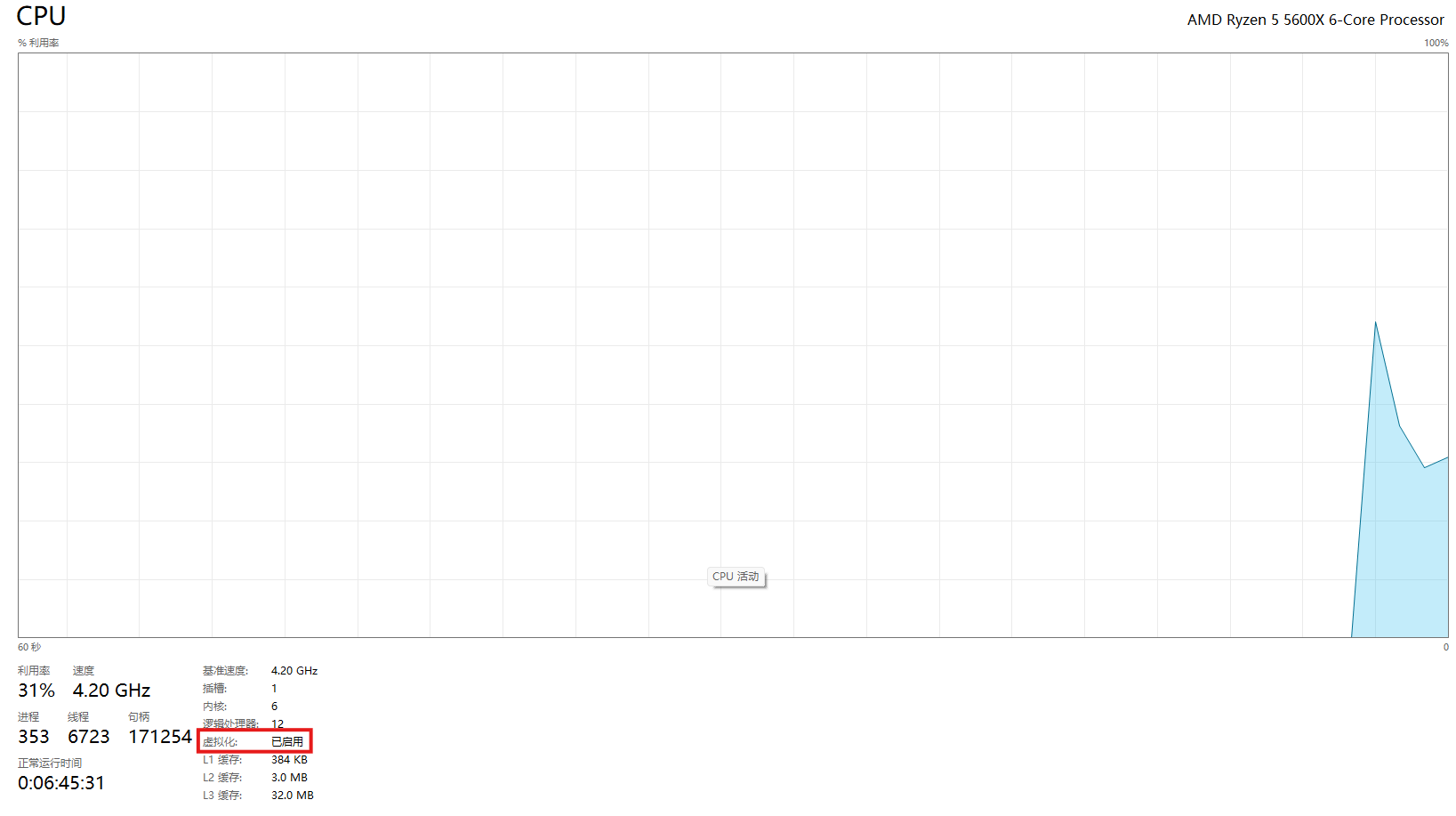
|
|
||||||
|
|
||||||
如果是在虚拟机中操作的话,就需要启用嵌套虚拟化技术啦~以VMware为例:
|
如果是在虚拟机中操作的话,就需要启用嵌套虚拟化技术啦~以VMware为例:
|
||||||
|
|
||||||
先关闭虚拟机,然后找到虚拟机的.vmx配置文件(通常在虚拟机目录下),在文件末尾添加一行:`vhv.enable = "TRUE"`
|
先关闭虚拟机,然后找到虚拟机的.vmx配置文件(通常在虚拟机目录下),在文件末尾添加一行:`vhv.enable = "TRUE"`
|
||||||
@@ -145,5 +142,4 @@ wsl --terminate Ubuntu-20.04
|
|||||||
接下来,我们还可以通过VS Code来进行开发哦~不过需要先安装一些扩展呢:'Remote - SSH'和'WSL'
|
接下来,我们还可以通过VS Code来进行开发哦~不过需要先安装一些扩展呢:'Remote - SSH'和'WSL'
|
||||||
|
|
||||||
安装好扩展后,在VS Code左侧打开远程资源管理器,就可以看到Ubuntu20.04虚拟机啦~直接点击连接就可以了哦~不过第一次连接可能需要启动一下虚拟机,会有点慢呢,耐心等待一下吧~
|
安装好扩展后,在VS Code左侧打开远程资源管理器,就可以看到Ubuntu20.04虚拟机啦~直接点击连接就可以了哦~不过第一次连接可能需要启动一下虚拟机,会有点慢呢,耐心等待一下吧~
|
||||||
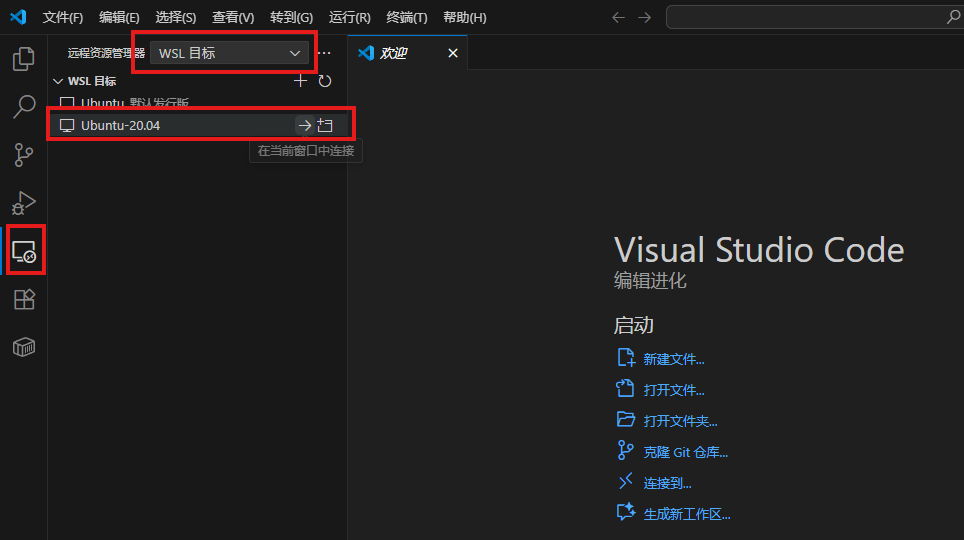
|
|
||||||
连接成功之后,就可以愉快地进行开发啦~是不是很简单呢~
|
连接成功之后,就可以愉快地进行开发啦~是不是很简单呢~
|
||||||
|
|||||||
@@ -1,8 +1,9 @@
|
|||||||
---
|
---
|
||||||
title: WSL2 核心操作指南
|
title: WSL2 核心操作指南
|
||||||
createTime: 2025/09/30 16:08:32
|
createTime: 2025/09/30 16:08:32
|
||||||
cover: /images/elysia/4.jpg
|
|
||||||
permalink: /article/operate-wsl2/
|
permalink: /article/operate-wsl2/
|
||||||
|
tags:
|
||||||
|
- wsl
|
||||||
---
|
---
|
||||||
这篇文章主要讲WSL2虚拟机核心操作哦~它基于轻量级Hyper-V运行,像贴心小精灵默默工作~还能用命令行精细控制!接下来讲启动/关闭、实例管理、资源配置、网络操作、备份迁移这五大操作,是不是很期待呢~♪
|
这篇文章主要讲WSL2虚拟机核心操作哦~它基于轻量级Hyper-V运行,像贴心小精灵默默工作~还能用命令行精细控制!接下来讲启动/关闭、实例管理、资源配置、网络操作、备份迁移这五大操作,是不是很期待呢~♪
|
||||||
|
|
||||||
|
|||||||
@@ -1,10 +1,9 @@
|
|||||||
---
|
---
|
||||||
title: 通过位运算快速生成所有的子序列
|
title: 通过位运算快速生成所有的子序列
|
||||||
createTime: 2026/01/09 16:15:00
|
createTime: 2026/01/09 16:15:00
|
||||||
cover: /images/elysia/10.jpg
|
|
||||||
coverStyle:
|
|
||||||
layout: right
|
|
||||||
permalink: /archives/ea20bdda-0d49-4472-a647-2e305a930d11/
|
permalink: /archives/ea20bdda-0d49-4472-a647-2e305a930d11/
|
||||||
|
tags:
|
||||||
|
- algorithms
|
||||||
---
|
---
|
||||||
## 一、子序列的本质
|
## 一、子序列的本质
|
||||||
|
|
||||||
|
|||||||
@@ -1,10 +1,9 @@
|
|||||||
---
|
---
|
||||||
title: 快速幂算法详解
|
title: 快速幂算法详解
|
||||||
createTime: 2026/01/09 16:05:00
|
createTime: 2026/01/09 16:05:00
|
||||||
cover: /images/elysia/9.jpg
|
|
||||||
coverStyle:
|
|
||||||
layout: left
|
|
||||||
permalink: /archives/1325a3bf-91d7-43ff-9630-e894549e12c1/
|
permalink: /archives/1325a3bf-91d7-43ff-9630-e894549e12c1/
|
||||||
|
tags:
|
||||||
|
- algorithms
|
||||||
---
|
---
|
||||||
## 简介
|
## 简介
|
||||||
|
|
||||||
|
|||||||
@@ -1,10 +1,9 @@
|
|||||||
---
|
---
|
||||||
title: Python 字符串格式化全指南
|
title: Python 字符串格式化全指南
|
||||||
createTime: 2026/01/09 14:00:48
|
createTime: 2026/01/09 14:00:48
|
||||||
cover: /images/elysia/7.jpg
|
|
||||||
coverStyle:
|
|
||||||
layout: left
|
|
||||||
permalink: /archives/56ea3081-9c69-43d7-96c8-2812ec08be2c/
|
permalink: /archives/56ea3081-9c69-43d7-96c8-2812ec08be2c/
|
||||||
|
tags:
|
||||||
|
- python
|
||||||
---
|
---
|
||||||
|
|
||||||
## 字符串格式化
|
## 字符串格式化
|
||||||
|
|||||||
@@ -1,10 +1,9 @@
|
|||||||
---
|
---
|
||||||
title: 原码、反码、补码
|
title: 原码、反码、补码
|
||||||
createTime: 2026/01/08 16:34:05
|
createTime: 2026/01/08 16:34:05
|
||||||
cover: /images/elysia/6.jpg
|
|
||||||
coverStyle:
|
|
||||||
layout: right
|
|
||||||
permalink: /archives/6f41cabe-41e6-4a09-9f1c-af7dd709a35d/
|
permalink: /archives/6f41cabe-41e6-4a09-9f1c-af7dd709a35d/
|
||||||
|
tags:
|
||||||
|
- cs-fundamentals
|
||||||
---
|
---
|
||||||
|
|
||||||
欢迎来到 0 与 1 的魔法派对!这篇文章将带你揭开原码、反码与补码的奥秘,看计算机如何巧妙地用补码化减为加。让我们一起翻开这页,去捕捉二进制底层那份迷人的理性之美吧♪
|
欢迎来到 0 与 1 的魔法派对!这篇文章将带你揭开原码、反码与补码的奥秘,看计算机如何巧妙地用补码化减为加。让我们一起翻开这页,去捕捉二进制底层那份迷人的理性之美吧♪
|
||||||
|
|||||||
@@ -1,8 +1,9 @@
|
|||||||
---
|
---
|
||||||
title: 通过 EdgeOne Pages 搭建图床
|
title: 通过 EdgeOne Pages 搭建图床
|
||||||
createTime: 2025/09/29 02:28:17
|
createTime: 2025/09/29 02:28:17
|
||||||
cover: /images/elysia/5.jpg
|
|
||||||
permalink: /article/8gihio2v/
|
permalink: /article/8gihio2v/
|
||||||
|
tags:
|
||||||
|
- image-hosting
|
||||||
---
|
---
|
||||||
|
|
||||||
各位~今天要给大家介绍一个超棒的图床搭建方法哦!EdgeOne Pages 是腾讯云提供的静态网站托管服务,而且还有免费额度可以使用呢,对于日常需求来说完全足够啦~
|
各位~今天要给大家介绍一个超棒的图床搭建方法哦!EdgeOne Pages 是腾讯云提供的静态网站托管服务,而且还有免费额度可以使用呢,对于日常需求来说完全足够啦~
|
||||||
|
|||||||
13
docs/notes/ai/README.md
Normal file
13
docs/notes/ai/README.md
Normal file
@@ -0,0 +1,13 @@
|
|||||||
|
---
|
||||||
|
title: 模型
|
||||||
|
createTime: 2026/03/29 20:00:00
|
||||||
|
permalink: /ai/
|
||||||
|
---
|
||||||
|
|
||||||
|
# 模型
|
||||||
|
|
||||||
|
这里是我和大模型、RAG、本地部署还有各种工具链打交道的地方~
|
||||||
|
|
||||||
|
和博客里的随想不同,这些笔记会更系统化一些,方便以后自己回来查的时候能一把抓到重点。左侧的目录会随着我记的东西越来越多而慢慢展开,就像「英语学习」「Web 开发」那些栏目一样,可以按专题慢慢逛。
|
||||||
|
|
||||||
|
当然啦,如果只是突然想到什么、想随手记几句碎碎念,还是会丢进 [博客](/blog/) 里,那里更适合发点动态更新的小东西~
|
||||||
@@ -1,15 +1,12 @@
|
|||||||
---
|
---
|
||||||
title: 便宜免费的大模型 API 整合 ( 2025年11月11日 )
|
title: 便宜免费的大模型 API 整合 ( 2025年11月11日 )
|
||||||
createTime: 2025/11/11 13:54:02
|
createTime: 2025/11/11 13:54:02
|
||||||
cover: /images/elysia/1.jpg
|
|
||||||
coverStyle:
|
|
||||||
layout: right
|
|
||||||
permalink: /article/free_model_api/
|
permalink: /article/free_model_api/
|
||||||
|
sidebar: '/ai/'
|
||||||
---
|
---
|
||||||
|
|
||||||
百度千帆、讯飞星火、腾讯混元均有免费在线额度,SCNet 提供 0.1 元/百万 tokens 的超低价大模型,轻量任务先薅免费,量大了再掏 0.1 元,稳!
|
百度千帆、讯飞星火、腾讯混元均有免费在线额度,SCNet 提供 0.1 元/百万 tokens 的超低价大模型,轻量任务先薅免费,量大了再掏 0.1 元,稳!
|
||||||
|
|
||||||
<!-- more -->
|
|
||||||
## 免费的大模型 API 整合
|
## 免费的大模型 API 整合
|
||||||
|
|
||||||
嗨~如果你在找既温柔又省荷包的小模型,就把它们悄悄收进这里吧!它们也许不是夜空最亮的那颗星,却能在摘要、划重点、轻声问答的小角落里,给你软软又稳稳的陪伴哦~
|
嗨~如果你在找既温柔又省荷包的小模型,就把它们悄悄收进这里吧!它们也许不是夜空最亮的那颗星,却能在摘要、划重点、轻声问答的小角落里,给你软软又稳稳的陪伴哦~
|
||||||
188
docs/notes/ai/mcp-and-skills.md
Normal file
188
docs/notes/ai/mcp-and-skills.md
Normal file
@@ -0,0 +1,188 @@
|
|||||||
|
---
|
||||||
|
title: MCP 与 Skills:让 AI 助手更懂你的利器
|
||||||
|
createTime: 2026/03/29 14:00:00
|
||||||
|
permalink: /article/mcp-and-skills/
|
||||||
|
sidebar: '/ai/'
|
||||||
|
---
|
||||||
|
|
||||||
|
嗨~今天来聊聊两个让 AI 助手变得更聪明、更贴心的小魔法:**MCP** 和 **Skills** 🪄
|
||||||
|
|
||||||
|
它们就像是给 AI 装上了「外挂」和「说明书」,让它不仅能聊天,还能真正帮你干活、调用工具、甚至访问你的本地知识库~
|
||||||
|
|
||||||
|
|
||||||
|
## 一、MCP 是什么?
|
||||||
|
|
||||||
|
**MCP** 全称是 **Model Context Protocol**(模型上下文协议),是由 [Anthropic](https://www.anthropic.com/) 提出的一种开放协议。
|
||||||
|
|
||||||
|
简单来说,它就像是 AI 和外部世界之间的「通用翻译官」🌐
|
||||||
|
|
||||||
|
### 为什么需要 MCP?
|
||||||
|
|
||||||
|
想象一下:
|
||||||
|
- 你想让 AI 查一下你的本地数据库
|
||||||
|
- 你想让 AI 调用某个特定工具
|
||||||
|
- 你想让 AI 访问你的笔记知识库
|
||||||
|
|
||||||
|
以前,每个工具都要写一套单独的对接代码,很麻烦对吧?
|
||||||
|
|
||||||
|
MCP 的出现,就是为了让这些「对接」变得标准化——**一次配置,到处可用**。
|
||||||
|
|
||||||
|
### MCP 的工作原理
|
||||||
|
|
||||||
|
```
|
||||||
|
┌─────────────┐ ┌─────────────┐ ┌─────────────┐
|
||||||
|
│ AI 助手 │ ◄──► │ MCP 协议 │ ◄──► │ 外部工具 │
|
||||||
|
│ (Cursor等) │ │ (标准化) │ │ (数据库/API) │
|
||||||
|
└─────────────┘ └─────────────┘ └─────────────┘
|
||||||
|
```
|
||||||
|
|
||||||
|
AI 助手通过 MCP 协议,可以:
|
||||||
|
- 🔍 **检索**(Retrieval):查询知识库、数据库
|
||||||
|
- 🛠️ **调用工具**(Tools):执行特定功能
|
||||||
|
- 💾 **访问资源**(Resources):读取文件、配置等
|
||||||
|
|
||||||
|
|
||||||
|
## 二、Skills 是什么?
|
||||||
|
|
||||||
|
如果说 MCP 是「通信协议」,那 **Skills** 就是「技能说明书」📖
|
||||||
|
|
||||||
|
### Skills 的概念
|
||||||
|
|
||||||
|
Skills(技能)是封装好的、可复用的功能模块。每个 Skill 通常包含:
|
||||||
|
- **功能描述**:这个技能是干嘛的
|
||||||
|
- **调用方式**:需要哪些参数、返回什么结果
|
||||||
|
- **使用示例**:实际怎么调用
|
||||||
|
|
||||||
|
### MCP vs Skills 的关系
|
||||||
|
|
||||||
|
| 概念 | 比喻 | 作用 |
|
||||||
|
|------|------|------|
|
||||||
|
| **MCP** | 电话线/网络协议 📡 | 负责「能连上」 |
|
||||||
|
| **Skills** | 电话簿/功能菜单 📋 | 负责「知道能做什么」 |
|
||||||
|
|
||||||
|
MCP 让 AI 和工具**连得通**,Skills 让 AI**知道怎么用**。
|
||||||
|
|
||||||
|
|
||||||
|
## 三、实际应用场景
|
||||||
|
|
||||||
|
### 场景 1:本地知识库检索 🗃️
|
||||||
|
|
||||||
|
就像我在 [RAGFlow 部署文章](../windows11-ragflow-deployment-mcp/) 里写的,通过 MCP 把 RAGFlow 接到 Cursor 里:
|
||||||
|
|
||||||
|
```json
|
||||||
|
// Cursor 的 MCP 配置
|
||||||
|
{
|
||||||
|
"mcpServers": {
|
||||||
|
"RAGFlow": {
|
||||||
|
"url": "http://127.0.0.1:39382/mcp/"
|
||||||
|
}
|
||||||
|
}
|
||||||
|
}
|
||||||
|
```
|
||||||
|
|
||||||
|
然后 AI 就能:
|
||||||
|
- 自动检索你的笔记
|
||||||
|
- 基于本地知识回答问题
|
||||||
|
- 不用把敏感文件上传到云端
|
||||||
|
|
||||||
|
### 场景 2:数据库查询 🗄️
|
||||||
|
|
||||||
|
配置一个数据库 MCP Server,AI 就能直接帮你:
|
||||||
|
|
||||||
|
```
|
||||||
|
用户:查一下上个月销售额最高的产品
|
||||||
|
AI:【通过 MCP 调用数据库查询工具】
|
||||||
|
SELECT product_name, SUM(sales)
|
||||||
|
FROM sales
|
||||||
|
WHERE date >= '2025-02-01'
|
||||||
|
GROUP BY product_name
|
||||||
|
ORDER BY SUM(sales) DESC
|
||||||
|
LIMIT 1;
|
||||||
|
|
||||||
|
结果是:产品 A,销售额 ¥123,456
|
||||||
|
```
|
||||||
|
|
||||||
|
### 场景 3:文件操作 📁
|
||||||
|
|
||||||
|
通过文件系统 MCP,AI 可以:
|
||||||
|
- 读取项目配置文件
|
||||||
|
- 批量重命名文件
|
||||||
|
- 生成代码并保存到指定目录
|
||||||
|
|
||||||
|
|
||||||
|
## 四、在 Cursor 中使用
|
||||||
|
|
||||||
|
### 配置 MCP Server
|
||||||
|
|
||||||
|
以 Cursor 为例,在 `~/.cursor/mcp.json` 中添加:
|
||||||
|
|
||||||
|
```json
|
||||||
|
{
|
||||||
|
"mcpServers": {
|
||||||
|
"my-database": {
|
||||||
|
"url": "http://localhost:3000/mcp"
|
||||||
|
},
|
||||||
|
"file-system": {
|
||||||
|
"command": "npx",
|
||||||
|
"args": ["-y", "@modelcontextprotocol/server-filesystem", "/path/to/allowed/dir"]
|
||||||
|
}
|
||||||
|
}
|
||||||
|
}
|
||||||
|
```
|
||||||
|
|
||||||
|
### 使用流程
|
||||||
|
|
||||||
|
1. **AI 发现技能**:启动时,AI 会自动获取所有可用的 Skills 列表
|
||||||
|
2. **意图识别**:当你提问时,AI 判断是否需要调用工具
|
||||||
|
3. **参数填充**:AI 自动提取所需参数
|
||||||
|
4. **执行并返回**:调用 MCP Server,获取结果后呈现给你
|
||||||
|
|
||||||
|
### 交互示例
|
||||||
|
|
||||||
|
```
|
||||||
|
你:帮我总结一下项目里的 API 接口
|
||||||
|
|
||||||
|
AI:我来帮你分析一下项目中的 API 接口。
|
||||||
|
【调用 file-system skill 读取项目文件】
|
||||||
|
【调用检索 skill 查找路由定义】
|
||||||
|
|
||||||
|
找到以下接口:
|
||||||
|
1. GET /api/users - 获取用户列表
|
||||||
|
2. POST /api/users - 创建用户
|
||||||
|
3. GET /api/users/:id - 获取单个用户
|
||||||
|
...
|
||||||
|
```
|
||||||
|
|
||||||
|
|
||||||
|
## 五、MCP 生态一览
|
||||||
|
|
||||||
|
目前 MCP 生态正在快速发展,已有许多现成的 Server 可用:
|
||||||
|
|
||||||
|
| 类型 | 代表项目 | 用途 |
|
||||||
|
|------|---------|------|
|
||||||
|
| 文件系统 | `@modelcontextprotocol/server-filesystem` | 读写本地文件 |
|
||||||
|
| 数据库 | `@modelcontextprotocol/server-postgres` | PostgreSQL 查询 |
|
||||||
|
| GitHub | `@modelcontextprotocol/server-github` | 操作 GitHub |
|
||||||
|
| 浏览器 | `@browserbasehq/mcp-server-browserbase` | 自动化浏览器操作 |
|
||||||
|
| 知识库 | RAGFlow MCP | 本地文档检索 |
|
||||||
|
|
||||||
|
完整的官方列表可以在 [MCP Servers Repository](https://github.com/modelcontextprotocol/servers) 找到。
|
||||||
|
|
||||||
|
|
||||||
|
## 六、总结
|
||||||
|
|
||||||
|
| 要点 | 说明 |
|
||||||
|
|------|------|
|
||||||
|
| **MCP** | 让 AI 和工具「说同一种语言」的开放协议 |
|
||||||
|
| **Skills** | 封装好的功能模块,告诉 AI「我能做什么」 |
|
||||||
|
| **价值** | 打破信息孤岛,让 AI 真正连接你的数字世界 |
|
||||||
|
| **前景** | 越来越多的工具会支持 MCP,生态会越来越丰富 |
|
||||||
|
|
||||||
|
用一句话概括:**MCP 是桥梁,Skills 是地图,让 AI 从「聊天伙伴」变成「得力助手」** 🎯
|
||||||
|
|
||||||
|
---
|
||||||
|
|
||||||
|
> 💡 **延伸阅读**
|
||||||
|
> - [Windows 11 本地部署 RAGFlow 与 Cursor MCP](./windows11-ragflow-deployment-mcp.md)
|
||||||
|
> - [MCP 官方文档](https://modelcontextprotocol.io/)
|
||||||
|
> - [Anthropic MCP 介绍](https://www.anthropic.com/news/model-context-protocol)
|
||||||
1091
docs/notes/ai/ragflow-windows11-mcp.md
Normal file
1091
docs/notes/ai/ragflow-windows11-mcp.md
Normal file
File diff suppressed because it is too large
Load Diff
@@ -1,40 +0,0 @@
|
|||||||
---
|
|
||||||
title: LeetCode 题解笔记
|
|
||||||
description: 记录LeetCode算法题的解题思路和代码实现
|
|
||||||
createTime: 2025/09/22 08:09:52
|
|
||||||
permalink: /programming/leetcode/
|
|
||||||
---
|
|
||||||
|
|
||||||
# LeetCode 题解笔记
|
|
||||||
|
|
||||||
这里是我在LeetCode刷题过程中记录的解题思路和代码实现。通过整理这些题解,希望能够提高自己的算法水平和编程能力。
|
|
||||||
|
|
||||||
## 题解分类
|
|
||||||
|
|
||||||
### 数组与字符串
|
|
||||||
|
|
||||||
- [两数之和](https://leetcode-cn.com/problems/two-sum/)
|
|
||||||
- [三数之和](https://leetcode-cn.com/problems/3sum/)
|
|
||||||
|
|
||||||
### 链表
|
|
||||||
|
|
||||||
- [反转链表](https://leetcode-cn.com/problems/reverse-linked-list/)
|
|
||||||
- [合并两个有序链表](https://leetcode-cn.com/problems/merge-two-sorted-lists/)
|
|
||||||
|
|
||||||
### 动态规划
|
|
||||||
|
|
||||||
- [爬楼梯](https://leetcode-cn.com/problems/climbing-stairs/)
|
|
||||||
- [最长回文子串](https://leetcode-cn.com/problems/longest-palindromic-substring/)
|
|
||||||
|
|
||||||
## 解题技巧
|
|
||||||
|
|
||||||
1. **双指针法**:常用于数组、链表问题,如两数之和、反转链表等
|
|
||||||
2. **滑动窗口**:处理字符串子串问题
|
|
||||||
3. **动态规划**:将原问题分解为子问题,自底向上求解
|
|
||||||
4. **分治法**:将问题分成若干子问题,分别求解后合并结果
|
|
||||||
|
|
||||||
## 学习资源
|
|
||||||
|
|
||||||
- [LeetCode官方题解](https://leetcode-cn.com/problemset/all/)
|
|
||||||
- [代码随想录](https://programmercarl.com/)
|
|
||||||
- [算法导论](https://mitpress.mit.edu/books/introduction-algorithms)
|
|
||||||
@@ -1,13 +0,0 @@
|
|||||||
---
|
|
||||||
title: LeetCode 入门题单~(≧∇≦)ノ
|
|
||||||
description: 给算法初学者的题目推荐和学习路径
|
|
||||||
createTime: 2025年9月22日 08:52:52
|
|
||||||
permalink: /programming/leetcode/question_sheet/beginner/
|
|
||||||
---
|
|
||||||
# LeetCode 入门题单~(๑>◡<๑)
|
|
||||||
|
|
||||||
作为算法初学者,选择合适的题目开始练习真的超~级重要哦!这里给大家推荐一份超棒的入门题单——[「新」动计划 · 编程入门](https://leetcode.cn/studyplan/primers-list/) ~这份题单就像给小树苗精心准备的阳光和雨露一样,特别适合刚开始算法之旅的你~(悄悄告诉你,里面有两题是数据库基础,暂时可以跳过哦~)
|
|
||||||
|
|
||||||
我的小建议是:先自己试着挑战一下,如果遇到困难了,再来看题解也没关系~重要的是享受这个成长的过程呀~(♡˙︶˙♡)
|
|
||||||
|
|
||||||
## 基础语法 & 数据类型 ٩(๑>◡<๑)۶
|
|
||||||
5793
package-lock.json
generated
5793
package-lock.json
generated
File diff suppressed because it is too large
Load Diff
17
package.json
17
package.json
@@ -7,25 +7,32 @@
|
|||||||
"engines": {
|
"engines": {
|
||||||
"node": "^20.6.0 || >=22.0.0"
|
"node": "^20.6.0 || >=22.0.0"
|
||||||
},
|
},
|
||||||
|
"overrides": {
|
||||||
|
"@vuepress/helper": "2.0.0-rc.123"
|
||||||
|
},
|
||||||
"scripts": {
|
"scripts": {
|
||||||
"docs:dev": "vuepress dev docs",
|
"docs:dev": "vuepress dev docs",
|
||||||
"docs:dev-clean": "vuepress dev docs --clean-cache --clean-temp",
|
"docs:dev-clean": "vuepress dev docs --clean-cache --clean-temp",
|
||||||
|
"docs:clear-cache": "node scripts/clear-vuepress-cache.mjs",
|
||||||
"docs:build": "vuepress build docs --clean-cache --clean-temp",
|
"docs:build": "vuepress build docs --clean-cache --clean-temp",
|
||||||
|
"docs:verify": "node scripts/verify-site.mjs",
|
||||||
|
"docs:place-ragflow-guide": "node scripts/place-ragflow-guide.mjs",
|
||||||
"docs:preview": "http-server docs/.vuepress/dist",
|
"docs:preview": "http-server docs/.vuepress/dist",
|
||||||
"vp-update": "npx vp-update"
|
"vp-update": "npx vp-update"
|
||||||
},
|
},
|
||||||
"devDependencies": {
|
"devDependencies": {
|
||||||
"@vuepress/bundler-vite": "2.0.0-rc.24",
|
"@vuepress/helper": "2.0.0-rc.123",
|
||||||
"@vuepress/plugin-umami-analytics": "^2.0.0-rc.112",
|
"@vuepress/bundler-vite": "2.0.0-rc.26",
|
||||||
|
"@vuepress/plugin-umami-analytics": "2.0.0-rc.112",
|
||||||
"artalk": "^2.9.1",
|
"artalk": "^2.9.1",
|
||||||
"http-server": "^14.1.1",
|
"http-server": "^14.1.1",
|
||||||
"typescript": "^5.9.2",
|
"typescript": "^5.9.2",
|
||||||
"vue": "^3.5.21",
|
"vue": "^3.5.21",
|
||||||
"vuepress": "2.0.0-rc.24",
|
"vuepress": "2.0.0-rc.26",
|
||||||
"vuepress-theme-plume": "1.0.0-rc.164"
|
"vuepress-theme-plume": "1.0.0-rc.192"
|
||||||
},
|
},
|
||||||
"dependencies": {
|
"dependencies": {
|
||||||
"@vuepress/plugin-comment": "^2.0.0-rc.112",
|
"@vuepress/plugin-comment": "2.0.0-rc.123",
|
||||||
"@waline/client": "^3.13.0",
|
"@waline/client": "^3.13.0",
|
||||||
"mermaid": "^11.12.1"
|
"mermaid": "^11.12.1"
|
||||||
}
|
}
|
||||||
|
|||||||
17
script/commit-notes.ps1
Normal file
17
script/commit-notes.ps1
Normal file
@@ -0,0 +1,17 @@
|
|||||||
|
# 提交笔记站源码变更(尊重 .gitignore,不会加入 _publish、dist、PROJECT_BRIEF.local.md 等)
|
||||||
|
# 用法: .\script\commit-notes.ps1 -m "提交说明"
|
||||||
|
param(
|
||||||
|
[Parameter(Mandatory = $true)]
|
||||||
|
[string] $Message
|
||||||
|
)
|
||||||
|
$ErrorActionPreference = "Stop"
|
||||||
|
$root = Split-Path -Parent $PSScriptRoot
|
||||||
|
Set-Location $root
|
||||||
|
|
||||||
|
git add docs/.vuepress docs/blog .cursor/rules script/commit-notes.ps1
|
||||||
|
$staged = @(git diff --cached --name-only)
|
||||||
|
if ($staged.Count -eq 0) {
|
||||||
|
Write-Host "No staged changes."
|
||||||
|
exit 0
|
||||||
|
}
|
||||||
|
git commit -m $Message
|
||||||
Reference in New Issue
Block a user