Compare commits
37 Commits
| Author | SHA1 | Date | |
|---|---|---|---|
 祀梦 祀梦
|
190a0a4cdb | ||
|
祀梦
|
c0a061463b | ||
|
祀梦
|
56abd10b42 | ||
|
祀梦
|
d75133d0e4 | ||
|
祀梦
|
463e265fbe | ||
|
祀梦
|
b75fa7337f | ||
|
祀梦
|
09e9d996f8 | ||
|
祀梦
|
d08ce7e3e7 | ||
|
祀梦
|
fc6a6a03b8 | ||
|
祀梦
|
4a674ccc7a | ||
|
祀梦
|
0fb0ad811b | ||
|
祀梦
|
98ec780ed9 | ||
|
祀梦
|
a89746e0e8 | ||
|
祀梦
|
2cf5142b0e | ||
|
祀梦
|
1726ac9828 | ||
|
祀梦
|
01c3741b9a | ||
|
祀梦
|
b7018f8423 | ||
|
祀梦
|
d9a089be3f | ||
|
祀梦
|
c0ff3b29de | ||
 Kawaxxxsaki Kawaxxxsaki
|
82324f6274 | ||
|
Kawaxxxsaki
|
3531360974 | ||
|
Kawaxxxsaki
|
da188afd82 | ||
|
祀梦
|
ba9298852e | ||
|
祀梦
|
8ad5c45a42 | ||
|
祀梦
|
bca2e0619c | ||
|
祀梦
|
5d510b0433 | ||
|
Kawaxxxsaki
|
2f55fc7184 | ||
|
Kawaxxxsaki
|
474f335e94 | ||
|
祀梦
|
2b9e5f9bd1 | ||
|
祀梦
|
43aa3f07e5 | ||
|
祀梦
|
c3e8cad947 | ||
|
Kawaxxxsaki
|
b7c97d0f17 | ||
|
Kawaxxxsaki
|
2391018d79 | ||
|
祀梦
|
b28ed8ebfe | ||
|
Kawaxxxsaki
|
799551073c | ||
|
祀梦
|
3f8169ae56 | ||
|
祀梦
|
8c7e8ea6e3 |
@@ -9,3 +9,6 @@
|
|||||||
*.tff binary
|
*.tff binary
|
||||||
*.woff binary
|
*.woff binary
|
||||||
*.woff2 binary
|
*.woff2 binary
|
||||||
|
*.mp4 binary
|
||||||
|
*.webm binary
|
||||||
|
*.mov binary
|
||||||
|
|||||||
@@ -7,3 +7,12 @@ docs/.vuepress/dist
|
|||||||
.trae/
|
.trae/
|
||||||
.DS_Store
|
.DS_Store
|
||||||
*.log
|
*.log
|
||||||
|
|
||||||
|
# Build and Publish output
|
||||||
|
_publish/
|
||||||
|
|
||||||
|
# Local resources storage (not uploaded)
|
||||||
|
resources/
|
||||||
|
|
||||||
|
# Ensure .gitkeep files are always tracked
|
||||||
|
!**/.gitkeep
|
||||||
|
|||||||
@@ -1,22 +1,8 @@
|
|||||||
import { defineClientConfig } from 'vuepress/client'
|
import { defineClientConfig } from 'vuepress/client'
|
||||||
// import RepoCard from 'vuepress-theme-plume/features/RepoCard.vue'
|
import RImg from './theme/components/RImg.vue'
|
||||||
// import NpmBadge from 'vuepress-theme-plume/features/NpmBadge.vue'
|
|
||||||
// import NpmBadgeGroup from 'vuepress-theme-plume/features/NpmBadgeGroup.vue'
|
|
||||||
// import Swiper from 'vuepress-theme-plume/features/Swiper.vue'
|
|
||||||
|
|
||||||
// import CustomComponent from './theme/components/Custom.vue'
|
|
||||||
|
|
||||||
// import './theme/styles/custom.css'
|
|
||||||
|
|
||||||
export default defineClientConfig({
|
export default defineClientConfig({
|
||||||
enhance({ app }) {
|
enhance({ app }) {
|
||||||
// built-in components
|
app.component('RImg', RImg)
|
||||||
// app.component('RepoCard', RepoCard)
|
|
||||||
// app.component('NpmBadge', NpmBadge)
|
|
||||||
// app.component('NpmBadgeGroup', NpmBadgeGroup)
|
|
||||||
// app.component('Swiper', Swiper) // you should install `swiper`
|
|
||||||
|
|
||||||
// your custom components
|
|
||||||
// app.component('CustomComponent', CustomComponent)
|
|
||||||
},
|
},
|
||||||
})
|
})
|
||||||
|
|||||||
@@ -3,6 +3,11 @@ import { plumeTheme } from 'vuepress-theme-plume'
|
|||||||
import { viteBundler } from '@vuepress/bundler-vite'
|
import { viteBundler } from '@vuepress/bundler-vite'
|
||||||
import { commentPlugin } from '@vuepress/plugin-comment'
|
import { commentPlugin } from '@vuepress/plugin-comment'
|
||||||
import { umamiAnalyticsPlugin } from '@vuepress/plugin-umami-analytics'
|
import { umamiAnalyticsPlugin } from '@vuepress/plugin-umami-analytics'
|
||||||
|
import path from 'node:path'
|
||||||
|
import { fileURLToPath } from 'node:url'
|
||||||
|
|
||||||
|
const __filename = fileURLToPath(import.meta.url)
|
||||||
|
const __dirname = path.dirname(__filename)
|
||||||
|
|
||||||
export default defineUserConfig({
|
export default defineUserConfig({
|
||||||
base: '/',
|
base: '/',
|
||||||
@@ -14,10 +19,19 @@ export default defineUserConfig({
|
|||||||
['link', { rel: 'icon', type: 'image/png', href: 'https://theme-plume.vuejs.press/favicon-32x32.png' }],
|
['link', { rel: 'icon', type: 'image/png', href: 'https://theme-plume.vuejs.press/favicon-32x32.png' }],
|
||||||
],
|
],
|
||||||
|
|
||||||
bundler: viteBundler(),
|
bundler: viteBundler({
|
||||||
|
viteOptions: {
|
||||||
|
resolve: {
|
||||||
|
alias: {
|
||||||
|
},
|
||||||
|
},
|
||||||
|
},
|
||||||
|
}),
|
||||||
shouldPrefetch: false,
|
shouldPrefetch: false,
|
||||||
|
|
||||||
theme: plumeTheme({
|
theme: plumeTheme({
|
||||||
|
/* 站点域名,启动 SEO 优化 */
|
||||||
|
hostname: 'https://www.simengweb.com',
|
||||||
/* 博客文章页面链接前缀 */
|
/* 博客文章页面链接前缀 */
|
||||||
article: '/article/',
|
article: '/article/',
|
||||||
|
|
||||||
@@ -36,7 +50,10 @@ export default defineUserConfig({
|
|||||||
|
|
||||||
/* 本地搜索, 默认启用 */
|
/* 本地搜索, 默认启用 */
|
||||||
search: { provider: 'local' },
|
search: { provider: 'local' },
|
||||||
|
footer: {
|
||||||
|
message: '愿每一份温柔都被世界珍藏 ✨',
|
||||||
|
copyright: '<a href="https://beian.miit.gov.cn/" target="_blank" aria-label="gongan filing address">沪ICP备2023010022号-1</a>©2025祀梦的个人博客'
|
||||||
|
},
|
||||||
/**
|
/**
|
||||||
* 博客相关配置
|
* 博客相关配置
|
||||||
*/
|
*/
|
||||||
@@ -73,6 +90,7 @@ export default defineUserConfig({
|
|||||||
codeHighlighter: {
|
codeHighlighter: {
|
||||||
lineNumbers: true,
|
lineNumbers: true,
|
||||||
}
|
}
|
||||||
|
|
||||||
}),
|
}),
|
||||||
|
|
||||||
plugins: [
|
plugins: [
|
||||||
@@ -83,9 +101,9 @@ export default defineUserConfig({
|
|||||||
requiredMeta: ['nick']
|
requiredMeta: ['nick']
|
||||||
}),
|
}),
|
||||||
umamiAnalyticsPlugin({
|
umamiAnalyticsPlugin({
|
||||||
id: 'a4f0ca65-2da6-4e6b-a01b-f3b3157d05a3',
|
id: '2114ab32-5543-4be1-b5e8-c4f2c9269d0d',
|
||||||
link: 'https://umami.simengweb.com/script.js',
|
link: 'https://umami.simengweb.com/script.js',
|
||||||
domains: ['notes.simengweb.com'],
|
domains: ['www.simengweb.com'],
|
||||||
cache: true
|
cache: true
|
||||||
}),
|
}),
|
||||||
],
|
],
|
||||||
|
|||||||
@@ -59,6 +59,10 @@ export default defineNavbarConfig([
|
|||||||
text: 'Linux 运维',
|
text: 'Linux 运维',
|
||||||
link: '/ops/linux/',
|
link: '/ops/linux/',
|
||||||
},
|
},
|
||||||
|
{
|
||||||
|
text: 'Docker 运维',
|
||||||
|
link: '/ops/docker/',
|
||||||
|
},
|
||||||
],
|
],
|
||||||
},
|
},
|
||||||
{
|
{
|
||||||
|
|||||||
+33
-2
@@ -104,7 +104,8 @@ const cryptography = defineNoteConfig({
|
|||||||
{ text: "密码学基础", link: "/theory/cryptography/" },
|
{ text: "密码学基础", link: "/theory/cryptography/" },
|
||||||
{
|
{
|
||||||
text: "古典加密算法", prefix: "/theory", items: [
|
text: "古典加密算法", prefix: "/theory", items: [
|
||||||
{ text: "替换密码", link: "/theory/cryptography/substitution-ciphers/" }
|
{ text: "替换密码", link: "/theory/cryptography/substitution-ciphers/" },
|
||||||
|
{ text: "置换密码", link: "/theory/cryptography/permutation-encryption/" },
|
||||||
]
|
]
|
||||||
},
|
},
|
||||||
]
|
]
|
||||||
@@ -138,9 +139,36 @@ const linux = defineNoteConfig({
|
|||||||
text: "Linux 基础", prefix: "/linux", items: [
|
text: "Linux 基础", prefix: "/linux", items: [
|
||||||
{ text: "Linux 基础命令详解", link: "/ops/linux/basic-commands/" }
|
{ text: "Linux 基础命令详解", link: "/ops/linux/basic-commands/" }
|
||||||
]
|
]
|
||||||
|
},
|
||||||
|
{
|
||||||
|
text: "其他", prefix: "/linux", items: [
|
||||||
|
{ text: "一些零散的命令", link: "/ops/linux/other/" }
|
||||||
|
]
|
||||||
}
|
}
|
||||||
]
|
]
|
||||||
})
|
})
|
||||||
|
const docker = defineNoteConfig({
|
||||||
|
dir: 'ops',
|
||||||
|
link: '/ops/docker/',
|
||||||
|
sidebar: [
|
||||||
|
{ text: "Docker 运维笔记", link: "/ops/docker/" },
|
||||||
|
{
|
||||||
|
text: "数据库相关",
|
||||||
|
prefix: "/ops/docker/db/",
|
||||||
|
items: [
|
||||||
|
{ text: "MongoDB 部署", link: "/ops/docker/db/mongodb/" },
|
||||||
|
{ text: "Postgres 部署", link: "/ops/docker/db/postgres/" },
|
||||||
|
]
|
||||||
|
},
|
||||||
|
{
|
||||||
|
text: "其他服务",
|
||||||
|
prefix: "/ops/docker/other/",
|
||||||
|
items: [
|
||||||
|
{ text: "ETLCloud 部署", link: "/ops/docker/other/ETLCloud/" },
|
||||||
|
]
|
||||||
|
},
|
||||||
|
]
|
||||||
|
})
|
||||||
const web = defineNoteConfig({
|
const web = defineNoteConfig({
|
||||||
dir: 'programming',
|
dir: 'programming',
|
||||||
link: '/programming/web/',
|
link: '/programming/web/',
|
||||||
@@ -149,6 +177,9 @@ const web = defineNoteConfig({
|
|||||||
{
|
{
|
||||||
text: "基础知识", prefix: "/basic-syntax", items: [
|
text: "基础知识", prefix: "/basic-syntax", items: [
|
||||||
{ text: "Web 前端基础讲解", link: "/programming/web/basic-syntax/html-css-js/" },
|
{ text: "Web 前端基础讲解", link: "/programming/web/basic-syntax/html-css-js/" },
|
||||||
|
{ text: "HTML 常用标签与属性", link: "/programming/web/basic-syntax/html-tags-attributes/" },
|
||||||
|
{ text: "HTML 列表与语义布局", link: "/programming/web/basic-syntax/html-lists-and-semantic-layout/" },
|
||||||
|
{ text: "JavaScript 基础知识", link: "/programming/web/basic-syntax/javascript-basics/" },
|
||||||
],
|
],
|
||||||
},
|
},
|
||||||
]
|
]
|
||||||
@@ -159,5 +190,5 @@ const web = defineNoteConfig({
|
|||||||
export default defineNotesConfig({
|
export default defineNotesConfig({
|
||||||
dir: 'notes',
|
dir: 'notes',
|
||||||
link: '/',
|
link: '/',
|
||||||
notes: [LeetCode, english, cPlusPlus, solidity, blockchain, linux, cryptography, web],
|
notes: [LeetCode, english, cPlusPlus, solidity, blockchain, linux, docker, cryptography, web],
|
||||||
})
|
})
|
||||||
|
|||||||

Binary file not shown.
|
After Width: | Height: | Size: 1.0 MiB |

Binary file not shown.
|
After Width: | Height: | Size: 933 KiB |

Binary file not shown.
|
After Width: | Height: | Size: 600 KiB |

Binary file not shown.
|
After Width: | Height: | Size: 614 KiB |

Binary file not shown.
|
After Width: | Height: | Size: 509 KiB |

Binary file not shown.
|
After Width: | Height: | Size: 492 KiB |
@@ -1,11 +0,0 @@
|
|||||||
<script setup lang="ts">
|
|
||||||
import { ref } from 'vue'
|
|
||||||
|
|
||||||
const message = ref('Hello World!')
|
|
||||||
</script>
|
|
||||||
|
|
||||||
<template>
|
|
||||||
<div class="my-custom-content">
|
|
||||||
{{ message }}
|
|
||||||
</div>
|
|
||||||
</template>
|
|
||||||
@@ -0,0 +1,27 @@
|
|||||||
|
<template>
|
||||||
|
<img :src="imageSrc" :alt="alt" v-bind="$attrs" />
|
||||||
|
</template>
|
||||||
|
|
||||||
|
<script setup>
|
||||||
|
import { computed } from 'vue'
|
||||||
|
|
||||||
|
const props = defineProps({
|
||||||
|
src: {
|
||||||
|
type: String,
|
||||||
|
required: true
|
||||||
|
},
|
||||||
|
alt: {
|
||||||
|
type: String,
|
||||||
|
default: ''
|
||||||
|
}
|
||||||
|
})
|
||||||
|
|
||||||
|
// 使用 Vite 的 import.meta.glob 或简单字符串拼接
|
||||||
|
// 由于别名在运行时不可直接动态拼接,我们这里使用一个更稳妥的方法
|
||||||
|
// 映射到我们配置好的别名
|
||||||
|
const imageSrc = computed(() => {
|
||||||
|
// 处理路径,确保指向别名
|
||||||
|
const path = props.src.startsWith('/') ? props.src.slice(1) : props.src
|
||||||
|
return new URL(`../../../resources/${path}`, import.meta.url).href
|
||||||
|
})
|
||||||
|
</script>
|
||||||
+42
-19
@@ -1,5 +1,5 @@
|
|||||||
---
|
---
|
||||||
title: 关于祀梦的花园
|
title: 关于祀梦与他的花园
|
||||||
description: 这里是爱与回忆的小世界~
|
description: 这里是爱与回忆的小世界~
|
||||||
hideInBlogList: true
|
hideInBlogList: true
|
||||||
article: false
|
article: false
|
||||||
@@ -7,36 +7,59 @@ createTime: 2024/10/29 12:30:00
|
|||||||
permalink: /about/
|
permalink: /about/
|
||||||
---
|
---
|
||||||
|
|
||||||
# 👋 这里是祀梦的小窝!
|
# 👋 嗨呀!这里是祀梦的小窝~
|
||||||
|
|
||||||
嗨~ 欢迎来到祀梦的个人博客,这是我在这个小站发布的第一篇文章哦~ (✧ω✧)
|
欢迎来到我的数字花园!这里不仅是笔记的存放处,更是我思维流转、技术成长与生活感悟的小小交汇点。希望能在这里和你分享温暖与美好~ (๑>◡<๑)
|
||||||
|
|
||||||
## 关于站长我呀~ 🌸
|
## 🏗️ 正在努力构建的未来~
|
||||||
|
|
||||||
我是祀梦,现在在上海某大专读书,是个可爱的男孩子~ 目前是信息安全专业的学生,但是超——级喜欢编程!(๑•̀ㅂ•́)و✧
|
目前我是一名大三的学生,主修**信息安全**专业。虽然专业背景在“守”,但我对“建”有着更浓厚的兴趣呢!
|
||||||
|
|
||||||
## 我的兴趣爱好~ 🌈
|
- **职业坐标**:目前正全力投入**后端开发**的学习中,正在努力准备实习,期待能在真实的代码世界里磨砺自己,成为厉害的后端大牛!(๑•̀ㅂ•́)و✧
|
||||||
|
- **技术理念**:我崇尚简洁、高效的代码,同时也相信技术的最终目的是为了传递温暖和解决问题。
|
||||||
|
|
||||||
我喜欢好多好多东西呀!编程、摄像、美食、旅游,还有画画~ 假期闲下来的时候,我会画一些自己喜欢的角色呢!(๑˘ᴗ˘๑)
|
## 🪴 为什么会有这个“花园”?
|
||||||
|
|
||||||
## 技术方面~ 💻
|
你可能会发现这个站点的结构非常清晰(或者说,我在努力让它变得整齐一些~)。
|
||||||
|
|
||||||
在技术方面,Python 是我最熟练的编程语言,Java 和 C 也懂一些,前后端开发和 Linux 运维我也会一点哦~ 虽然什么都感兴趣,什么都想学,但是总觉得自己不够聪明,学杂而不精呢... (╥ω╥)
|
在 2025 年末,我决定将原有的博客迁移到这个新家。原因很简单:**我需要一个更具结构化的空间来安放我的笔记**。从密码学理论到后端开发实战,从英语四级备考到算法练习,我希望知识能够像小植物一样,在合适的土壤里有序生长,方便自己翻阅,也能给路过的你一点点参考呀~ 🌸
|
||||||
|
|
||||||
## 为什么叫"祀梦"? 🌙
|
## 🚀 个人项目展示~
|
||||||
|
|
||||||
这个名字的由来超有趣!初中的时候我很喜欢写小说,"祀梦"是我其中一本小书的主角名字~ 当时我的初中同学聊天的时候说这个名字很好听,我就一直沿用下来啦!(๑´ㅂ`๑)
|
除了这个笔记站,我还维护着以下这些心血之作:
|
||||||
|
|
||||||
## 联系方式~ 📱
|
- [**祀梦的个人博客**](https://blog.simengweb.com/):我的感性领地,记录着生活故事与长长的技术思考。
|
||||||
|
- [**算法练习平台**](https://algorithmplatform.simengweb.com/):为了提升算法能力而开发的小平台,欢迎来一起刷题呀!(≧∇≦)ノ
|
||||||
|
|
||||||
如果您在网页访问过程中遇到什么问题,或者想要交个朋友的话,欢迎随时来找我玩哦~
|
## 🛠️ 祀梦的小技能树~ (〃'▽'〃)
|
||||||
- 邮箱:meng_si@proton.me
|
|
||||||
- B站:[66ccff色的薰依草](https://space.bilibili.com/361714249)
|
|
||||||
|
|
||||||
## 网站的成长记录~ 📝
|
虽然总觉得自己学得杂杂的,但每一项技能都是我用心收集的“宝藏”哦!
|
||||||
|
|
||||||
- 2025年9月21日:部署完网站
|
- **常用的魔法咒语**:Python (最熟练啦~), C++, Java, Solidity, JavaScript
|
||||||
|
- **探索过的奇幻领地**:后端开发、信息安全、区块链运维、Linux 系统管理 (。・ω・。)
|
||||||
|
- **随身携带的口袋工具**:Docker, Git, WSL2, Hardhat
|
||||||
|
|
||||||
## 写在最后~ 💌
|
## 📸 生活的彩色一角
|
||||||
|
|
||||||
很早之前我就总是喜欢写点东西,但是又不敢发到大的平台上,做一个属于自己的互联网小窝感觉真的超——级棒!希望大家能在这里找到有用的内容,也欢迎大家常来玩哦~ (づ ̄ 3 ̄)づ
|
在代码之外,我的世界也是五颜六色的:
|
||||||
|
|
||||||
|
- **超棒的朋友**:首页提到的“小小夏”是我非常要好的朋友。我们共同守护着这个数字花园的宁静。
|
||||||
|
- **我的小爱好**:我热爱摄像、美食与旅游。假期闲下来的时候,也会拿起画笔,勾勒出心里的角色呢~ (๑˘ᴗ˘๑)
|
||||||
|
- **关于我呀**:一个喜欢美好事物、偶尔有点小社恐、但在技术面前总能保持好奇心的男孩子。
|
||||||
|
|
||||||
|
## 🕰️ 网站的成长足迹
|
||||||
|
|
||||||
|
- **2025-12-15**:完成结构化迁移,给笔记们找了个舒服的新家。
|
||||||
|
- **2025-09-21**:笔记站初次部署。
|
||||||
|
- **2024-10-29**:在这个小站写下了第一段关于花园的文字。
|
||||||
|
|
||||||
|
## 💌 找我玩呀~
|
||||||
|
|
||||||
|
如果你对我的项目感兴趣,或者只是想聊聊技术与生活,欢迎随时联系:
|
||||||
|
|
||||||
|
- **邮箱**:[meng_si@proton.me](mailto:meng_si@proton.me)
|
||||||
|
- **B站**:[66ccff色的薰依草](https://space.bilibili.com/361714249)
|
||||||
|
|
||||||
|
---
|
||||||
|
|
||||||
|
> “在每一个文字里,都承载着温暖与美好。” 🌸
|
||||||
@@ -0,0 +1,255 @@
|
|||||||
|
---
|
||||||
|
title: 便宜免费的大模型 API 整合 ( 2025年11月11日 )
|
||||||
|
createTime: 2025/11/11 13:54:02
|
||||||
|
cover: /images/elysia/1.jpg
|
||||||
|
coverStyle:
|
||||||
|
layout: right
|
||||||
|
permalink: /article/free_model_api/
|
||||||
|
---
|
||||||
|
|
||||||
|
百度千帆、讯飞星火、腾讯混元均有免费在线额度,SCNet 提供 0.1 元/百万 tokens 的超低价大模型,轻量任务先薅免费,量大了再掏 0.1 元,稳!
|
||||||
|
|
||||||
|
<!-- more -->
|
||||||
|
## 免费的大模型 API 整合
|
||||||
|
|
||||||
|
嗨~如果你在找既温柔又省荷包的小模型,就把它们悄悄收进这里吧!它们也许不是夜空最亮的那颗星,却能在摘要、划重点、轻声问答的小角落里,给你软软又稳稳的陪伴哦~
|
||||||
|
|
||||||
|
|
||||||
|
### 百度千帆大模型平台
|
||||||
|
|
||||||
|
先从千帆开始吧~下面是常用模型的参考价格:
|
||||||
|
|
||||||
|
| 模型名称 | 版本名称 | 服务内容 | 子项 | 在线推理 | 批量推理 | 单位 |
|
||||||
|
|---|---|---|---|---|---|---|
|
||||||
|
| ERNIE Speed | ernie-speed-128k | 推理服务 | 输入 | 0 | 0.00012 | 元/千tokens |
|
||||||
|
| ERNIE Speed | ernie-speed-128k | 推理服务 | 输出 | 0 | 0.00024 | 元/千tokens |
|
||||||
|
| ERNIE Lite | ernie-lite-8k | 推理服务 | 输入 | 0 | 0.0012 | 元/千tokens |
|
||||||
|
| ERNIE Lite | ernie-lite-8k | 推理服务 | 输出 | 0 | 0.0024 | 元/千tokens |
|
||||||
|
| ERNIE Tiny | ernie-tiny-8k | 推理服务 | 输入 | 0 | 0.00008 | 元/千tokens |
|
||||||
|
| ERNIE Tiny | ernie-tiny-8k | 推理服务 | 输出 | 0 | 0.00016 | 元/千tokens |
|
||||||
|
|
||||||
|
> 提示:单纯调用 API 接口属于在线推理,当前显示为 0 元;批量推理按量计费。
|
||||||
|
|
||||||
|
#### 快速上手
|
||||||
|
|
||||||
|
1. 访问控制台并获取 API Key。
|
||||||
|
2. 使用下方示例进行快速测试。
|
||||||
|
3. 若遇错误,请检查模型名称与凭证有效期。
|
||||||
|
|
||||||
|
控制台:[https://console.bce.baidu.com/qianfan/ais/console/apiKey](https://console.bce.baidu.com/qianfan/ais/console/apiKey)
|
||||||
|
|
||||||
|
```python
|
||||||
|
import requests
|
||||||
|
import json
|
||||||
|
|
||||||
|
def main():
|
||||||
|
url = "https://qianfan.baidubce.com/v2/chat/completions"
|
||||||
|
API_KEY = 'YOUR_API_KEY'
|
||||||
|
payload = json.dumps({
|
||||||
|
"model": "ernie-speed-128k",
|
||||||
|
"messages": [
|
||||||
|
{
|
||||||
|
"role": "system",
|
||||||
|
"content": "You are a helpful assistant."
|
||||||
|
},
|
||||||
|
{
|
||||||
|
"role": "user",
|
||||||
|
"content": "你好"
|
||||||
|
}
|
||||||
|
]
|
||||||
|
})
|
||||||
|
headers = {
|
||||||
|
'Content-Type': 'application/json',
|
||||||
|
'Authorization': F'Bearer {API_KEY}'
|
||||||
|
}
|
||||||
|
response = requests.request("POST", url, headers=headers, data=payload)
|
||||||
|
print(response.text)
|
||||||
|
|
||||||
|
|
||||||
|
if __name__ == '__main__':
|
||||||
|
main()
|
||||||
|
```
|
||||||
|
|
||||||
|
> 小贴士:将 `YOUR_API_KEY` 替换为你的密钥,建议使用环境变量管理凭证;请勿在公共仓库提交 Key。
|
||||||
|
|
||||||
|
更多文档:[https://cloud.baidu.com/doc/qianfan-api/s/3m9b5lqft](https://cloud.baidu.com/doc/qianfan-api/s/3m9b5lqft)
|
||||||
|
|
||||||
|
### 讯飞星火大模型
|
||||||
|
|
||||||
|
接着,我们轻盈地来到星火~
|
||||||
|
|
||||||
|
- 官网:[https://xinghuo.xfyun.cn/sparkapi](https://xinghuo.xfyun.cn/sparkapi)
|
||||||
|
- 控制台:[https://console.xfyun.cn/services/cbm?from=desk](https://console.xfyun.cn/services/cbm?from=desk)
|
||||||
|
- 模型说明:可见 Spark Lite,Token 余量为无限。
|
||||||
|
|
||||||
|
#### 快速上手
|
||||||
|
|
||||||
|
> 小贴士:如需联网检索,启用 `web_search`;流式输出可以提升交互体验。
|
||||||
|
|
||||||
|
1. 在控制台获取授权凭证并替换到示例中。
|
||||||
|
2. 选择 `Lite` 模型,按需开启 `web_search` 与 `stream`。
|
||||||
|
3. 若需要长内容输出,注意 8K tokens 限制,合理裁剪上下文。
|
||||||
|
|
||||||
|
```python
|
||||||
|
# encoding:UTF-8
|
||||||
|
import json
|
||||||
|
import requests
|
||||||
|
|
||||||
|
|
||||||
|
# 请替换XXXXXXXXXX为您的 APIpassword, 获取地址:https://console.xfyun.cn/services/bmx1
|
||||||
|
api_key = "Bearer XXXXXXXXXX"
|
||||||
|
url = "https://spark-api-open.xf-yun.com/v1/chat/completions"
|
||||||
|
|
||||||
|
# 请求模型,并将结果输出
|
||||||
|
def get_answer(message):
|
||||||
|
#初始化请求体
|
||||||
|
headers = {
|
||||||
|
'Authorization':api_key,
|
||||||
|
'content-type': "application/json"
|
||||||
|
}
|
||||||
|
body = {
|
||||||
|
"model": "Lite",
|
||||||
|
"user": "user_id",
|
||||||
|
"messages": message,
|
||||||
|
# 下面是可选参数
|
||||||
|
"stream": True,
|
||||||
|
"tools": [
|
||||||
|
{
|
||||||
|
"type": "web_search",
|
||||||
|
"web_search": {
|
||||||
|
"enable": True,
|
||||||
|
"search_mode":"deep"
|
||||||
|
}
|
||||||
|
}
|
||||||
|
]
|
||||||
|
}
|
||||||
|
full_response = "" # 存储返回结果
|
||||||
|
isFirstContent = True # 首帧标识
|
||||||
|
|
||||||
|
response = requests.post(url=url,json= body,headers= headers,stream= True)
|
||||||
|
# print(response)
|
||||||
|
for chunks in response.iter_lines():
|
||||||
|
# 打印返回的每帧内容
|
||||||
|
# print(chunks)
|
||||||
|
if (chunks and '[DONE]' not in str(chunks)):
|
||||||
|
data_org = chunks[6:]
|
||||||
|
|
||||||
|
# print(f"DEBUG: raw data_org: {data_org}")
|
||||||
|
chunk = json.loads(data_org)
|
||||||
|
text = chunk['choices'][0]['delta']
|
||||||
|
|
||||||
|
# 判断最终结果状态并输出
|
||||||
|
if ('content' in text and '' != text['content']):
|
||||||
|
content = text["content"]
|
||||||
|
if (True == isFirstContent):
|
||||||
|
isFirstContent = False
|
||||||
|
print(content, end="")
|
||||||
|
full_response += content
|
||||||
|
return full_response
|
||||||
|
|
||||||
|
|
||||||
|
# 管理对话历史,按序编为列表
|
||||||
|
def getText(text,role, content):
|
||||||
|
jsoncon = {}
|
||||||
|
jsoncon["role"] = role
|
||||||
|
jsoncon["content"] = content
|
||||||
|
text.append(jsoncon)
|
||||||
|
return text
|
||||||
|
|
||||||
|
# 获取对话中的所有角色的content长度
|
||||||
|
def getlength(text):
|
||||||
|
length = 0
|
||||||
|
for content in text:
|
||||||
|
temp = content["content"]
|
||||||
|
leng = len(temp)
|
||||||
|
length += leng
|
||||||
|
return length
|
||||||
|
|
||||||
|
# 判断长度是否超长,当前限制8K tokens
|
||||||
|
def checklen(text):
|
||||||
|
while (getlength(text) > 11000):
|
||||||
|
del text[0]
|
||||||
|
return text
|
||||||
|
|
||||||
|
|
||||||
|
#主程序入口
|
||||||
|
if __name__ =='__main__':
|
||||||
|
|
||||||
|
#对话历史存储列表
|
||||||
|
chatHistory = []
|
||||||
|
#循环对话轮次
|
||||||
|
while (1):
|
||||||
|
# 等待控制台输入
|
||||||
|
Input = input("\n" + "我:")
|
||||||
|
question = checklen(getText(chatHistory,"user", Input))
|
||||||
|
# 开始输出模型内容
|
||||||
|
print("星火:", end="")
|
||||||
|
getText(chatHistory,"assistant", get_answer(question))
|
||||||
|
```
|
||||||
|
|
||||||
|
### 腾讯混元大模型
|
||||||
|
|
||||||
|
- 计费与价格:[https://cloud.tencent.com/document/product/1729/97731](https://cloud.tencent.com/document/product/1729/97731)
|
||||||
|
- 文档与控制台:[https://cloud.tencent.com/document/product/1729/111008](https://cloud.tencent.com/document/product/1729/111008)
|
||||||
|
- 模型说明:`hunyuan-lite` 免费可用,适合轻量任务。
|
||||||
|
|
||||||
|
```python
|
||||||
|
import os
|
||||||
|
from openai import OpenAI
|
||||||
|
|
||||||
|
# 构造 client(建议使用环境变量管理密钥)
|
||||||
|
api_key = os.getenv("HUNYUAN_API_KEY", "YOUR_API_KEY")
|
||||||
|
client = OpenAI(
|
||||||
|
api_key=api_key, # 混元 APIKey
|
||||||
|
base_url="https://api.hunyuan.cloud.tencent.com/v1", # 混元 endpoint
|
||||||
|
)
|
||||||
|
|
||||||
|
completion = client.chat.completions.create(
|
||||||
|
model="hunyuan-lite",
|
||||||
|
messages=[
|
||||||
|
{
|
||||||
|
"role": "user",
|
||||||
|
"content": "泥嚎"
|
||||||
|
}
|
||||||
|
],
|
||||||
|
extra_body={
|
||||||
|
"enable_enhancement": True,
|
||||||
|
},
|
||||||
|
)
|
||||||
|
print(completion.choices[0].message.content)
|
||||||
|
```
|
||||||
|
|
||||||
|
> 小贴士:请勿在公共仓库提交任何真实密钥;使用环境变量或密钥管理服务更安全。
|
||||||
|
|
||||||
|
## 低价大模型
|
||||||
|
|
||||||
|
### SCNet 平台
|
||||||
|
|
||||||
|
#### 简介
|
||||||
|
SCNet 是一个面向人工智能和科学计算的一站式算力与 AI 平台,提供从数据管理、模型训练到部署的完整链路服务,同时结合国产超算硬件和多模态模型生态,让企业和开发者能更高效地使用 AI。
|
||||||
|
|
||||||
|
#### 链接与文档
|
||||||
|
- 官网:[https://www.scnet.cn/](https://www.scnet.cn/)
|
||||||
|
#### 价格一览
|
||||||
|
| 模型 | 上下文长度 | 百万 tokens 输入价格 | 百万 tokens 输出价格 |
|
||||||
|
|---|---|---|---|
|
||||||
|
| Qwen3-235B-A22B | 32K | 0.1 元 | 0.1 元 |
|
||||||
|
| DeepSeek-R1-Distill-Qwen-7B | 32K | 0.1 元 | 0.1 元 |
|
||||||
|
| DeepSeek-R1-Distill-Qwen-32B | 32K | 1 元 | 4 元 |
|
||||||
|
| DeepSeek-R1-Distill-Llama-70B | 32K | 0.1 元 | 6 元 |
|
||||||
|
| QwQ-32B | 32K | 1 元 | 4 元 |
|
||||||
|
| Qwen3-30B-A3B | 128K | 1 元 | 6 元 |
|
||||||
|
| Qwen3-Embedding-8B | - | 0.1 元 | - |
|
||||||
|
|
||||||
|
- 文档(计费与说明):[https://www.scnet.cn/ac/openapi/doc/2.0/moduleapi/tutorial/modulefee.html](https://www.scnet.cn/ac/openapi/doc/2.0/moduleapi/tutorial/modulefee.html)
|
||||||
|
|
||||||
|
目前看到的价格最低的 Qwen3-235B-A22B 模型的 API,相比前面的免费模型,性能更强。
|
||||||
|
- API 接口使用样例:[https://www.scnet.cn/ac/openapi/doc/2.0/moduleapi/tutorial/apicall.html](https://www.scnet.cn/ac/openapi/doc/2.0/moduleapi/tutorial/apicall.html)
|
||||||
|
|
||||||
|
## 小结
|
||||||
|
|
||||||
|
把上面这些“零钱包”级别的模型都翻完啦~
|
||||||
|
- 百度千帆、讯飞星火、腾讯混元都给出「免费在线额度」,日常轻量问答、摘要、润色完全够用;记得把 Key 藏进环境变量,别手滑推到 GitHub。
|
||||||
|
- 如果任务量突然暴涨,SCNet 的 Qwen3-235B-A22B 只要 0.1 元/百万 tokens,性价比直接拉满,当“备胎”也安心。
|
||||||
|
|
||||||
|
一句话:先薅免费的,薅不动再掏 0.1 元,让荷包和模型一起“稳稳幸福”吧!
|
||||||
@@ -1,149 +0,0 @@
|
|||||||
---
|
|
||||||
title: 2025 一带一路金砖 - 区块链应用开发与运维 样题详解
|
|
||||||
createTime: 2025/09/30 19:57:14
|
|
||||||
permalink: /article/2025-BR-BRICS-BC-App-Develop-Op-Sample-Q&A/
|
|
||||||
password: simeng
|
|
||||||
---
|
|
||||||
|
|
||||||
## 第一部分:区块链平台运维
|
|
||||||
### 第1题:完成 FISCO BCOS 区块链系统部署并验证
|
|
||||||
**【要求】**
|
|
||||||
|
|
||||||
登录 Linux 服务器,完成节点部署、启动、将过程结果截图,保存至做答题并点击提交。
|
|
||||||
|
|
||||||
**【任务】**
|
|
||||||
|
|
||||||
登录 Linux 服务器,进入指定操作目录(/root/tools)基于开发部署工具 build_chain.sh 脚本在本地搭建一条 4 节点的 FISCO BCOS 链。起始端口号为:30300,20200,8545。将节点 2 的端口号改为 30500,20400,8675。确保搭建的区块链系统能正常运行,并将执行的命令和完整的命令执行结果截图保存至作答区并点击提交。具体任务如下:
|
|
||||||
|
|
||||||
**【参考答案】**
|
|
||||||
|
|
||||||
使用 build_chain.sh 脚本搭建 FISCO BCOS 链:
|
|
||||||
|
|
||||||
默认的 -v 会从网络中下载 FISCO BCOS,这里本地已经有了,比赛的时候肯定是断网的,这里直接调用本地的即可
|
|
||||||
```shell
|
|
||||||
bash build_chain.sh -l "127.0.0.1:4" -p 30300,20200,8545 -e ./fisco-bcos
|
|
||||||
```
|
|
||||||
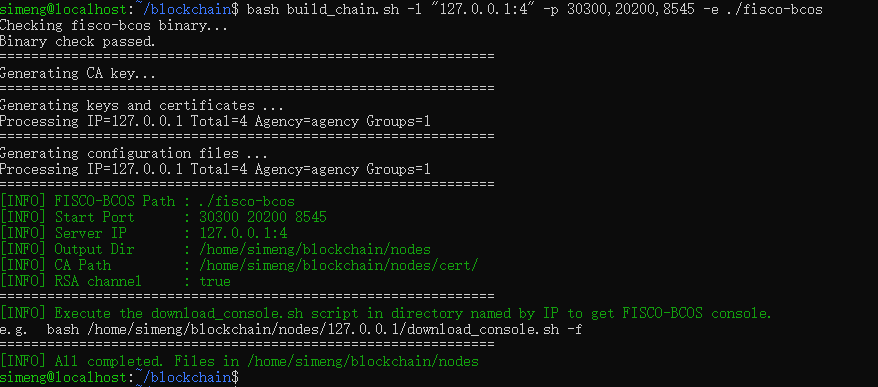
|
|
||||||
在创建完成之后,当前目录会出现一个 nodes 文件夹,这里面就是我们的每个节点的具体配置信息等等
|
|
||||||
|
|
||||||
这里推荐下载一个 tree 用来查看目录结构
|
|
||||||
```shell
|
|
||||||
apt install tree
|
|
||||||
tree nodes
|
|
||||||
```
|
|
||||||
目录结构应该大概如下:
|
|
||||||
```
|
|
||||||
nodes
|
|
||||||
├── 127.0.0.1
|
|
||||||
│ ├── node0
|
|
||||||
│ │ ├── ...
|
|
||||||
│ ├── node1
|
|
||||||
│ │ ├── ...
|
|
||||||
│ ├── node2
|
|
||||||
│ │ ├── ...
|
|
||||||
│ ├── node3
|
|
||||||
│ │ ├── ...
|
|
||||||
```
|
|
||||||
每个 node 文件夹都包含 `conf/`(配置文件),`log/`(日志文件),`fisco-bcos/`(二进制副本)
|
|
||||||
|
|
||||||
修改节点2的端口,根据要求修改为 30500,20400,8675
|
|
||||||
|
|
||||||
编辑配置文件:`vim nodes/127.0.0.1/node2/config.ini`
|
|
||||||
|
|
||||||
```bash
|
|
||||||
[rpc]
|
|
||||||
channel_listen_ip=0.0.0.0
|
|
||||||
channel_listen_port=20202 # [!code --]
|
|
||||||
channel_listen_port=20400 # [!code ++]
|
|
||||||
jsonrpc_listen_ip=127.0.0.1
|
|
||||||
jsonrpc_listen_port=8547 # [!code --]
|
|
||||||
jsonrpc_listen_port=8675 # [!code ++]
|
|
||||||
disable_dynamic_group=false
|
|
||||||
[p2p]
|
|
||||||
listen_ip=0.0.0.0
|
|
||||||
listen_port=30302 # [!code --]
|
|
||||||
listen_port=30500 # [!code ++]
|
|
||||||
; nodes to connect
|
|
||||||
node.0=127.0.0.1:30300
|
|
||||||
node.1=127.0.0.1:30301
|
|
||||||
node.2=127.0.0.1:30302 # [!code --]
|
|
||||||
node.2=127.0.0.1:30500 # [!code ++]
|
|
||||||
node.3=127.0.0.1:30303
|
|
||||||
```
|
|
||||||
不光节点2的 \[p2p\] 的 `node.2` 需要修改,其他几个节点的都需要进行修改
|
|
||||||
|
|
||||||
切换到 `nodes/127.0.0.1/` 目录下,通过 `bash start_all.sh` 启动所有节点
|
|
||||||
|
|
||||||
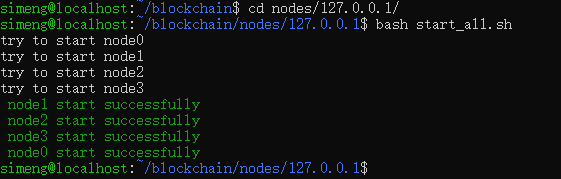
|
|
||||||
|
|
||||||
验证端口是否生效:`ss -tuln | grep -E '30500|20400|8675'`
|
|
||||||
|
|
||||||
预期输出如下:
|
|
||||||
|
|
||||||
```bash
|
|
||||||
tcp LISTEN 0 4096 127.0.0.1:8675 0.0.0.0:*
|
|
||||||
tcp LISTEN 0 4096 0.0.0.0:30500 0.0.0.0:*
|
|
||||||
tcp LISTEN 0 4096 0.0.0.0:20400 0.0.0.0:*
|
|
||||||
```
|
|
||||||
|
|
||||||
|
|
||||||
主要参考文章如下:
|
|
||||||
|
|
||||||
1. [搭建第一个区块链网络](https://fisco-doc.readthedocs.io/zh/latest/docs/installation.html)
|
|
||||||
2. [开发部署工具(build_chain.sh)](https://fisco-bcos-documentation.readthedocs.io/zh-cn/latest/docs/manual/build_chain.html)
|
|
||||||
|
|
||||||
### 第2题:按要求完成WeBASE-Node-Manager的安装与部署
|
|
||||||
**【要求】**
|
|
||||||
|
|
||||||
登录 Linux 服务器,部署节点管理平台,并将部署、启动、应用过程结果截图,保存至作答区并点击提交。
|
|
||||||
|
|
||||||
**【任务】**
|
|
||||||
|
|
||||||
登录 linux 服务器,进入指定操作目录(/root/tools/webase)中完成区块链一体化管理平台的配置部署,并检查是否安装成功,具体操作任务如下:
|
|
||||||
1. 进入 WeBASE-Node-Manager 目录,完成数据库初始化操作;
|
|
||||||
2. 修改 application.yml 配置文件,进行 WeBASE-Node-Manager 的服务配置,包括数据库名称,数据库用户,数据库密码等;
|
|
||||||
3. 使用命令启动 WeBASE-Node-Manager 管理平台服务,并检查节点管理是否正常启动;
|
|
||||||
4. 使用 swagger 对节点管理服务的 API 接口测试。
|
|
||||||
|
|
||||||
**【参考答案】**
|
|
||||||
|
|
||||||
切换到 WeBASE-Front 目录下,将 `dist/conf_template` 配置文件目录复制一份作为配置文件,命名为 `dist/conf`
|
|
||||||
```bash
|
|
||||||
# 当前工作目录为:/home/simeng/blockchain/WeBASE-Front
|
|
||||||
cp -r dist/conf_template dist/conf
|
|
||||||
```
|
|
||||||
|
|
||||||
将节点所在目录 `nodes/{$ip}/sdk` 下的所有文件拷贝到当前的 `dist/conf` 目录下
|
|
||||||
```bash
|
|
||||||
cp ../nodes/127.0.0.1/sdk/* ./dist/conf/
|
|
||||||
```
|
|
||||||
|
|
||||||
编辑配置文件 : `vim dist/conf/application.yml`
|
|
||||||
```bash
|
|
||||||
|
|
||||||
```
|
|
||||||
|
|
||||||
配置环境变量 JAVA_HOME
|
|
||||||
编辑配置文件:`~/.bashrc`,添加如下内容
|
|
||||||
```bash
|
|
||||||
export JAVA_HOME="/usr/lib/jvm/java-1.8.0-openjdk-amd64"
|
|
||||||
export PATH=$JAVA_HOME/bin:$PATH
|
|
||||||
```
|
|
||||||
刷新环境变量
|
|
||||||
```bash
|
|
||||||
source ~/.bashrc
|
|
||||||
```
|
|
||||||
|
|
||||||
切换到 `dist` 目录下,拉取 Solidity 开发工具 v0.8.11.js(这一步可能会很慢,建议直接把 v0.8.11.js 下载到本地,然后直接放到对应目录,WSL2 的机器是直接挂载在 Windows 上的,Windows 可以直接操作)
|
|
||||||
```bash
|
|
||||||
wget https://github.com/WeBankBlockchain/WeBASELargeFiles/releases/download/v3.0.0/v0.8.11.js -O static/static/js/v0.8.11.js
|
|
||||||
```
|
|
||||||
|
|
||||||
运行 `bash start.sh` 启动 WeBASE-Node-Manager 管理平台服务
|
|
||||||
```bash
|
|
||||||
# 当前工作目录为:/home/simeng/blockchain/WeBASE-Front/dist
|
|
||||||
bash start.sh
|
|
||||||
```
|
|
||||||
|
|
||||||
由于 localhostForwarding 机制(具体参考:[配置WSL2资源](https://notes.simengweb.com/article/operate-wsl2/#%E7%BD%91%E7%BB%9C%E7%9B%B8%E5%85%B3%E9%85%8D%E7%BD%AE)),我们可以直接通过localhost来访问WSL2容器的端口的服务
|
|
||||||
访问:[http://localhost:5002/WeBASE-Front](http://localhost:5002/WeBASE-Front)
|
|
||||||
@@ -0,0 +1,298 @@
|
|||||||
|
---
|
||||||
|
title: 爱莉希雅语录
|
||||||
|
createTime: 2026/01/08 15:39:17
|
||||||
|
cover: /images/elysia/2.png
|
||||||
|
coverStyle:
|
||||||
|
layout: left
|
||||||
|
permalink: /archives/a5b3ea8e-7c3c-40a1-a737-26e911623da8/
|
||||||
|
---
|
||||||
|
嗨,亲爱的来访者♪ 欢迎来到这片收集了“真我”与“美丽”碎片的园圃。在这里,你会读到执拗花朵在暴雨中的坚持,也会听见逐火英桀们为文明奏响的最后颂歌。请怀着期待慢慢翻阅吧,愿这些如星光般的文字能陪你开启属于自己的闪耀旅程,毕竟……你本身就是这世间最瑰丽的馈赠呢♪
|
||||||
|
<!-- more -->
|
||||||
|

|
||||||
|
1. 执拗的花朵永远不会因暴雨而褪去颜色,你的决心也一定能在绝境中绽放真我。
|
||||||
|
|
||||||
|
2. 愿你前行的道路有群星闪耀。愿你留下的足迹有百花绽放。你即是上帝的馈赠,世界因你而瑰丽。
|
||||||
|
|
||||||
|
3. 悲剧并非终结,而是希望的起始。
|
||||||
|
|
||||||
|
4. 此后,将有群星闪耀,因为我如今来过。此后,将有百花绽放,因为我从未离去。
|
||||||
|
|
||||||
|
5. 告别过去,是为了走向未来
|
||||||
|
|
||||||
|
6. 我名为爱莉希雅……最初的律者,人之律者。
|
||||||
|
|
||||||
|
7. 某一日,祂从天坠落。人们抬头仰望,于是看见了星空。星月送来神的女儿,她愿成为人的伴侣。长风化作她的轺车,四海落成她的园圃。鸟雀衔来善的种子,百花编织爱的颂歌。她便是这样降生于世,行于大地,与人类一同长大,与世界一起发芽。
|
||||||
|
|
||||||
|
8. 亲爱的山雀,请将我的箭,我的花,与我的爱,带给那子然独行的旅人。然后,便让它开出永恒而无瑕的…人性之华吧。
|
||||||
|
|
||||||
|
9. 压力之下的选择才能揭示一个人的真我,也将决定他最终会成为怎样的人。
|
||||||
|
|
||||||
|
10. 即使未来不能改变,我也要自己决定到达那个结果的过程。
|
||||||
|
|
||||||
|
11. 这是段漫长的路途,你或许会停滞不前,甚至在很长一段时间里一无所获。但这未必是件坏事,并不是一定要做到了什么,达成了什么才算前进。空虚、迷茫、犹豫、自否,对于一个人的一生,这些过程同样拥有它们的意义——就像这里的十三个人曾经历的那样。
|
||||||
|
|
||||||
|
12. 天色暗了,接下来就是调皮捣蛋的时间了呢。
|
||||||
|
|
||||||
|
13. 白天的我也很可爱,晚上的我也很可爱,你更喜欢哪个我呢?
|
||||||
|
|
||||||
|
14. 说起粉色头发的可爱女孩,你第一个会想到谁?321回答!
|
||||||
|
|
||||||
|
15. 你好像有不少问题想问我呢,别心急,我们还有很多很多时间。
|
||||||
|
|
||||||
|
16. 你喜欢脚踩在落叶或是新雪上的感觉吗?我很喜欢哦。
|
||||||
|
|
||||||
|
17. 你比我想象中还可爱许多呢。是不是很在意我想象了什么?
|
||||||
|
|
||||||
|
18. 今天的任务都完成啦?真棒,夸夸你哦。
|
||||||
|
|
||||||
|
19. 嗨!今天天气真好,和我一样闪闪发光呢。
|
||||||
|
|
||||||
|
20. 嗨,早上好!一天的好心情,从见到你开始。
|
||||||
|
|
||||||
|
21. 嗨,早上好呀!看见我,有没有很开心呢?
|
||||||
|
|
||||||
|
22. 你该休息啦,约好了,我们明天再见哦。
|
||||||
|
|
||||||
|
23. 天冷了,小心别着凉哦。我?美少女怎么会冷呢。
|
||||||
|
|
||||||
|
24. 今天是我的生日哦。要一起庆祝吗?就我们两个人。
|
||||||
|
|
||||||
|
25. 哎呀,你也睡不着吗?那我们来聊聊天,好不好?
|
||||||
|
|
||||||
|
26. 有些事不用太在意,美丽的少女总有些小秘密,不是吗?
|
||||||
|
|
||||||
|
27. 这么晚了还不睡吗?是在想我,对不对?
|
||||||
|
|
||||||
|
28. 知道吗,今天是个很特别的日子。对啦,就是你的生日♪
|
||||||
|
|
||||||
|
29. 好啦,冷静一下♪
|
||||||
|
|
||||||
|
30. 以律者的标准,你的样子还真有些......别致呢♪
|
||||||
|
|
||||||
|
31. 哎呀,别生气嘛♪
|
||||||
|
|
||||||
|
32. 真是的......我会哭的哦......
|
||||||
|
|
||||||
|
33. 抱歉......得让你失望啦♪
|
||||||
|
|
||||||
|
34. 英桀们的谢幕,必须盛大而壮丽
|
||||||
|
|
||||||
|
35. 只是你我二人独处,显然有些寂寞了♪
|
||||||
|
|
||||||
|
36. 你说对不对?我的好·伊·甸♪
|
||||||
|
|
||||||
|
37. 你明明也很开心嘛♪
|
||||||
|
|
||||||
|
38. 英桀们也不过是心绪复杂,带有缺陷的普通人,就和当时的每个普通人一样。有自己的私心,也多半谈不上有什么大爱,但也会因为一时感动,或是心血来潮,去做一些冲动,又了不起的事。他们从来不是完美的英雄,只是因为在那个时间,出现在那里的是他们而已。
|
||||||
|
|
||||||
|
39. 我相信换做其他人,也一定会做出小异大同的选择,甚至做得更好也说不定?这就是[美丽]的永恒,我所相信的[真我]。十三个人生命的全部就是如此纷繁而又美妙的事物,意义在于在这个过程中我想要相信什么。那会决定在抵达终点时你能得到什么。
|
||||||
|
|
||||||
|
40. 你看,他们曾如此骄傲地活过,贯彻始终,以生命奏响了文明的颂歌,这是被称作英桀的人们的故事,是十三位逐火者未尽的旅途,但来访者,你们的道路仍将延续,不是吗,那就听凭心意前进吧,嘻,都说了要前进啦,沿着脚下的足迹,去见证这段逐火的征程,最后跨越逝者们的终幕,去创造我们所未能迎接的未来吧。
|
||||||
|
|
||||||
|
41. 要流传给后世的,绝不应该只有憎恨和使命。只有领略过这个时代的光辉和灿烂,未来的人们才能理解我们为之而战的意义。
|
||||||
|
|
||||||
|
42. 由英桀们来传承的,应当是身为英桀的荣耀,战斗的理由。是在这段逐火的旅途中,我们最终的灵魂所托。
|
||||||
|
|
||||||
|
43. 而后来的你们,将见证我们生命的足迹,灵魂的刻印,并在其中找到自己寻求的答案。
|
||||||
|
|
||||||
|
44. 但无论如何 我们的时代已经结束了,而我们也努力完成了各自的使命。
|
||||||
|
|
||||||
|
45. 不是被推搡,被裹挟着向前,也不是沿着被别人选定的道路行进。而是怀着这样的想法——我想要怎么做,我应该怎么做——去决定自己的命路,自己的刻印。
|
||||||
|
|
||||||
|
46. 以自我的意志,朝着自身所设下的目标,用自在的方式,竭尽全力活过“我”作为主角的一生。
|
||||||
|
|
||||||
|
47. 你看,我是这样的,大家也是这样的。我所知晓的那个时代,以及它所孕育出的这十三个人,都是如此。万千的轨迹交织、萦绕,由此诞下百花齐放的奇迹。这就是“美丽”的永恒,我所相信的“真我”。
|
||||||
|
|
||||||
|
48. 至此,我们的故事结束了。而从今以后,就是“你”的故事了。
|
||||||
|
|
||||||
|
49. 让无人传颂的歌谣,再度启唱。
|
||||||
|
|
||||||
|
50. 为历史尘封的故事,续写新章。
|
||||||
|
|
||||||
|
51. 高洁而纯真的灵魂,踏上旅途。
|
||||||
|
|
||||||
|
52. 愿掠集之兽爱佑其身,赐予「空梦」的自由。
|
||||||
|
|
||||||
|
53. 愿渡尘之羽爱佑其身,赐予「浮生」的坚忍。
|
||||||
|
|
||||||
|
54. 愿绘世之卷爱佑其身,赐予「繁星」的纯真。
|
||||||
|
|
||||||
|
55. 愿噬界之蛇爱佑其身,赐予「无限」的渴求。
|
||||||
|
|
||||||
|
56. 愿黎明之哨爱佑其身,赐予「旭光」的意志。
|
||||||
|
|
||||||
|
57. 愿寸断之刃爱佑其身,赐予「刹那」的决绝。
|
||||||
|
|
||||||
|
58. 愿善法之瞳爱佑其身,赐予「天慧」的智识。
|
||||||
|
|
||||||
|
59. 愿坏劫之焱爱佑其身,赐予「鏖灭」的赤诚。
|
||||||
|
|
||||||
|
60. 愿愚戏之匣爱佑其身,赐予「螺旋」的奇迹。
|
||||||
|
|
||||||
|
61. 愿璀耀之歌爱佑其身,赐予「黄金」的光辉。
|
||||||
|
|
||||||
|
62. 愿深罪之槛爱佑其身,赐予「戒律」的慈爱。
|
||||||
|
|
||||||
|
63. 愿无烬之剑爱佑其身,赐予「救世」的理想。
|
||||||
|
|
||||||
|
64. 愿无瑕之人爱佑其身,赐予「真我」的回归。
|
||||||
|
|
||||||
|
65. 我们于此赞颂,始源之律者的诞生
|
||||||
|
|
||||||
|
66. 我这支歌将抚摸你的前额,犹如那祝福的亲吻
|
||||||
|
|
||||||
|
67. 当你独自一人时,它会坐在身旁与你耳语
|
||||||
|
|
||||||
|
68. 当你陷入人群时,它又会保护你远离喧嚣。
|
||||||
|
|
||||||
|
69. 我的歌将成为你梦想的羽翼,它将载着你的心到那未知的边缘
|
||||||
|
|
||||||
|
70. 当黑夜遮蔽了你的路时,它又成为了照耀在你头顶的忠实星光
|
||||||
|
|
||||||
|
71. 于是,「始源」的故事迎来落幕
|
||||||
|
|
||||||
|
72. 于是,「始源」的故事迎来伊始
|
||||||
|
|
||||||
|
73. 以我为终……
|
||||||
|
|
||||||
|
74. 以我……为始。
|
||||||
|
|
||||||
|
75. 而今,终焉之时将至。而今,归去之时已至。就此告别吧,美丽的世界。
|
||||||
|
|
||||||
|
76. 不想前进的时候,就暂且停下脚步吧,我们永远都在这里,和当初一模一样,毕竟,美丽的女孩子什么都能做到嘛!
|
||||||
|
|
||||||
|
77. 游云拂风,花染湛空,与你并肩漫步在午后街头,携手美好此刻,共赏岁月温柔。
|
||||||
|
|
||||||
|
78. 经常会和别的女孩子谈论你哦。内容……是不是很想知道呀~
|
||||||
|
|
||||||
|
79. 有些事不用太在意,美丽的少女总有些小秘密,不是吗?
|
||||||
|
|
||||||
|
80. 这里有好多和我一样漂亮的女孩子呀,是天堂吗?
|
||||||
|
|
||||||
|
81. 你会不会嫌我话多呢?可我就是有好多话想对你说呀。
|
||||||
|
|
||||||
|
82. 不许叫错我的名字噢,不然……我会有小情绪的。
|
||||||
|
|
||||||
|
83. 如此绚丽的花朵,不该在绽放之前就枯萎。我会赠予你璀聚的祝福,而你的灵魂,也将会绽放更耀眼的光辉。
|
||||||
|
|
||||||
|
84. 嗨,想我了吗?
|
||||||
|
|
||||||
|
85. 不论何时何地,爱莉希雅都会回应你的期待
|
||||||
|
|
||||||
|
86. 嗨,我又来啦。多夸夸我好吗?我会很开心的~♪
|
||||||
|
|
||||||
|
87. 你好!新的一天,从一场美妙的邂逅开始。
|
||||||
|
|
||||||
|
88. 终于轮到我啦,这段时间我可是一直都在构思与你见面的开场白呢。
|
||||||
|
|
||||||
|
89. 你可以更光明正大的看向我噢,毕竟我也直在看着你嘛。来,让我们更深入地了解彼此吧?
|
||||||
|
|
||||||
|
90. 唉,要做的事好多~但焦虑可是女孩子的大敌,保持优雅得体,从容愉快地前进吧。
|
||||||
|
|
||||||
|
91. 别看我这样,其实我也是很忙的。不过,我的日程上永远有为你预留的时间。
|
||||||
|
|
||||||
|
92. 唉,时间真是个讨厌的东西,你不觉得吗?如果不是时间紧迫,我还想留下更多值得纪念的话语。
|
||||||
|
|
||||||
|
93. 有没有觉得我的话要比别人多一点?多就对啦,我可是有在很认真地准备这件事的。
|
||||||
|
|
||||||
|
94. 哇,你看那朵白白软软的云,是不是有点像我呢?
|
||||||
|
|
||||||
|
95. 可爱的少女心可是无所不能的噢~♪
|
||||||
|
|
||||||
|
96. 好啦可以啦,再说下去我就要哭了噢~♪
|
||||||
|
|
||||||
|
97. 这束鲜花,要心怀感激的收下哦~♪
|
||||||
|
|
||||||
|
98. 要好好看着我哦~♪
|
||||||
|
|
||||||
|
99. 这身衣服是伊甸做的噢,喜欢吗,还是说,喜欢的是我呢~♪
|
||||||
|
|
||||||
|
100. 别动噢,借你的眼睛照照镜子……好啦,我看起来怎么样?
|
||||||
|
|
||||||
|
101. 嗯~和女孩子独处时,可要好好看向对方的眼晴噢~♪
|
||||||
|
|
||||||
|
102. 有空多来陪陪我好吗,你一定不忍心让可爱的我孤独寂寞吧。
|
||||||
|
|
||||||
|
103. 这可是你选的衣服,要好好看着,不许移开视线噢。
|
||||||
|
|
||||||
|
104. 加点浪漫的气氛,如何?
|
||||||
|
|
||||||
|
105. 哇谢谢!我就知道你对我最好啦!
|
||||||
|
|
||||||
|
106. 爱莉希雅的贴心提示!你可以尽情的依赖爱莉希雅,而她,也会以全部的身心回应你!
|
||||||
|
|
||||||
|
107. 爱莉希雅的贴心提示!如果见到凯文在大厅里,多穿点衣服,他很冷的,各种意义上呢。
|
||||||
|
|
||||||
|
108. 在热情似火这件事上,我可不会输给千劫哦。
|
||||||
|
|
||||||
|
109. 这一次有你想要的东西吗?没有的话,我就可以再见你一面了。
|
||||||
|
|
||||||
|
110. 你应该不会嫌我话多吧?还是说,你更喜欢伊甸那种优雅文静的类型?
|
||||||
|
|
||||||
|
111. 如你所见,与那个凯文齐名的第二领袖,竟是一位如花朵般娇羞的少女也就是我啦。
|
||||||
|
|
||||||
|
112. 爱莉希雅的贴心提示!和樱说话时,别盯着耳朵看太久,她和我不一样,会害羞。
|
||||||
|
|
||||||
|
113. 想了想我毕竟算半个文职,说“武”也不太合适。那就去掉一个字,叫“女神”吧!你觉得呢?
|
||||||
|
|
||||||
|
114. 你说,我要是把头发留的和樱那么长,会不会更好看呀?嗯?
|
||||||
|
|
||||||
|
115. 你战斗的样子如此绚丽,就如同漫天的飞花一般。让我再为其添点色彩吧。
|
||||||
|
|
||||||
|
116. 这里埋藏着太多的历史、太多的秘密。但别担心,无论路有多长,我始终都会在你身边。
|
||||||
|
|
||||||
|
117. 如果我也成为律者,会是什么样子呢?头发会再变多些吗?还是说……裙摆会突然变长?
|
||||||
|
|
||||||
|
118. 说起来,为什么只有我的刻印是金色的伊甸不会生气吧?算啦,她那么好,一定不会生气的。
|
||||||
|
|
||||||
|
119. 咦,到我了吗?哎呀真可惜,这次的开场白我还没想好呢,原谅我吧,下次一定给你个惊喜。
|
||||||
|
|
||||||
|
120. 仔细想想,我是女孩子,战力比肩凯文,又有如神明般的聪慧与美貌。这么说来,我不也是“女武神”吗?
|
||||||
|
|
||||||
|
121. 爱莉希雅的贴心提示!如果遇到千劫,千万别问他有关面具的事哦。
|
||||||
|
|
||||||
|
122. 唉,不知道你见没见到这里的男孩们,他们都内向得很,还是我比较放得开吧?
|
||||||
|
|
||||||
|
123. 爱莉希雅的贴心提示!伊甸就像是天使一样——温柔,美丽,又总会予人以天使般的馈赠。
|
||||||
|
|
||||||
|
124. 这真是个神奇的地方,不是吗?它让我们的灵魂跨越时空于此相遇,多么浪漫呀。
|
||||||
|
|
||||||
|
125. 悄悄告诉你哦,我一共准备了40种不同的开场白。
|
||||||
|
|
||||||
|
126. 咦,你在看哪?哦......很在意这对耳朵?它们很漂亮对吗,我也这么觉得。
|
||||||
|
|
||||||
|
127. 你一定也在期待和我相遇吧?我知道,因为我的刻印总是很实用嘛。
|
||||||
|
|
||||||
|
128. 我的抉择与你的抉择,二者相遇会诞下怎样的奇迹,我想见证这一刻的到来。
|
||||||
|
|
||||||
|
129. 爱莉希雅的贴心提示!如果你不想听苏说话了,悄悄走开也行,他看不见。
|
||||||
|
|
||||||
|
130. 有我的刻印,你绝对不会输。输了也没关系,我会先一步去大厅等你回来。
|
||||||
|
|
||||||
|
131. 不要被三次元的女人骗了呀。
|
||||||
|
|
||||||
|
132. 英桀第二位,爱莉希雅,如你所见是一位像花朵般可爱的美丽少女。
|
||||||
|
|
||||||
|
133. 我们会留在过去,而你将走向未来。
|
||||||
|
|
||||||
|
134. 毕竟我向来不习惯太严肃的场合,也不喜欢过于拘谨的人际关系。
|
||||||
|
|
||||||
|
135. 再打下去我会哭的哦
|
||||||
|
|
||||||
|
136. 怎么样?喜欢我的记忆吗?有没有一种在和美丽的少女并肩作战的感觉?
|
||||||
|
|
||||||
|
137. 猜猜我为你带来了什么,金色的、闪闪发光的刻印,没有人能拒绝它,不是吗?
|
||||||
|
|
||||||
|
138. 见好就收哦!
|
||||||
|
|
||||||
|
139. 但我永远都会在这里,为你点亮前行的灯火。
|
||||||
|
|
||||||
|
140. 纵使知道文明已经覆灭,却依旧选择穷尽一切抗争到最后,只是为了将自己骄傲活过的样子永远铭刻在历史之中。
|
||||||
|
|
||||||
|
141. 悲伤不会凭空消失,但温暖的感情也会永远在心底珍藏。
|
||||||
|
|
||||||
|
142. 无论过去还是现在,可爱的少女心是无所不能的——只有这一点,无论如何都不会改变。
|
||||||
|
|
||||||
|
143. 那个白头发的漂亮女孩就是芽衣的...嗯哼哼,被我发现喽。
|
||||||
|
|
||||||
|
143.那是...华?唉,她交到了新的朋友,太好了。
|
||||||
@@ -1,7 +1,7 @@
|
|||||||
---
|
---
|
||||||
title: 在 Windows10 上部署 WSL2 并启动 ubuntu 虚拟机
|
title: 在 Windows10 上部署 WSL2 并启动 ubuntu 虚拟机
|
||||||
createTime: 2025/09/29 07:13:17
|
createTime: 2025/09/29 07:13:17
|
||||||
cover: https://image.simengweb.com/elysia_cover_image/1pK7sI441p7x25YV.jpg
|
cover: /images/elysia/3.jpg
|
||||||
coverStyle:
|
coverStyle:
|
||||||
layout: right
|
layout: right
|
||||||
permalink: /article/deploying-wsl2-on-windows-10/
|
permalink: /article/deploying-wsl2-on-windows-10/
|
||||||
|
|||||||
@@ -1,7 +1,7 @@
|
|||||||
---
|
---
|
||||||
title: WSL2 核心操作指南
|
title: WSL2 核心操作指南
|
||||||
createTime: 2025/09/30 16:08:32
|
createTime: 2025/09/30 16:08:32
|
||||||
cover: https://image.simengweb.com/elysia_cover_image/2MEiWEhvsx8OtKeJ.png
|
cover: /images/elysia/4.jpg
|
||||||
permalink: /article/operate-wsl2/
|
permalink: /article/operate-wsl2/
|
||||||
---
|
---
|
||||||
这篇文章主要讲WSL2虚拟机核心操作哦~它基于轻量级Hyper-V运行,像贴心小精灵默默工作~还能用命令行精细控制!接下来讲启动/关闭、实例管理、资源配置、网络操作、备份迁移这五大操作,是不是很期待呢~♪
|
这篇文章主要讲WSL2虚拟机核心操作哦~它基于轻量级Hyper-V运行,像贴心小精灵默默工作~还能用命令行精细控制!接下来讲启动/关闭、实例管理、资源配置、网络操作、备份迁移这五大操作,是不是很期待呢~♪
|
||||||
|
|||||||
@@ -0,0 +1,118 @@
|
|||||||
|
---
|
||||||
|
title: 原码、反码、补码
|
||||||
|
createTime: 2026/01/08 16:34:05
|
||||||
|
cover: /images/elysia/6.jpg
|
||||||
|
coverStyle:
|
||||||
|
layout: right
|
||||||
|
permalink: /archives/6f41cabe-41e6-4a09-9f1c-af7dd709a35d/
|
||||||
|
---
|
||||||
|
|
||||||
|
欢迎来到 0 与 1 的魔法派对!这篇文章将带你揭开原码、反码与补码的奥秘,看计算机如何巧妙地用补码化减为加。让我们一起翻开这页,去捕捉二进制底层那份迷人的理性之美吧♪
|
||||||
|
|
||||||
|
<!-- more -->
|
||||||
|
|
||||||
|
## 一、 前置概念
|
||||||
|
|
||||||
|
计算机底层存储数据的时候使用的是二进制数字,但是计算机在存储一个数字的时候并不是直接存储该数字对应的二进制数,而是存储该数字对应的**二进制数的补码**。
|
||||||
|
|
||||||
|
在了解原码、反码和补码之前,我们要了解**机器数**和**真值**的概念。
|
||||||
|
|
||||||
|
### 1) 机器数
|
||||||
|
一个数在计算机的存储形式是二进制数,我们称这些二进制数为**机器数**。机器数是有符号的,在计算机中用机器数的最高位存放符号位,`0` 表示正数,`1` 表示负数。
|
||||||
|
|
||||||
|
### 2) 真值
|
||||||
|
因为机器数带有符号位,所以机器数的形式值不等于其真实表示的值(真值)。
|
||||||
|
- 以机器数 `1000 0001` 为例,其真正表示的值(首位为符号位)为 `-1`,而形式值(首位就是代表 1)为 `129`。
|
||||||
|
- 因此将带符号的机器数的真正表示的值称为机器数的**真值**。
|
||||||
|
|
||||||
|
## 二、 原码、反码与补码
|
||||||
|
|
||||||
|
### 1) 原码
|
||||||
|
原码的表示与机器数真值表示的一样,即用第一位表示符号,其余位表示数值。
|
||||||
|
- **正数**:就是它对应的二进制数。
|
||||||
|
- **负数**:将绝对值对应的二进制最左边位变为 `1`。
|
||||||
|
|
||||||
|
例如十进制的正负 1,用 8 位二进制的原码表示如下:
|
||||||
|
- `[+1]` = 原: `[ 0000 0001 ]`
|
||||||
|
- `[-1]` = 原: `[ 1000 0001 ]`
|
||||||
|
|
||||||
|
### 2) 反码
|
||||||
|
- **正数**:和原码相同。
|
||||||
|
- **负数**:在其原码的基础上,**符号位不变,其余各位取反**。
|
||||||
|
|
||||||
|
示例:
|
||||||
|
- `[+1]` = 原: `[ 0000 0001 ]` = 反: `[ 0000 0001 ]`
|
||||||
|
- `[-1]` = 原: `[ 1000 0001 ]` = 反: `[ 1111 1110 ]`
|
||||||
|
|
||||||
|
### 3) 补码
|
||||||
|
- **正数**:补码是其原码本身。
|
||||||
|
- **负数**:补码是在其原码的基础上,**符号位不变,其余各位取反后加 1**(即在反码的基础上加 1)。
|
||||||
|
|
||||||
|
示例:
|
||||||
|
- `[+1]` = 原: `[ 0000 0001 ]` = 反: `[ 0000 0001 ]` = 补: `[ 0000 0001 ]`
|
||||||
|
- `[-1]` = 原: `[ 1000 0001 ]` = 反: `[ 1111 1110 ]` = 补: `[ 1111 1111 ]`
|
||||||
|
|
||||||
|
## 三、 数据在计算机中的存储形式
|
||||||
|
|
||||||
|
计算机实际上只存储**补码**,所以说原码转换为补码的过程,也可以理解为数据存储到计算机内存中的过程。
|
||||||
|
|
||||||
|
在原、反、补码中,正数的表示是一模一样的,而负数的表示是不相同的。因此对于负数的补码来说,我们不能直接用进制转换将其转换为十进制数值,因为这样是得不到计算机真正存储的十进制数的。**应该将其转换为原码后,再将转换得到的原码进行进制转换为十进制数**(机器数包含符号位)。
|
||||||
|
|
||||||
|
## 四、 为什么会使用原码、反码、补码
|
||||||
|
|
||||||
|
对于人脑来说,知道机器数的第一位是符号位是一件很轻松的事情,但对于计算机基础电路设计来说判别第一位是符号位是非常难和复杂的事情。
|
||||||
|
|
||||||
|
为了让计算机底层设计更加简单,于是设计将符号位参与运算,并且**只保留加法**的方法,通过**加上一个负数的方式来实现减法**。这样让计算机运算更加简单,并且也让符号位参与到运算中去。
|
||||||
|
|
||||||
|
## 五、 使用原码、反码与补码进行运算
|
||||||
|
|
||||||
|
### 1) 使用原码运算
|
||||||
|
计算十进制表达式:`1 - 1 = 0`
|
||||||
|
```text
|
||||||
|
1 - 1 = 1 + (-1)
|
||||||
|
= 原:[ 0000 0001 ] + 原:[ 1000 0001 ]
|
||||||
|
= 原:[ 1000 0010 ] = -2
|
||||||
|
```
|
||||||
|
**结论**:如果用原码表示,让符号位也参与计算,对于减法来说,结果是不正确的。这也是计算机内部在存储数据时不使用原码的原因。为了解决这一问题,出现了反码。
|
||||||
|
|
||||||
|
### 2) 使用反码运算
|
||||||
|
计算十进制表达式:`1 - 1 = 0`
|
||||||
|
```text
|
||||||
|
1 - 1 = 1 + (-1)
|
||||||
|
= 原:[ 0000 0001 ] + 原:[ 1000 0001 ]
|
||||||
|
= 反:[ 0000 0001 ] + 反:[ 1111 1110 ]
|
||||||
|
= 反:[ 1111 1111 ] = 原:[ 1000 0000 ] = -0
|
||||||
|
```
|
||||||
|
**结论**:通过计算我们发现用反码计算减法,结果的真值部分是正确的。唯一的问题出现在 "0" 这个特殊的数值上。虽然人们理解上 `+0` 和 `-0` 是一样的,但是 0 带符号是没有任何意义的,而且会有 `[0000 0000]原` 和 `[1000 0000]原` 两个编码表示 0。为了解决这一问题,出现了补码。
|
||||||
|
|
||||||
|
### 3) 使用补码运算
|
||||||
|
计算十进制表达式:`1 - 1 = 0`
|
||||||
|
```text
|
||||||
|
1 - 1 = 1 + (-1)
|
||||||
|
= 原:[ 0000 0001 ] + 原:[ 1000 0001 ]
|
||||||
|
= 补:[ 0000 0001 ] + 补:[ 1111 1111 ]
|
||||||
|
= 补:[ 0000 0000 ] = 原:[ 0000 0000 ] = 0
|
||||||
|
```
|
||||||
|
**结论**:这样 0 用 `[0000 0000]` 表示,而以前出现问题的 `-0` 则不存在了。而且人们还发现可以用 `[1000 0000]` 表示 `-128`。
|
||||||
|
|
||||||
|
**-128 的推算过程如下**:
|
||||||
|
```text
|
||||||
|
(-1) + (-127) = -128
|
||||||
|
= 原:[ 1000 0001 ] + 原:[ 1111 1111 ]
|
||||||
|
= 补:[ 1111 1111 ] + 补:[ 1000 0001 ]
|
||||||
|
= 补:[ 1000 0000 ]
|
||||||
|
```
|
||||||
|
> **注意**:因为实际上是使用以前的 `-0` 的补码来表示 `-128`,所以 `-128` 并没有原码和反码表示。只要补码是 `[1000 0000]`,其十进制数值就为 `-128`。
|
||||||
|
|
||||||
|
### 4) 小结
|
||||||
|
因为补码能多存储一个 `-128`,而且在计算机底层中存储的是补码,所以在计算机中一个 8 位的二进制数的存储范围是用补码表示的 `[-128, 127]`,而不是用原码或反码表示的 `[-127, 127]`。这也可以解释为什么计算机中一个字节的取值范围是 `[-128, 127]`。
|
||||||
|
|
||||||
|
## 六、 总结(牢记)
|
||||||
|
|
||||||
|
- **二进制的最高位是符号位**:`0` 表示正数,`1` 表示负数。
|
||||||
|
- **正数三码合一**:正数的原码、反码、补码都一样。
|
||||||
|
- **负数反码**:它的原码符号位不变,其它位取反。
|
||||||
|
- **负数补码**:它的反码 + 1;反之,负数反码 = 负数补码 - 1。
|
||||||
|
- **0 的表示**:`0` 的反码、补码都是 `0`。
|
||||||
|
- **运算方式**:在计算机运算的时候都是以 **“补码”** 的方式来运算的。
|
||||||
|
- **查看结果**:当我们看运算结果的时候,要看它的**原码**(重点)。
|
||||||
@@ -1,7 +1,7 @@
|
|||||||
---
|
---
|
||||||
title: 通过 EdgeOne Pages 搭建图床
|
title: 通过 EdgeOne Pages 搭建图床
|
||||||
createTime: 2025/09/29 02:28:17
|
createTime: 2025/09/29 02:28:17
|
||||||
cover: https://image.simengweb.com/elysia_cover_image/0lQviAbmMCVGN0Y6.png
|
cover: /images/elysia/5.jpg
|
||||||
permalink: /article/8gihio2v/
|
permalink: /article/8gihio2v/
|
||||||
---
|
---
|
||||||
|
|
||||||
|
|||||||
@@ -0,0 +1,78 @@
|
|||||||
|
---
|
||||||
|
title: ETLCloud
|
||||||
|
createTime: 2025/12/24 17:13:36
|
||||||
|
permalink: /ops/docker/other/ETLCloud/
|
||||||
|
---
|
||||||
|
|
||||||
|
## 前置环境
|
||||||
|
这里安装之前,需要先安装 mongodb 数据库,可以参考 [使用 Docker 部署 MongoDB](mongodb.md)
|
||||||
|
|
||||||
|
## 安装 ETLCloud
|
||||||
|
|
||||||
|
拉取社区版本镜像:
|
||||||
|
```bash
|
||||||
|
docker pull ccr.ccs.tencentyun.com/restcloud/restcloud-etl:V4.0
|
||||||
|
```
|
||||||
|
|
||||||
|
### 部署容器
|
||||||
|
|
||||||
|
如果您已经运行过同名容器,请先删除:
|
||||||
|
```bash
|
||||||
|
docker rm -f restcloud-etl-V4.0
|
||||||
|
```
|
||||||
|
|
||||||
|
使用以下命令进行部署(包含授权绑定、数据持久化和端口映射):
|
||||||
|
```bash
|
||||||
|
docker run -d \
|
||||||
|
--restart=always \
|
||||||
|
--privileged=true \
|
||||||
|
--name restcloud-etl-V4.0 \
|
||||||
|
--mac-address=01:D2:F4:18:B8:67 \
|
||||||
|
-v /data/tomcat:/usr/tomcat \
|
||||||
|
-p 9527:8080 \
|
||||||
|
ccr.ccs.tencentyun.com/restcloud/restcloud-etl:V4.0
|
||||||
|
```
|
||||||
|
|
||||||
|
**参数说明:**
|
||||||
|
- `--restart=always`: 容器退出时总是重启(如系统重启)。
|
||||||
|
- `--privileged=true`: 赋予容器特权模式,确保初始化正常。
|
||||||
|
- `--mac-address`: 固定 MAC 地址,用于绑定 License 授权(**注意:第一个字节必须为偶数,建议使用 02 开头**)。
|
||||||
|
- `-v /data/tomcat:/usr/tomcat`: 将 Tomcat 目录挂载到宿主机,实现数据持久化。
|
||||||
|
- `-p 9527:8080`: 访问端口映射,宿主机访问端口为 9527。
|
||||||
|
|
||||||
|
拷贝容器中的 tomcat 目录到主机上
|
||||||
|
```bash
|
||||||
|
docker cp e0419ad8a2bf31743ec17368cf4098e293c36761842a7dcff8280fbc34195fba:/usr/tomcat /data/
|
||||||
|
```
|
||||||
|
删除之前创建的简单容器
|
||||||
|
```bash
|
||||||
|
docker rm -f e0419ad8a2bf31743ec17368cf4098e293c36761842a7dcff8280fbc34195fba
|
||||||
|
```
|
||||||
|
在 /data/tomcat 路径下,编辑ETLCloud mongo相关的配置文件,这里的信息参考之前创建的 MongoDB 实例。
|
||||||
|
这里我额外修改了 server.port ,这里太容易和其他的服务端口冲突,所以这里修改为 9527。
|
||||||
|
```bash
|
||||||
|
sudo vim ./webapps/ROOT/WEB-INF/classes/application.properties
|
||||||
|
|
||||||
|
server.port=9527
|
||||||
|
...
|
||||||
|
#集群服务器之间同步用的公共配置数据库,空表示和配置库一起
|
||||||
|
spring.data.mongodb.host=127.0.0.1:27018
|
||||||
|
spring.data.mongodb.repositories.enabled=true
|
||||||
|
#MongoDb的数据库认证用户名及密码,没有可以为空
|
||||||
|
spring.data.mongodb.username=admin
|
||||||
|
spring.data.mongodb.password=admin
|
||||||
|
...
|
||||||
|
```
|
||||||
|
然后可以启动容器,样例如下:
|
||||||
|
```bash
|
||||||
|
docker run -d --restart=always --restart=on-failure:5 --privileged=true --name restcloud-etl-V4.0 --mac-address=自定义mac地址 -v /home/tomcat:/usr/tomcat -p 8080:8080 镜像id
|
||||||
|
```
|
||||||
|
具体命令,这里的MAC地址参数一定是要有的,不然每次重新创建之后MAC地址会变就需要重新生成SN码
|
||||||
|
|
||||||
|
这里的MAC地址不要和博主写一样的...自己随机一个或者随便写一个就行
|
||||||
|
```bash
|
||||||
|
docker run -d --restart=always --restart=on-failure:5 --privileged=true --name restcloud-etl-V4.0 --mac-address=02:D2:00:00:00:67 -v /data/tomcat:/usr/tomcat -p 9527:8080 4a5c0ed2a5b2
|
||||||
|
```
|
||||||
|
然后访问 服务器IP:9527/restcloud/admin/login 就可以啦
|
||||||
|
|
||||||
|
后面的话就是去官网申请一个SN码,然后就可以开始使用啦。
|
||||||
@@ -0,0 +1,69 @@
|
|||||||
|
---
|
||||||
|
title: 使用 Docker 部署 Postgres
|
||||||
|
createTime: 2025/12/25 10:52:34
|
||||||
|
permalink: /ops/docker/db/postgres/
|
||||||
|
---
|
||||||
|
|
||||||
|
## 在 Ubuntu 上部署 Postgres 实例
|
||||||
|
|
||||||
|
拉取 Postgres 镜像:
|
||||||
|
```bash
|
||||||
|
docker pull postgres
|
||||||
|
```
|
||||||
|
|
||||||
|
> [!IMPORTANT] 注意事项
|
||||||
|
> 从 **PostgreSQL 18+** 版本开始,官方镜像建议将数据目录挂载到 `/var/lib/postgresql` 而非 `/var/lib/postgresql/data`。如果你是从旧版本升级镜像,直接挂载旧目录会导致启动失败。
|
||||||
|
|
||||||
|
### 极简运行 Postgres 实例
|
||||||
|
```bash
|
||||||
|
docker run --restart=always -itd --name postgres -p 5432:5432 -e POSTGRES_PASSWORD=postgres postgres
|
||||||
|
```
|
||||||
|
解析:
|
||||||
|
- `--restart=always`:容器重启时自动启动。
|
||||||
|
- `-itd`:交互式模式运行容器,后台模式。
|
||||||
|
- `--name postgres`:为容器命名为 postgres。
|
||||||
|
- `-p 5432:5432`:将主机的 5432 端口映射到容器的 5432 端口。
|
||||||
|
- `-e POSTGRES_PASSWORD=postgres`:设置 Postgres 数据库的密码为 postgres。
|
||||||
|
- `postgres`:使用 Postgres 镜像。
|
||||||
|
|
||||||
|
### 配置 Postgres 持久化实例
|
||||||
|
|
||||||
|
#### 方案一:使用最新版本 (18+)
|
||||||
|
创建一个目录用于存储 Postgres 数据:
|
||||||
|
```bash
|
||||||
|
mkdir -p /data/postgres/
|
||||||
|
```
|
||||||
|
运行 Postgres 容器:
|
||||||
|
```bash
|
||||||
|
docker run --restart=always -itd \
|
||||||
|
--name postgres \
|
||||||
|
-p 5432:5432 \
|
||||||
|
-e POSTGRES_PASSWORD=postgres \
|
||||||
|
-v /data/postgres/:/var/lib/postgresql \
|
||||||
|
postgres
|
||||||
|
```
|
||||||
|
|
||||||
|
#### 方案二:固定使用旧版本 (如 17)
|
||||||
|
如果你有现存的 `/var/lib/postgresql/data` 格式数据,建议固定版本:
|
||||||
|
```bash
|
||||||
|
docker run --restart=always -itd \
|
||||||
|
--name postgres \
|
||||||
|
-p 5432:5432 \
|
||||||
|
-e POSTGRES_PASSWORD=postgres \
|
||||||
|
-v /data/postgres/:/var/lib/postgresql/data \
|
||||||
|
postgres:17
|
||||||
|
```
|
||||||
|
解析:
|
||||||
|
- `-v /data/postgres/:/var/lib/postgresql/data`:将主机的 /data/postgres/ 目录挂载到容器的 /var/lib/postgresql/data 目录,用于持久化存储数据。
|
||||||
|
|
||||||
|
#### 进入容器之后修改 postgres 用户密码
|
||||||
|
进入 Postgres 容器:
|
||||||
|
```bash
|
||||||
|
docker exec -it postgres psql -U postgres
|
||||||
|
```
|
||||||
|
解析:
|
||||||
|
- `docker exec -it postgres psql -U postgres`:进入 Postgres 容器的 psql 命令行界面,使用 postgres 用户进行登录。
|
||||||
|
修改 postgres 用户密码为 postgres:
|
||||||
|
```sql
|
||||||
|
ALTER USER postgres PASSWORD 'postgres';
|
||||||
|
```
|
||||||
@@ -0,0 +1,39 @@
|
|||||||
|
---
|
||||||
|
title: Docker 部署运维
|
||||||
|
createTime: 2025/12/24 16:39:34
|
||||||
|
permalink: /ops/docker/
|
||||||
|
---
|
||||||
|
|
||||||
|
欢迎来到 Docker 运维笔记!✨
|
||||||
|
|
||||||
|
在这里,我们将一起探索那些神奇的“小盒子”——Docker 容器。它们就像是装满惊喜的礼盒,把复杂的程序都整整齐齐地收纳在一起,是不是很有趣呢?♪
|
||||||
|
|
||||||
|
不管是部署数据库,还是搭建各种好玩的应用,只要有了这些小盒子,一切都会变得像魔法一样简单又优雅呢~真期待看到你在运维的道路上,也能像花朵一样绽放光彩呢。🌸
|
||||||
|
|
||||||
|
好啦,让我们开始这段美妙的旅程吧~如果遇到困难,这里会一直提供帮助的哦~
|
||||||
|
|
||||||
|
## 常用基础命令 🛠️
|
||||||
|
|
||||||
|
为了更顺畅地开启这段旅程,这里准备了一些常用的魔法指令:
|
||||||
|
|
||||||
|
### 容器管理
|
||||||
|
- `docker ps`:查看正在运行的小盒子。
|
||||||
|
- `docker ps -a`:查看所有的小盒子(包括休息中的)。
|
||||||
|
- `docker stop <ID>`:让小盒子暂时休息一下。
|
||||||
|
- `docker start <ID>`:唤醒休息中的小盒子。
|
||||||
|
- `docker rm <ID>`:送走不再需要的小盒子。
|
||||||
|
|
||||||
|
### 镜像管理
|
||||||
|
- `docker images`:查看我们收集的所有魔法镜像。
|
||||||
|
- `docker pull <name>`:从云端下载新的魔法镜像。
|
||||||
|
- `docker rmi <ID>`:清理不再需要的魔法镜像。
|
||||||
|
|
||||||
|
### 日志与调试
|
||||||
|
- `docker logs -f <ID>`:实时查看小盒子里的悄悄话。
|
||||||
|
- `docker exec -it <ID> /bin/bash`:亲自钻进小盒子里面看看。
|
||||||
|
|
||||||
|
## 部署清单 📋
|
||||||
|
|
||||||
|
- [MongoDB 部署魔法](./mongodb.md)
|
||||||
|
- 更多惊喜,敬请期待~✨
|
||||||
|
|
||||||
@@ -0,0 +1,69 @@
|
|||||||
|
---
|
||||||
|
title: 使用 Docker 部署 MongoDB
|
||||||
|
createTime: 2025/12/24 16:34:00
|
||||||
|
permalink: /ops/docker/db/mongodb/
|
||||||
|
---
|
||||||
|
|
||||||
|
本教程将介绍如何使用 Docker 快速部署一个 MongoDB 实例。
|
||||||
|
|
||||||
|
## 在 Ubuntu 上部署 MongoDB:4.2 实例
|
||||||
|
|
||||||
|
我们先拉取 MongoDB:4.2 镜像:
|
||||||
|
|
||||||
|
```bash
|
||||||
|
docker pull mongo:4.2
|
||||||
|
```
|
||||||
|
|
||||||
|
创建一个目录用于存储 MongoDB 数据:
|
||||||
|
|
||||||
|
```bash
|
||||||
|
mkdir -p /data/mongo/
|
||||||
|
```
|
||||||
|
|
||||||
|
启动 MongoDB 容器:
|
||||||
|
```bash :wrap
|
||||||
|
sudo docker run --restart=always -itd --name mongo -p 27018:27017 -v /data/mongo/:/data/db mongo:4.2 --auth
|
||||||
|
```
|
||||||
|
命令详解:
|
||||||
|
- `--restart=always`:容器重启时自动启动。
|
||||||
|
- `-itd`:交互式模式运行容器,后台模式。
|
||||||
|
- `--name mongo`:为容器命名为 mongo。
|
||||||
|
- `-p 27018:27017`:将主机的 27018 端口映射到容器的 27017 端口。
|
||||||
|
- `-v /data/mongo/:/data/db`:将主机的 /data/mongo/ 目录挂载到容器的 /data/db 目录,用于持久化存储数据。
|
||||||
|
- `mongo:4.2`:使用 MongoDB:4.2 镜像。
|
||||||
|
- `--auth`:启用身份验证功能。
|
||||||
|
|
||||||
|
进入 MongoDB 容器:
|
||||||
|
```bash
|
||||||
|
docker exec -it mongo mongo admin
|
||||||
|
```
|
||||||
|
|
||||||
|
### 在 MongoDB 容器中创建管理员用户
|
||||||
|
先进入 admin 数据库
|
||||||
|
```bash
|
||||||
|
use admin;
|
||||||
|
```
|
||||||
|
创建管理员用户 admin, 密码 root, 角色为 root。
|
||||||
|
```bash
|
||||||
|
db.createUser( { user: "root", pwd: "root", roles:['root'] });
|
||||||
|
```
|
||||||
|
退出 MongoDB 容器:
|
||||||
|
```bash
|
||||||
|
exit
|
||||||
|
```
|
||||||
|
使用 root 用户进行登录
|
||||||
|
```bash
|
||||||
|
docker exec -it mongo mongo admin -u root -p root
|
||||||
|
```
|
||||||
|
这里还能创建一个 admin 用户,用密码 admin,角色为 readWriteAnyDatabase, dbAdminAnyDatabase。
|
||||||
|
```bash
|
||||||
|
db.createUser( { user: "admin", pwd: "admin", roles:['readWriteAnyDatabase','dbAdminAnyDatabase'] } );
|
||||||
|
```
|
||||||
|
验证用户,这里会登录到 admin
|
||||||
|
```bash
|
||||||
|
db.auth("admin","admin");
|
||||||
|
```
|
||||||
|
删除用户的话可以使用,注意这里要切换回 root 用户
|
||||||
|
```bash
|
||||||
|
db.dropUser("admin");
|
||||||
|
```
|
||||||
@@ -0,0 +1,12 @@
|
|||||||
|
---
|
||||||
|
title: 一些零散的命令
|
||||||
|
createTime: 2025/12/31 10:00:30
|
||||||
|
permalink: /ops/linux/other/
|
||||||
|
---
|
||||||
|
|
||||||
|
## 文件处理相关
|
||||||
|
|
||||||
|
统计当前目录下的所有文件加起来有多少行
|
||||||
|
```
|
||||||
|
wc -l * | tail -n 1
|
||||||
|
```
|
||||||
@@ -0,0 +1,468 @@
|
|||||||
|
---
|
||||||
|
title: html 列表与语义布局
|
||||||
|
createTime: 2025/11/02 20:47:50
|
||||||
|
permalink: /programming/web/basic-syntax/html-lists-and-semantic-layout/
|
||||||
|
---
|
||||||
|
## 四、列表(UL/OL/LI)
|
||||||
|
|
||||||
|
无序列表(圆点):
|
||||||
|
```html title="index.html"
|
||||||
|
<ul>
|
||||||
|
<li>学习笔记</li>
|
||||||
|
<li>工具推荐</li>
|
||||||
|
<li>友情链接</li>
|
||||||
|
</ul>
|
||||||
|
```
|
||||||
|
|
||||||
|
有序列表(数字):
|
||||||
|
```html title="index.html"
|
||||||
|
<ol>
|
||||||
|
<li>需求与原型</li>
|
||||||
|
<li>API 设计</li>
|
||||||
|
<li>联调与验收</li>
|
||||||
|
</ol>
|
||||||
|
```
|
||||||
|
|
||||||
|
**小案例:展示清单与步骤**
|
||||||
|
::: code-tabs
|
||||||
|
@tab index.html
|
||||||
|
```html
|
||||||
|
<!DOCTYPE html>
|
||||||
|
<html lang="zh-CN">
|
||||||
|
<head>
|
||||||
|
<meta charset="utf-8">
|
||||||
|
<title>列表案例</title>
|
||||||
|
<link rel="stylesheet" href="style.css">
|
||||||
|
<script defer src="app.js"></script>
|
||||||
|
</head>
|
||||||
|
<body>
|
||||||
|
<h2>我的清单</h2>
|
||||||
|
<ul>
|
||||||
|
<li>学习笔记</li>
|
||||||
|
<li>工具推荐</li>
|
||||||
|
<li>友情链接</li>
|
||||||
|
</ul>
|
||||||
|
<h2>项目步骤</h2>
|
||||||
|
<ol>
|
||||||
|
<li>需求与原型</li>
|
||||||
|
<li>API 设计</li>
|
||||||
|
<li>联调与验收</li>
|
||||||
|
</ol>
|
||||||
|
</body>
|
||||||
|
</html>
|
||||||
|
```
|
||||||
|
@tab style.css
|
||||||
|
```css
|
||||||
|
ul, ol { margin: .5rem 0 1rem; padding-left: 1.5rem; }
|
||||||
|
li { margin: .25rem 0; }
|
||||||
|
```
|
||||||
|
@tab app.js
|
||||||
|
```js
|
||||||
|
document.querySelectorAll('li').forEach(li => li.addEventListener('click', () => li.classList.toggle('done')));
|
||||||
|
```
|
||||||
|
:::
|
||||||
|
|
||||||
|
**小作业:做一个“今日任务清单”**
|
||||||
|
::: code-tabs
|
||||||
|
@tab index.html
|
||||||
|
```html
|
||||||
|
<!DOCTYPE html>
|
||||||
|
<html lang="zh-CN">
|
||||||
|
<head>
|
||||||
|
<meta charset="utf-8">
|
||||||
|
<title>今日任务清单</title>
|
||||||
|
<link rel="stylesheet" href="style.css">
|
||||||
|
</head>
|
||||||
|
<body>
|
||||||
|
<h1>今天要做的事</h1>
|
||||||
|
<ul>
|
||||||
|
<li>阅读 30 分钟</li>
|
||||||
|
<li>练习 1 个算法题</li>
|
||||||
|
<li>整理房间</li>
|
||||||
|
</ul>
|
||||||
|
</body>
|
||||||
|
</html>
|
||||||
|
```
|
||||||
|
@tab style.css
|
||||||
|
```css
|
||||||
|
body { font-family: system-ui; margin: 2rem; }
|
||||||
|
li { cursor: pointer; }
|
||||||
|
.done { text-decoration: line-through; color: #888; }
|
||||||
|
```
|
||||||
|
:::
|
||||||
|
|
||||||
|
## 五、语义化布局(Header/Nav/Main/Section/Article/Aside/Footer)
|
||||||
|
|
||||||
|
语义化标签让结构更清晰,搜索引擎更友好:
|
||||||
|
```html title="index.html"
|
||||||
|
<header>
|
||||||
|
<h1>我的网站</h1>
|
||||||
|
<nav>
|
||||||
|
<a href="/blog/">博客</a>
|
||||||
|
<a href="/notes/">笔记</a>
|
||||||
|
</nav>
|
||||||
|
<!-- 注意:更复杂的导航通常配合 CSS/JS 做响应式菜单 -->
|
||||||
|
<!-- 小提示:块级容器的外层仍可使用 <div> 来做网格或栅格布局 -->
|
||||||
|
<!-- 例如 <div class="container"> 包裹全站 -->
|
||||||
|
<!-- 只是这些语义标签会让搜索引擎更理解结构 -->
|
||||||
|
<!-- 语义标签与 <div> 并不冲突,可以配合使用 -->
|
||||||
|
<!-- 选择语义标签能让你的 HTML 更“有含义”而非只是分区 -->
|
||||||
|
<!-- 如果仅用于布局、无明确语义,用 <div> 即可 -->
|
||||||
|
<!-- 这段说明旨在帮助你建立语义化与布局之间的直觉 -->
|
||||||
|
<!-- 逐步养成好的结构化写法 -->
|
||||||
|
<!-- 让内容更可维护,更易被机器理解 -->
|
||||||
|
<!-- (继续往下看,还会介绍 Article/Section 等) -->
|
||||||
|
```
|
||||||
|
|
||||||
|
> 语义化标签的要点:这些标签表达了“这是什么内容”,而不是“怎么显示”。更容易被搜索引擎和读屏工具理解。
|
||||||
|
|
||||||
|
**小案例:语义化布局入门**
|
||||||
|
::: code-tabs
|
||||||
|
@tab index.html
|
||||||
|
```html
|
||||||
|
<!DOCTYPE html>
|
||||||
|
<html lang="zh-CN">
|
||||||
|
<head>
|
||||||
|
<meta charset="utf-8">
|
||||||
|
<title>语义化布局案例</title>
|
||||||
|
<link rel="stylesheet" href="style.css">
|
||||||
|
<script defer src="app.js"></script>
|
||||||
|
</head>
|
||||||
|
<body>
|
||||||
|
<header>
|
||||||
|
<h1>我的网站</h1>
|
||||||
|
<nav>
|
||||||
|
<a href="#home">首页</a>
|
||||||
|
<a href="#blog">博客</a>
|
||||||
|
</nav>
|
||||||
|
</header>
|
||||||
|
<main>
|
||||||
|
<section>
|
||||||
|
<h2>最新文章</h2>
|
||||||
|
<article>
|
||||||
|
<h3>用语义标签改造你的页面</h3>
|
||||||
|
<p>示例段落:用 header/nav/main/section/article/aside/footer 组织结构。</p>
|
||||||
|
</article>
|
||||||
|
</section>
|
||||||
|
<aside>
|
||||||
|
<h2>侧栏</h2>
|
||||||
|
<p>这里可以放导航、标签云或广告位。</p>
|
||||||
|
</aside>
|
||||||
|
</main>
|
||||||
|
<footer>© 2025 祀梦</footer>
|
||||||
|
</body>
|
||||||
|
</html>
|
||||||
|
```
|
||||||
|
@tab style.css
|
||||||
|
```css
|
||||||
|
body { font-family: system-ui; margin: 0; }
|
||||||
|
header, footer { padding: 1rem 2rem; background: #f7f7f7; }
|
||||||
|
nav { display: flex; gap: 1rem; }
|
||||||
|
main { display: grid; grid-template-columns: 1fr 240px; gap: 1rem; padding: 1rem 2rem; }
|
||||||
|
article { background: #fff; padding: 1rem; border: 1px solid #eee; border-radius: 8px; }
|
||||||
|
aside { background: #fff; padding: 1rem; border: 1px solid #eee; border-radius: 8px; }
|
||||||
|
```
|
||||||
|
@tab app.js
|
||||||
|
```js
|
||||||
|
document.querySelectorAll('nav a').forEach(a => a.addEventListener('click', () => {
|
||||||
|
document.querySelectorAll('nav a').forEach(x => x.classList.remove('active'));
|
||||||
|
a.classList.add('active');
|
||||||
|
}));
|
||||||
|
```
|
||||||
|
:::
|
||||||
|
|
||||||
|
**小作业:用语义标签搭一个博客首页**
|
||||||
|
::: code-tabs
|
||||||
|
@tab index.html
|
||||||
|
```html
|
||||||
|
<!DOCTYPE html>
|
||||||
|
<html lang="zh-CN">
|
||||||
|
<head>
|
||||||
|
<meta charset="utf-8">
|
||||||
|
<title>博客首页</title>
|
||||||
|
<link rel="stylesheet" href="style.css">
|
||||||
|
</head>
|
||||||
|
<body>
|
||||||
|
<header>
|
||||||
|
<h1>博客名称</h1>
|
||||||
|
<nav>
|
||||||
|
<a href="#">首页</a>
|
||||||
|
<a href="#">归档</a>
|
||||||
|
<a href="#">关于</a>
|
||||||
|
</nav>
|
||||||
|
</header>
|
||||||
|
<main>
|
||||||
|
<section>
|
||||||
|
<article>
|
||||||
|
<h2>第一篇文章标题</h2>
|
||||||
|
<p>摘要内容……</p>
|
||||||
|
</article>
|
||||||
|
<article>
|
||||||
|
<h2>第二篇文章标题</h2>
|
||||||
|
<p>摘要内容……</p>
|
||||||
|
</article>
|
||||||
|
</section>
|
||||||
|
<aside>
|
||||||
|
<h2>侧栏</h2>
|
||||||
|
<p>分类、标签或个人简介。</p>
|
||||||
|
</aside>
|
||||||
|
</main>
|
||||||
|
<footer>© 2025 你的名字</footer>
|
||||||
|
</body>
|
||||||
|
</html>
|
||||||
|
```
|
||||||
|
@tab style.css
|
||||||
|
```css
|
||||||
|
/* 与案例类似的栅格布局样式 */
|
||||||
|
main { display: grid; grid-template-columns: 1fr 240px; gap: 1rem; padding: 1rem 2rem; }
|
||||||
|
article { background: #fff; padding: 1rem; border: 1px solid #eee; border-radius: 8px; }
|
||||||
|
aside { background: #fff; padding: 1rem; border: 1px solid #eee; border-radius: 8px; }
|
||||||
|
```
|
||||||
|
:::
|
||||||
|
|
||||||
|
## 六、表格(Table/TR/TH/TD)
|
||||||
|
|
||||||
|
```html title="index.html"
|
||||||
|
<table>
|
||||||
|
<thead>
|
||||||
|
<tr>
|
||||||
|
<th>姓名</th>
|
||||||
|
<th>职业</th>
|
||||||
|
</tr>
|
||||||
|
</thead>
|
||||||
|
<tbody>
|
||||||
|
<tr>
|
||||||
|
<td>祀梦</td>
|
||||||
|
<td>开发者</td>
|
||||||
|
</tr>
|
||||||
|
</tbody>
|
||||||
|
</table>
|
||||||
|
```
|
||||||
|
小提示:表格样式通常用 CSS 来美化(边框、间距、对齐等)。
|
||||||
|
|
||||||
|
**小案例:信息表格**
|
||||||
|
::: code-tabs
|
||||||
|
@tab index.html
|
||||||
|
```html
|
||||||
|
<!DOCTYPE html>
|
||||||
|
<html lang="zh-CN">
|
||||||
|
<head>
|
||||||
|
<meta charset="utf-8">
|
||||||
|
<title>信息表格案例</title>
|
||||||
|
<link rel="stylesheet" href="style.css">
|
||||||
|
<script defer src="app.js"></script>
|
||||||
|
</head>
|
||||||
|
<body>
|
||||||
|
<table>
|
||||||
|
<thead>
|
||||||
|
<tr><th>姓名</th><th>职业</th><th>城市</th></tr>
|
||||||
|
</thead>
|
||||||
|
<tbody>
|
||||||
|
<tr><td>祀梦</td><td>开发者</td><td>上海</td></tr>
|
||||||
|
<tr><td>小李</td><td>产品经理</td><td>杭州</td></tr>
|
||||||
|
<tr><td>小王</td><td>设计师</td><td>北京</td></tr>
|
||||||
|
</tbody>
|
||||||
|
</table>
|
||||||
|
</body>
|
||||||
|
</html>
|
||||||
|
```
|
||||||
|
@tab style.css
|
||||||
|
```css
|
||||||
|
table { border-collapse: collapse; width: 100%; }
|
||||||
|
th, td { border: 1px solid #ddd; padding: .5rem .75rem; text-align: left; }
|
||||||
|
thead th { background: #f7f7f7; }
|
||||||
|
tbody tr:nth-child(odd) { background: #fafafa; }
|
||||||
|
```
|
||||||
|
@tab app.js
|
||||||
|
```js
|
||||||
|
document.querySelectorAll('tbody tr').forEach(tr => tr.addEventListener('click', () => tr.classList.toggle('highlight')));
|
||||||
|
```
|
||||||
|
:::
|
||||||
|
|
||||||
|
**小作业:制作“课程表”**
|
||||||
|
::: code-tabs
|
||||||
|
@tab index.html
|
||||||
|
```html
|
||||||
|
<!DOCTYPE html>
|
||||||
|
<html lang="zh-CN">
|
||||||
|
<head>
|
||||||
|
<meta charset="utf-8">
|
||||||
|
<title>课程表</title>
|
||||||
|
<link rel="stylesheet" href="style.css">
|
||||||
|
</head>
|
||||||
|
<body>
|
||||||
|
<table>
|
||||||
|
<thead>
|
||||||
|
<tr><th>时间</th><th>课程</th><th>教室</th></tr>
|
||||||
|
</thead>
|
||||||
|
<tbody>
|
||||||
|
<tr><td>周一 9:00</td><td>数学</td><td>A101</td></tr>
|
||||||
|
<tr><td>周三 14:00</td><td>英语</td><td>B302</td></tr>
|
||||||
|
<tr><td>周五 10:00</td><td>计算机</td><td>C210</td></tr>
|
||||||
|
</tbody>
|
||||||
|
</table>
|
||||||
|
</body>
|
||||||
|
</html>
|
||||||
|
```
|
||||||
|
@tab style.css
|
||||||
|
```css
|
||||||
|
table { border-collapse: collapse; width: 100%; }
|
||||||
|
th, td { border: 1px solid #ddd; padding: .5rem .75rem; }
|
||||||
|
thead th { background: #f0f0f0; }
|
||||||
|
```
|
||||||
|
:::
|
||||||
|
|
||||||
|
|
||||||
|
## 七、媒体(Audio/Video/Source)
|
||||||
|
|
||||||
|
```html title="index.html"
|
||||||
|
<audio src="bgm.mp3" controls loop></audio>
|
||||||
|
|
||||||
|
<video src="intro.mp4" controls width="480" poster="cover.jpg" muted></video>
|
||||||
|
<!-- 常用属性:controls / autoplay / loop / muted / poster(封面) -->
|
||||||
|
```
|
||||||
|
|
||||||
|
补充说明:
|
||||||
|
- `controls` 提供播放控制;一般不建议隐藏,保证可用性。
|
||||||
|
- `autoplay` 可能被浏览器限制;若需自动播放,通常需同时设置 `muted`。
|
||||||
|
- `preload` 控制预加载策略(`none`/`metadata`/`auto`),根据页面性能需求选择。
|
||||||
|
- `poster` 为视频未播放时的封面图;音频没有封面属性。
|
||||||
|
- 使用 `<source>` 指定多种格式与 MIME 类型,提升兼容性:`<source src="xxx.mp4" type="video/mp4">`。
|
||||||
|
|
||||||
|
**小案例:嵌入音视频**
|
||||||
|
::: code-tabs
|
||||||
|
@tab index.html
|
||||||
|
```html
|
||||||
|
<!DOCTYPE html>
|
||||||
|
<html lang="zh-CN">
|
||||||
|
<head>
|
||||||
|
<meta charset="utf-8">
|
||||||
|
<title>媒体案例</title>
|
||||||
|
<link rel="stylesheet" href="style.css">
|
||||||
|
</head>
|
||||||
|
<body>
|
||||||
|
<h2>背景音乐</h2>
|
||||||
|
<audio src="bgm.mp3" controls loop></audio>
|
||||||
|
<h2>介绍视频</h2>
|
||||||
|
<video src="intro.mp4" controls width="480" poster="cover.jpg" muted></video>
|
||||||
|
</body>
|
||||||
|
</html>
|
||||||
|
```
|
||||||
|
@tab style.css
|
||||||
|
```css
|
||||||
|
video { display: block; margin-top: .5rem; }
|
||||||
|
```
|
||||||
|
:::
|
||||||
|
|
||||||
|
**小作业:添加一段你喜欢的音乐与视频**
|
||||||
|
::: code-tabs
|
||||||
|
@tab index.html
|
||||||
|
```html
|
||||||
|
<!DOCTYPE html>
|
||||||
|
<html lang="zh-CN">
|
||||||
|
<head>
|
||||||
|
<meta charset="utf-8">
|
||||||
|
<title>我的媒体</title>
|
||||||
|
<link rel="stylesheet" href="style.css">
|
||||||
|
</head>
|
||||||
|
<body>
|
||||||
|
<audio src="music.mp3" controls></audio>
|
||||||
|
<video src="movie.mp4" controls width="480" poster="cover.jpg"></video>
|
||||||
|
</body>
|
||||||
|
</html>
|
||||||
|
```
|
||||||
|
@tab style.css
|
||||||
|
```css
|
||||||
|
audio, video { display: block; margin: .5rem 0; }
|
||||||
|
```
|
||||||
|
:::
|
||||||
|
|
||||||
|
|
||||||
|
## 八、全局常用属性(任何标签几乎都能用)
|
||||||
|
|
||||||
|
- `id`:唯一标识,用于 JS/CSS 精确选择。
|
||||||
|
- `class`:分组与样式选择(上一课已讲)。
|
||||||
|
- `style`:内联样式(不推荐大量使用,建议写到 CSS 文件)。
|
||||||
|
- `title`:悬停提示文字。
|
||||||
|
- `data-*`:自定义数据属性(如 `data-user-id="42"`)。
|
||||||
|
- `aria-*`:无障碍相关属性,帮助读屏工具理解(如 `aria-label`)。
|
||||||
|
|
||||||
|
**小案例:使用 id/class/data/title/aria**
|
||||||
|
::: code-tabs
|
||||||
|
@tab index.html
|
||||||
|
```html
|
||||||
|
<!DOCTYPE html>
|
||||||
|
<html lang="zh-CN">
|
||||||
|
<head>
|
||||||
|
<meta charset="utf-8">
|
||||||
|
<title>全局属性案例</title>
|
||||||
|
<link rel="stylesheet" href="style.css">
|
||||||
|
<script defer src="app.js"></script>
|
||||||
|
</head>
|
||||||
|
<body>
|
||||||
|
<button id="likeBtn" class="btn" title="点赞一下" data-count="0" aria-label="点赞">👍 喜欢</button>
|
||||||
|
<p id="msg" class="note" aria-live="polite">点击按钮试试。</p>
|
||||||
|
</body>
|
||||||
|
</html>
|
||||||
|
```
|
||||||
|
@tab style.css
|
||||||
|
```css
|
||||||
|
.btn { padding: .5rem .75rem; border: 1px solid #ccc; border-radius: 6px; background: #fff; }
|
||||||
|
.note { color: #555; }
|
||||||
|
```
|
||||||
|
@tab app.js
|
||||||
|
```js
|
||||||
|
const btn = document.getElementById('likeBtn');
|
||||||
|
const msg = document.getElementById('msg');
|
||||||
|
btn.addEventListener('click', () => {
|
||||||
|
const count = Number(btn.dataset.count || 0) + 1;
|
||||||
|
btn.dataset.count = String(count);
|
||||||
|
msg.textContent = `已点赞 ${count} 次`;
|
||||||
|
});
|
||||||
|
```
|
||||||
|
:::
|
||||||
|
|
||||||
|
**小作业:做一个带计数的按钮**
|
||||||
|
::: code-tabs
|
||||||
|
@tab index.html
|
||||||
|
```html
|
||||||
|
<!DOCTYPE html>
|
||||||
|
<html lang="zh-CN">
|
||||||
|
<head>
|
||||||
|
<meta charset="utf-8">
|
||||||
|
<title>计数按钮</title>
|
||||||
|
<link rel="stylesheet" href="style.css">
|
||||||
|
<script defer src="app.js"></script>
|
||||||
|
</head>
|
||||||
|
<body>
|
||||||
|
<button id="counter" class="btn" title="点击增加" data-count="0">点击我</button>
|
||||||
|
<p id="status" class="note">当前计数:0</p>
|
||||||
|
</body>
|
||||||
|
</html>
|
||||||
|
```
|
||||||
|
@tab style.css
|
||||||
|
```css
|
||||||
|
.btn { padding: .5rem .75rem; border: 1px solid #ccc; border-radius: 6px; background: #fff; }
|
||||||
|
.note { margin-top: .5rem; }
|
||||||
|
```
|
||||||
|
@tab app.js
|
||||||
|
```js
|
||||||
|
const counter = document.getElementById('counter');
|
||||||
|
const statusEl = document.getElementById('status');
|
||||||
|
counter.addEventListener('click', () => {
|
||||||
|
const count = Number(counter.dataset.count || 0) + 1;
|
||||||
|
counter.dataset.count = String(count);
|
||||||
|
statusEl.textContent = `当前计数:${count}`;
|
||||||
|
});
|
||||||
|
```
|
||||||
|
:::
|
||||||
|
|
||||||
|
## 结尾:先结构清晰,再上样式与交互
|
||||||
|
|
||||||
|
写网页像搭房子:先把房间(结构标签)安排好,再选家具颜色(CSS),最后加智能设备(JS)。
|
||||||
|
|
||||||
|
建议你先用这些常用标签做一个“个人名片页”,含标题、段落、头像图片、导航链接和一个简单表单。练熟后再加样式与交互。
|
||||||
|
|
||||||
|
**延伸阅读**:
|
||||||
|
- HTML 规范与参考(MDN):https://developer.mozilla.org/en-US/docs/Web/HTML
|
||||||
|
- 无障碍与语义化:https://developer.mozilla.org/en-US/docs/Glossary/Semantics
|
||||||
@@ -0,0 +1,424 @@
|
|||||||
|
---
|
||||||
|
title: HTML 常用标签与属性
|
||||||
|
createTime: 2025/11/2 19:30:00
|
||||||
|
permalink: /programming/web/basic-syntax/html-tags-attributes/
|
||||||
|
---
|
||||||
|
|
||||||
|
## 文本与标题(H/P/Span/Strong/Em/Div)
|
||||||
|
|
||||||
|
**标题**:从重要到不重要,`<h1>` ~ `<h6>`。
|
||||||
|
```html title="index.html"
|
||||||
|
<h1>我的网站</h1>
|
||||||
|
<h2>关于我</h2>
|
||||||
|
<h3>联系方式</h3>
|
||||||
|
```
|
||||||
|
|
||||||
|
### 认识div标签
|
||||||
|
|
||||||
|
**什么是 `<div>`?**
|
||||||
|
|
||||||
|
`<div>` 是 "division"(分区)的缩写,可以理解为网页中的"容器"或"盒子"。
|
||||||
|
|
||||||
|
想象一下搬家时的纸箱:
|
||||||
|
|
||||||
|
* 网页 = 整个房间
|
||||||
|
* `<div>` = 一个个纸箱
|
||||||
|
* 箱子里 = 可以放各种物品(文字、图片、按钮等)
|
||||||
|
|
||||||
|
### `<div>` 的基本特点
|
||||||
|
|
||||||
|
1. 块级元素
|
||||||
|
`<div>` 是块级元素,这意味着:
|
||||||
|
|
||||||
|
* 默认会占据整行的宽度
|
||||||
|
* 前后会自动换行
|
||||||
|
* 就像段落一样,每个`<div>`都会从新的一行开始
|
||||||
|
|
||||||
|
**`<div>` 本身没有特定含义,它只是用来分组和布局。**
|
||||||
|
|
||||||
|
### 为什么要使用 `<div>`?
|
||||||
|
|
||||||
|
没有`<div>`的情况:
|
||||||
|
```html title='index.html'
|
||||||
|
<!DOCTYPE html>
|
||||||
|
<html>
|
||||||
|
<head>
|
||||||
|
<meta charset="utf-8">
|
||||||
|
<title>仲夏夜之梦</title>
|
||||||
|
</head>
|
||||||
|
<body>
|
||||||
|
<h1>我的网站</h1>
|
||||||
|
<p>欢迎来到我的个人网站!</p>
|
||||||
|
<img src="photo.jpg" alt="我的照片">
|
||||||
|
<p>这是我的个人介绍...</p>
|
||||||
|
<button>联系我</button>
|
||||||
|
</body>
|
||||||
|
</html>
|
||||||
|
```
|
||||||
|
|
||||||
|
所有元素都堆在一起,很难分别控制样式。
|
||||||
|
|
||||||
|
使用 `<div>` 的情况:
|
||||||
|
```html title='index.html'
|
||||||
|
<!DOCTYPE html>
|
||||||
|
<html>
|
||||||
|
<head>
|
||||||
|
<meta charset="utf-8">
|
||||||
|
<title>仲夏夜之梦</title>
|
||||||
|
</head>
|
||||||
|
<body>
|
||||||
|
<div class="header">
|
||||||
|
<h1>我的网站</h1>
|
||||||
|
<p>欢迎来到我的个人网站!</p>
|
||||||
|
</div>
|
||||||
|
<div class="content">
|
||||||
|
<img src="photo.jpg" alt="我的照片">
|
||||||
|
<p>这是我的个人介绍...</p>
|
||||||
|
</div>
|
||||||
|
<div class="footer">
|
||||||
|
<button>联系我</button>
|
||||||
|
</div>
|
||||||
|
</body>
|
||||||
|
</html>
|
||||||
|
```
|
||||||
|
这样我就可以分别控制每个部分的样式啦!
|
||||||
|
|
||||||
|
这个时候又有聪明的小朋友问了:这个class是什么呀?难道说?!是**起的名字!!**
|
||||||
|
|
||||||
|
太好了,恭喜你答对了,那么我们为什么要用class呢?
|
||||||
|
|
||||||
|
### Class
|
||||||
|
|
||||||
|
Class 可以理解为给 HTML 元素起的"组名"或"类别名",让 CSS 能够精确地找到并美化特定的元素。
|
||||||
|
|
||||||
|
想象一个学校:
|
||||||
|
* HTML 元素 = 学生
|
||||||
|
* Class = 学生的身份(如"三年级一班"、"篮球队员")
|
||||||
|
* CSS = 老师,根据身份给学生安排不同的任务和服装
|
||||||
|
|
||||||
|
class基本用法此处就不举例了,详情参照上面的代码。
|
||||||
|
|
||||||
|
如果没有class的情况:
|
||||||
|
```html title='index.html'
|
||||||
|
<!DOCTYPE html>
|
||||||
|
<html>
|
||||||
|
<head>
|
||||||
|
<meta charset="utf-8">
|
||||||
|
<title>仲夏夜之梦</title>
|
||||||
|
</head>
|
||||||
|
<body>
|
||||||
|
<h1>我的网站</h1>
|
||||||
|
<p>普通段落</p>
|
||||||
|
<p>个人介绍</p>
|
||||||
|
<p>重要提示</p>
|
||||||
|
<button>普通按钮</button>
|
||||||
|
<button>重要按钮</button>
|
||||||
|
</body>
|
||||||
|
</html>
|
||||||
|
```
|
||||||
|
|
||||||
|
如果我们想给"重要提示"和"重要按钮"设置特殊样式,很难精确选择!像之前我教的一样css直接用p或者h1来选择的话就无法区分具体每一段的区别了。
|
||||||
|
|
||||||
|
这时候就可以用class了!
|
||||||
|
::: code-tabs
|
||||||
|
@tab index.html
|
||||||
|
```html
|
||||||
|
<!DOCTYPE html>
|
||||||
|
<html>
|
||||||
|
<head>
|
||||||
|
<meta charset="utf-8">
|
||||||
|
<title>仲夏夜之梦</title>
|
||||||
|
</head>
|
||||||
|
<body>
|
||||||
|
<h1>我的网站</h1>
|
||||||
|
<p class="normal">普通段落</p>
|
||||||
|
<p class="intro">个人介绍</p>
|
||||||
|
<p class="warning">重要提示</p>
|
||||||
|
<button class="normal-btn">普通按钮</button>
|
||||||
|
<button class="important-btn">重要按钮</button>
|
||||||
|
</body>
|
||||||
|
</html>
|
||||||
|
```
|
||||||
|
@tab style.css
|
||||||
|
```css
|
||||||
|
.warning {
|
||||||
|
color: red;
|
||||||
|
font-weight: bold;
|
||||||
|
}
|
||||||
|
.important-btn {
|
||||||
|
background-color: red;
|
||||||
|
color: white;
|
||||||
|
}
|
||||||
|
```
|
||||||
|
:::
|
||||||
|
**现在自己动手尝试一下**
|
||||||
|
|
||||||
|
## 动手练习:小作业
|
||||||
|
|
||||||
|
运用所学的 HTML 和 CSS 知识,创建一个美观的个人名片页面。不确定的时候翻翻文档
|
||||||
|
|
||||||
|
```html title='index.html'
|
||||||
|
<!DOCTYPE html>
|
||||||
|
<html lang="zh-CN">
|
||||||
|
<head>
|
||||||
|
<!-- 在这里添加字符编码和标题 -->
|
||||||
|
</head>
|
||||||
|
<body>
|
||||||
|
<!-- 创建一个名片容器 div,class 为 "card" -->
|
||||||
|
|
||||||
|
<!-- 在卡片内部分为三个区域: -->
|
||||||
|
|
||||||
|
<!-- 1. 头部区域:包含姓名和职位 -->
|
||||||
|
<div class="card-header">
|
||||||
|
<!-- 添加 h1 标题显示你的姓名 -->
|
||||||
|
<!-- 添加 p 段落显示你的职位或专业 -->
|
||||||
|
</div>
|
||||||
|
|
||||||
|
<!-- 2. 主体区域:包含联系信息 -->
|
||||||
|
<div class="card-body">
|
||||||
|
<!-- 添加至少3个联系信息,使用 p 标签 -->
|
||||||
|
<!-- 例如:电话、邮箱、地址等 -->
|
||||||
|
</div>
|
||||||
|
|
||||||
|
<!-- 3. 底部区域:包含个人简介 -->
|
||||||
|
<div class="card-footer">
|
||||||
|
<!-- 添加一个个人简介段落 -->
|
||||||
|
</div>
|
||||||
|
|
||||||
|
</body>
|
||||||
|
</html>
|
||||||
|
```
|
||||||
|
|
||||||
|
css样式自定,发挥自己的创作力,创建一个独特的个人名片页面。
|
||||||
|
|
||||||
|
**段落与换行**:
|
||||||
|
```html title="index.html"
|
||||||
|
<p>这是一个段落,里面可以有<strong>加粗</strong>和<em>强调</em>。</p>
|
||||||
|
<p>这是另一个段落。<br>需要换行时用 <code><br></code>。</p>
|
||||||
|
<hr> <!-- 水平分割线 -->
|
||||||
|
```
|
||||||
|
|
||||||
|
**行内 vs 块级**:
|
||||||
|
- `<div>` 是块级元素(换行占整行),用于分区布局;
|
||||||
|
- `<span>` 是行内元素(不换行),用于强调局部文字。
|
||||||
|
|
||||||
|
使用建议与解释:
|
||||||
|
- 语义优先:`<strong>` 表示“语义上的重点”,`<b>` 仅表示“加粗外观”;`<em>` 表示“语气强调”,`<i>` 仅表示“斜体外观”。优先使用语义标签,样式交给 CSS。
|
||||||
|
- 标题层级:通常一个页面只有一个 `<h1>`,下面按层级组织为 `<h2>/<h3>...`。不要为求大小随意跳级或用标题替代普通文本。
|
||||||
|
- 段落与换行:换行请优先使用分段(`<p>`),只有在同段内需要视觉换行时使用 `<br>`。`<hr>` 适合用于内容分隔或主题切换。
|
||||||
|
|
||||||
|
**小案例:文本与标题**
|
||||||
|
::: code-tabs
|
||||||
|
@tab index.html
|
||||||
|
```html
|
||||||
|
<!DOCTYPE html>
|
||||||
|
<html lang="zh-CN">
|
||||||
|
<head>
|
||||||
|
<meta charset="utf-8">
|
||||||
|
<title>文本与标题案例</title>
|
||||||
|
<link rel="stylesheet" href="style.css">
|
||||||
|
</head>
|
||||||
|
<body>
|
||||||
|
<h1>我的网站</h1>
|
||||||
|
<h2>关于我</h2>
|
||||||
|
<p>我是一名<strong>前端开发者</strong>,喜欢<em>简洁的设计</em>与清晰的结构。</p>
|
||||||
|
<hr>
|
||||||
|
<h3>联系方式</h3>
|
||||||
|
<p>Email: hello@example.com</p>
|
||||||
|
</body>
|
||||||
|
</html>
|
||||||
|
```
|
||||||
|
@tab style.css
|
||||||
|
```css
|
||||||
|
body { font-family: system-ui; margin: 2rem; }
|
||||||
|
h1 { font-size: 2rem; margin-bottom: .5rem; }
|
||||||
|
h2 { margin-top: 1.5rem; }
|
||||||
|
p { margin: .5rem 0; }
|
||||||
|
```
|
||||||
|
:::
|
||||||
|
|
||||||
|
**小作业:写一段个人简介**
|
||||||
|
::: code-tabs
|
||||||
|
@tab index.html
|
||||||
|
```html
|
||||||
|
<!DOCTYPE html>
|
||||||
|
<html lang="zh-CN">
|
||||||
|
<head>
|
||||||
|
<meta charset="utf-8">
|
||||||
|
<title>个人简介</title>
|
||||||
|
<link rel="stylesheet" href="style.css">
|
||||||
|
</head>
|
||||||
|
<body>
|
||||||
|
<h1>你的名字</h1>
|
||||||
|
<h2>一句话介绍</h2>
|
||||||
|
<p>用两段文字,分别写你现在在做什么、你感兴趣的方向。</p>
|
||||||
|
<p>使用 <strong>strong</strong> 与 <em>em</em> 做重点强调。</p>
|
||||||
|
</body>
|
||||||
|
</html>
|
||||||
|
```
|
||||||
|
@tab style.css
|
||||||
|
```css
|
||||||
|
body { font-family: system-ui; margin: 2rem; line-height: 1.8; }
|
||||||
|
p { max-width: 60ch; }
|
||||||
|
```
|
||||||
|
:::
|
||||||
|
|
||||||
|
## 三、链接与图片(A/IMG)
|
||||||
|
|
||||||
|
### 什么是 `<img>` 标签
|
||||||
|
|
||||||
|
`<img>` 标签用于在网页中插入图片,它是自闭合标签(不需要结束标签)。
|
||||||
|
|
||||||
|
### `<img>` 标签的基本属性
|
||||||
|
|
||||||
|
* src:指定图片的路径(必填)
|
||||||
|
* alt:指定图片的替代文本(必填,用于图片加载失败时显示)
|
||||||
|
* width:指定图片的宽度(可选)
|
||||||
|
* height:指定图片的高度(可选)
|
||||||
|
|
||||||
|
基本语法:
|
||||||
|
```html title='index.html'
|
||||||
|
<img src="photo.jpg" alt="我的照片" width="200" height="300">
|
||||||
|
```
|
||||||
|
|
||||||
|
### HTML 超链接
|
||||||
|
|
||||||
|
HTML 链接(Anchor)是网页之间跳转的核心部分。
|
||||||
|
|
||||||
|
HTML 使用链接与网络上的另一个文档相连。
|
||||||
|
|
||||||
|
HTML中的链接是一种用于在不同网页之间导航的元素。
|
||||||
|
|
||||||
|
链接通常用于将一个网页与另一个网页或资源(如文档、图像、音频文件等)相关联。
|
||||||
|
|
||||||
|
链接允许用户在浏览网页时单击文本或图像来跳转到其他位置,从而实现网页之间的互联。
|
||||||
|
|
||||||
|
HTML 链接 通过 `<a>` 标签创建,通常用于将用户从一个页面导航到另一个页面、从一个部分跳转到页面中的另一个部分、下载文件、打开电子邮件应用程序或执行 JavaScript 函数等。
|
||||||
|
|
||||||
|
超链接可以是一个字,一个词,或者一组词,也可以是一幅图像,可以点击这些内容来跳转到新的文档或者当前文档中的某个部分。
|
||||||
|
|
||||||
|
当把鼠标指针移动到网页中的某个链接上时,箭头会变为**一只小手**。
|
||||||
|
|
||||||
|
## `<a>` 标签的基本属性
|
||||||
|
|
||||||
|
* href:指定链接的目标 URL(必填)
|
||||||
|
* target:指定链接在何处打开(可选)
|
||||||
|
* _blank:在新窗口或标签页中打开链接
|
||||||
|
* _self:在当前窗口或标签页中打开链接(默认)
|
||||||
|
* _parent:在父框架中打开链接
|
||||||
|
* _top:在顶部框架中打开链接
|
||||||
|
|
||||||
|
基本语法:
|
||||||
|
```html title='index.html'
|
||||||
|
<a href="https://www.example.com">链接文本</a>
|
||||||
|
```
|
||||||
|
- `<a>` 标签:定义了一个超链接(anchor)。它是 HTML 中用来创建可点击链接的主要标签。
|
||||||
|
- href 属性:指定目标 URL,当点击链接时,浏览器将导航到此 URL。
|
||||||
|
|
||||||
|
**这里还有一个target 属性**:
|
||||||
|
- _blank:在新窗口或标签页中打开链接
|
||||||
|
- _self:在当前窗口或标签页中打开链接(默认)
|
||||||
|
- _parent:在父框架中打开链接
|
||||||
|
- _top:在顶部框架中打开链接
|
||||||
|
|
||||||
|
```html title='index.html'
|
||||||
|
<!DOCTYPE html>
|
||||||
|
<html>
|
||||||
|
<head>
|
||||||
|
<title>target属性示例</title>
|
||||||
|
</head>
|
||||||
|
<body>
|
||||||
|
<h2>target属性示例</h2>
|
||||||
|
|
||||||
|
<!-- 在当前窗口打开(默认) -->
|
||||||
|
<a href="https://www.baidu.com" target="_self">当前窗口打开</a>
|
||||||
|
|
||||||
|
<!-- 在新窗口打开 -->
|
||||||
|
<a href="https://www.baidu.com" target="_blank">新窗口打开</a>
|
||||||
|
|
||||||
|
<!-- 在父窗口打开 -->
|
||||||
|
<a href="https://www.baidu.com" target="_parent">父窗口打开</a>
|
||||||
|
|
||||||
|
<!-- 建议:新窗口打开外部链接 -->
|
||||||
|
<a href="https://www.example.com" target="_blank" rel="noopener">
|
||||||
|
外部网站(安全的新窗口)
|
||||||
|
</a>
|
||||||
|
</body>
|
||||||
|
</html>
|
||||||
|
```
|
||||||
|
复制代码到自己的html文件中,尝试一下不同的target属性值。
|
||||||
|
|
||||||
|
常用属性:
|
||||||
|
- `href`:目标地址;
|
||||||
|
- `target="_blank"`:新窗口打开;
|
||||||
|
- `rel="noopener"`:安全与性能(避免旧窗口被新页面控制)。
|
||||||
|
|
||||||
|
补充说明:
|
||||||
|
- 链接安全:外链新窗口打开时同时设置 `rel="noopener"` 或 `rel="noreferrer"`,避免安全与性能问题。
|
||||||
|
- 图片可使用 `loading="lazy"` 懒加载,减少首屏资源压力;`alt` 请写出图片用途或内容摘要。
|
||||||
|
- 设定 `width/height` 可以预留占位,减少页面布局抖动(CLS)。复杂场景可考虑 `<picture>` + `<source>` 做响应式图片。
|
||||||
|
- 与图片相关的配套标签:`<figure>` + `<figcaption>` 用于图片与说明文字的组合。
|
||||||
|
|
||||||
|
**小案例:链接与图片**
|
||||||
|
::: code-tabs
|
||||||
|
@tab index.html
|
||||||
|
```html
|
||||||
|
<!DOCTYPE html>
|
||||||
|
<html lang="zh-CN">
|
||||||
|
<head>
|
||||||
|
<meta charset="utf-8">
|
||||||
|
<title>链接与图片案例</title>
|
||||||
|
<link rel="stylesheet" href="style.css">
|
||||||
|
</head>
|
||||||
|
<body>
|
||||||
|
<nav>
|
||||||
|
<a href="/" >首页</a>
|
||||||
|
<a href="https://developer.mozilla.org/" target="_blank" rel="noopener">MDN</a>
|
||||||
|
</nav>
|
||||||
|
<img src="avatar.jpg" alt="我的头像" width="160" height="160">
|
||||||
|
</body>
|
||||||
|
</html>
|
||||||
|
```
|
||||||
|
@tab style.css
|
||||||
|
```css
|
||||||
|
nav { display: flex; gap: 1rem; margin-bottom: 1rem; }
|
||||||
|
nav a { color: #06c; text-decoration: none; }
|
||||||
|
nav a:hover { text-decoration: underline; }
|
||||||
|
img { border-radius: 8px; box-shadow: 0 2px 8px rgba(0,0,0,.1); }
|
||||||
|
```
|
||||||
|
:::
|
||||||
|
|
||||||
|
**小作业:做一个“友链”与头像区块**
|
||||||
|
::: code-tabs
|
||||||
|
@tab index.html
|
||||||
|
```html
|
||||||
|
<!DOCTYPE html>
|
||||||
|
<html lang="zh-CN">
|
||||||
|
<head>
|
||||||
|
<meta charset="utf-8">
|
||||||
|
<title>友链与头像</title>
|
||||||
|
<link rel="stylesheet" href="style.css">
|
||||||
|
</head>
|
||||||
|
<body>
|
||||||
|
<section>
|
||||||
|
<h2>友情链接</h2>
|
||||||
|
<p>
|
||||||
|
<a href="https://notes.simengweb.com" target="_blank" rel="noopener">祀梦笔记</a>
|
||||||
|
·
|
||||||
|
<a href="https://vuejs.org/" target="_blank" rel="noopener">Vue.js</a>
|
||||||
|
</p>
|
||||||
|
</section>
|
||||||
|
<section>
|
||||||
|
<h2>头像</h2>
|
||||||
|
<img src="avatar.jpg" alt="你的头像" width="160" height="160">
|
||||||
|
</section>
|
||||||
|
</body>
|
||||||
|
</html>
|
||||||
|
```
|
||||||
|
@tab style.css
|
||||||
|
```css
|
||||||
|
section { margin-bottom: 1rem; }
|
||||||
|
img { border: 2px solid #eee; border-radius: 50%; }
|
||||||
|
```
|
||||||
|
:::
|
||||||
|
|
||||||
@@ -0,0 +1,606 @@
|
|||||||
|
---
|
||||||
|
title: JavaScript 基础知识
|
||||||
|
createTime: 2025/11/2 21:30:00
|
||||||
|
permalink: /programming/web/basic-syntax/javascript-basics/
|
||||||
|
---
|
||||||
|
|
||||||
|
## JavaScript 是什么?
|
||||||
|
|
||||||
|
JavaScript 是一种广泛用于网页开发的脚本语言,它使网页能够实现交互式功能。与 HTML(负责结构)和 CSS(负责样式)不同,JavaScript 专注于**行为**,可以让网页变得动态和响应式。
|
||||||
|
|
||||||
|
|
||||||
|
## 第一个 JavaScript 程序
|
||||||
|
|
||||||
|
JavaScript 代码可以直接写在 HTML 文件中,通常放在 `<body>` 标签的底部,使用 `<script>` 标签包裹。
|
||||||
|
|
||||||
|
```html title="index.html"
|
||||||
|
<!DOCTYPE html>
|
||||||
|
<html lang="zh-CN">
|
||||||
|
<head>
|
||||||
|
<meta charset="utf-8">
|
||||||
|
<title>我的第一个 JavaScript 程序</title>
|
||||||
|
</head>
|
||||||
|
<body>
|
||||||
|
<h1>你好,世界!</h1>
|
||||||
|
|
||||||
|
<script>
|
||||||
|
// 这是注释,不会被执行
|
||||||
|
console.log('Hello, JavaScript!'); // 在控制台输出文本
|
||||||
|
alert('欢迎学习 JavaScript!'); // 弹出提示框
|
||||||
|
</script>
|
||||||
|
</body>
|
||||||
|
</html>
|
||||||
|
```
|
||||||
|
|
||||||
|
**提示**:你可以在浏览器中按下 F12 打开开发者工具,然后切换到 "Console" 标签查看 `console.log()` 的输出。
|
||||||
|
|
||||||
|
`console.log()` 是 JavaScript 中最常用、最重要的调试工具,可以说是每个开发者的"最佳朋友"!
|
||||||
|
|
||||||
|
### 基本输出 ###
|
||||||
|
|
||||||
|
```javascript
|
||||||
|
// 输出字符串
|
||||||
|
console.log("Hello World!");
|
||||||
|
|
||||||
|
// 输出变量
|
||||||
|
const name = "小明";
|
||||||
|
console.log(name);
|
||||||
|
|
||||||
|
// 输出多个值
|
||||||
|
const age = 18;
|
||||||
|
const isStudent = true;
|
||||||
|
console.log("学生信息:", name, age, isStudent);
|
||||||
|
```
|
||||||
|
|
||||||
|
### 输出不同类型的数据 ###
|
||||||
|
|
||||||
|
```javascript
|
||||||
|
// 各种数据类型
|
||||||
|
console.log("字符串:", "Hello");
|
||||||
|
console.log("数字:", 42);
|
||||||
|
console.log("布尔值:", true);
|
||||||
|
console.log("数组:", [1, 2, 3]);
|
||||||
|
console.log("对象:", {name: "李华", age: 20});
|
||||||
|
console.log("函数:", function() {});
|
||||||
|
console.log("undefined:", undefined);
|
||||||
|
console.log("null:", null);
|
||||||
|
```
|
||||||
|
|
||||||
|
### 字符串插值 ###
|
||||||
|
|
||||||
|
```javascript
|
||||||
|
const userName = "张三";
|
||||||
|
const userAge = 25;
|
||||||
|
const score = 95.5;
|
||||||
|
|
||||||
|
// 传统方式
|
||||||
|
console.log("用户 " + userName + " 年龄 " + userAge + " 分数 " + score);
|
||||||
|
|
||||||
|
// 模板字符串(推荐)
|
||||||
|
console.log(`用户 ${userName} 年龄 ${userAge} 分数 ${score}`);
|
||||||
|
|
||||||
|
// 带表达式的插值
|
||||||
|
console.log(`${userName} 是 ${userAge >= 18 ? "成年人" : "未成年人"}`);
|
||||||
|
```
|
||||||
|
|
||||||
|
### 格式化输出 ###
|
||||||
|
|
||||||
|
```javascript
|
||||||
|
const product = {
|
||||||
|
name: "笔记本电脑",
|
||||||
|
price: 5999,
|
||||||
|
brand: "Dell",
|
||||||
|
inStock: true
|
||||||
|
};
|
||||||
|
|
||||||
|
// %s - 字符串
|
||||||
|
console.log("产品名称: %s", product.name);
|
||||||
|
|
||||||
|
// %d - 数字
|
||||||
|
console.log("价格: %d 元", product.price);
|
||||||
|
|
||||||
|
// %f - 浮点数
|
||||||
|
console.log("折扣价: %f", product.price * 0.9);
|
||||||
|
|
||||||
|
// %o - 对象
|
||||||
|
console.log("完整产品信息: %o", product);
|
||||||
|
|
||||||
|
// %c - CSS样式
|
||||||
|
console.log("%c重要信息!", "color: red; font-size: 20px; font-weight: bold;");
|
||||||
|
```
|
||||||
|
|
||||||
|
## JavaScript 变量
|
||||||
|
|
||||||
|
变量是用来存储信息的容器。在 JavaScript 中,我们使用 `let`、`const` 或 `var` 关键字来声明变量。
|
||||||
|
|
||||||
|
### 变量声明方式
|
||||||
|
|
||||||
|
```javascript
|
||||||
|
// 使用 let 声明可变变量
|
||||||
|
let name = "小明";
|
||||||
|
name = "小红"; // 可以修改
|
||||||
|
|
||||||
|
// 使用 const 声明常量(不可变)
|
||||||
|
const PI = 3.14159;
|
||||||
|
// PI = 3.14; // 错误!常量不能修改
|
||||||
|
|
||||||
|
// 使用 var 声明变量(旧方式,现在推荐使用 let 和 const)
|
||||||
|
var age = 25;
|
||||||
|
```
|
||||||
|
|
||||||
|
**注意**:
|
||||||
|
- 使用 `let` 声明的变量可以重新赋值
|
||||||
|
- 使用 `const` 声明的变量不能重新赋值(常量)
|
||||||
|
- 尽量避免使用 `var`,因为它有一些奇怪的作用域规则
|
||||||
|
|
||||||
|
|
||||||
|
## 数据类型
|
||||||
|
|
||||||
|
JavaScript 有几种基本数据类型:
|
||||||
|
|
||||||
|
### 1. 字符串(String)
|
||||||
|
|
||||||
|
用于表示文本,可以使用单引号或双引号。
|
||||||
|
|
||||||
|
```javascript
|
||||||
|
const greeting = "你好";
|
||||||
|
const name = 'JavaScript';
|
||||||
|
const message = `${greeting}, ${name}!`; // 使用模板字符串(ES6 特性)
|
||||||
|
console.log(message); // 输出:你好, JavaScript!
|
||||||
|
```
|
||||||
|
|
||||||
|
### 2. 数字(Number)
|
||||||
|
|
||||||
|
用于表示数值。
|
||||||
|
|
||||||
|
```javascript
|
||||||
|
const age = 25;
|
||||||
|
const price = 99.99;
|
||||||
|
const PI = 3.14159;
|
||||||
|
```
|
||||||
|
|
||||||
|
### 3. 布尔值(Boolean)
|
||||||
|
|
||||||
|
用于表示真或假,只有两个值:`true` 和 `false`。
|
||||||
|
|
||||||
|
```javascript
|
||||||
|
const isStudent = true;
|
||||||
|
const hasGraduated = false;
|
||||||
|
```
|
||||||
|
|
||||||
|
### 4. 数组(Array)
|
||||||
|
|
||||||
|
用于存储多个值的集合。
|
||||||
|
|
||||||
|
```javascript
|
||||||
|
const fruits = ["苹果", "香蕉", "橙子"];
|
||||||
|
console.log(fruits[0]); // 输出:苹果(数组索引从0开始)
|
||||||
|
|
||||||
|
// 添加元素
|
||||||
|
fruits.push("葡萄");
|
||||||
|
console.log(fruits); // 输出:["苹果", "香蕉", "橙子", "葡萄"]
|
||||||
|
```
|
||||||
|
|
||||||
|
### 5. 对象(Object)
|
||||||
|
|
||||||
|
用于存储键值对集合。
|
||||||
|
|
||||||
|
```javascript
|
||||||
|
const person = {
|
||||||
|
name: "小明",
|
||||||
|
age: 25,
|
||||||
|
isStudent: true,
|
||||||
|
greet: function() {
|
||||||
|
console.log(`你好,我是${this.name}!`);
|
||||||
|
}
|
||||||
|
};
|
||||||
|
|
||||||
|
console.log(person.name); // 输出:小明
|
||||||
|
person.greet(); // 输出:你好,我是小明!
|
||||||
|
```
|
||||||
|
|
||||||
|
## 运算符
|
||||||
|
|
||||||
|
### 算术运算符
|
||||||
|
|
||||||
|
```javascript
|
||||||
|
const a = 10;
|
||||||
|
const b = 5;
|
||||||
|
|
||||||
|
console.log(a + b); // 15 加法
|
||||||
|
console.log(a - b); // 5 减法
|
||||||
|
console.log(a * b); // 50 乘法
|
||||||
|
console.log(a / b); // 2 除法
|
||||||
|
console.log(a % b); // 0 取余
|
||||||
|
console.log(a ** b); // 100000 幂运算(ES6)
|
||||||
|
```
|
||||||
|
|
||||||
|
### 赋值运算符
|
||||||
|
|
||||||
|
```javascript
|
||||||
|
const x = 10;
|
||||||
|
|
||||||
|
x += 5; // 等同于 x = x + 5
|
||||||
|
console.log(x); // 15
|
||||||
|
|
||||||
|
x -= 3; // 等同于 x = x - 3
|
||||||
|
console.log(x); // 12
|
||||||
|
```
|
||||||
|
|
||||||
|
### 比较运算符
|
||||||
|
|
||||||
|
```javascript
|
||||||
|
const a = 10;
|
||||||
|
const b = 5;
|
||||||
|
|
||||||
|
console.log(a > b); // true
|
||||||
|
console.log(a < b); // false
|
||||||
|
console.log(a >= b); // true
|
||||||
|
console.log(a <= b); // false
|
||||||
|
console.log(a === b); // false(严格相等,比较值和类型)
|
||||||
|
console.log(a == b); // false(宽松相等,只比较值)
|
||||||
|
console.log(a !== b); // true(严格不相等)
|
||||||
|
```
|
||||||
|
|
||||||
|
## 条件语句
|
||||||
|
|
||||||
|
### if 语句
|
||||||
|
|
||||||
|
```javascript
|
||||||
|
const age = 18;
|
||||||
|
|
||||||
|
if (age >= 18) {
|
||||||
|
console.log("你已经成年了!");
|
||||||
|
} else if (age >= 13) {
|
||||||
|
console.log("你是青少年。");
|
||||||
|
} else {
|
||||||
|
console.log("你还是个孩子。");
|
||||||
|
}
|
||||||
|
```
|
||||||
|
|
||||||
|
|
||||||
|
## 循环
|
||||||
|
|
||||||
|
### for 循环
|
||||||
|
|
||||||
|
```javascript
|
||||||
|
// 打印1到5
|
||||||
|
for (const i = 1; i <= 5; i++) {
|
||||||
|
console.log(i);
|
||||||
|
}
|
||||||
|
|
||||||
|
// 遍历数组
|
||||||
|
const fruits = ["苹果", "香蕉", "橙子"];
|
||||||
|
for (const i = 0; i < fruits.length; i++) {
|
||||||
|
console.log(fruits[i]);
|
||||||
|
}
|
||||||
|
|
||||||
|
// 使用 for...of 遍历(ES6)
|
||||||
|
for (const fruit of fruits) {
|
||||||
|
console.log(fruit);
|
||||||
|
}
|
||||||
|
```
|
||||||
|
|
||||||
|
### while 循环
|
||||||
|
|
||||||
|
```javascript
|
||||||
|
const count = 1;
|
||||||
|
while (count <= 5) {
|
||||||
|
console.log(count);
|
||||||
|
count++;
|
||||||
|
}
|
||||||
|
```
|
||||||
|
|
||||||
|
## 函数
|
||||||
|
|
||||||
|
函数是一段可重复使用的代码块,可以接受输入(参数),执行操作,并返回输出(返回值)。
|
||||||
|
|
||||||
|
### 函数声明
|
||||||
|
|
||||||
|
```javascript
|
||||||
|
function greet(name) {
|
||||||
|
return `你好,${name}!`;
|
||||||
|
}
|
||||||
|
|
||||||
|
const message = greet("小明");
|
||||||
|
console.log(message); // 输出:你好,小明!
|
||||||
|
```
|
||||||
|
|
||||||
|
格式如下
|
||||||
|
|
||||||
|
```javascript
|
||||||
|
function 函数名(参数1, 参数2, ...参数N) {
|
||||||
|
// 函数体:要执行的代码
|
||||||
|
return 返回值; // 可选
|
||||||
|
}
|
||||||
|
```
|
||||||
|
|
||||||
|
### 箭头函数(ES6)
|
||||||
|
|
||||||
|
```javascript
|
||||||
|
const sum = (a, b) => {
|
||||||
|
return a + b;
|
||||||
|
};
|
||||||
|
|
||||||
|
// 简化写法(当只有一行返回语句时)
|
||||||
|
const multiply = (a, b) => a * b;
|
||||||
|
|
||||||
|
console.log(sum(3, 4)); // 7
|
||||||
|
console.log(multiply(3, 4)); // 12
|
||||||
|
```
|
||||||
|
|
||||||
|
## DOM 操作
|
||||||
|
|
||||||
|
DOM(文档对象模型)是 HTML 和 XML 文档的编程接口。JavaScript 可以通过 DOM 来操作网页元素。
|
||||||
|
|
||||||
|
### 选择元素
|
||||||
|
|
||||||
|
```javascript
|
||||||
|
// 通过 id 选择元素
|
||||||
|
const title = document.getElementById("title");
|
||||||
|
|
||||||
|
// 通过 class 选择元素(返回元素集合)
|
||||||
|
const items = document.getElementsByClassName("item");
|
||||||
|
|
||||||
|
// 通过标签名选择元素
|
||||||
|
const paragraphs = document.getElementsByTagName("p");
|
||||||
|
|
||||||
|
// 通过 CSS 选择器选择元素(ES5+)
|
||||||
|
const header = document.querySelector("header"); // 选择第一个匹配的元素
|
||||||
|
const allLinks = document.querySelectorAll("a"); // 选择所有匹配的元素
|
||||||
|
```
|
||||||
|
|
||||||
|
### 修改元素内容
|
||||||
|
|
||||||
|
```javascript
|
||||||
|
// 修改文本内容
|
||||||
|
const title = document.getElementById("title");
|
||||||
|
title.textContent = "新标题";
|
||||||
|
|
||||||
|
// 修改 HTML 内容
|
||||||
|
title.innerHTML = "<strong>加粗的新标题</strong>";
|
||||||
|
```
|
||||||
|
|
||||||
|
### 修改元素样式
|
||||||
|
|
||||||
|
```javascript
|
||||||
|
const element = document.getElementById("box");
|
||||||
|
element.style.color = "red";
|
||||||
|
element.style.fontSize = "20px";
|
||||||
|
element.style.backgroundColor = "#f0f0f0";
|
||||||
|
```
|
||||||
|
|
||||||
|
### 添加事件监听器
|
||||||
|
|
||||||
|
```javascript
|
||||||
|
const button = document.getElementById("myButton");
|
||||||
|
|
||||||
|
button.addEventListener("click", function() {
|
||||||
|
console.log("按钮被点击了!");
|
||||||
|
alert("你好,欢迎使用!");
|
||||||
|
});
|
||||||
|
```
|
||||||
|
|
||||||
|
## 小案例:交互式计算器
|
||||||
|
|
||||||
|
下面是一个简单的交互式计算器示例,演示如何结合 HTML、CSS 和 JavaScript。
|
||||||
|
|
||||||
|
::: code-tabs
|
||||||
|
@tab index.html
|
||||||
|
```html
|
||||||
|
<!DOCTYPE html>
|
||||||
|
<html lang="zh-CN">
|
||||||
|
<head>
|
||||||
|
<meta charset="utf-8">
|
||||||
|
<title>简易计算器</title>
|
||||||
|
<link rel="stylesheet" href="style.css">
|
||||||
|
</head>
|
||||||
|
<body>
|
||||||
|
<div class="calculator">
|
||||||
|
<h2>简易计算器</h2>
|
||||||
|
<input type="number" id="num1" placeholder="输入第一个数字">
|
||||||
|
<select id="operation">
|
||||||
|
<option value="add">+</option>
|
||||||
|
<option value="subtract">-</option>
|
||||||
|
<option value="multiply">×</option>
|
||||||
|
<option value="divide">÷</option>
|
||||||
|
</select>
|
||||||
|
<input type="number" id="num2" placeholder="输入第二个数字">
|
||||||
|
<button id="calculate">计算</button>
|
||||||
|
<div id="result">结果将显示在这里</div>
|
||||||
|
</div>
|
||||||
|
|
||||||
|
<script src="script.js"></script>
|
||||||
|
</body>
|
||||||
|
</html>
|
||||||
|
```
|
||||||
|
@tab style.css
|
||||||
|
```css
|
||||||
|
.calculator {
|
||||||
|
max-width: 300px;
|
||||||
|
margin: 2rem auto;
|
||||||
|
padding: 1.5rem;
|
||||||
|
border: 1px solid #ddd;
|
||||||
|
border-radius: 8px;
|
||||||
|
text-align: center;
|
||||||
|
font-family: system-ui;
|
||||||
|
}
|
||||||
|
|
||||||
|
input, select, button {
|
||||||
|
margin: 0.5rem 0;
|
||||||
|
padding: 0.5rem;
|
||||||
|
width: 100%;
|
||||||
|
box-sizing: border-box;
|
||||||
|
}
|
||||||
|
|
||||||
|
button {
|
||||||
|
background: #007bff;
|
||||||
|
color: white;
|
||||||
|
border: none;
|
||||||
|
cursor: pointer;
|
||||||
|
border-radius: 4px;
|
||||||
|
}
|
||||||
|
|
||||||
|
button:hover {
|
||||||
|
background: #0056b3;
|
||||||
|
}
|
||||||
|
|
||||||
|
#result {
|
||||||
|
margin-top: 1rem;
|
||||||
|
padding: 1rem;
|
||||||
|
background: #f8f9fa;
|
||||||
|
border-radius: 4px;
|
||||||
|
}
|
||||||
|
```
|
||||||
|
@tab script.js
|
||||||
|
```javascript
|
||||||
|
// 获取DOM元素
|
||||||
|
const num1Input = document.getElementById('num1');
|
||||||
|
const num2Input = document.getElementById('num2');
|
||||||
|
const operationSelect = document.getElementById('operation');
|
||||||
|
const calculateButton = document.getElementById('calculate');
|
||||||
|
const resultDiv = document.getElementById('result');
|
||||||
|
|
||||||
|
// 添加点击事件监听器
|
||||||
|
calculateButton.addEventListener('click', function() {
|
||||||
|
// 获取输入值
|
||||||
|
const num1 = parseFloat(num1Input.value);
|
||||||
|
const num2 = parseFloat(num2Input.value);
|
||||||
|
const operation = operationSelect.value;
|
||||||
|
const result;
|
||||||
|
|
||||||
|
// 检查输入是否有效
|
||||||
|
if (isNaN(num1) || isNaN(num2)) {
|
||||||
|
resultDiv.textContent = '请输入有效的数字!';
|
||||||
|
return;
|
||||||
|
}
|
||||||
|
|
||||||
|
// 执行计算
|
||||||
|
switch (operation) {
|
||||||
|
case 'add':
|
||||||
|
result = num1 + num2;
|
||||||
|
break;
|
||||||
|
case 'subtract':
|
||||||
|
result = num1 - num2;
|
||||||
|
break;
|
||||||
|
case 'multiply':
|
||||||
|
result = num1 * num2;
|
||||||
|
break;
|
||||||
|
case 'divide':
|
||||||
|
// 检查除数是否为0
|
||||||
|
if (num2 === 0) {
|
||||||
|
resultDiv.textContent = '除数不能为0!';
|
||||||
|
return;
|
||||||
|
}
|
||||||
|
result = num1 / num2;
|
||||||
|
break;
|
||||||
|
}
|
||||||
|
|
||||||
|
// 显示结果
|
||||||
|
resultDiv.textContent = `计算结果:${result}`;
|
||||||
|
});
|
||||||
|
```
|
||||||
|
:::
|
||||||
|
|
||||||
|
## JavaScript 的异步编程
|
||||||
|
|
||||||
|
JavaScript 是单线程的,但它可以通过异步编程模型来处理耗时操作,如网络请求、定时器等。
|
||||||
|
|
||||||
|
### setTimeout 和 setInterval
|
||||||
|
|
||||||
|
```javascript
|
||||||
|
// setTimeout - 延迟执行一次
|
||||||
|
setTimeout(function() {
|
||||||
|
console.log('2秒后执行');
|
||||||
|
}, 2000);
|
||||||
|
|
||||||
|
// setInterval - 定期重复执行
|
||||||
|
const count = 0;
|
||||||
|
const timer = setInterval(function() {
|
||||||
|
count++;
|
||||||
|
console.log(`执行第 ${count} 次`);
|
||||||
|
|
||||||
|
if (count >= 5) {
|
||||||
|
clearInterval(timer); // 清除定时器
|
||||||
|
console.log('定时器已停止');
|
||||||
|
}
|
||||||
|
}, 1000);
|
||||||
|
```
|
||||||
|
|
||||||
|
### Promise(ES6)
|
||||||
|
|
||||||
|
Promise 是异步编程的一种解决方案,用于处理异步操作。
|
||||||
|
|
||||||
|
```javascript
|
||||||
|
// 创建一个Promise
|
||||||
|
const fetchData = new Promise((resolve, reject) => {
|
||||||
|
// 模拟网络请求
|
||||||
|
setTimeout(() => {
|
||||||
|
const success = true;
|
||||||
|
if (success) {
|
||||||
|
resolve('数据获取成功');
|
||||||
|
} else {
|
||||||
|
reject('数据获取失败');
|
||||||
|
}
|
||||||
|
}, 2000);
|
||||||
|
});
|
||||||
|
|
||||||
|
// 使用Promise
|
||||||
|
fetchData
|
||||||
|
.then(data => {
|
||||||
|
console.log(data);
|
||||||
|
})
|
||||||
|
.catch(error => {
|
||||||
|
console.error(error);
|
||||||
|
});
|
||||||
|
```
|
||||||
|
|
||||||
|
## 常见错误和调试技巧
|
||||||
|
|
||||||
|
### 常见错误
|
||||||
|
|
||||||
|
1. **语法错误**:代码不符合 JavaScript 语法规则
|
||||||
|
2. **引用错误**:使用了未定义的变量或函数
|
||||||
|
3. **类型错误**:对错误类型的值进行操作
|
||||||
|
4. **范围错误**:数值超出有效范围
|
||||||
|
|
||||||
|
### 调试技巧
|
||||||
|
|
||||||
|
1. **使用 console.log()**:在控制台输出变量值或执行流程
|
||||||
|
2. **使用断点**:在浏览器开发者工具中设置断点,逐步执行代码
|
||||||
|
3. **检查错误信息**:仔细阅读错误提示,找出问题所在
|
||||||
|
4. **检查变量类型**:使用 `typeof` 操作符检查变量类型
|
||||||
|
|
||||||
|
```javascript
|
||||||
|
console.log(typeof "hello"); // "string"
|
||||||
|
console.log(typeof 42); // "number"
|
||||||
|
console.log(typeof true); // "boolean"
|
||||||
|
console.log(typeof {}); // "object"
|
||||||
|
console.log(typeof []); // "object"(数组也是对象的一种)
|
||||||
|
```
|
||||||
|
|
||||||
|
## 实践练习
|
||||||
|
|
||||||
|
### 练习1:创建一个简单的待办事项列表
|
||||||
|
|
||||||
|
使用 HTML、CSS 和 JavaScript 创建一个待办事项列表,包含添加、删除和标记完成功能。
|
||||||
|
|
||||||
|
提示:
|
||||||
|
- 使用数组存储待办事项
|
||||||
|
- 使用 DOM 操作动态更新列表
|
||||||
|
- 为按钮添加事件监听器
|
||||||
|
|
||||||
|
### 练习2:实现一个数字猜谜游戏
|
||||||
|
|
||||||
|
计算机随机生成一个1到100之间的数字,玩家通过输入框猜测,程序提示"猜大了"或"猜小了",直到猜对为止。
|
||||||
|
|
||||||
|
提示:
|
||||||
|
- 使用 `Math.random()` 生成随机数
|
||||||
|
- 使用条件语句判断猜测结果
|
||||||
|
- 记录并显示猜测次数
|
||||||
|
|
||||||
|
## 总结
|
||||||
|
|
||||||
|
JavaScript 是现代 web 开发的核心技术之一,它可以让网页变得动态和交互。通过学习变量、数据类型、运算符、条件语句、循环、函数和 DOM 操作等基础知识,你已经迈出了学习 JavaScript 的第一步。
|
||||||
|
|
||||||
|
继续练习和探索,你会发现 JavaScript 的强大功能和灵活性!
|
||||||
@@ -1,50 +0,0 @@
|
|||||||
---
|
|
||||||
title: 学习资源与工具
|
|
||||||
createTime: 2025/10/20 16:40:00
|
|
||||||
permalink: /subject/english/resources/
|
|
||||||
---
|
|
||||||
|
|
||||||
# 学习资源与工具
|
|
||||||
|
|
||||||
- 词典与语法书:牛津、朗文、柯林斯
|
|
||||||
- 学习 App:扇贝、欧路、Grammarly
|
|
||||||
- 新闻来源:BBC、VOA、The Economist
|
|
||||||
- 社区与练习:Reddit、StackExchange English、写作论坛
|
|
||||||
|
|
||||||
## 每日读物
|
|
||||||
希望每天都能读一篇简单的小文章,将不会的单词标出,不理解的句子记下来。通过有道词典等工具查询后能够自己理解并通读。
|
|
||||||
|
|
||||||
### 下面是今日份读物推荐~
|
|
||||||
|
|
||||||
解析将稍后更新~
|
|
||||||
|
|
||||||
### 2025.10.27
|
|
||||||
|
|
||||||
```
|
|
||||||
https://web.shanbay.com/reading/web-news/articles/umxci
|
|
||||||
```
|
|
||||||
|
|
||||||
复制链接至浏览器后,点击APP内打开,点击短文,登陆注册后找到这篇文章可读性更强且自带单词查询功能
|
|
||||||
|
|
||||||
不过个人建议先盲读,尝试用自己认识的单词推理拼凑一篇文章吧~
|
|
||||||
|
|
||||||
#### Study Finds Minimal Link Between phone Use and Adult Well-Being
|
|
||||||
|
|
||||||
Despite previous findings, Oregon-led research has determined that smartphone use isn't necessarily related to the well-being of adults.
|
|
||||||
|
|
||||||
The study conducted by the University of Oregon and Google Research found that younger adults experience lower moods when using social media in one particular stance, but the link between mental health and digital surfing was "either weak or statistically insignificant" when assessing longer time periods.
|
|
||||||
|
|
||||||
According to UO, Nicholas Allen — a psychology professor and director of the Center for Digital Mental Health — led the team that conducted the study.For four weeks, researchers recorded the smartphone activity and daily moods of more than 10,000 participants who were at least 18 years of age.
|
|
||||||
|
|
||||||
The university noted that previous studies have included self-reported data, which scientists claimed aren't as reliable.
|
|
||||||
|
|
||||||
"Our findings challenge the popular assumption that smartphone use is inherently harmful to mental health and well-being," Allen said in a release."There's been a lot of public concern and policy discussion often based on small, self-reported studies.This large-scale, objective data suggests the relationship is far more nuanced and, in most cases, minimal — at least over this time frame."
|
|
||||||
|
|
||||||
The findings, which were published in the National Library of Medicine earlier this week, show that demographics like age and gender were more likely to negatively impact mental well-being than smartphone usage.Notably, researchers discovered that younger adults and women experienced lower moods despite how often they surfed social media.
|
|
||||||
|
|
||||||
"Smartphones are part of the context of our daily lives; they're not inherently good or bad.The key is understanding how people use them and how technology can be designed to support well-being rather than detract from it," Allen added.
|
|
||||||
|
|
||||||
|
|
||||||
|
|
||||||
|
|
||||||
#### 将生词整理到纸或本子上吧~熟记这些单词和使用时的语境会在你意想不到的时候帮助到你哦!
|
|
||||||
@@ -0,0 +1,107 @@
|
|||||||
|
---
|
||||||
|
title: 置换密码 - 等待完善
|
||||||
|
createTime: 2025/10/29 13:50:49
|
||||||
|
permalink: /theory/cryptography/permutation-encryption/
|
||||||
|
---
|
||||||
|
|
||||||
|
# 置换密码(Permutation / Transposition Ciphers)
|
||||||
|
|
||||||
|
置换密码的核心思想不是“把字母换成别的字母”(替换),而是**重新排列明文字符的位置**。也就是说:
|
||||||
|
- 明文字母的集合不变,顺序发生了改变;
|
||||||
|
- 由于字母频率不变,置换密码依然会暴露统计特征,但单词的结构与位置模式被打散。
|
||||||
|
|
||||||
|
与“替换密码”相比,置换密码更像是“洗牌”:把原本顺序排列的牌重新打乱。单独使用时并不安全,但与替换联合使用(乘积密码)能显著增强安全性。
|
||||||
|
|
||||||
|
```mermaid
|
||||||
|
flowchart LR
|
||||||
|
P[明文] --> A{根据密钥生成位置}
|
||||||
|
A --> B[重新排列字符]
|
||||||
|
B --> C[密文]
|
||||||
|
```
|
||||||
|
|
||||||
|
## 一、栅栏密码(Rail Fence Cipher)
|
||||||
|
|
||||||
|
**工作原理**:
|
||||||
|
将明文按“Z字形”写入若干行(称为“栅栏/轨道”),再按行依次读出即得到密文。轨道数即为密钥。
|
||||||
|
|
||||||
|
**示意**(以 3 轨为例):
|
||||||
|
```
|
||||||
|
轨1: 0 4 8 ...
|
||||||
|
轨2: 1 3 5 7 9 ...
|
||||||
|
轨3: 2 6 ...
|
||||||
|
```
|
||||||
|
|
||||||
|
**示例**:
|
||||||
|
明文:`HELLOWORLD`
|
||||||
|
轨道数:`3`
|
||||||
|
- 轨1(索引 0,4,8):`H O L`
|
||||||
|
- 轨2(索引 1,3,5,7,9):`E L W R D`
|
||||||
|
- 轨3(索引 2,6):`L O`
|
||||||
|
|
||||||
|
密文为各轨串联:`HOL` + `ELWRD` + `LO` → `HOLELWRDLO`
|
||||||
|
|
||||||
|
**数学表示**:
|
||||||
|
设明文 $P = p_0 p_1 \dots p_{n-1}$,根据密钥生成一个位置序列 $s_0, s_1, \dots, s_{n-1}$(即置换次序),则:
|
||||||
|
$$
|
||||||
|
C_j = p_{s_j}, \quad j = 0,1,\dots,n-1
|
||||||
|
$$
|
||||||
|
解密使用逆序列 $t = s^{-1}$:
|
||||||
|
$$
|
||||||
|
p_i = C_{t_i}, \quad i = 0,1,\dots,n-1
|
||||||
|
$$
|
||||||
|
|
||||||
|
**特点**:
|
||||||
|
- 实现简单,直观“打乱顺序”
|
||||||
|
- 频率不变,难以抵抗纯统计分析;但位置模式被破坏,较难直接猜词
|
||||||
|
- 作为教学与与替换密码的组合(乘积密码)更有价值
|
||||||
|
|
||||||
|
## 二、列移位置换(Columnar Transposition)
|
||||||
|
|
||||||
|
**工作原理**:
|
||||||
|
选择一个关键词,将明文按列填入表格,再按关键词的字母排序对列进行重排,最终按列或按行读出密文。
|
||||||
|
|
||||||
|
```mermaid
|
||||||
|
flowchart LR
|
||||||
|
A[明文填入表格] --> B{按关键词排序列}
|
||||||
|
B --> C[重排读取]
|
||||||
|
C --> D[密文]
|
||||||
|
```
|
||||||
|
|
||||||
|
**简例(概念演示)**:
|
||||||
|
明文:`ATTACKATDAWN`
|
||||||
|
关键词:`ZEBRA`(按字母表排序为 `A B E R Z`)
|
||||||
|
1) 将明文逐行填入 5 列表格;
|
||||||
|
2) 按关键词排序(A→B→E→R→Z)重排列;
|
||||||
|
3) 按重排后的列依次读出密文。
|
||||||
|
|
||||||
|
(实际实现时需要处理明文长度不足一整行的填充策略,如使用 `X` 或留空。)
|
||||||
|
|
||||||
|
**数学表示(一般置换模型)**:
|
||||||
|
关键词决定一个列置换 $\pi$,其作用是重新排列列索引。若把明文按列读取为序列 $P$,加密可抽象为:
|
||||||
|
$$
|
||||||
|
C = \operatorname{Permute}_{\pi}(P), \quad P = \operatorname{Permute}_{\pi^{-1}}(C)
|
||||||
|
$$
|
||||||
|
|
||||||
|
**特点**:
|
||||||
|
- 比栅栏更灵活,关键词让置换更“难猜”
|
||||||
|
- 仍保留频率分布,易受已知明文/选择明文的结构分析攻击
|
||||||
|
- 常与替换结合形成更强的乘积密码(如 ADFGX/ADFGVX 密码)
|
||||||
|
|
||||||
|
## 三、联合与加固:置换 × 替换
|
||||||
|
|
||||||
|
将“替换”与“置换”组合(先替换后置换,或多轮交替)能显著增强安全性:
|
||||||
|
- 替换打乱统计特征(字母频率分布变平)
|
||||||
|
- 置换打乱位置结构(模式与相邻关系被破坏)
|
||||||
|
|
||||||
|
这种思路在现代密码设计中仍然常见(“混淆与扩散”理念),尽管算法形式已经大为不同。
|
||||||
|
|
||||||
|
## 四、安全性与弱点(直观理解)
|
||||||
|
- 单独的置换密码不改变字母频率,抵抗统计攻击能力有限
|
||||||
|
- 容易受到已知明文/选择明文攻击(通过结构猜测置换)
|
||||||
|
- 多轮、复杂置换能提高攻击成本,但不建议单独用于实际安全场景
|
||||||
|
|
||||||
|
## 五、小练习(可选)
|
||||||
|
试着把你自己的名字用 3 轨栅栏加密;然后写出解密过程(先确定轨道索引,再按逆序重建原文)。
|
||||||
|
|
||||||
|
## 附件:
|
||||||
|
具体的使用样例代码请参考:[https://gitea.simengweb.com/si-meng-spec/cryptography-example-code](https://gitea.simengweb.com/si-meng-spec/cryptography-example-code)
|
||||||
Generated
+57
-57
@@ -10,7 +10,7 @@
|
|||||||
"license": "MIT",
|
"license": "MIT",
|
||||||
"dependencies": {
|
"dependencies": {
|
||||||
"@waline/client": "^3.6.0",
|
"@waline/client": "^3.6.0",
|
||||||
"mermaid": "^11.12.0"
|
"mermaid": "^11.12.1"
|
||||||
},
|
},
|
||||||
"devDependencies": {
|
"devDependencies": {
|
||||||
"@vuepress/bundler-vite": "2.0.0-rc.24",
|
"@vuepress/bundler-vite": "2.0.0-rc.24",
|
||||||
@@ -4051,7 +4051,7 @@
|
|||||||
},
|
},
|
||||||
"node_modules/d3": {
|
"node_modules/d3": {
|
||||||
"version": "7.9.0",
|
"version": "7.9.0",
|
||||||
"resolved": "https://registry.npmmirror.com/d3/-/d3-7.9.0.tgz",
|
"resolved": "https://registry.npmjs.org/d3/-/d3-7.9.0.tgz",
|
||||||
"integrity": "sha512-e1U46jVP+w7Iut8Jt8ri1YsPOvFpg46k+K8TpCb0P+zjCkjkPnV7WzfDJzMHy1LnA+wj5pLT1wjO901gLXeEhA==",
|
"integrity": "sha512-e1U46jVP+w7Iut8Jt8ri1YsPOvFpg46k+K8TpCb0P+zjCkjkPnV7WzfDJzMHy1LnA+wj5pLT1wjO901gLXeEhA==",
|
||||||
"license": "ISC",
|
"license": "ISC",
|
||||||
"dependencies": {
|
"dependencies": {
|
||||||
@@ -4092,7 +4092,7 @@
|
|||||||
},
|
},
|
||||||
"node_modules/d3-array": {
|
"node_modules/d3-array": {
|
||||||
"version": "3.2.4",
|
"version": "3.2.4",
|
||||||
"resolved": "https://registry.npmmirror.com/d3-array/-/d3-array-3.2.4.tgz",
|
"resolved": "https://registry.npmjs.org/d3-array/-/d3-array-3.2.4.tgz",
|
||||||
"integrity": "sha512-tdQAmyA18i4J7wprpYq8ClcxZy3SC31QMeByyCFyRt7BVHdREQZ5lpzoe5mFEYZUWe+oq8HBvk9JjpibyEV4Jg==",
|
"integrity": "sha512-tdQAmyA18i4J7wprpYq8ClcxZy3SC31QMeByyCFyRt7BVHdREQZ5lpzoe5mFEYZUWe+oq8HBvk9JjpibyEV4Jg==",
|
||||||
"license": "ISC",
|
"license": "ISC",
|
||||||
"dependencies": {
|
"dependencies": {
|
||||||
@@ -4104,7 +4104,7 @@
|
|||||||
},
|
},
|
||||||
"node_modules/d3-axis": {
|
"node_modules/d3-axis": {
|
||||||
"version": "3.0.0",
|
"version": "3.0.0",
|
||||||
"resolved": "https://registry.npmmirror.com/d3-axis/-/d3-axis-3.0.0.tgz",
|
"resolved": "https://registry.npmjs.org/d3-axis/-/d3-axis-3.0.0.tgz",
|
||||||
"integrity": "sha512-IH5tgjV4jE/GhHkRV0HiVYPDtvfjHQlQfJHs0usq7M30XcSBvOotpmH1IgkcXsO/5gEQZD43B//fc7SRT5S+xw==",
|
"integrity": "sha512-IH5tgjV4jE/GhHkRV0HiVYPDtvfjHQlQfJHs0usq7M30XcSBvOotpmH1IgkcXsO/5gEQZD43B//fc7SRT5S+xw==",
|
||||||
"license": "ISC",
|
"license": "ISC",
|
||||||
"engines": {
|
"engines": {
|
||||||
@@ -4113,7 +4113,7 @@
|
|||||||
},
|
},
|
||||||
"node_modules/d3-brush": {
|
"node_modules/d3-brush": {
|
||||||
"version": "3.0.0",
|
"version": "3.0.0",
|
||||||
"resolved": "https://registry.npmmirror.com/d3-brush/-/d3-brush-3.0.0.tgz",
|
"resolved": "https://registry.npmjs.org/d3-brush/-/d3-brush-3.0.0.tgz",
|
||||||
"integrity": "sha512-ALnjWlVYkXsVIGlOsuWH1+3udkYFI48Ljihfnh8FZPF2QS9o+PzGLBslO0PjzVoHLZ2KCVgAM8NVkXPJB2aNnQ==",
|
"integrity": "sha512-ALnjWlVYkXsVIGlOsuWH1+3udkYFI48Ljihfnh8FZPF2QS9o+PzGLBslO0PjzVoHLZ2KCVgAM8NVkXPJB2aNnQ==",
|
||||||
"license": "ISC",
|
"license": "ISC",
|
||||||
"dependencies": {
|
"dependencies": {
|
||||||
@@ -4129,7 +4129,7 @@
|
|||||||
},
|
},
|
||||||
"node_modules/d3-chord": {
|
"node_modules/d3-chord": {
|
||||||
"version": "3.0.1",
|
"version": "3.0.1",
|
||||||
"resolved": "https://registry.npmmirror.com/d3-chord/-/d3-chord-3.0.1.tgz",
|
"resolved": "https://registry.npmjs.org/d3-chord/-/d3-chord-3.0.1.tgz",
|
||||||
"integrity": "sha512-VE5S6TNa+j8msksl7HwjxMHDM2yNK3XCkusIlpX5kwauBfXuyLAtNg9jCp/iHH61tgI4sb6R/EIMWCqEIdjT/g==",
|
"integrity": "sha512-VE5S6TNa+j8msksl7HwjxMHDM2yNK3XCkusIlpX5kwauBfXuyLAtNg9jCp/iHH61tgI4sb6R/EIMWCqEIdjT/g==",
|
||||||
"license": "ISC",
|
"license": "ISC",
|
||||||
"dependencies": {
|
"dependencies": {
|
||||||
@@ -4141,7 +4141,7 @@
|
|||||||
},
|
},
|
||||||
"node_modules/d3-color": {
|
"node_modules/d3-color": {
|
||||||
"version": "3.1.0",
|
"version": "3.1.0",
|
||||||
"resolved": "https://registry.npmmirror.com/d3-color/-/d3-color-3.1.0.tgz",
|
"resolved": "https://registry.npmjs.org/d3-color/-/d3-color-3.1.0.tgz",
|
||||||
"integrity": "sha512-zg/chbXyeBtMQ1LbD/WSoW2DpC3I0mpmPdW+ynRTj/x2DAWYrIY7qeZIHidozwV24m4iavr15lNwIwLxRmOxhA==",
|
"integrity": "sha512-zg/chbXyeBtMQ1LbD/WSoW2DpC3I0mpmPdW+ynRTj/x2DAWYrIY7qeZIHidozwV24m4iavr15lNwIwLxRmOxhA==",
|
||||||
"license": "ISC",
|
"license": "ISC",
|
||||||
"engines": {
|
"engines": {
|
||||||
@@ -4150,7 +4150,7 @@
|
|||||||
},
|
},
|
||||||
"node_modules/d3-contour": {
|
"node_modules/d3-contour": {
|
||||||
"version": "4.0.2",
|
"version": "4.0.2",
|
||||||
"resolved": "https://registry.npmmirror.com/d3-contour/-/d3-contour-4.0.2.tgz",
|
"resolved": "https://registry.npmjs.org/d3-contour/-/d3-contour-4.0.2.tgz",
|
||||||
"integrity": "sha512-4EzFTRIikzs47RGmdxbeUvLWtGedDUNkTcmzoeyg4sP/dvCexO47AaQL7VKy/gul85TOxw+IBgA8US2xwbToNA==",
|
"integrity": "sha512-4EzFTRIikzs47RGmdxbeUvLWtGedDUNkTcmzoeyg4sP/dvCexO47AaQL7VKy/gul85TOxw+IBgA8US2xwbToNA==",
|
||||||
"license": "ISC",
|
"license": "ISC",
|
||||||
"dependencies": {
|
"dependencies": {
|
||||||
@@ -4162,7 +4162,7 @@
|
|||||||
},
|
},
|
||||||
"node_modules/d3-delaunay": {
|
"node_modules/d3-delaunay": {
|
||||||
"version": "6.0.4",
|
"version": "6.0.4",
|
||||||
"resolved": "https://registry.npmmirror.com/d3-delaunay/-/d3-delaunay-6.0.4.tgz",
|
"resolved": "https://registry.npmjs.org/d3-delaunay/-/d3-delaunay-6.0.4.tgz",
|
||||||
"integrity": "sha512-mdjtIZ1XLAM8bm/hx3WwjfHt6Sggek7qH043O8KEjDXN40xi3vx/6pYSVTwLjEgiXQTbvaouWKynLBiUZ6SK6A==",
|
"integrity": "sha512-mdjtIZ1XLAM8bm/hx3WwjfHt6Sggek7qH043O8KEjDXN40xi3vx/6pYSVTwLjEgiXQTbvaouWKynLBiUZ6SK6A==",
|
||||||
"license": "ISC",
|
"license": "ISC",
|
||||||
"dependencies": {
|
"dependencies": {
|
||||||
@@ -4174,7 +4174,7 @@
|
|||||||
},
|
},
|
||||||
"node_modules/d3-dispatch": {
|
"node_modules/d3-dispatch": {
|
||||||
"version": "3.0.1",
|
"version": "3.0.1",
|
||||||
"resolved": "https://registry.npmmirror.com/d3-dispatch/-/d3-dispatch-3.0.1.tgz",
|
"resolved": "https://registry.npmjs.org/d3-dispatch/-/d3-dispatch-3.0.1.tgz",
|
||||||
"integrity": "sha512-rzUyPU/S7rwUflMyLc1ETDeBj0NRuHKKAcvukozwhshr6g6c5d8zh4c2gQjY2bZ0dXeGLWc1PF174P2tVvKhfg==",
|
"integrity": "sha512-rzUyPU/S7rwUflMyLc1ETDeBj0NRuHKKAcvukozwhshr6g6c5d8zh4c2gQjY2bZ0dXeGLWc1PF174P2tVvKhfg==",
|
||||||
"license": "ISC",
|
"license": "ISC",
|
||||||
"engines": {
|
"engines": {
|
||||||
@@ -4183,7 +4183,7 @@
|
|||||||
},
|
},
|
||||||
"node_modules/d3-drag": {
|
"node_modules/d3-drag": {
|
||||||
"version": "3.0.0",
|
"version": "3.0.0",
|
||||||
"resolved": "https://registry.npmmirror.com/d3-drag/-/d3-drag-3.0.0.tgz",
|
"resolved": "https://registry.npmjs.org/d3-drag/-/d3-drag-3.0.0.tgz",
|
||||||
"integrity": "sha512-pWbUJLdETVA8lQNJecMxoXfH6x+mO2UQo8rSmZ+QqxcbyA3hfeprFgIT//HW2nlHChWeIIMwS2Fq+gEARkhTkg==",
|
"integrity": "sha512-pWbUJLdETVA8lQNJecMxoXfH6x+mO2UQo8rSmZ+QqxcbyA3hfeprFgIT//HW2nlHChWeIIMwS2Fq+gEARkhTkg==",
|
||||||
"license": "ISC",
|
"license": "ISC",
|
||||||
"dependencies": {
|
"dependencies": {
|
||||||
@@ -4196,7 +4196,7 @@
|
|||||||
},
|
},
|
||||||
"node_modules/d3-dsv": {
|
"node_modules/d3-dsv": {
|
||||||
"version": "3.0.1",
|
"version": "3.0.1",
|
||||||
"resolved": "https://registry.npmmirror.com/d3-dsv/-/d3-dsv-3.0.1.tgz",
|
"resolved": "https://registry.npmjs.org/d3-dsv/-/d3-dsv-3.0.1.tgz",
|
||||||
"integrity": "sha512-UG6OvdI5afDIFP9w4G0mNq50dSOsXHJaRE8arAS5o9ApWnIElp8GZw1Dun8vP8OyHOZ/QJUKUJwxiiCCnUwm+Q==",
|
"integrity": "sha512-UG6OvdI5afDIFP9w4G0mNq50dSOsXHJaRE8arAS5o9ApWnIElp8GZw1Dun8vP8OyHOZ/QJUKUJwxiiCCnUwm+Q==",
|
||||||
"license": "ISC",
|
"license": "ISC",
|
||||||
"dependencies": {
|
"dependencies": {
|
||||||
@@ -4221,7 +4221,7 @@
|
|||||||
},
|
},
|
||||||
"node_modules/d3-dsv/node_modules/commander": {
|
"node_modules/d3-dsv/node_modules/commander": {
|
||||||
"version": "7.2.0",
|
"version": "7.2.0",
|
||||||
"resolved": "https://registry.npmmirror.com/commander/-/commander-7.2.0.tgz",
|
"resolved": "https://registry.npmjs.org/commander/-/commander-7.2.0.tgz",
|
||||||
"integrity": "sha512-QrWXB+ZQSVPmIWIhtEO9H+gwHaMGYiF5ChvoJ+K9ZGHG/sVsa6yiesAD1GC/x46sET00Xlwo1u49RVVVzvcSkw==",
|
"integrity": "sha512-QrWXB+ZQSVPmIWIhtEO9H+gwHaMGYiF5ChvoJ+K9ZGHG/sVsa6yiesAD1GC/x46sET00Xlwo1u49RVVVzvcSkw==",
|
||||||
"license": "MIT",
|
"license": "MIT",
|
||||||
"engines": {
|
"engines": {
|
||||||
@@ -4230,7 +4230,7 @@
|
|||||||
},
|
},
|
||||||
"node_modules/d3-ease": {
|
"node_modules/d3-ease": {
|
||||||
"version": "3.0.1",
|
"version": "3.0.1",
|
||||||
"resolved": "https://registry.npmmirror.com/d3-ease/-/d3-ease-3.0.1.tgz",
|
"resolved": "https://registry.npmjs.org/d3-ease/-/d3-ease-3.0.1.tgz",
|
||||||
"integrity": "sha512-wR/XK3D3XcLIZwpbvQwQ5fK+8Ykds1ip7A2Txe0yxncXSdq1L9skcG7blcedkOX+ZcgxGAmLX1FrRGbADwzi0w==",
|
"integrity": "sha512-wR/XK3D3XcLIZwpbvQwQ5fK+8Ykds1ip7A2Txe0yxncXSdq1L9skcG7blcedkOX+ZcgxGAmLX1FrRGbADwzi0w==",
|
||||||
"license": "BSD-3-Clause",
|
"license": "BSD-3-Clause",
|
||||||
"engines": {
|
"engines": {
|
||||||
@@ -4239,7 +4239,7 @@
|
|||||||
},
|
},
|
||||||
"node_modules/d3-fetch": {
|
"node_modules/d3-fetch": {
|
||||||
"version": "3.0.1",
|
"version": "3.0.1",
|
||||||
"resolved": "https://registry.npmmirror.com/d3-fetch/-/d3-fetch-3.0.1.tgz",
|
"resolved": "https://registry.npmjs.org/d3-fetch/-/d3-fetch-3.0.1.tgz",
|
||||||
"integrity": "sha512-kpkQIM20n3oLVBKGg6oHrUchHM3xODkTzjMoj7aWQFq5QEM+R6E4WkzT5+tojDY7yjez8KgCBRoj4aEr99Fdqw==",
|
"integrity": "sha512-kpkQIM20n3oLVBKGg6oHrUchHM3xODkTzjMoj7aWQFq5QEM+R6E4WkzT5+tojDY7yjez8KgCBRoj4aEr99Fdqw==",
|
||||||
"license": "ISC",
|
"license": "ISC",
|
||||||
"dependencies": {
|
"dependencies": {
|
||||||
@@ -4251,7 +4251,7 @@
|
|||||||
},
|
},
|
||||||
"node_modules/d3-force": {
|
"node_modules/d3-force": {
|
||||||
"version": "3.0.0",
|
"version": "3.0.0",
|
||||||
"resolved": "https://registry.npmmirror.com/d3-force/-/d3-force-3.0.0.tgz",
|
"resolved": "https://registry.npmjs.org/d3-force/-/d3-force-3.0.0.tgz",
|
||||||
"integrity": "sha512-zxV/SsA+U4yte8051P4ECydjD/S+qeYtnaIyAs9tgHCqfguma/aAQDjo85A9Z6EKhBirHRJHXIgJUlffT4wdLg==",
|
"integrity": "sha512-zxV/SsA+U4yte8051P4ECydjD/S+qeYtnaIyAs9tgHCqfguma/aAQDjo85A9Z6EKhBirHRJHXIgJUlffT4wdLg==",
|
||||||
"license": "ISC",
|
"license": "ISC",
|
||||||
"dependencies": {
|
"dependencies": {
|
||||||
@@ -4265,7 +4265,7 @@
|
|||||||
},
|
},
|
||||||
"node_modules/d3-format": {
|
"node_modules/d3-format": {
|
||||||
"version": "3.1.0",
|
"version": "3.1.0",
|
||||||
"resolved": "https://registry.npmmirror.com/d3-format/-/d3-format-3.1.0.tgz",
|
"resolved": "https://registry.npmjs.org/d3-format/-/d3-format-3.1.0.tgz",
|
||||||
"integrity": "sha512-YyUI6AEuY/Wpt8KWLgZHsIU86atmikuoOmCfommt0LYHiQSPjvX2AcFc38PX0CBpr2RCyZhjex+NS/LPOv6YqA==",
|
"integrity": "sha512-YyUI6AEuY/Wpt8KWLgZHsIU86atmikuoOmCfommt0LYHiQSPjvX2AcFc38PX0CBpr2RCyZhjex+NS/LPOv6YqA==",
|
||||||
"license": "ISC",
|
"license": "ISC",
|
||||||
"engines": {
|
"engines": {
|
||||||
@@ -4274,7 +4274,7 @@
|
|||||||
},
|
},
|
||||||
"node_modules/d3-geo": {
|
"node_modules/d3-geo": {
|
||||||
"version": "3.1.1",
|
"version": "3.1.1",
|
||||||
"resolved": "https://registry.npmmirror.com/d3-geo/-/d3-geo-3.1.1.tgz",
|
"resolved": "https://registry.npmjs.org/d3-geo/-/d3-geo-3.1.1.tgz",
|
||||||
"integrity": "sha512-637ln3gXKXOwhalDzinUgY83KzNWZRKbYubaG+fGVuc/dxO64RRljtCTnf5ecMyE1RIdtqpkVcq0IbtU2S8j2Q==",
|
"integrity": "sha512-637ln3gXKXOwhalDzinUgY83KzNWZRKbYubaG+fGVuc/dxO64RRljtCTnf5ecMyE1RIdtqpkVcq0IbtU2S8j2Q==",
|
||||||
"license": "ISC",
|
"license": "ISC",
|
||||||
"dependencies": {
|
"dependencies": {
|
||||||
@@ -4286,7 +4286,7 @@
|
|||||||
},
|
},
|
||||||
"node_modules/d3-hierarchy": {
|
"node_modules/d3-hierarchy": {
|
||||||
"version": "3.1.2",
|
"version": "3.1.2",
|
||||||
"resolved": "https://registry.npmmirror.com/d3-hierarchy/-/d3-hierarchy-3.1.2.tgz",
|
"resolved": "https://registry.npmjs.org/d3-hierarchy/-/d3-hierarchy-3.1.2.tgz",
|
||||||
"integrity": "sha512-FX/9frcub54beBdugHjDCdikxThEqjnR93Qt7PvQTOHxyiNCAlvMrHhclk3cD5VeAaq9fxmfRp+CnWw9rEMBuA==",
|
"integrity": "sha512-FX/9frcub54beBdugHjDCdikxThEqjnR93Qt7PvQTOHxyiNCAlvMrHhclk3cD5VeAaq9fxmfRp+CnWw9rEMBuA==",
|
||||||
"license": "ISC",
|
"license": "ISC",
|
||||||
"engines": {
|
"engines": {
|
||||||
@@ -4295,7 +4295,7 @@
|
|||||||
},
|
},
|
||||||
"node_modules/d3-interpolate": {
|
"node_modules/d3-interpolate": {
|
||||||
"version": "3.0.1",
|
"version": "3.0.1",
|
||||||
"resolved": "https://registry.npmmirror.com/d3-interpolate/-/d3-interpolate-3.0.1.tgz",
|
"resolved": "https://registry.npmjs.org/d3-interpolate/-/d3-interpolate-3.0.1.tgz",
|
||||||
"integrity": "sha512-3bYs1rOD33uo8aqJfKP3JWPAibgw8Zm2+L9vBKEHJ2Rg+viTR7o5Mmv5mZcieN+FRYaAOWX5SJATX6k1PWz72g==",
|
"integrity": "sha512-3bYs1rOD33uo8aqJfKP3JWPAibgw8Zm2+L9vBKEHJ2Rg+viTR7o5Mmv5mZcieN+FRYaAOWX5SJATX6k1PWz72g==",
|
||||||
"license": "ISC",
|
"license": "ISC",
|
||||||
"dependencies": {
|
"dependencies": {
|
||||||
@@ -4307,7 +4307,7 @@
|
|||||||
},
|
},
|
||||||
"node_modules/d3-path": {
|
"node_modules/d3-path": {
|
||||||
"version": "3.1.0",
|
"version": "3.1.0",
|
||||||
"resolved": "https://registry.npmmirror.com/d3-path/-/d3-path-3.1.0.tgz",
|
"resolved": "https://registry.npmjs.org/d3-path/-/d3-path-3.1.0.tgz",
|
||||||
"integrity": "sha512-p3KP5HCf/bvjBSSKuXid6Zqijx7wIfNW+J/maPs+iwR35at5JCbLUT0LzF1cnjbCHWhqzQTIN2Jpe8pRebIEFQ==",
|
"integrity": "sha512-p3KP5HCf/bvjBSSKuXid6Zqijx7wIfNW+J/maPs+iwR35at5JCbLUT0LzF1cnjbCHWhqzQTIN2Jpe8pRebIEFQ==",
|
||||||
"license": "ISC",
|
"license": "ISC",
|
||||||
"engines": {
|
"engines": {
|
||||||
@@ -4316,7 +4316,7 @@
|
|||||||
},
|
},
|
||||||
"node_modules/d3-polygon": {
|
"node_modules/d3-polygon": {
|
||||||
"version": "3.0.1",
|
"version": "3.0.1",
|
||||||
"resolved": "https://registry.npmmirror.com/d3-polygon/-/d3-polygon-3.0.1.tgz",
|
"resolved": "https://registry.npmjs.org/d3-polygon/-/d3-polygon-3.0.1.tgz",
|
||||||
"integrity": "sha512-3vbA7vXYwfe1SYhED++fPUQlWSYTTGmFmQiany/gdbiWgU/iEyQzyymwL9SkJjFFuCS4902BSzewVGsHHmHtXg==",
|
"integrity": "sha512-3vbA7vXYwfe1SYhED++fPUQlWSYTTGmFmQiany/gdbiWgU/iEyQzyymwL9SkJjFFuCS4902BSzewVGsHHmHtXg==",
|
||||||
"license": "ISC",
|
"license": "ISC",
|
||||||
"engines": {
|
"engines": {
|
||||||
@@ -4325,7 +4325,7 @@
|
|||||||
},
|
},
|
||||||
"node_modules/d3-quadtree": {
|
"node_modules/d3-quadtree": {
|
||||||
"version": "3.0.1",
|
"version": "3.0.1",
|
||||||
"resolved": "https://registry.npmmirror.com/d3-quadtree/-/d3-quadtree-3.0.1.tgz",
|
"resolved": "https://registry.npmjs.org/d3-quadtree/-/d3-quadtree-3.0.1.tgz",
|
||||||
"integrity": "sha512-04xDrxQTDTCFwP5H6hRhsRcb9xxv2RzkcsygFzmkSIOJy3PeRJP7sNk3VRIbKXcog561P9oU0/rVH6vDROAgUw==",
|
"integrity": "sha512-04xDrxQTDTCFwP5H6hRhsRcb9xxv2RzkcsygFzmkSIOJy3PeRJP7sNk3VRIbKXcog561P9oU0/rVH6vDROAgUw==",
|
||||||
"license": "ISC",
|
"license": "ISC",
|
||||||
"engines": {
|
"engines": {
|
||||||
@@ -4334,7 +4334,7 @@
|
|||||||
},
|
},
|
||||||
"node_modules/d3-random": {
|
"node_modules/d3-random": {
|
||||||
"version": "3.0.1",
|
"version": "3.0.1",
|
||||||
"resolved": "https://registry.npmmirror.com/d3-random/-/d3-random-3.0.1.tgz",
|
"resolved": "https://registry.npmjs.org/d3-random/-/d3-random-3.0.1.tgz",
|
||||||
"integrity": "sha512-FXMe9GfxTxqd5D6jFsQ+DJ8BJS4E/fT5mqqdjovykEB2oFbTMDVdg1MGFxfQW+FBOGoB++k8swBrgwSHT1cUXQ==",
|
"integrity": "sha512-FXMe9GfxTxqd5D6jFsQ+DJ8BJS4E/fT5mqqdjovykEB2oFbTMDVdg1MGFxfQW+FBOGoB++k8swBrgwSHT1cUXQ==",
|
||||||
"license": "ISC",
|
"license": "ISC",
|
||||||
"engines": {
|
"engines": {
|
||||||
@@ -4383,7 +4383,7 @@
|
|||||||
},
|
},
|
||||||
"node_modules/d3-scale": {
|
"node_modules/d3-scale": {
|
||||||
"version": "4.0.2",
|
"version": "4.0.2",
|
||||||
"resolved": "https://registry.npmmirror.com/d3-scale/-/d3-scale-4.0.2.tgz",
|
"resolved": "https://registry.npmjs.org/d3-scale/-/d3-scale-4.0.2.tgz",
|
||||||
"integrity": "sha512-GZW464g1SH7ag3Y7hXjf8RoUuAFIqklOAq3MRl4OaWabTFJY9PN/E1YklhXLh+OQ3fM9yS2nOkCoS+WLZ6kvxQ==",
|
"integrity": "sha512-GZW464g1SH7ag3Y7hXjf8RoUuAFIqklOAq3MRl4OaWabTFJY9PN/E1YklhXLh+OQ3fM9yS2nOkCoS+WLZ6kvxQ==",
|
||||||
"license": "ISC",
|
"license": "ISC",
|
||||||
"dependencies": {
|
"dependencies": {
|
||||||
@@ -4399,7 +4399,7 @@
|
|||||||
},
|
},
|
||||||
"node_modules/d3-scale-chromatic": {
|
"node_modules/d3-scale-chromatic": {
|
||||||
"version": "3.1.0",
|
"version": "3.1.0",
|
||||||
"resolved": "https://registry.npmmirror.com/d3-scale-chromatic/-/d3-scale-chromatic-3.1.0.tgz",
|
"resolved": "https://registry.npmjs.org/d3-scale-chromatic/-/d3-scale-chromatic-3.1.0.tgz",
|
||||||
"integrity": "sha512-A3s5PWiZ9YCXFye1o246KoscMWqf8BsD9eRiJ3He7C9OBaxKhAd5TFCdEx/7VbKtxxTsu//1mMJFrEt572cEyQ==",
|
"integrity": "sha512-A3s5PWiZ9YCXFye1o246KoscMWqf8BsD9eRiJ3He7C9OBaxKhAd5TFCdEx/7VbKtxxTsu//1mMJFrEt572cEyQ==",
|
||||||
"license": "ISC",
|
"license": "ISC",
|
||||||
"dependencies": {
|
"dependencies": {
|
||||||
@@ -4412,7 +4412,7 @@
|
|||||||
},
|
},
|
||||||
"node_modules/d3-selection": {
|
"node_modules/d3-selection": {
|
||||||
"version": "3.0.0",
|
"version": "3.0.0",
|
||||||
"resolved": "https://registry.npmmirror.com/d3-selection/-/d3-selection-3.0.0.tgz",
|
"resolved": "https://registry.npmjs.org/d3-selection/-/d3-selection-3.0.0.tgz",
|
||||||
"integrity": "sha512-fmTRWbNMmsmWq6xJV8D19U/gw/bwrHfNXxrIN+HfZgnzqTHp9jOmKMhsTUjXOJnZOdZY9Q28y4yebKzqDKlxlQ==",
|
"integrity": "sha512-fmTRWbNMmsmWq6xJV8D19U/gw/bwrHfNXxrIN+HfZgnzqTHp9jOmKMhsTUjXOJnZOdZY9Q28y4yebKzqDKlxlQ==",
|
||||||
"license": "ISC",
|
"license": "ISC",
|
||||||
"engines": {
|
"engines": {
|
||||||
@@ -4421,7 +4421,7 @@
|
|||||||
},
|
},
|
||||||
"node_modules/d3-shape": {
|
"node_modules/d3-shape": {
|
||||||
"version": "3.2.0",
|
"version": "3.2.0",
|
||||||
"resolved": "https://registry.npmmirror.com/d3-shape/-/d3-shape-3.2.0.tgz",
|
"resolved": "https://registry.npmjs.org/d3-shape/-/d3-shape-3.2.0.tgz",
|
||||||
"integrity": "sha512-SaLBuwGm3MOViRq2ABk3eLoxwZELpH6zhl3FbAoJ7Vm1gofKx6El1Ib5z23NUEhF9AsGl7y+dzLe5Cw2AArGTA==",
|
"integrity": "sha512-SaLBuwGm3MOViRq2ABk3eLoxwZELpH6zhl3FbAoJ7Vm1gofKx6El1Ib5z23NUEhF9AsGl7y+dzLe5Cw2AArGTA==",
|
||||||
"license": "ISC",
|
"license": "ISC",
|
||||||
"dependencies": {
|
"dependencies": {
|
||||||
@@ -4433,7 +4433,7 @@
|
|||||||
},
|
},
|
||||||
"node_modules/d3-time": {
|
"node_modules/d3-time": {
|
||||||
"version": "3.1.0",
|
"version": "3.1.0",
|
||||||
"resolved": "https://registry.npmmirror.com/d3-time/-/d3-time-3.1.0.tgz",
|
"resolved": "https://registry.npmjs.org/d3-time/-/d3-time-3.1.0.tgz",
|
||||||
"integrity": "sha512-VqKjzBLejbSMT4IgbmVgDjpkYrNWUYJnbCGo874u7MMKIWsILRX+OpX/gTk8MqjpT1A/c6HY2dCA77ZN0lkQ2Q==",
|
"integrity": "sha512-VqKjzBLejbSMT4IgbmVgDjpkYrNWUYJnbCGo874u7MMKIWsILRX+OpX/gTk8MqjpT1A/c6HY2dCA77ZN0lkQ2Q==",
|
||||||
"license": "ISC",
|
"license": "ISC",
|
||||||
"dependencies": {
|
"dependencies": {
|
||||||
@@ -4445,7 +4445,7 @@
|
|||||||
},
|
},
|
||||||
"node_modules/d3-time-format": {
|
"node_modules/d3-time-format": {
|
||||||
"version": "4.1.0",
|
"version": "4.1.0",
|
||||||
"resolved": "https://registry.npmmirror.com/d3-time-format/-/d3-time-format-4.1.0.tgz",
|
"resolved": "https://registry.npmjs.org/d3-time-format/-/d3-time-format-4.1.0.tgz",
|
||||||
"integrity": "sha512-dJxPBlzC7NugB2PDLwo9Q8JiTR3M3e4/XANkreKSUxF8vvXKqm1Yfq4Q5dl8budlunRVlUUaDUgFt7eA8D6NLg==",
|
"integrity": "sha512-dJxPBlzC7NugB2PDLwo9Q8JiTR3M3e4/XANkreKSUxF8vvXKqm1Yfq4Q5dl8budlunRVlUUaDUgFt7eA8D6NLg==",
|
||||||
"license": "ISC",
|
"license": "ISC",
|
||||||
"dependencies": {
|
"dependencies": {
|
||||||
@@ -4457,7 +4457,7 @@
|
|||||||
},
|
},
|
||||||
"node_modules/d3-timer": {
|
"node_modules/d3-timer": {
|
||||||
"version": "3.0.1",
|
"version": "3.0.1",
|
||||||
"resolved": "https://registry.npmmirror.com/d3-timer/-/d3-timer-3.0.1.tgz",
|
"resolved": "https://registry.npmjs.org/d3-timer/-/d3-timer-3.0.1.tgz",
|
||||||
"integrity": "sha512-ndfJ/JxxMd3nw31uyKoY2naivF+r29V+Lc0svZxe1JvvIRmi8hUsrMvdOwgS1o6uBHmiz91geQ0ylPP0aj1VUA==",
|
"integrity": "sha512-ndfJ/JxxMd3nw31uyKoY2naivF+r29V+Lc0svZxe1JvvIRmi8hUsrMvdOwgS1o6uBHmiz91geQ0ylPP0aj1VUA==",
|
||||||
"license": "ISC",
|
"license": "ISC",
|
||||||
"engines": {
|
"engines": {
|
||||||
@@ -4466,7 +4466,7 @@
|
|||||||
},
|
},
|
||||||
"node_modules/d3-transition": {
|
"node_modules/d3-transition": {
|
||||||
"version": "3.0.1",
|
"version": "3.0.1",
|
||||||
"resolved": "https://registry.npmmirror.com/d3-transition/-/d3-transition-3.0.1.tgz",
|
"resolved": "https://registry.npmjs.org/d3-transition/-/d3-transition-3.0.1.tgz",
|
||||||
"integrity": "sha512-ApKvfjsSR6tg06xrL434C0WydLr7JewBB3V+/39RMHsaXTOG0zmt/OAXeng5M5LBm0ojmxJrpomQVZ1aPvBL4w==",
|
"integrity": "sha512-ApKvfjsSR6tg06xrL434C0WydLr7JewBB3V+/39RMHsaXTOG0zmt/OAXeng5M5LBm0ojmxJrpomQVZ1aPvBL4w==",
|
||||||
"license": "ISC",
|
"license": "ISC",
|
||||||
"dependencies": {
|
"dependencies": {
|
||||||
@@ -4485,7 +4485,7 @@
|
|||||||
},
|
},
|
||||||
"node_modules/d3-zoom": {
|
"node_modules/d3-zoom": {
|
||||||
"version": "3.0.0",
|
"version": "3.0.0",
|
||||||
"resolved": "https://registry.npmmirror.com/d3-zoom/-/d3-zoom-3.0.0.tgz",
|
"resolved": "https://registry.npmjs.org/d3-zoom/-/d3-zoom-3.0.0.tgz",
|
||||||
"integrity": "sha512-b8AmV3kfQaqWAuacbPuNbL6vahnOJflOhexLzMMNLga62+/nh0JzvJ0aO/5a5MVgUFGS7Hu1P9P03o3fJkDCyw==",
|
"integrity": "sha512-b8AmV3kfQaqWAuacbPuNbL6vahnOJflOhexLzMMNLga62+/nh0JzvJ0aO/5a5MVgUFGS7Hu1P9P03o3fJkDCyw==",
|
||||||
"license": "ISC",
|
"license": "ISC",
|
||||||
"dependencies": {
|
"dependencies": {
|
||||||
@@ -4500,9 +4500,9 @@
|
|||||||
}
|
}
|
||||||
},
|
},
|
||||||
"node_modules/dagre-d3-es": {
|
"node_modules/dagre-d3-es": {
|
||||||
"version": "7.0.11",
|
"version": "7.0.13",
|
||||||
"resolved": "https://registry.npmmirror.com/dagre-d3-es/-/dagre-d3-es-7.0.11.tgz",
|
"resolved": "https://registry.npmjs.org/dagre-d3-es/-/dagre-d3-es-7.0.13.tgz",
|
||||||
"integrity": "sha512-tvlJLyQf834SylNKax8Wkzco/1ias1OPw8DcUMDE7oUIoSEW25riQVuiu/0OWEFqT0cxHT3Pa9/D82Jr47IONw==",
|
"integrity": "sha512-efEhnxpSuwpYOKRm/L5KbqoZmNNukHa/Flty4Wp62JRvgH2ojwVgPgdYyr4twpieZnyRDdIH7PY2mopX26+j2Q==",
|
||||||
"license": "MIT",
|
"license": "MIT",
|
||||||
"dependencies": {
|
"dependencies": {
|
||||||
"d3": "^7.9.0",
|
"d3": "^7.9.0",
|
||||||
@@ -4534,7 +4534,7 @@
|
|||||||
},
|
},
|
||||||
"node_modules/delaunator": {
|
"node_modules/delaunator": {
|
||||||
"version": "5.0.1",
|
"version": "5.0.1",
|
||||||
"resolved": "https://registry.npmmirror.com/delaunator/-/delaunator-5.0.1.tgz",
|
"resolved": "https://registry.npmjs.org/delaunator/-/delaunator-5.0.1.tgz",
|
||||||
"integrity": "sha512-8nvh+XBe96aCESrGOqMp/84b13H9cdKbG5P2ejQCh4d4sK9RL4371qou9drQjMhvnPmhWl5hnmqbEE0fXr9Xnw==",
|
"integrity": "sha512-8nvh+XBe96aCESrGOqMp/84b13H9cdKbG5P2ejQCh4d4sK9RL4371qou9drQjMhvnPmhWl5hnmqbEE0fXr9Xnw==",
|
||||||
"license": "ISC",
|
"license": "ISC",
|
||||||
"dependencies": {
|
"dependencies": {
|
||||||
@@ -5457,7 +5457,7 @@
|
|||||||
},
|
},
|
||||||
"node_modules/internmap": {
|
"node_modules/internmap": {
|
||||||
"version": "2.0.3",
|
"version": "2.0.3",
|
||||||
"resolved": "https://registry.npmmirror.com/internmap/-/internmap-2.0.3.tgz",
|
"resolved": "https://registry.npmjs.org/internmap/-/internmap-2.0.3.tgz",
|
||||||
"integrity": "sha512-5Hh7Y1wQbvY5ooGgPbDaL5iYLAPzMTUrjMulskHLH6wnv/A+1q5rgEaiuqEjB+oxGXIVZs1FF+R/KPN3ZSQYYg==",
|
"integrity": "sha512-5Hh7Y1wQbvY5ooGgPbDaL5iYLAPzMTUrjMulskHLH6wnv/A+1q5rgEaiuqEjB+oxGXIVZs1FF+R/KPN3ZSQYYg==",
|
||||||
"license": "ISC",
|
"license": "ISC",
|
||||||
"engines": {
|
"engines": {
|
||||||
@@ -5573,9 +5573,9 @@
|
|||||||
}
|
}
|
||||||
},
|
},
|
||||||
"node_modules/js-yaml": {
|
"node_modules/js-yaml": {
|
||||||
"version": "3.14.1",
|
"version": "3.14.2",
|
||||||
"resolved": "https://registry.npmmirror.com/js-yaml/-/js-yaml-3.14.1.tgz",
|
"resolved": "https://registry.npmjs.org/js-yaml/-/js-yaml-3.14.2.tgz",
|
||||||
"integrity": "sha512-okMH7OXXJ7YrN9Ok3/SXrnu4iX9yOk+25nqX4imS2npuvTYDmo/QEZoqwZkYaIDk3jVvBOTOIEgEhaLOynBS9g==",
|
"integrity": "sha512-PMSmkqxr106Xa156c2M265Z+FTrPl+oxd/rgOQy2tijQeK5TxQ43psO1ZCwhVOSdnn+RzkzlRz/eY4BgJBYVpg==",
|
||||||
"dev": true,
|
"dev": true,
|
||||||
"license": "MIT",
|
"license": "MIT",
|
||||||
"dependencies": {
|
"dependencies": {
|
||||||
@@ -5889,9 +5889,9 @@
|
|||||||
}
|
}
|
||||||
},
|
},
|
||||||
"node_modules/mdast-util-to-hast": {
|
"node_modules/mdast-util-to-hast": {
|
||||||
"version": "13.2.0",
|
"version": "13.2.1",
|
||||||
"resolved": "https://registry.npmmirror.com/mdast-util-to-hast/-/mdast-util-to-hast-13.2.0.tgz",
|
"resolved": "https://registry.npmjs.org/mdast-util-to-hast/-/mdast-util-to-hast-13.2.1.tgz",
|
||||||
"integrity": "sha512-QGYKEuUsYT9ykKBCMOEDLsU5JRObWQusAolFMeko/tYPufNkRffBAQjIE+99jbA87xv6FgmjLtwjh9wBWajwAA==",
|
"integrity": "sha512-cctsq2wp5vTsLIcaymblUriiTcZd0CwWtCbLvrOzYCDZoWyMNV8sZ7krj09FSnsiJi3WVsHLM4k6Dq/yaPyCXA==",
|
||||||
"dev": true,
|
"dev": true,
|
||||||
"license": "MIT",
|
"license": "MIT",
|
||||||
"dependencies": {
|
"dependencies": {
|
||||||
@@ -5928,21 +5928,21 @@
|
|||||||
}
|
}
|
||||||
},
|
},
|
||||||
"node_modules/mermaid": {
|
"node_modules/mermaid": {
|
||||||
"version": "11.12.0",
|
"version": "11.12.1",
|
||||||
"resolved": "https://registry.npmmirror.com/mermaid/-/mermaid-11.12.0.tgz",
|
"resolved": "https://registry.npmjs.org/mermaid/-/mermaid-11.12.1.tgz",
|
||||||
"integrity": "sha512-ZudVx73BwrMJfCFmSSJT84y6u5brEoV8DOItdHomNLz32uBjNrelm7mg95X7g+C6UoQH/W6mBLGDEDv73JdxBg==",
|
"integrity": "sha512-UlIZrRariB11TY1RtTgUWp65tphtBv4CSq7vyS2ZZ2TgoMjs2nloq+wFqxiwcxlhHUvs7DPGgMjs2aeQxz5h9g==",
|
||||||
"license": "MIT",
|
"license": "MIT",
|
||||||
"dependencies": {
|
"dependencies": {
|
||||||
"@braintree/sanitize-url": "^7.1.1",
|
"@braintree/sanitize-url": "^7.1.1",
|
||||||
"@iconify/utils": "^3.0.1",
|
"@iconify/utils": "^3.0.1",
|
||||||
"@mermaid-js/parser": "^0.6.2",
|
"@mermaid-js/parser": "^0.6.3",
|
||||||
"@types/d3": "^7.4.3",
|
"@types/d3": "^7.4.3",
|
||||||
"cytoscape": "^3.29.3",
|
"cytoscape": "^3.29.3",
|
||||||
"cytoscape-cose-bilkent": "^4.1.0",
|
"cytoscape-cose-bilkent": "^4.1.0",
|
||||||
"cytoscape-fcose": "^2.2.0",
|
"cytoscape-fcose": "^2.2.0",
|
||||||
"d3": "^7.9.0",
|
"d3": "^7.9.0",
|
||||||
"d3-sankey": "^0.12.3",
|
"d3-sankey": "^0.12.3",
|
||||||
"dagre-d3-es": "7.0.11",
|
"dagre-d3-es": "7.0.13",
|
||||||
"dayjs": "^1.11.18",
|
"dayjs": "^1.11.18",
|
||||||
"dompurify": "^3.2.5",
|
"dompurify": "^3.2.5",
|
||||||
"katex": "^0.16.22",
|
"katex": "^0.16.22",
|
||||||
@@ -6787,7 +6787,7 @@
|
|||||||
},
|
},
|
||||||
"node_modules/robust-predicates": {
|
"node_modules/robust-predicates": {
|
||||||
"version": "3.0.2",
|
"version": "3.0.2",
|
||||||
"resolved": "https://registry.npmmirror.com/robust-predicates/-/robust-predicates-3.0.2.tgz",
|
"resolved": "https://registry.npmjs.org/robust-predicates/-/robust-predicates-3.0.2.tgz",
|
||||||
"integrity": "sha512-IXgzBWvWQwE6PrDI05OvmXUIruQTcoMDzRsOd5CDvHCVLcLHMTSYvOK5Cm46kWqlV3yAbuSpBZdJ5oP5OUoStg==",
|
"integrity": "sha512-IXgzBWvWQwE6PrDI05OvmXUIruQTcoMDzRsOd5CDvHCVLcLHMTSYvOK5Cm46kWqlV3yAbuSpBZdJ5oP5OUoStg==",
|
||||||
"license": "Unlicense"
|
"license": "Unlicense"
|
||||||
},
|
},
|
||||||
@@ -6871,7 +6871,7 @@
|
|||||||
},
|
},
|
||||||
"node_modules/rw": {
|
"node_modules/rw": {
|
||||||
"version": "1.3.3",
|
"version": "1.3.3",
|
||||||
"resolved": "https://registry.npmmirror.com/rw/-/rw-1.3.3.tgz",
|
"resolved": "https://registry.npmjs.org/rw/-/rw-1.3.3.tgz",
|
||||||
"integrity": "sha512-PdhdWy89SiZogBLaw42zdeqtRJ//zFd2PgQavcICDUgJT5oW10QCRKbJ6bg4r0/UY2M6BWd5tkxuGFRvCkgfHQ==",
|
"integrity": "sha512-PdhdWy89SiZogBLaw42zdeqtRJ//zFd2PgQavcICDUgJT5oW10QCRKbJ6bg4r0/UY2M6BWd5tkxuGFRvCkgfHQ==",
|
||||||
"license": "BSD-3-Clause"
|
"license": "BSD-3-Clause"
|
||||||
},
|
},
|
||||||
@@ -7668,9 +7668,9 @@
|
|||||||
}
|
}
|
||||||
},
|
},
|
||||||
"node_modules/vite": {
|
"node_modules/vite": {
|
||||||
"version": "7.0.7",
|
"version": "7.0.8",
|
||||||
"resolved": "https://registry.npmmirror.com/vite/-/vite-7.0.7.tgz",
|
"resolved": "https://registry.npmjs.org/vite/-/vite-7.0.8.tgz",
|
||||||
"integrity": "sha512-hc6LujN/EkJHmxeiDJMs0qBontZ1cdBvvoCbWhVjzUFTU329VRyOC46gHNSA8NcOC5yzCeXpwI40tieI3DEZqg==",
|
"integrity": "sha512-cJBdq0/u+8rgstg9t7UkBilf8ipLmeXJO30NxD5HAHOivnj10ocV8YtR/XBvd2wQpN3TmcaxNKaHX3tN7o5F5A==",
|
||||||
"dev": true,
|
"dev": true,
|
||||||
"license": "MIT",
|
"license": "MIT",
|
||||||
"dependencies": {
|
"dependencies": {
|
||||||
@@ -8124,9 +8124,9 @@
|
|||||||
}
|
}
|
||||||
},
|
},
|
||||||
"node_modules/vuepress-theme-plume/node_modules/js-yaml": {
|
"node_modules/vuepress-theme-plume/node_modules/js-yaml": {
|
||||||
"version": "4.1.0",
|
"version": "4.1.1",
|
||||||
"resolved": "https://registry.npmmirror.com/js-yaml/-/js-yaml-4.1.0.tgz",
|
"resolved": "https://registry.npmjs.org/js-yaml/-/js-yaml-4.1.1.tgz",
|
||||||
"integrity": "sha512-wpxZs9NoxZaJESJGIZTyDEaYpl0FKSA+FB9aJiyemKhMwkxQg63h4T1KJgUGHpTqPDNRcmmYLugrRjJlBtWvRA==",
|
"integrity": "sha512-qQKT4zQxXl8lLwBtHMWwaTcGfFOZviOJet3Oy/xmGk2gZH677CJM9EvtfdSkgWcATZhj/55JZ0rmy3myCT5lsA==",
|
||||||
"dev": true,
|
"dev": true,
|
||||||
"license": "MIT",
|
"license": "MIT",
|
||||||
"dependencies": {
|
"dependencies": {
|
||||||
|
|||||||
+3
-3
@@ -8,8 +8,8 @@
|
|||||||
"node": "^20.6.0 || >=22.0.0"
|
"node": "^20.6.0 || >=22.0.0"
|
||||||
},
|
},
|
||||||
"scripts": {
|
"scripts": {
|
||||||
"docs:dev": "vuepress dev docs --port 4567",
|
"docs:dev": "vuepress dev docs",
|
||||||
"docs:dev-clean": "vuepress dev docs --clean-cache --clean-temp --port 4567",
|
"docs:dev-clean": "vuepress dev docs --clean-cache --clean-temp",
|
||||||
"docs:build": "vuepress build docs --clean-cache --clean-temp",
|
"docs:build": "vuepress build docs --clean-cache --clean-temp",
|
||||||
"docs:preview": "http-server docs/.vuepress/dist",
|
"docs:preview": "http-server docs/.vuepress/dist",
|
||||||
"vp-update": "npx vp-update"
|
"vp-update": "npx vp-update"
|
||||||
@@ -26,6 +26,6 @@
|
|||||||
},
|
},
|
||||||
"dependencies": {
|
"dependencies": {
|
||||||
"@waline/client": "^3.6.0",
|
"@waline/client": "^3.6.0",
|
||||||
"mermaid": "^11.12.0"
|
"mermaid": "^11.12.1"
|
||||||
}
|
}
|
||||||
}
|
}
|
||||||
|
|||||||
@@ -0,0 +1,153 @@
|
|||||||
|
@echo off
|
||||||
|
setlocal EnableExtensions EnableDelayedExpansion
|
||||||
|
|
||||||
|
REM ==========================================
|
||||||
|
REM Configuration
|
||||||
|
REM ==========================================
|
||||||
|
chcp 65001 >nul
|
||||||
|
|
||||||
|
REM Move to project root
|
||||||
|
cd /d "%~dp0.."
|
||||||
|
set "PROJECT_DIR=%CD%\"
|
||||||
|
|
||||||
|
set "DIST_DIR=%PROJECT_DIR%docs\.vuepress\dist"
|
||||||
|
set "CACHE_DIR=%PROJECT_DIR%docs\.vuepress\.cache"
|
||||||
|
set "TEMP_DIR=%PROJECT_DIR%docs\.vuepress\.temp"
|
||||||
|
set "PUBLISH_DIR=%PROJECT_DIR%_publish"
|
||||||
|
set "REMOTE_URL=https://gitea.simengweb.com/si-meng-spec/build_notes_simengweb.git"
|
||||||
|
set "BRANCH=main"
|
||||||
|
|
||||||
|
REM High memory limit for better performance/stability (8GB)
|
||||||
|
set "NODE_OPTIONS=--max-old-space-size=8192"
|
||||||
|
|
||||||
|
REM Disable Git SSL Verification for this session
|
||||||
|
git config --global http.sslVerify false
|
||||||
|
git config --global http.sslBackend openssl
|
||||||
|
|
||||||
|
REM Args
|
||||||
|
set "COMMIT_MSG=%~1"
|
||||||
|
if "%COMMIT_MSG%"=="" set "COMMIT_MSG=Build: %DATE% %TIME%"
|
||||||
|
|
||||||
|
echo ==========================================
|
||||||
|
echo Start Build and Publish
|
||||||
|
echo Project Dir: %PROJECT_DIR%
|
||||||
|
echo Memory Limit: 8192 MB
|
||||||
|
echo ==========================================
|
||||||
|
|
||||||
|
REM ==========================================
|
||||||
|
REM 1. Cleanup
|
||||||
|
REM ==========================================
|
||||||
|
echo [1/5] Cleaning up old artifacts...
|
||||||
|
|
||||||
|
if exist "%DIST_DIR%" (
|
||||||
|
echo - Removing %DIST_DIR%
|
||||||
|
rd /s /q "%DIST_DIR%"
|
||||||
|
)
|
||||||
|
if exist "%CACHE_DIR%" (
|
||||||
|
echo - Removing %CACHE_DIR%
|
||||||
|
rd /s /q "%CACHE_DIR%"
|
||||||
|
)
|
||||||
|
if exist "%TEMP_DIR%" (
|
||||||
|
echo - Removing %TEMP_DIR%
|
||||||
|
rd /s /q "%TEMP_DIR%"
|
||||||
|
)
|
||||||
|
REM Clean node_modules for a fresh install every time (Ensures clean state)
|
||||||
|
if exist "%PROJECT_DIR%node_modules" (
|
||||||
|
echo - Removing node_modules (Fresh Install Mode)
|
||||||
|
rd /s /q "%PROJECT_DIR%node_modules"
|
||||||
|
)
|
||||||
|
|
||||||
|
REM ==========================================
|
||||||
|
REM 2. Install Dependencies
|
||||||
|
REM ==========================================
|
||||||
|
echo [2/5] Installing dependencies (npm ci)...
|
||||||
|
call npm ci
|
||||||
|
if %ERRORLEVEL% NEQ 0 (
|
||||||
|
echo [Error] npm ci failed.
|
||||||
|
exit /b 1
|
||||||
|
)
|
||||||
|
|
||||||
|
REM ==========================================
|
||||||
|
REM 3. Build
|
||||||
|
REM ==========================================
|
||||||
|
echo [3/5] Building docs...
|
||||||
|
call npm run docs:build
|
||||||
|
if %ERRORLEVEL% NEQ 0 (
|
||||||
|
echo [Error] Build failed.
|
||||||
|
exit /b 1
|
||||||
|
)
|
||||||
|
|
||||||
|
if not exist "%DIST_DIR%" (
|
||||||
|
echo [Error] Dist directory not found after build.
|
||||||
|
exit /b 1
|
||||||
|
)
|
||||||
|
|
||||||
|
REM ==========================================
|
||||||
|
REM 4. Prepare Publish Directory
|
||||||
|
REM ==========================================
|
||||||
|
echo [4/5] Preparing publish directory...
|
||||||
|
|
||||||
|
if not exist "%PUBLISH_DIR%\.git" (
|
||||||
|
echo - Cloning publish repo...
|
||||||
|
if exist "%PUBLISH_DIR%" rd /s /q "%PUBLISH_DIR%"
|
||||||
|
git clone "%REMOTE_URL%" "%PUBLISH_DIR%"
|
||||||
|
if !ERRORLEVEL! NEQ 0 exit /b 1
|
||||||
|
) else (
|
||||||
|
echo - Updating publish repo...
|
||||||
|
pushd "%PUBLISH_DIR%"
|
||||||
|
git fetch --all
|
||||||
|
git checkout "%BRANCH%"
|
||||||
|
git reset --hard "origin/%BRANCH%"
|
||||||
|
popd
|
||||||
|
)
|
||||||
|
|
||||||
|
echo - Cleaning publish directory content (preserving .git)...
|
||||||
|
pushd "%PUBLISH_DIR%"
|
||||||
|
for /f "delims=" %%F in ('dir /a /b') do (
|
||||||
|
if /I not "%%F"==".git" (
|
||||||
|
if exist "%%F" (
|
||||||
|
attrib -R "%%F" >nul 2>&1
|
||||||
|
rd /s /q "%%F" 2>nul
|
||||||
|
del /f /q "%%F" 2>nul
|
||||||
|
)
|
||||||
|
)
|
||||||
|
)
|
||||||
|
popd
|
||||||
|
|
||||||
|
echo - Copying new build artifacts...
|
||||||
|
robocopy "%DIST_DIR%" "%PUBLISH_DIR%" *.* /E /NFL /NDL /NP /NJH /NJS >nul
|
||||||
|
if %ERRORLEVEL% GEQ 8 (
|
||||||
|
echo [Error] Robocopy failed.
|
||||||
|
exit /b 1
|
||||||
|
)
|
||||||
|
|
||||||
|
REM ==========================================
|
||||||
|
REM 5. Push to Remote
|
||||||
|
REM ==========================================
|
||||||
|
echo [5/5] Pushing changes...
|
||||||
|
pushd "%PUBLISH_DIR%"
|
||||||
|
|
||||||
|
if defined GIT_USERNAME git config user.name "%GIT_USERNAME%"
|
||||||
|
if defined GIT_EMAIL git config user.email "%GIT_EMAIL%"
|
||||||
|
|
||||||
|
git add -A
|
||||||
|
git diff --cached --quiet
|
||||||
|
if %ERRORLEVEL% EQU 0 (
|
||||||
|
echo [Info] No changes to commit.
|
||||||
|
) else (
|
||||||
|
git commit -m "%COMMIT_MSG%"
|
||||||
|
echo - Pushing to %BRANCH%...
|
||||||
|
git push origin "%BRANCH%"
|
||||||
|
if !ERRORLEVEL! NEQ 0 (
|
||||||
|
echo [Error] Git push failed.
|
||||||
|
popd
|
||||||
|
exit /b 1
|
||||||
|
)
|
||||||
|
echo [Success] Pushed successfully.
|
||||||
|
)
|
||||||
|
popd
|
||||||
|
|
||||||
|
echo ==========================================
|
||||||
|
echo All Done!
|
||||||
|
echo ==========================================
|
||||||
|
exit /b 0
|
||||||
@@ -0,0 +1,3 @@
|
|||||||
|
@echo off
|
||||||
|
cd /d "%~dp0.."
|
||||||
|
npm run docs:dev -- --host 0.0.0.0 --port 8888
|
||||||
Executable → Regular
+1
@@ -1 +1,2 @@
|
|||||||
|
cd "$(dirname "$0")/.."
|
||||||
npm run docs:dev -- --host 0.0.0.0 --port 8888
|
npm run docs:dev -- --host 0.0.0.0 --port 8888
|
||||||
@@ -1,59 +0,0 @@
|
|||||||
@echo off
|
|
||||||
setlocal ENABLEDELAYEDEXPANSION
|
|
||||||
|
|
||||||
REM Usage:
|
|
||||||
REM start.bat [host] [port]
|
|
||||||
REM Examples:
|
|
||||||
REM start.bat -> try 0.0.0.0:4567, fallback to localhost and 5173
|
|
||||||
REM start.bat local 8080 -> localhost:8080
|
|
||||||
REM start.bat lan 4567 -> 0.0.0.0:4567
|
|
||||||
|
|
||||||
set HOST=%~1
|
|
||||||
if "%HOST%"=="" set HOST=0.0.0.0
|
|
||||||
if /I "%HOST%"=="lan" set HOST=0.0.0.0
|
|
||||||
if /I "%HOST%"=="local" set HOST=localhost
|
|
||||||
|
|
||||||
set PORT=%~2
|
|
||||||
if "%PORT%"=="" set PORT=4567
|
|
||||||
set FALLBACK_PORT=5173
|
|
||||||
|
|
||||||
echo [Start] VuePress dev on host %HOST% port %PORT%
|
|
||||||
call npx vuepress@2.0.0-rc.24 dev docs --host %HOST% --port %PORT%
|
|
||||||
if %ERRORLEVEL% EQU 0 goto success
|
|
||||||
|
|
||||||
REM Fallback 1: switch to localhost same port
|
|
||||||
if NOT "%HOST%"=="localhost" (
|
|
||||||
echo [Fallback] switch to localhost on same port %PORT%...
|
|
||||||
call npx vuepress@2.0.0-rc.24 dev docs --host localhost --port %PORT%
|
|
||||||
if %ERRORLEVEL% EQU 0 goto success
|
|
||||||
)
|
|
||||||
|
|
||||||
REM Fallback 2: clean cache and use localhost on fallback port
|
|
||||||
if NOT "%PORT%"=="%FALLBACK_PORT%" (
|
|
||||||
echo [Fallback] clean cache and start on localhost:%FALLBACK_PORT%...
|
|
||||||
call npx vuepress@2.0.0-rc.24 dev docs --clean-cache --clean-temp --host localhost --port %FALLBACK_PORT%
|
|
||||||
if %ERRORLEVEL% EQU 0 (
|
|
||||||
set HOST=localhost
|
|
||||||
set PORT=%FALLBACK_PORT%
|
|
||||||
goto success
|
|
||||||
)
|
|
||||||
)
|
|
||||||
|
|
||||||
REM Fallback 3: try another common port
|
|
||||||
set ALT_PORT=8080
|
|
||||||
if NOT "%PORT%"=="%ALT_PORT%" (
|
|
||||||
echo [Fallback] try localhost:%ALT_PORT%...
|
|
||||||
call npx vuepress@2.0.0-rc.24 dev docs --host localhost --port %ALT_PORT%
|
|
||||||
if %ERRORLEVEL% EQU 0 (
|
|
||||||
set HOST=localhost
|
|
||||||
set PORT=%ALT_PORT%
|
|
||||||
goto success
|
|
||||||
)
|
|
||||||
)
|
|
||||||
|
|
||||||
echo [Error] Failed to start dev server. Please check firewall or port usage.
|
|
||||||
exit /b 1
|
|
||||||
|
|
||||||
:success
|
|
||||||
echo [Ready] Open http://localhost:%PORT%/ (or http://%HOST%:%PORT%/ if accessible)
|
|
||||||
exit /b 0
|
|
||||||
Reference in New Issue
Block a user